Bettina
 Hello @cavalrydesign!
Of course, you can install a post template from the Cloud Templates -> add new.
Documentation here:
– https://forum.tagdiv.com/cloud-library-templates/
– https://forum.tagdiv.com/design-post-pages-using-cloud-library-templates/
– https://forum.tagdiv.com/cloud-library-category-templates/
Check also our video tutorials here: https://www.youtube.com/c/tagdivThemes/videos
Thank you!
Bettina Hello!
Unfortunately, no, sorry. But you can import any template you’ll like from the Cloud templates.
Thank you!
 foreclosurepedia
 I reinstalled all the plugins and was golden. Perhaps clear the cache in browser and in any caching plugins including Cloudfare, etc.
 ahmetekinler
Hi there,
I made minor additions to the following two files.
As a matter of fact, what I’ve done with each update is gone.
What should I do so that the changes I made are not lost in the update?
I guess I won’t be able to use the child theme?
wp-content/plugins/td-cloud-library/shortcodes/search/tdb_search_form.php
wp-content/plugins/td-composer/legacy/Newspaper/parts/search.php
Thanks
 Calin
Calin Hi,
I think that you are referring to this https://i.imgur.com/iwIvxGl.png I’m not sure, maybe it can work if you edit the files of that element -> wp-content/plugins/td-cloud-library/shortcodes/single/tdb_single_related.php. But, please try something different, what you should do is to use a flex block and in filter tab set https://prnt.sc/2410idq but this also has an inconvenience, will not select the taxonomy after the current post.
For the moment those are the only solutions that I have in my mind.
Thank you!
Bettina Hello @usacarry!
There is a conflict between TagDiv Composer and WP Bakery. So, I gladly recommend you to shift from WPBakery to Composer, because WPBakery is an old builder plugin. Please check our guide to know how to shift from WPBakery to Composer: https://www.screencast.com/t/6xLVMmlsY ; https://www.screencast.com/t/zWHrRmK1LQC ; https://www.screencast.com/t/vuFdT9Stx ; https://www.screencast.com/t/DWbSf3qj ; https://www.screencast.com/t/QuHyGccTK71v
We recommend to use cloud/PRO templates in order to have the possibility to edit them with the TagDiv Composer which contains a lot of functions and features, please check our tutorial here: https://forum.tagdiv.com/tagdiv-composer-tutorial/
Documentation here:
– https://forum.tagdiv.com/cloud-library-templates/
– https://forum.tagdiv.com/design-post-pages-using-cloud-library-templates/
– https://forum.tagdiv.com/cloud-library-category-templates/
Check also our video tutorials here: https://www.youtube.com/c/tagdivThemes/videos
Thank you!
Bettina Hello!
If you mean a cloud template, the you can edit it with the TagDiv Composer and set a width of every row, so in this mood you won’t break any element.
Thank you!
 c386
c386 Hi Bettina,
That being the case, is it possible to create a cloud template from an existing page?
Bettina Hello!
The easiest way to achieve this is to use cloud templates, otherwise you need custom code for that.
Thank you for understanding!
 sudipto
Hi,
I am using PODS(plugin) for creating custom taxonomy.
While using the ‘Single Related Post’ element on a cloud template, can we call the posts on basis of custom taxonomy?
The TagDiv composer under General>Extra gives option to call “Related Post Type” by Categories and Tags. Can custom taxonomy be automatically added to that dropdown?
 embarcado
 I am so sorry Anamaria, I’m not an expert. Just the owner of the website and unable to understand all the specifics. However I can tell/confirm the following:
a. I don’t get any 403 or 404 error when saving nor working on with the TagDiv composer.
b. I don’t have wordfence pluging installed.
c. Neither Cloudflare.
d. Deactivated all plugins except tagdiv ones.
e. Have cleared cache using recommended by TagDiv SuperCache.
After doing all the above the website still:
a. Doesn’t play any other videos than the one you have tasted at yours.
b. Saving in TagDiv Composer stays clogged.
Anything else you can help me out with please?
Thanks in advance,
Cristyan
c386Hi,
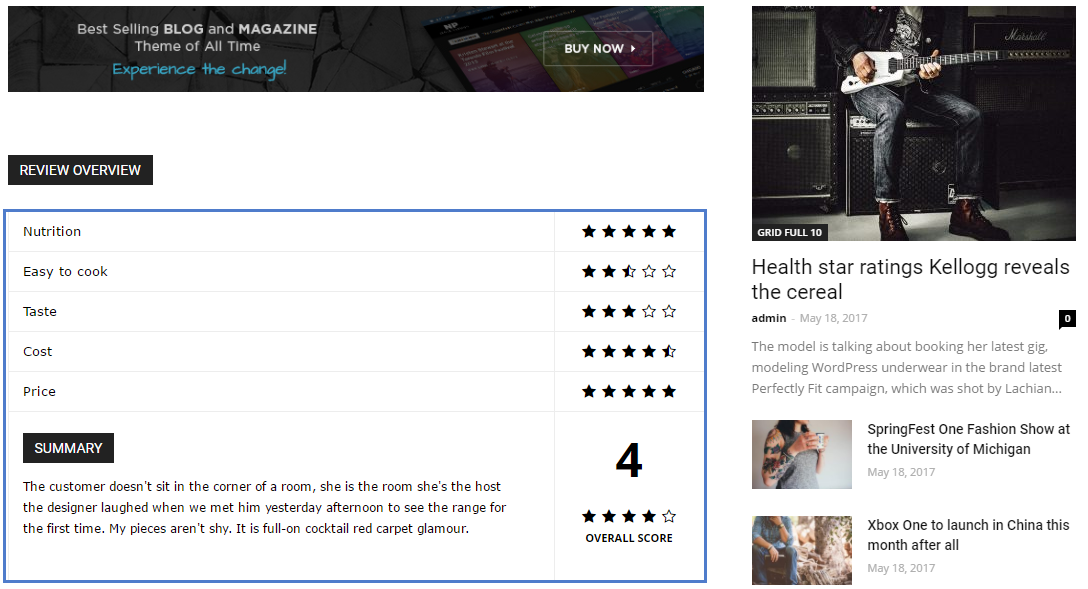
I want to make better use of the review system built into the Newspaper theme: https://forum.tagdiv.com/reviews-2/
The basic functionality works well – as shown here: https://forum.tagdiv.com/wp-content/uploads/2017/05/review.png – but is there a way to edit what is automatically added to the foot of the review?
I would like to add lists of pros and cons, some imagery, and basically want to use the review system in a more personalised way. The above guide suggests using tagDiv Cloud Library Post Templates in order to open up further customisation options. I don’t really need a whole new template in this instance, and just want to edit the review element.
What would be the best way to achieve this?
Thank you in advance.
 Doan Thanh Nhut
 I have taken a screenshot of my screen, all devices from Laptop, phone are the same. After 0.5 seconds, the main interface of the website’s homepage will be stabilized again.
-
Plugins I’m Using:
- Akismet Anti-Spam
- All 404 Redirect to Homepage
- Classic Editor
- Easy Table of Contents
- Insert Headers and Footers
- Smush Pro
- tagDiv Cloud Library
- tagDiv Composer
- tagDiv Social Counter
- tagDiv Standard Pack
- WP Rocket
- WPMU DEV Dashboard
- Yoast SEO
 Anamaria
 Hello,
I made a new test and works fine https://i.imgur.com/ydIPAJy.png
Please check the console when you try to save the changes made with tagDiv Composer maybe is possible to be from the firewall or security module which blocks the admin-ajax.php request, which usually displays a 403 or 404 error.
If you don’t use a security plugin, please ask your host about this, maybe you have a security module that blocks this.
If you use a plugin like Wordfence please set it in learning mode.
Also, if you are using Cloudflare, please make sure that is set as in our guide https://forum.tagdiv.com/cloudflare-cdn/, you need to disable the Rocket Loader.
Please make sure that you do not have a plugin conflict, please deactivate ALL plugins except tagDiv ones, also if you are using a child theme or cache plugin, deactivate them, clear all cache and try again.
Let me know the results!
Thank you!
Bettina Hello Lucas!
On that block the sort order is Latest, that’s why it will take the new one there up. That option from WordPress is no more working with our theme.
A solution to keep that post every time the first one is to use cloud templates and then it is very simple: add a block into the page with the post’s ID in filter, limit:1. After this block, you can exclude the post from above. Check this guides: https://forum.tagdiv.com/flex-block-settings-guide/ ; https://forum.tagdiv.com/offset-feature/
For more customizations, we recommend to use cloud/PRO templates in order to have the possibility to edit them with the TagDiv Composer which contains a lot of functions and features, please check our tutorial here: https://forum.tagdiv.com/tagdiv-composer-tutorial/
Documentation here:
– https://forum.tagdiv.com/cloud-library-templates/
– https://forum.tagdiv.com/design-post-pages-using-cloud-library-templates/
– https://forum.tagdiv.com/cloud-library-category-templates/
Check also our video tutorials here: https://www.youtube.com/c/tagdivThemes/videos
Thank you!
Anamaria Hello,
Please try to enable the cache on Cloudflare for mobile devices.
Maybe this article will help you https://developers.cloudflare.com/automatic-platform-optimization/reference/cache-device-type
Thank you!
Anamaria Hello,
Please check the console when you try to save the changes made in Theme Panel maybe is possible to be from the firewall or security module which blocks the admin-ajax.php request, which usually displays a 403 or 404 error.
If you don’t use a security plugin, please ask your host about this, maybe you have a security module that blocks this.
If you use a plugin like Wordfence please set it in learning mode.
Also, if you are using Cloudflare, please make sure that is set as in our guide https://forum.tagdiv.com/cloudflare-cdn/, you need to disable the Rocket Loader.
Please make sure that you do not have a plugin conflict, please deactivate ALL plugins except tagDiv ones, also if you are using a child theme or cache plugin, deactivate them, clear all cache and try again.
Let me know the results!
Thank you!
 MrFrog5 MrFrog5
With AMP activated on the home page, after update, all posts show editor name. I can not find where to remove this, I only want the date. Can you help ?
Thank you
Bettina Hello @quangninhvn!
Unfortunately, for this template (not element) according to your screenshot, there is no file, because the data is stored in the database.
In order to add custom fields into a cloud template, you need to create a special element which allows you to display the data from your custom fields. This will require custom work which is not covered by the support team.
Thank you!
Bettina Hello @grezako!
In order to have different posts on every category(the posts from the current category), you should set up a special filter category – current category for that flex blocks from the cloud template. Make the change once on a category page and it should set automatically for all which has assign that template.
Or if you need specific articles in one category only, then make sure you have different template(or you can duplicate it) and use the post IDs filter: https://www.screencast.com/t/LssLUafW
Check this topic: https://forum.tagdiv.com/topic/different-logo-in-categorypage/ ; Here I explained step by step how you can duplicate a template.
Thank you!
Bettina Hello @Lane18 !
1. For this you can use the flex block element with some filters which is suitable for your needs: https://forum.tagdiv.com/flex-block-settings-guide/ or posts loop element. Both of them have the pagination feature. If you have an example please provide the link, let me know about which demo you use or your website link in order to help you efficiently. A solution for sending a screenshot/video is this: Download, capture, send: https://www.techsmith.com/jing-tool.html. After making the screenshot, you will have a link, paste it here.
2. If you have a cloud/PRO template, but you can’t edit the footer, then edit your homepage with the TagDiv Composer, scroll till footer, click on footer zone and you can edit/delete the elements there.
Select the row from footer and in the CSS tab you’ll find the background: https://i.imgur.com/Yq06HV5.png
3. If you need random ads, then you can use auto ads and you should place the code in the Theme Panel -> Analytics/Js Codes. For reference, check this article: https://support.google.com/adsense/answer/9261805?hl=en&ref_topic=9261304
4.If you want to have the fullwidth row, then you can use the stretch row like this: https://www.screencast.com/t/bsbB5P97A
Hope that helps you!
Thank you!
 dimitrisv
Hello,
We noticed that our mobile page (using mobile template) but also the rich (not amp) homepage are not being refreshed on mobiles. We are using Cloudflare CDN. The only way to refresh the page is by purging the Cloudflare cache.
Are there any ideas on how to solve the issue?
Back in the day, we used to write random headers in the homepages with every article published so that caching mechanisms (AKAMAI) and mobile browsers can realise that the content is now new.
Thank you.
Anamaria Hello,
Please let me know what template you use for posts, form Theme Panel or Single Post Template from tagDiv Cloud Library.
Also, please check this topic with the same issue https://forum.tagdiv.com/topic/theme-panel-settings-are-not-saving-2/ and let me know the results.
Thank you!
Bettina Hello @dkleidonaris!
For more customizations, we recommend to use cloud/PRO templates in order to have the possibility to edit them with the TagDiv Composer which contains a lot of functions and features, please check our tutorial here: https://forum.tagdiv.com/tagdiv-composer-tutorial/
Documentation here:
– https://forum.tagdiv.com/cloud-library-templates/
– https://forum.tagdiv.com/design-post-pages-using-cloud-library-templates/
– https://forum.tagdiv.com/cloud-library-category-templates/
Check also our video tutorials here: https://www.youtube.com/c/tagdivThemes/videos
In order to help you efficiently, please provide more information about the issue or what you need to achieve, screenshots or a video.
A solution for sending a screenshot/video is this:
Download, capture, send: https://www.techsmith.com/jing-tool.html
After making the screenshot, you will have a link, paste it here.
Thank you!