
- NewsmagRequirements for Newsmag
- NewsmagtagDiv Social Counter tutorial
 Anamaria
 Hello,
In most cases when tagDiv Css Analyzer has stopped it when is use Cloudflare and the Rocket Loader is active (in our guide it is mentioned the Rocket Loader must be disabled).
The issue can be from a plugin conflict, that’s why, please deactivate ALL plugins except tagDiv ones, also if you are using a cache plugin, deactivate it, clear all cache and try again.
Take a look at the video guide here: https://www.youtube.com/watch?v=tnkVapqhIHc
“This custom tool performs an automatic test to find missing CSS rules applied by user interaction. Moreover, you can manually interact with a chosen section/component from the page while the tool records all the involved CSS. It will generate the final CSS file for this page and also will split the rules in Critical CSS to be loaded in the website’s header.” ( https://tagdiv.com/whats-new-in-the-newspaper-theme-10-4-update/ )
Our tool is running only on normal pages and not for posts or categories for example.
Thank you!
 vorilask
 Hello again. Yes, I use WP Bakery. The problem persists though, even after I deactivate WP Bakery. I have captured a screenshot of the following subpage: https://www.bet3.gr/category/euro-2020/
Please take into account that the WP Bakery deactivation should only be a temporary solution. I desperately need this plugin, because services of bet3.GR are designed and sold under its call-to-action and layout boxes settings. If there is a solution, this should include WP Bakery and Cloud Template. If not, please notify me, so as to deactivate Cloud Templates for subpages.
Anamaria Hello,
This is the way that our theme builder is working. Using tagDiv Composer you can build pages and cloud templates and this is done on the front-end where you will see exactly how the website looks when you add elements, but in the back-end, those pages and cloud templates are builder using shortcodes. That is why when you open a page in a WordPress editor it is displayed only shortcodes.
In order that your SEO plugin to identify words on your page, you can set the text in column text or in the text with title =>https://www.screencast.com/t/NsyYy3VHXQd
Thank you!
Anamaria Hello,
Did you use WP Bakery? If yes, we strongly recommend using only one of those plugins with our theme (WP Bakery or tagDiv Cloud Library, but not simultaneously).
Please deactivated the WP Bakery and see if the problem persists.
Thank you!
 Emirelkz
 Hello Betina
I cannot provide links because it’s on Maintenance mode now
Here you can find screenshots
how header and footer should look like
Main page with header based on cloud template
https://photos.app.goo.gl/CBaJssPSfNCYm58n9
Main page with header based on theme template
https://photos.app.goo.gl/qJoqFmEiUrxS1tGi8
How header and footer look on category page (author page and maybe others)
https://photos.app.goo.gl/Kt1sPTnU6secQ5vn7
https://photos.app.goo.gl/ssSV2zDMLDYU9gV9A
The same page in editing in composer view looks ok
https://photos.app.goo.gl/ssSV2zDMLDYU9gV9A
As I see it’s theme header and footer without CSS
 yy
yyHi!
I’m sorry for asking such basic question, how can I reproduce article meta info row of prebuilt template GOURMET PRO?
Detail;
In the Single Template of Cloud Template for GOURMET PRO, there’s a row which shows meta info such as author name, date, page views, number of comments above article section.
When I try to reproduce same row via tagDiv composer, I couldn’t done it properly.
For example, please check the image I attached. I drag and drop Single Post Date element to right next of number of comments element (Where blue arrow indicates). But it doesn’t settle on right place and it wants to settle on light-green highlighted area and then it’ll be inserted on the place underneath ‘Sample Post Subtitle!’.
How can I place elements side by side to achieve creating the row like the one on original template?
https://drive.google.com/file/d/1NZpGySQeYC088Lbt3UMwWw7OhFgWrjjL/view?usp=sharing
Thank you!
 hansennn
Download installation files from https://cloud.tagdiv.com/td_plugins/td-composer/78be34af347704c29acc8080ee49e259/td-composer.zip…
Unpack the package…
Installing the extension…
The destination folder already exists. / home / 1 / w / weednorge / www / wp-content / plugins / td-composer /
Plugin installation failed.
this happens everytime i try to update this theme. what could i do to provent this?
 samdyz
Hello,
My website is – https://bikeadvice.in/
I recently downloaded few headers/module templates from the cloud library and applied them on my website.
The problem is – they display fine when I am on edit (with TagDiv Composer) mode but after I save them they show the default fonts at the front end.
What could be the issue..?
vorilaskI only recently applied Category Template – Magazine PRO on a category subpage of my website: https://www.bet3.gr/category/euro-2020/
From the first time, images on first row do not apply on full width of image position, plus the fact that the right sidebar on second row, that includes Social Counter and Latest Articles Module is shown upon the left module of latest category articles.
When I see that in tagDiv Composer, it seems alright, but once I save some extra settings and close the composer, it seems ruined, as described previously. Why is this happening? I can send you screenshots.
Anamaria Hello,
Did you use WP Bakery? If yes, we strongly recommend using only one of those plugins with our theme (WP Bakery or tagDiv Cloud Library, but not both).
Did you make any changes to the theme files, introduce a code?
Thank you!
 Bettina
 Hello!
Unfortunately, for the cloud template, there is no settings to achieve that together, only separate.
Thank you!
 Alin
Alin The option in your image only shows up if I use an image ad. We are using an Ad Network that relies on its code.
Attached is the screenshot of the theme options back-end. We are calling the header Ad unit with the cloud header.
The website is sneakerbardetroit.com
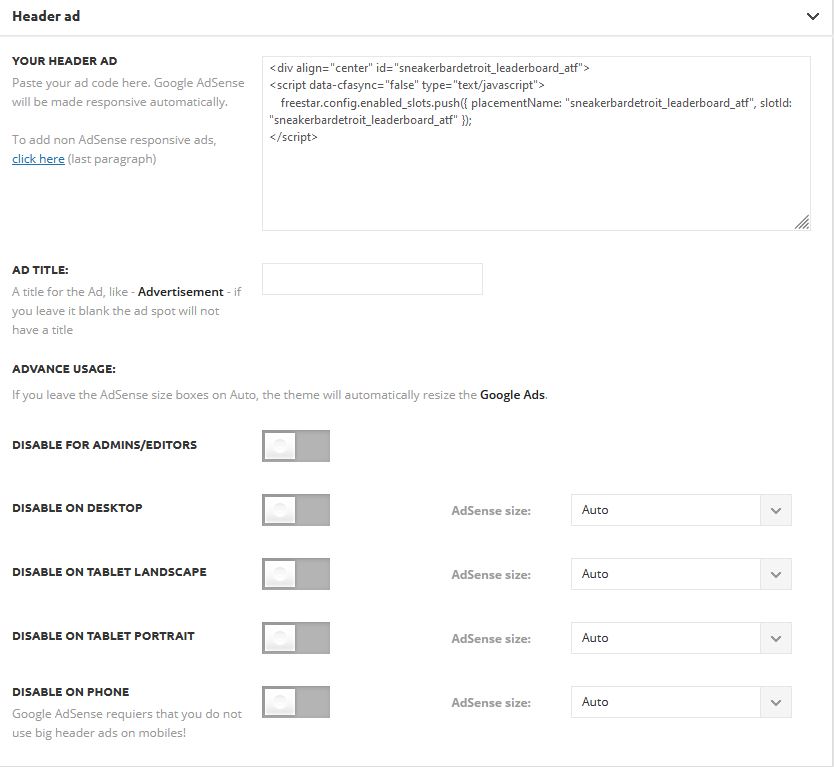
Also here is a screenshot of our cloud template.

If I click on image ad – non of the hiding check-boxes are marked.
-
This reply was modified 5 years by
Alin.
EmirelkzHi Support team,
I created header with Cloud template and applied it on Theme Panel
It looks good everywhere except Category pages, where Header looks like it lost all its CSS
How I can fix this?
 Edged
Edged Hello,
Thank you for your reply, but you have answered the question that I know was already correct but didn’t answer my primary questions. So let’s do it this way.
Question 1:
Currently, only one Adsense auto ad is showing at the bottom of my post page and not in the article content itself. So my question is, does Adsense in article auto ads work on cloud templates such as Gourmet Pro single post template? (A simple yes or no please)
Questions 2:
If no to question 1, does this mean that I can only add 3 in article ads (Article inline ads) max manually via the 3 “Your ad code” fields in the TagDiv composer if using cloud templates such as Gourmet Pro single post template?
Question 3:
If question 2 is yes, do you have any plans to allow for more than only 3 in article ads to be added in the future? or better yet auto-populating the ads in the article based on every few paragraphs specified and the overall number of paragraphs in the article?
 enjoy777
Footer settings does show in theme panel and the footer template from cloud template can’t be edited with tagDiv composer. What I need to do to appear those options?
Anamaria Hello,
Please please tell us how you designed the category page, and how you set the font.
If you have a template from Theme Panel, then you need to set the font from Theme Panel -> Theme Fonts, but if you have a template from Cloud Library, then you need to set the font with tagDiv Composer https://www.youtube.com/watch?v=jQvA64uTLkI
Also, please include the link to your category page, to inspect it.
Thank you!
Anamaria Hello,
Please check if you do not have a plugin conflict, please deactivate ALL plugins except tagDiv plugins, also if you are using a child theme or cache plugin, deactivate them, clear all cache and try again.
Also, if the problem persists please send screenshots with the settings for the featured image, how you set and the link to your website to investigate.
Also, if you have Cloudflare, please make sure is set like in our guide https://forum.tagdiv.com/cloudflare-cdn/
Thank you!
Anamaria Hello,
If you created the header is from the cloud library, then please make sure if the option from the ad box is set to no hiding the ads on the mobile => https://www.screencast.com/t/YkQ9euUwD4
Also, please send the link to your website to inspect it
Thank you!
Anamaria Hello,
If you want to have that block, you can import it from Cloud Library => https://www.screencast.com/t/RKSDrbbb and with drag and drop you can set it where you want.
Also, after import will display the at the end of the post/pages https://www.youtube.com/watch?v=6m8-EebnfM0
Hope this helps you!
Thank you!
 Vlad S
 Hello!
If you are using AdSense auto ads, you have to insert the code in only 1 place. For example, insert it in Theme Panel – Ads – Header Ads. And that is the only place where this code should be.
If you insert it in more than 1 place, the code will be broken or will not work. Based on your most intense areas where users put their finger (on mobile) and cursor on desktop, Google will autoplace ads so that you will get maximum out of them.
Please make sure that after you are making any changes, clear your cache and test your changes on an incognito page.
You can if you want to switch to standard templates but that would be a shame when there is so much more potential on cloud library templates.
Please let me know the result of the instructions above! If this doesn’t work please contact us via email at contact@tagdiv.com and provide the following:
– admin url and credentials
– A link to this topic in order to identify you
Our team will take a look ! Please note that at the moment the support is a bit crowded. Replying may take up to 24 hours.
Thank you !
 jcdestro20
Hi ,
I have disabled the access to this file to make sure I don’t have any more attacks. this file : /xmlrpc.php. Did you think I’m going to have trouble with this Newspaper theme?
Thank you for responding
 ygknews2020
Hey everyone,
I’m dealing with an issue where when I make a post the image appears blank but when I click the photo it suddenly loads. Basically, the entire blog post looks imageless unless I click on to the photo. At first it happened on the mobile version only. Then when I turned on AMP is started happening to the desktop version. I tried turning off the lazy loader and turned off all the Smush type image loading softwares. It started happening 6 months ago ish. I also have Cloudflare installed. Any help would be appreciated.
Alin Hi,
Yes the option is turned on. This is a header that was created using the cloud templates if that matters. But it’s the tagdiv preset option.
Bettina Hello!
It should work with both templates cloud or default. There should be something that could interfere over the template, that’s why deactivate the non TagDiv plugins and see the results in both cases.
Thank you!
 EDFU
EDFUHello, I have two problems with the footer. I have importet a footer from the tagDiv Cloud Templates. The first edit was okay but now in the cloud templates it’s not possible to open the footer with the tagDiv Composer:
https://www.screencast.com/t/g0UrnkwvtB
For example the header has the function:
https://www.screencast.com/t/o35QcnCwGjNx
The second problem is that the footer is not complete displayed in the mobile version.
Desktop:
https://www.screencast.com/t/toMZmO2Fy
Mobile:
https://www.screencast.com/t/Zhqro7jR0S
Thank you and best regards,
Martin
