- NewsmagRequirements for Newsmag
- NewsmagtagDiv Social Counter tutorial
 Antonio53_Lido
Hi there,
I can’t change the image on footer background. I have to upload it only with this name “footer_bg”.
Also, I can’t edit with tag div footer cloud templates.
 Path87
On my website I am detecting abnormal behavior in the featured image.
If I choose the “Default” or “Style 2” template in the theme settings panel, the featured image is resized to 50% height and 50% width when the page is loaded in frontend. However, this does not always happen: if you reload the page, it goes back to the 696×495 size (the correct dimension), if you reload again it becomes 348×247.5, if I reload again it remains 348×247.5, then it goes back to 696×495 and so on. Of course I’m talking about the website’s desktop mode. AMP and mobile view are perfect.
I’ve tried disabling all plugins, but the problem is still there. I have cleared the cache, but the problem is still there. If I choose another template for posts (“Style 3”, “Style 4” and so on) the featured image does not show any anomalies.
I also disabled the cache plugin (LiteSpeed) which uses the lazy load feature on both the featured image and all other images published, but the problem is still there. Also, this problem is only on the featured image, while all other images are loaded in the correct size.
I also checked the html code with browser console and the image is called to its original size (696×495) and the width and height tags in are set correctly as well. But however the image is displayed at 50% of the actual size.
I know that it is possible to use a template from the Cloud Library for set properly featured image size, but I cannot enable this feature, because in the past the website has crashed due to Cloud Library enabled and now I need to stay with the standard mode.
In the past everything worked fine. Maybe a bug?
 insumedical
 hi..Bettina
Thank you for your answer
But it didn’t help.
Is the following possible?
———
In my WordPress manager…
“Cloud Templates → Add New”
By using..
https://demo.tagdiv.com/newspaper_pro/category/tagdiv-technology/tagdiv-gadgets/
Can it be recalled?
 xxxLesy
 Thank you Bettina,
Site: https://www.student.si/
PS: https://developers.google.com/speed/pagespeed/insights/?url=https%3A%2F%2Fwww.student.si%2F
Notice on mobile PS it mostly pulls desktop view (big grid: 1 large article + 3 in row bellow) instead of mobile theme (1 banner + grid: 3 articles in a colum) resulting in huge LCP as it renders desktop size images.
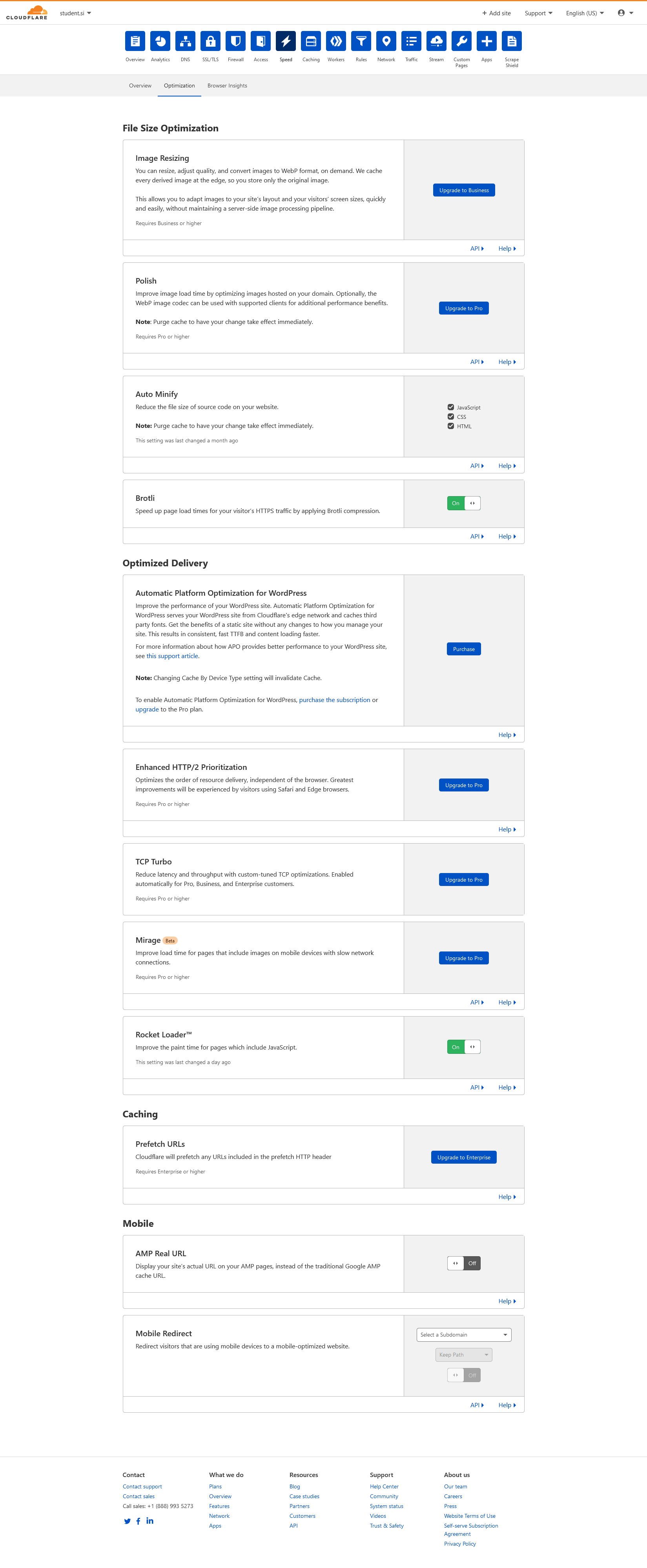
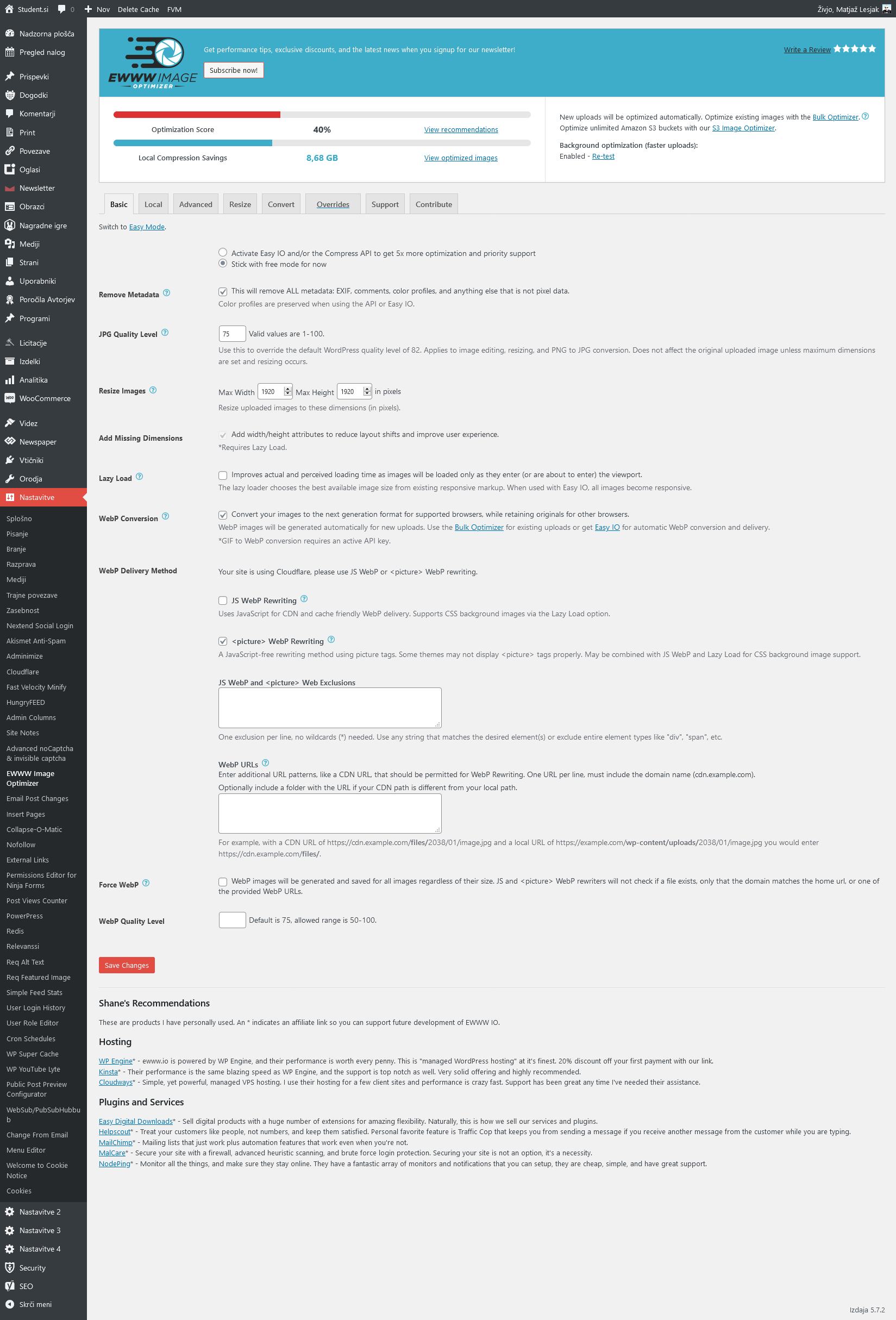
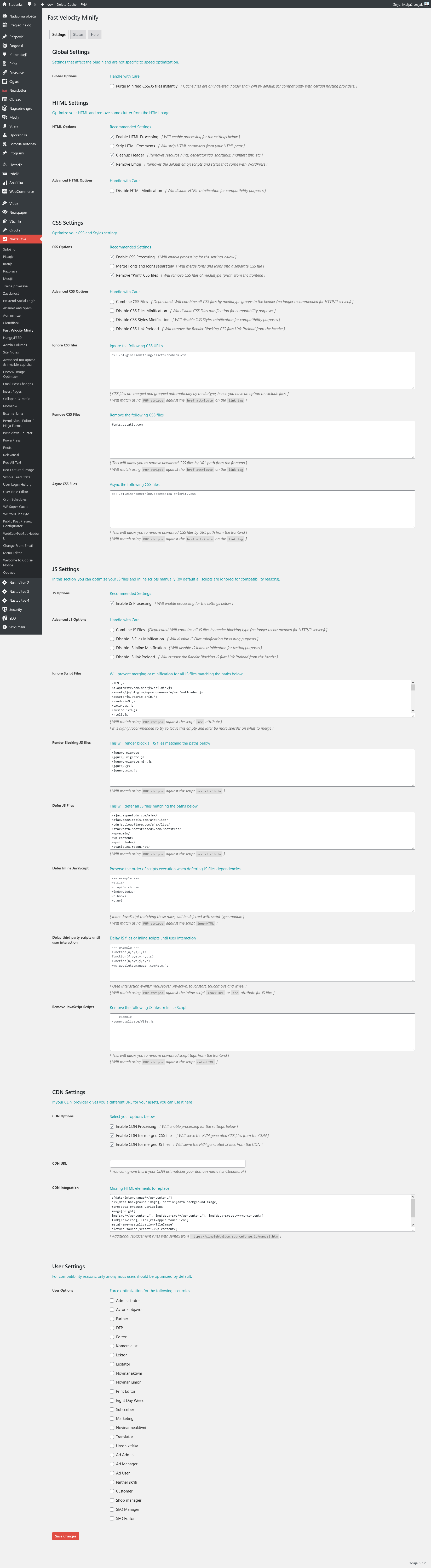
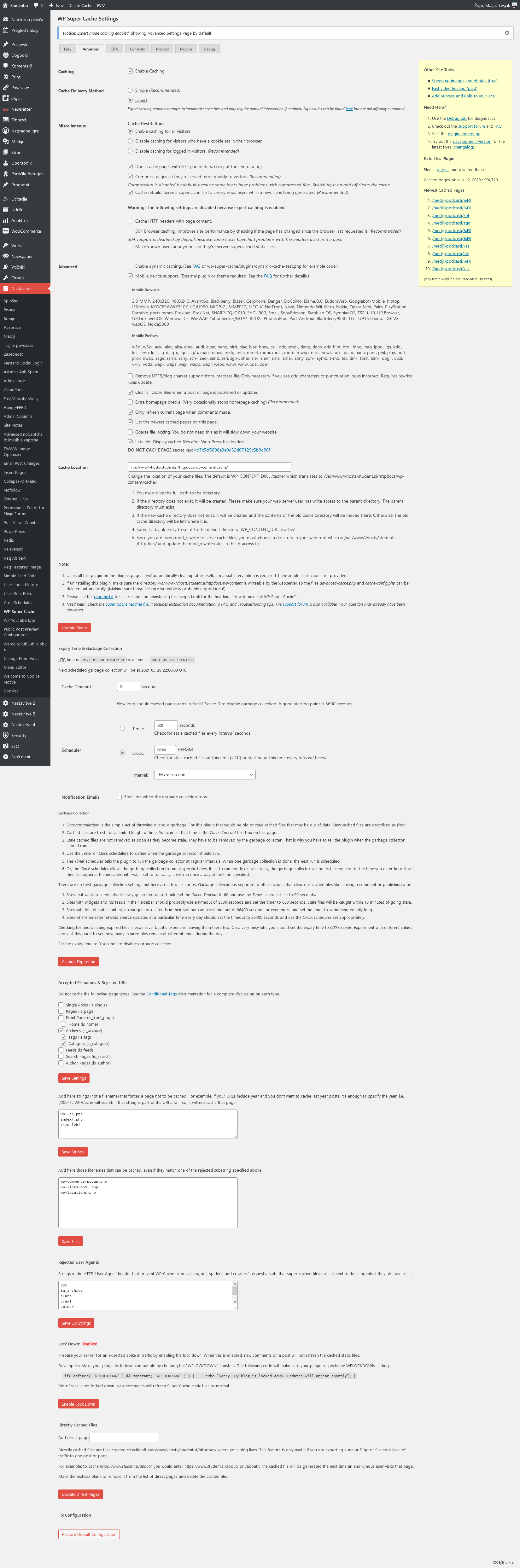
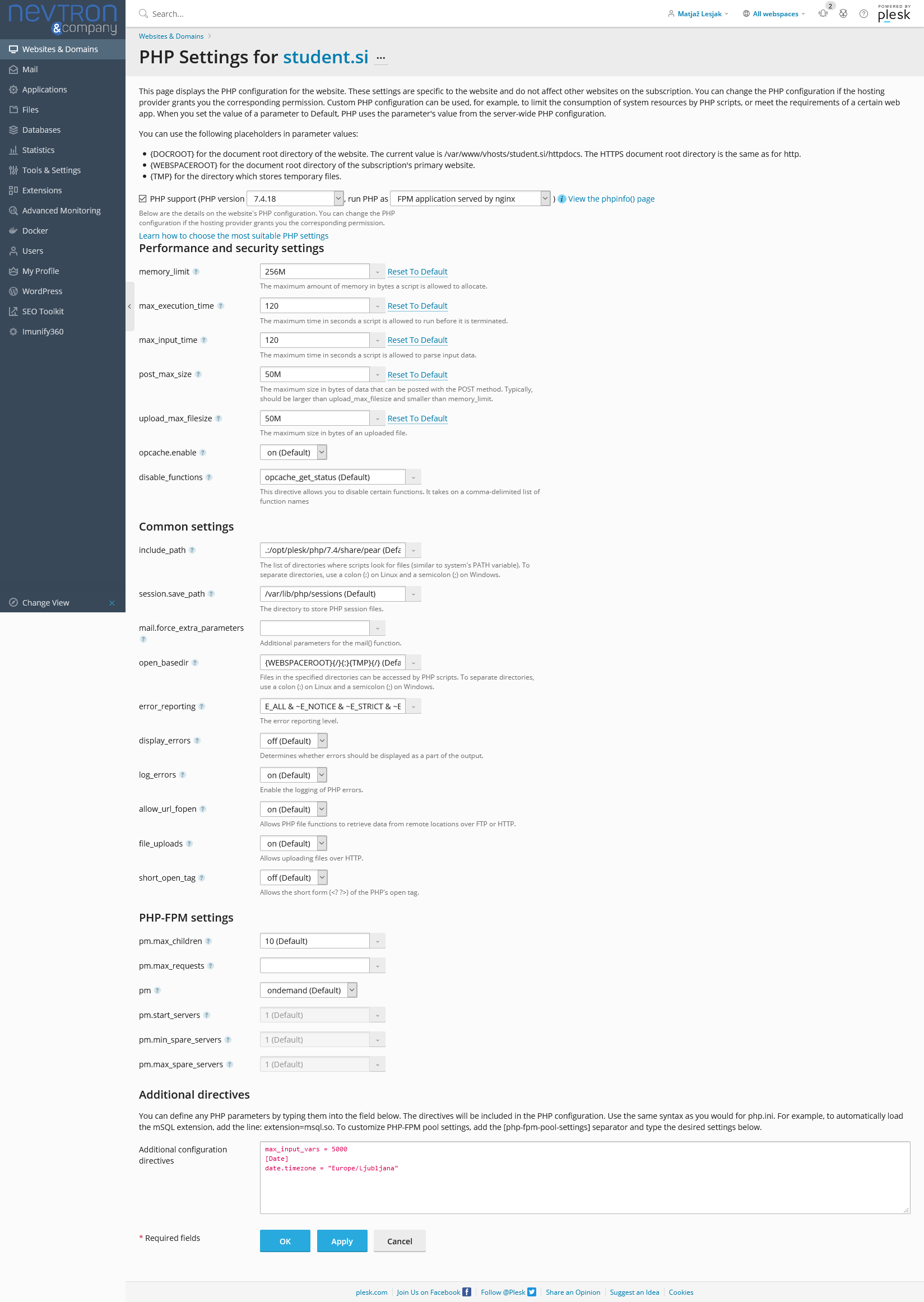
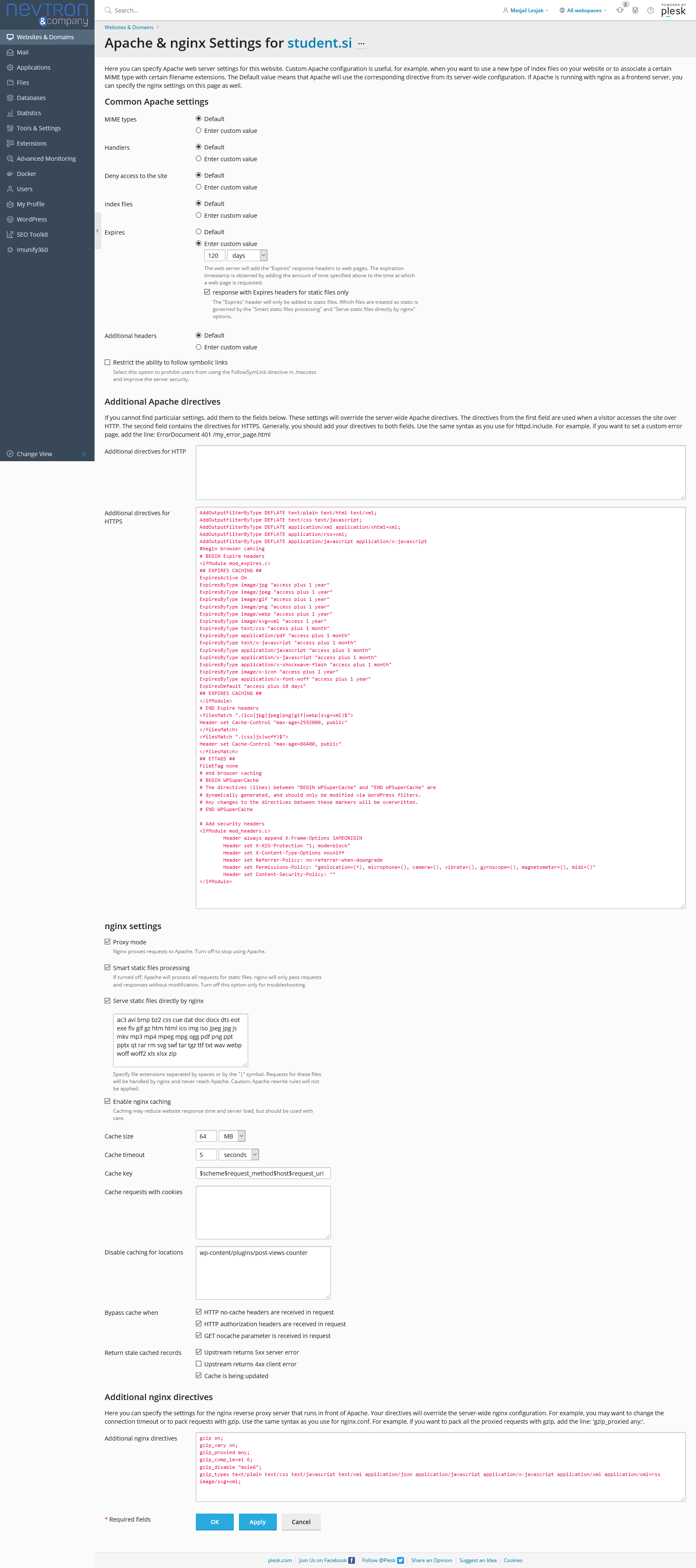
Relevant settings screenshots:
Cloudflare: https://student.si/wp-content/uploads/cloudflare-st.png
Ewww: https://student.si/wp-content/uploads/ewww-st.png
FVM: https://student.si/wp-content/uploads/fvm-st.png
Supercache: https://student.si/wp-content/uploads/supercache-st.png
Php: https://student.si/wp-content/uploads/php-settings.png
Apace & Nginx: https://student.si/wp-content/uploads/apache-nginx.png
-
This reply was modified 5 years by
xxxLesy.
 Bettina
 Hello!
Unfortunately, there is not an option for cloud templates. It was for style 1 of the default templates.
To achieve this you need to do an investigation and write a custom CSS code which allows you to have the featured images like style 1. This will require custom work which is not covered by the support team.
Thank you for understanding!
 Anamaria
 Hello,
Please make sure all theme requirements are set as in our guide -> https://forum.tagdiv.com/requirements-for-newspaper/ in special please make sure this code is set in .htaccess => https://www.screencast.com/t/YMLZf32uQ
Also, if you have Cloudflare, please make sure is set like in our guide https://forum.tagdiv.com/cloudflare-cdn/
Thank you!
Anamaria Hello,
Yes, at this point the implementation of ACF in tagDiv Cloud Templates is quite difficult to achieve, and the major problem is that these settings cannot be saved in the child theme. As such, the ACF integration must be performed after each update made to the theme. For these reasons at the moment, no solution has been found for its implementation in the topic. We hope that this request will be implemented in the future because it is still on our list.
Thank you for your understanding!
Anamaria Hello,
If you use Cloud Library, these templates can’t be set in the child theme. Child Theme uses the standard templates.
If you have the right skills, maybe you can achieve that, but for this, you need to have very good programming skills. For the moment we don’t have a solution for this, because the cloud templates are made so that you can make changes using tagDiv Composer, not in the files of the theme.
Unfortunately, implementations and customizations are not covered by support, but if you want you can contact our team our custom work team here: https://tagdiv.com/premium-customization-services/
Thank you for your understanding!
Anamaria Hello,
In most cases when you get a similar message, then indeed it is a problem, most of the time the problem is from a shortcode that is not compatible with our theme, therefore after you set it with tagDiv Composer and save the page/cloud template, the next time when you try to edit it, you’ll get that error.
Also, if you have other extra plugins, please deactivate them, clear the cache and see if the problem persists, you can do this on a staging website, you can try to create a new page and see if you get the error.
For this error, you can check our guide from here at point 5 -> https://forum.tagdiv.com/tagdiv-composer-not-working/ also after trying the steps from our guide you do not get any good results, You can send us an email at contact@tagdiv.com and provide wp-admin login, as well as cPanel and credentials. We will take a look. Include a link to this topic in the email.
Thank you!
Anamaria Hello,
I’m sorry, I don’t understand exactly what you mean with post settings missing, you don’t have all settings for the post (or only a setting).
Please check if you have the tagDiv plugins activate(tagDiv Composer, tagDiv Cloud Library, tagDiv Standard Pack), also please check if you have other plugins, if you have, please deactivate them and see if the problem persists.
Also, please send some screenshots of what the theme panel looks like for you.
Thank you!
Bettina Hello!
If you have a cloud/PRO template, but you can’t edit the footer, then edit your homepage with TagDiv Composer, scroll till footer, click on footer zone and you can edit/delete the elements there.
Thank you!
 baamit
 Hi,
It’s been nearly 3 years since the request for ACF integration was raised first. However, I can see that Tagdiv Newspaper is still lagging much behind other themes when it comes to flexibility. No one these days use your theme template nowadays and you must know that. Most the customers use CLoud Template, but still, there is no composer element developed till date to add ACF? Really strange.
Even if we want to change the code of the cloud template manually to add ACF code via a Child theme, that is also not possible.
So, ultimately, there is no integration of ACF?
Bettina Hello!
For cloud templates, you will have more options in TagDiv Composer, so these settings overwrite the settings from Theme Panel. If you let the settings by default in TagDiv Composer, then the settings from Theme Panel will reflect on your website.
In order to edit your responsive version, you need edit the page with TagDiv Composer, click on the mobile viewport: https://www.screencast.com/t/XDQJedlggSB ; there you can see your mobile version and you can edit the elements there.
If you want to use a mobile page, then you need to assign it to your homepage. For more information about this mobile version please take a look in this article: https://tagdiv.com/newspaper-10-3-7-update-brings-customizable-and-fast-mobile-pages/
If you created the mobile pages with TagDiv Composer, then when you install Mobile Theme plugin, your pages will be overwritten by the plugin.
The Mobile Theme is a performance optimized theme included in the Newspaper main theme and it loads only for mobile devices. It comes with its own templates for page, post, category, etc so your current templates from the desktop theme will get converted to the mobile theme layout. For more details, please take a look here: https://forum.tagdiv.com/the-mobile-theme/
A full explanation you can find here: https://www.youtube.com/watch?v=SpGkOnJeNZY
Thank you!
baamit Thanks for the response Anamaria, appreciate it!
Let’s say if I want to change that cloud library Blank page code a bit, can I make use of the child theme concept? If yes, what should be the path of these files? can you pls explain the way it’s explained for the standard template child theme here => https://forum.tagdiv.com/the-child-theme-support-tutorial/
Bettina Hello!
One thing that you need to know before is that mobile pages which you use is not compatible with AMP at the moment.
Unfortunately, AMP is faster and works better only with Mobile Theme, because it is not compatible with cloud templates.
From my point of view, if you don’t use the Mobile Theme plugin, then there is no reason or benefit from AMP.
Check our documentation about this plugin here:
https://forum.tagdiv.com/tagdiv-amp-plugin-tutorial/
Thank you!
 Vlad S
 Hi Daniel,
Thank you for reaching out. Can you please be more specific about the empty columns between the blocks? Do you refer to the usage of columns while using the tagDiv Composer page builder? If this is the case, the empty columns appear only in the editing mode and are displayed only if you have a row divided in multiple columns and you don’t add any elements in some of the columns. This will leave the columns empty and the message “empty column” will be displayed. However, this can only be seen in the editing mode. If you need help with this, please let us know and we will guide you through.
The WPBackery page builder cannot be used along with the tagDiv Composer. They are not compatible. I’m sorry for this inconvenience! You can use the WPBackery plugin if you want. But you cannot use the tagDiv Cloud Library nor the PRO demos, as well as other tools that include the Header Builder, Footer Manager, and more, because the functionality is given by the tagDiv Composer page builder. We’ve specifically created this custom page builder so you can easily edit pages and posts on the frontend using adaptive elements and amazing visuals. Unfortunately, there’s no possible way to make two different page builders work at the same time. They have distinct functionality and coding specifications.
Thank you for understanding!
xxxLesyGoogles PageSpeed used to have a 50-50 chance of either pulling desktop or mobile theme version of the site for both of its tests (desktop and mobile). But it would always use the same version in both tests. If it used the mobile version, both scores would be great, but if desktop, mobile score would suck.
But I’ve noticed lately it always tests only desktop site (meaning it pulls resposnive desktop site in mobile view instead of mobile theme). This is only a Google issue. It works fine for real mobile users.
Is there any way to force Googles PageSpeed to load mobile theme version of the site?
If any of it matters, I’m using vps, cloudflare, fvm, supercache, mobile theme, no standard pack, followed all your optimization guides.
Anamaria Hello,
In this path are the all single post templates => wp-content/plugins/td-cloud-library/shortcodes/single and the file where is the single post title is here wp-content/plugins/td-cloud-library/state/single/tdb_state_single.php => https://i.imgur.com/eThibEr.png
Thank you!
Anamaria Hello,
Please make sure that you do not have a plugin conflict, please deactivate ALL plugins except tagDiv plugins, also if you are using child theme or cache plugin, deactivate them, clear all cache and try again.
Also, make sure that all the settings are like in our requirements, please follow the guide carefully
– https://forum.tagdiv.com/requirements-for-newspaper/
and please increase all requirements that are lower, and follow all steps.
Did you use WP Bakery? If yes, we strongly recommend using only one of those plugins with our theme (WP Bakery or tagDiv Cloud Library, but not both).
Thank you!
 bord1983
Hello,
I would like to ad some category templates from cloud templates plugin, however the installation of the template freezes and import is not complete (tagdiv composer cannot add elements etc.). I tried several times but the problem persists. Registration look OK.
Thanks for your help 😉
Jan
 tadejbogataj
 Hello, I tried disabling all non mandatory plugins and set php.ini configuration as described in the post you linked. At the moment only TagDiv plugins are active, but the issue still persists.
Console shows the following error:
GET http://wordpress-501840-1881548.cloudwaysapps.com/wp-content/plugins/td-composer/includes/wpeditor.php?wp_path=/mnt/BLOCKSTORAGE/home/501840.cloudwaysapps.com/uctnhtaatu/public_html/ 403 (Forbidden)
source: load-scripts.php?c=0&load[chunk_0]=jquery-core,jquery-migrate,utils&ver=5.7.2:2
Bettina Hello!
A workaround could be to build it like this:
1. You have already 1 row with the 4 articles.
2. Split that row into 2 columns( 2/3 + 1/3 )
3. You can add whatever you want into the second column and consider it a sidebar. In your case the element called “Ad box”.
Unfortunately, you can not add the ad there on a default post template, only if you will use a cloud post template.
Thank you!
tadejbogatajHello, I have an issue with column text block in DivTag editor. When I click “Edit content” I get an infinite load. Console shows the following jquery error: http://wordpress-501840-1881548.cloudwaysapps.com/wp-content/plugins/td-composer/includes/wpeditor.php?wp_path=/mnt/BLOCKSTORAGE/home/501840.cloudwaysapps.com/uctnhtaatu/public_html/ 403 (Forbidden)
Website url: http://wordpress-501840-1881548.cloudwaysapps.com/
I would appreciate it if you can help me out.
tadejbogatajHello, I am trying to create the following:
– I want a “default” cloud library template for every category, which I achieved by going to theme options -> layout settings -> category -> category global settings and choosing the template I want
– I want another template, that is slightly modified from the one I used for global display, for a specific category. I went to: options -> layout settings -> category -> per category settings to set this up
Category with global option: http://wordpress-501840-1881548.cloudwaysapps.com/poglavje/destinacije/afrika/juzna-afrika/
Category with “per category” option: http://wordpress-501840-1881548.cloudwaysapps.com/poglavje/destinacije/afrika/etiopija/
I you check the above urls you will see, that content on both of the category pages are the same. After some fiddling I found out, that if I change some content on any category template, the changes get copied to others. I was changing the title on hero image and the changes always get reflected to the other template.
I also have and issue, that this category content is also being displayed on the front page. But I was not trying to fix this just yet.
I would really appreciate your help,
thank you
baamit Hi Anamaria,
I appreciate your quick response. Based on your reply, I have few more queries:
Let’s say I have imported blank template from Cloud LIbrary. Then using Composer, I have designed it and set all my header, blocks etc etc. Named as it “Roller”
Then I want to add a code in that blank page template after the Title. This unique code can’t be added from the composer element, I need to add that PHP code manually in that blank page template file.
Can you tell me which file do I need to access and made changes pls?
Thanks in advance