Calin
Calin Hello josemiguelsf,
So if you have single post templates (cloud templates), then you need to edit them using tagdiv composer and use it to make the changes. The theme panel settings was used for old theme settings (those form tagDiv Standard pack).
Thank you!
 Anamaria
 Hello,
For each category, on the flex block there is a special filter for the current category, which dynamically displays the posts from that category within each category.
The Posts Loop automatically filters the posts depending on the cloud template you set (for example, on the category page, there will be posted posts from that category) https://forum.tagdiv.com/posts-loop/
If there is an offset set, please check the block with “No posts” and delete it. Leave it empty with no space or value: https://app.screencast.com/Gh9jDf6t0XtLS
You can find the documentation here: https://forum.tagdiv.com/offset-feature/
Thank you!
Calin Hi NickDeBaerdemaeker, the problem with the theme files that are edited is that you need to do it after each theme update, because the code will be removed. If you want to edit it, the file path is wp-content/plugins/td-cloud-library/modules/tdb_module_mm.php
Thank you!
Anamaria Hi,
Usually the “Invalid reply from server endpoint error” is caused by insufficient WP_Memory_limit, if you’ll set it to 256M, and is still not working, please double it and check the rest of the settings from our guide -> https://forum.tagdiv.com/requirements-for-newspaper/ also make sure that you are using SSL and you have a good bandwidth, the one from our server is 1GB/s and the one that I use at home is 500MB/s, if you have low bandwidth, then you can access parts of the cloud, this can be done from the frontend, for example, if you are on a post -> https://i.imgur.com/4G74M7F.jpg or from tagDiv Composer -> https://i.imgur.com/2F6MhfI.png or from backend -> https://www.screencast.com/t/wekHmc7kJ8J
Thank you!
Anamaria Hi,
You can remove the author name section from Single Post Template, edit with tagDiv Composer => https://www.screencast.com/t/4VoyAOlzgd6, select the element Single Post Comments and with right-click you can delete or selecting the element and with drag & drop place into the deleting red zone from the bottom right of the page.
The same steps for all elements.
You need to drag and drop the elements to move them where you want. Also, do you use a Single Post template or a standard template? Please provide a video.
You can find more details here:
-> https://forum.tagdiv.com/tagdiv-composer-tutorial/
-> https://forum.tagdiv.com/design-post-pages-using-cloud-library-templates/
Thank you!
Anamaria Hello,
Please check this topic https://forum.tagdiv.com/topic/column-text-wp-editor-not-working/
Also, if you are using Cloudflare, please make sure that is set as in our guide https://forum.tagdiv.com/cloudflare-cdn/, you need to disable the Rocket Loader.
Thank you!
 thiru
thiru Thanks. First thing, I am not getting alerts when you guys respond to my queries even though I subscribe for alerts.
You can not use flex blocks without the plugin or theme
I dont understand this, I already have installed Newspaper theme and it has installed the required plugins.
The elements from the tagdiv Composer can not be used in the default templates.
Ok, I got this.
Check the settings of the flex blocks: https://forum.tagdiv.com/flex-block-settings-guide/
There are special filters as well and the block knows to filter by the current category for example. You can also copy-paste the block or save it as element and use it in another cloud page
I need more clarity on this, I have used tagdiv composer and used few blocks and created pages. Are you saying I can create a my own elements to be used on Tagdiv composer by using a block, change the settings and save as my own element template for further using on pages?
So you are confirming that there is no provision provided by Newspaper theme/plugins to embed the blocks or posts of specific category or filters on Posts by embedding short codes?
I saw reference to embedding blocks @ https://forum.tagdiv.com/set-block-inside-post-content/ ?
[td_flex_block_1 modules_on_row="" limit="1" hide_audio="yes" show_btn="none" show_excerpt="none" show_review="none" show_com="none" show_date="none" show_author="none" image_floated="float_left" sort="random_posts" image_width="200px" meta_padding="25px 0 0 25px" modules_category="above" modules_category_margin="0 0 10px 0" tdc_css="eyJhbGwiOnsiYm9yZGVyLXRvcC13aWR0aCI6IjEiLCJib3JkZXItYm90dG9tLXdpZHRoIjoiMSIsInBhZGRpbmctdG9wIjoiMTIiLCJwYWRkaW5nLWJvdHRvbSI6IjgiLCJib3JkZXItY29sb3IiOiIjZWFlYWVhIiwiZGlzcGxheSI6IiJ9fQ=="]
-
This reply was modified 2 years by
thiru.
 sayeedjoy
Whenever I try to access the cloud template library and visit the cloud library, I keep getting the error ‘Invalid reply from server endpoint’. My WordPress setup follows the Newspaper documentation exactly. Any ideas on how to fix this?
 violetsky200
 jtobler
 It does, indeed. Thank you! I’m having one more issue that I can’t seem to resolve. This involves the screen, not just images, but text and elements hesitating to load when swiping up and down. It’s like the whole site is on lazy load or trying to load each time from the cloud.
This is what it looks like. https://app.screencast.com/9aM03flRkYNzh
1) Is there a setting to change this? I’ve tried disabling lazy load, but it doesn’t change.
2) Do cloud templates load continuously all assets from the cloud? Could that be the issue?
Thank you for your help! I truly appreciate the time you’ve spent helping me out with these issues.
 Bettina
 Hello!
Check out this video about how to create a website from scratch: https://www.youtube.com/watch?v=SoGQ0d5kIBg
More documentation about the cloud templates is here:
– https://forum.tagdiv.com/cloud-library-templates/
– https://forum.tagdiv.com/design-post-pages-using-cloud-library-templates/
– https://forum.tagdiv.com/cloud-library-category-templates/
Thank you!
Bettina Hello!
You should identify the template you are using on your posts.
We have 3 options available for mobile versions that you can use:
1. Responsive version: A responsive version of your website looks similar to the desktop version. TagDiv Composer is used to edit the page. Click on the mobile viewport: https://www.screencast.com/t/XDQJedlggSB. There, you can see your mobile version and edit or adjust the elements to look better.
2. Mobile pages: https://tagdiv.com/newspaper-10-3-7-update-brings-customizable-and-fast-mobile-pages
3. Mobile theme plugin: The Mobile Theme is a performance-optimized theme included in the main Newspaper theme that only loads on mobile devices. It comes with its own templates and designs for pages, posts, categories, etc., so your current templates from the desktop theme will get converted to the mobile theme layout. Please see https://forum.tagdiv.com/the-mobile-theme/ and https://forum.tagdiv.com/mobile-theme-introduction/ for more information.
A full explanation is here: https://www.youtube.com/watch?v=SpGkOnJeNZY
If you need to use mobile version 1 or 2, then you need to uninstall the Mobile Theme plugin and AMP.
Please note that you need to use cloud templates to edit them with the tagDiv Composer.
We recommend using cloud/PRO templates to have the possibility to edit them with the TagDiv Composer, which contains a lot of functions and features; please check our tutorial here: https://forum.tagdiv.com/tagdiv-composer-tutorial/
More documentation about the cloud templates is here:
– https://forum.tagdiv.com/cloud-library-templates/
– https://forum.tagdiv.com/design-post-pages-using-cloud-library-templates/
– https://forum.tagdiv.com/cloud-library-category-templates/
Thank you!
Bettina Hello!
They are old, prebuilt websites, and other customers are using them.
You can import a blank template, add every element manually, and apply customization to the element’s settings. Most of them can be recreated with the cloud template.
Check out this video about how to create a website from scratch: https://www.youtube.com/watch?v=SoGQ0d5kIBg
Thank you!
Bettina Hello!
Please note that you need to use cloud templates to edit them with the tagDiv Composer.
We recommend using cloud/PRO templates to have the possibility to edit them with the TagDiv Composer, which contains a lot of functions and features; please check our tutorial here: https://forum.tagdiv.com/tagdiv-composer-tutorial/
More documentation about the cloud templates is here:
– https://forum.tagdiv.com/cloud-library-templates/
– https://forum.tagdiv.com/design-post-pages-using-cloud-library-templates/
– https://forum.tagdiv.com/cloud-library-category-templates/
Thank you!
 trisquelmedia
https://www.staging4.empresarioseguro.com/
All plugins are disabled except Tag Div Composer Tag Div Cloud..
Why???
Calin Hi mixalisandrou, If I correctly understand you want to change the breakpoint in the theme files, now this is a little over hand because it will be need to edit many files, you should start with wp-content/themes/Newspaper/style.css continue with wp-content/plugins/td-composer/legacy/Newspaper/assets/css
I believe it will be easier to use cloud template and set the row width you want – https://forum.tagdiv.com/tagdiv-composer-tutorial/ – https://tagdiv.com/how-to-add-delete-and-duplicate-row-newspaper-theme/ – https://tagdiv.com/flexibility-rows-columns-newspaper-theme/
 hakabilg
Hi, I cannot import any section from the cloud when trying to design a page using tagdiv composer. The pop-up to confirm seems to appear behind the preview window. Or the preview popup does not disappear. Has this happened to anyone? I can import templates using the ‘cloud templates’ tab on the main menu, but like I said, when I try and create a page where I would like to import different sections from templates using the tagdiv composer, it does not allow me. Please see image

 reloaded
 ahahaha i loved to debug menu appearing, i had no cloud of this.
Ok thanks!
 idiriasl
 Hi, Anamaria,
I do have those plugins activated. I have tried with and without cloud templates to no avail (same problem). In fact using templates I do see a logo but I cannot change it (I can but it is not reflected). Whenever I see the resulting page code, it just shows the css class for text logo, never image.
Any hints what can be left behind in the database (just the uploaded files folder was restored after migration)? How can I remove everything from the database that could be causing problems?
Thanks in advance,
Jose
 dscom
dscomHallo,
We are curently use the “Multicategories” template for displaying categories and tag pages. However, we are experiencing an issue where the article images are loaded as background images. This prevents the use of the image optimization tools we have in place, which leads to slower page loading, especially on mobile devices.
After searching through your Cloud Library, we couldn’t find a template that loads article images without using background images. Could you let us know if there’s a template available that addresses this issue, or suggest any other solutions to improve the image loading performance?
Anamaria Hello,
Can you please tell me why you would assign a category in the Gutenberg editor for a cloud template? I think the issue is from some code in the template, please use a revision.
Thank you!
Anamaria Hello,
You can import this header template https://cloud.tagdiv.com/#/single/header/Headers/1865 and after only copy the row with the block -> https://i.imgur.com/y8VPH5J.png after you can delete the header template.
Thank you!
Anamaria Hi,
Those tables are part of the Newspaper theme; the theme panel settings and other settings from the theme are stored in those tables.
In td_011, all the data from the theme is stored. The settings, cloud templates, backup for the theme panel, pages and so on are stored. -> https://imgur.com/k7nkIRg
If you have more settings and a big website, then it is possible for the database to grow; there are set data for posts and pages, categories, and authors. There is a limit that you can set to revert back the settings https://i.imgur.com/Riz0x9H.png
If you want, you can check this article: 7 Tips To Reduce WordPress Database Size -> https://eu.siteground.com/kb/reduce-database-size-wordpress/ But before taking any action, please make a full backup of your website and database and only then make changes in the database.
Thank you!
 sanseijob
Dear support
I plan to use Flex block builder.
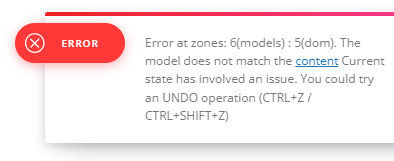
When I try to Module Template of Cloud template with TD, but I cannot edit it.
Error massage is as follows…
https://senkyojoho.com/img/20240925error.png
Please check it and tell me how to fix it.
Regards
Calin Hi,
This is because you are using cloud template that allow you to do almost everything you want, change layout, functionality ….
My recommendation is to check each category cloud template with tagDiv Composer, make sure that you have the blocks filtered after the current category, also elements as sibling will display multiple categories…