
 hadharm
 Please is there any effect for parallax background/parallax movement in tagdiv composer???
Also, I added some effects (hdmfadein,hdmslideright, and others) to my homepage at hiideemedia.com but it is not animating for me. I tested my codes on a separate HTML file (in my host) and everything works fine.
Is there any way to troubleshoot this pls??? I think the issue is with tagDiv composer/newspaper theme.
-
This reply was modified 3 years by
hadharm.
 Bettina
 Hello!
Did you add the content to the TagDiv Composer?
Thank you!
Bettina Hello!
I just provided this information above: plugins/td-composer/legacy/Newspaper/parts/header/td-login-modal.php
Thank you!
Bettina Hello!
If the templates are not appearing there, then it means that you are using default templates.
Execute these steps and check why the cloud templates are not working: https://forum.tagdiv.com/topic/cloud-library-not-working-6/
We recommend using cloud/PRO templates in order to have the possibility to edit them with the TagDiv Composer, which contains a lot of functions and features, Please check our tutorial here: https://forum.tagdiv.com/tagdiv-composer-tutorial/
More documentation about the cloud templates is here:
– https://forum.tagdiv.com/cloud-library-templates/
– https://forum.tagdiv.com/design-post-pages-using-cloud-library-templates/
– https://forum.tagdiv.com/cloud-library-category-templates/
Thank you!
 Anamaria
 Hello,
Please check this video -> https://www.screencast.com/t/1OjhFvX5
Also, please note the WP Bakery plugin is in conflict with tagDiv Composer, and tagDiv Cloud Library.
Thank you!
Anamaria Hello,
To remove the sign-in/join from the header you can do it with tagDiv Composer => https://www.screencast.com/t/Y5j6ArY8Ug , select the element, and with right-click, you can delete it => https://www.screencast.com/t/GshM3Q3nwDv r using the drag and drop -> http://prntscr.com/owlz2r or you can simply click on the row and press the delete button from your keyboard -> https://www.screencast.com/t/Mai7iyEG
The same steps are for the date and button.
Thank you!
 Hamid Fekhart
 Vous êtes vraiment sympa !
En fait, je crois que c’est simple à expliquer. La solution que j’ai voulu adopter est comme suit :
Dans TgdDic composer, il y a le bouton “create mobile page”. Alors, pour mes pages (accueil, catégories – j’ai deux styles de catégories -, les articles – j’ai aussi deux styles d’articles – et les autres pages : contact, politique de confidentialité…), je vais dans cette partie et je crée des pages mobile pour chaque page du site. Je crois que c’est fait pour que chaque page mobile soit unique. Mais voilà, quand j’apporte une modification, par exemple, sur la page “Accueil”, je la trouve également sur la page catégorie. À mon sens, ça ne devrait pas se passer ainsi. Ou il y a quelques chose qui m’échappe ?
Merci pour vos réponses et votre sens des détails. Et, encore une fois, désolé pour autant de questions.
Cordialement.
 diriras
Hello,
I had to change my VPS server so i thought to upgrade my php version from 7.4 to 8.1 also. After doing that i have a lot of errors both in my backend and frontend
2023-03-28 01:58:00.916978 [NOTICE] [1065] [172.70.243.46:63118:HTTP2-1#sportlive.gr] [STDERR] PHP Warning: Undefined array key 0 in /home/sportlive.gr/public_html/wp-content/plugins/td-cloud-library/includes/tdb_module.php on line 357
2023-03-28 01:58:00.917018 [NOTICE] [1065] [172.70.243.46:63118:HTTP2-1#sportlive.gr] [STDERR] PHP Warning: Trying to access array offset on value of type bool in /home/sportlive.gr/public_html/wp-content/plugins/td-cloud-library/includes/tdb_module.php on line 486
2023-03-28 01:58:01.021848 [NOTICE] [1065] [172.70.243.46:63118:HTTP2-1#sportlive.gr] [STDERR] PHP Warning: Undefined variable $data in /home/sportlive.gr/public_html/wp-content/plugins/featured-image-from-url/includes/attachment.php on line 316
2023-03-28 01:58:01.021869 [NOTICE] [1065] [172.70.243.46:63118:HTTP2-1#sportlive.gr] [STDERR] PHP Warning: Trying to access array offset on value of type null in /home/sportlive.gr/public_html/wp-content/plugins/featured-image-from-url/includes/attachment.php on line 316
2023-03-28 01:58:11.345318 [NOTICE] [1060] [172.70.242.109:35842:HTTP2-3#sportlive.gr] [STDERR] PHP Warning: Undefined array key 0 in /home/sportlive.gr/public_html/wp-content/plugins/td-cloud-library/includes/tdb_module.php on line 357
2023-03-28 01:58:11.345338 [NOTICE] [1060] [172.70.242.109:35842:HTTP2-3#sportlive.gr] [STDERR] PHP Warning: Trying to access array offset on value of type bool in /home/sportlive.gr/public_html/wp-content/plugins/td-cloud-library/includes/tdb_module.php on line 486
2023-03-28 01:58:11.349510 [NOTICE] [1060] [172.70.242.109:35842:HTTP2-3#sportlive.gr] [STDERR] PHP Warning: Undefined array key 0 in /home/sportlive.gr/public_html/wp-content/plugins/td-cloud-library/includes/tdb_module.php on line 357
2023-03-28 01:58:11.349522 [NOTICE] [1060] [172.70.242.109:35842:HTTP2-3#sportlive.gr] [STDERR] PHP Warning: Trying to access array offset on value of type bool in /home/sportlive.gr/public_html/wp-content/plugins/td-cloud-library/includes/tdb_module.php on line 486
2023-03-28 01:58:17.557406 [NOTICE] [1067] [172.70.242.157:39290:HTTP2-1#sportlive.gr] [STDERR] PHP Warning: Undefined array key 0 in /home/sportlive.gr/public_html/wp-content/plugins/td-cloud-library/includes/tdb_module.php on line 357
2023-03-28 01:58:17.557439 [NOTICE] [1067] [172.70.242.157:39290:HTTP2-1#sportlive.gr] [STDERR] PHP Warning: Trying to access array offset on value of type bool in /home/sportlive.gr/public_html/wp-content/plugins/td-cloud-library/includes/tdb_module.php on line 486
2023-03-28 01:58:18.363461 [NOTICE] [1067] [172.70.243.61:27082:HTTP2-1#sportlive.gr] [STDERR] PHP Warning: Undefined array key 0 in /home/sportlive.gr/public_html/wp-content/plugins/td-cloud-library/includes/tdb_module.php on line 357
2023-03-28 01:58:18.363492 [NOTICE] [1067] [172.70.243.61:27082:HTTP2-1#sportlive.gr] [STDERR] PHP Warning: Trying to access array offset on value of type bool in /home/sportlive.gr/public_html/wp-content/plugins/td-cloud-library/includes/tdb_module.php on line 486
2023-03-28 01:58:18.363837 [NOTICE] [1067] [172.70.243.61:27082:HTTP2-1#sportlive.gr] [STDERR] PHP Warning: Undefined array key 0 in /home/sportlive.gr/public_html/wp-content/plugins/td-cloud-library/includes/tdb_module.php on line 357
2023-03-28 01:58:18.363854 [NOTICE] [1067] [172.70.243.61:27082:HTTP2-1#sportlive.gr] [STDERR] PHP Warning: Trying to access array offset on value of type bool in /home/sportlive.gr/public_html/wp-content/plugins/td-cloud-library/includes/tdb_module.php on line 486
2023-03-28 01:58:18.364188 [NOTICE] [1067] [172.70.243.61:27082:HTTP2-1#sportlive.gr] [STDERR] PHP Warning: Undefined array key 0 in /home/sportlive.gr/public_html/wp-content/plugins/td-cloud-library/includes/tdb_module.php on line 357
2023-03-28 01:58:18.364203 [NOTICE] [1067] [172.70.243.61:27082:HTTP2-1#sportlive.gr] [STDERR] PHP Warning: Trying to access array offset on value of type bool in /home/sportlive.gr/public_html/wp-content/plugins/td-cloud-library/includes/tdb_module.php on line 486
2023-03-28 01:58:18.467499 [NOTICE] [1067] [172.70.243.61:27082:HTTP2-1#sportlive.gr] [STDERR] PHP Warning: Undefined variable $data in /home/sportlive.gr/public_html/wp-content/plugins/featured-image-from-url/includes/attachment.php on line 316
2023-03-28 01:58:18.467533 [NOTICE] [1067] [172.70.243.61:27082:HTTP2-1#sportlive.gr] [STDERR] PHP Warning: Trying to access array offset on value of type null in /home/sportlive.gr/public_html/wp-content/plugins/featured-image-from-url/includes/attachment.php on line 316
2023-03-28 01:58:18.467595 [NOTICE] [1067] [172.70.243.61:27082:HTTP2-1#sportlive.gr] [STDERR] PHP Warning: Undefined variable $data in /home/sportlive.gr/public_html/wp-content/plugins/featured-image-from-url/includes/attachment.php on line 316
2023-03-28 01:58:18.467604 [NOTICE] [1067] [172.70.243.61:27082:HTTP2-1#sportlive.gr] [STDERR] PHP Warning: Trying to access array offset on value of type null in /home/sportlive.gr/public_html/wp-content/plugins/featured-image-from-url/includes/attachment.php on line 316
2023-03-28 01:58:18.467638 [NOTICE] [1067] [172.70.243.61:27082:HTTP2-1#sportlive.gr] [STDERR] PHP Warning: Undefined variable $data in /home/sportlive.gr/public_html/wp-content/plugins/featured-image-from-url/includes/attachment.php on line 316
2023-03-28 01:58:18.467645 [NOTICE] [1067] [172.70.243.61:27082:HTTP2-1#sportlive.gr] [STDERR] PHP Warning: Trying to access array offset on value of type null in /home/sportlive.gr/public_html/wp-content/plugins/featured-image-from-url/includes/attachment.php on line 316
2023-03-28 01:58:23.586287 [NOTICE] [1062] [172.70.243.94:53690:HTTP2-1#sportlive.gr] [STDERR] PHP Warning: Undefined array key 0 in /home/sportlive.gr/public_html/wp-content/plugins/td-cloud-library/includes/tdb_module.php on line 357
2023-03-28 01:58:23.586325 [NOTICE] [1062] [172.70.243.94:53690:HTTP2-1#sportlive.gr] [STDERR] PHP Warning: Trying to access array offset on value of type bool in /home/sportlive.gr/public_html/wp-content/plugins/td-cloud-library/includes/tdb_module.php on line 486
2023-03-28 01:59:14.967458 [NOTICE] [1061] [172.70.243.52:18046:HTTP2-3#sportlive.gr] [STDERR] PHP Warning: Undefined array key 0 in /home/sportlive.gr/public_html/wp-content/plugins/td-cloud-library/includes/tdb_module.php on line 357
2023-03-28 01:59:14.967486 [NOTICE] [1061] [172.70.243.52:18046:HTTP2-3#sportlive.gr] [STDERR] PHP Warning: Trying to access array offset on value of type bool in /home/sportlive.gr/public_html/wp-content/plugins/td-cloud-library/includes/tdb_module.php on line 486
2023-03-28 01:59:18.156127 [NOTICE] [1063] [172.70.242.108:16306:HTTP2-1#sportlive.gr] [STDERR] PHP Warning: Undefined variable $data in /home/sportlive.gr/public_html/wp-content/plugins/featured-image-from-url/includes/attachment.php on line 316
2023-03-28 01:59:18.156143 [NOTICE] [1063] [172.70.242.108:16306:HTTP2-1#sportlive.gr] [STDERR] PHP Warning: Trying to access array offset on value of type null in /home/sportlive.gr/public_html/wp-content/plugins/featured-image-from-url/includes/attachment.php on line 316
2023-03-28 01:59:19.154430 [NOTICE] [1062] [172.70.242.228:12192:HTTP2-1#sportlive.gr] [STDERR] PHP Warning: Undefined variable $data in /home/sportlive.gr/public_html/wp-content/plugins/featured-image-from-url/includes/attachment.php on line 316
2023-03-28 01:59:19.154448 [NOTICE] [1062] [172.70.242.228:12192:HTTP2-1#sportlive.gr] [STDERR] PHP Warning: Trying to access array offset on value of type null in /home/sportlive.gr/public_html/wp-content/plugins/featured-image-from-url/includes/attachment.php on line 316
2023-03-28 01:59:54.454820 [NOTICE] [1061] [172.70.242.38:55912:HTTP2-3#sportlive.gr] [STDERR] PHP Warning: Undefined array key 0 in /home/sportlive.gr/public_html/wp-content/plugins/td-composer/legacy/common/wp_booster/td_module.php on line 391
2023-03-28 01:59:54.454879 [NOTICE] [1061] [172.70.242.38:55912:HTTP2-3#sportlive.gr] [STDERR] PHP Warning: Trying to access array offset on value of type bool in /home/sportlive.gr/public_html/wp-content/plugins/td-composer/legacy/common/wp_booster/td_module.php on line 572
2023-03-28 01:59:54.661073 [NOTICE] [1061] [172.70.242.38:55912:HTTP2-3#sportlive.gr] [STDERR] PHP Warning: Undefined array key 0 in /home/sportlive.gr/public_html/wp-content/plugins/td-composer/legacy/common/wp_booster/td_module.php on line 391
2023-03-28 01:59:54.661142 [NOTICE] [1061] [172.70.242.38:55912:HTTP2-3#sportlive.gr] [STDERR] PHP Warning: Trying to access array offset on value of type bool in /home/sportlive.gr/public_html/wp-content/plugins/td-composer/legacy/common/wp_booster/td_module.php on line 572
2023-03-28 02:00:16.775834 [NOTICE] [1068] [172.70.242.58:41026:HTTP2-1#sportlive.gr] [STDERR] PHP Warning: Undefined variable $data in /home/sportlive.gr/public_html/wp-content/plugins/featured-image-from-url/includes/attachment.php on line 316
2023-03-28 02:00:16.775866 [NOTICE] [1068] [172.70.242.58:41026:HTTP2-1#sportlive.gr] [STDERR] PHP Warning: Trying to access array offset on value of type null in /home/sportlive.gr/public_html/wp-content/plugins/featured-image-from-url/includes/attachment.php on line 316
2023-03-28 02:00:19.873368 [NOTICE] [1062] [172.70.242.38:55920:HTTP2-5#sportlive.gr] [STDERR] PHP Warning: Undefined variable $data in /home/sportlive.gr/public_html/wp-content/plugins/featured-image-from-url/includes/attachment.php on line 316
2023-03-28 02:00:19.873390 [NOTICE] [1062] [172.70.242.38:55920:HTTP2-5#sportlive.gr] [STDERR] PHP Warning: Trying to access array offset on value of type null in /home/sportlive.gr/public_html/wp-content/plugins/featured-image-from-url/includes/attachment.php on line 316
 GennaroTedesco
Good evening, we are unable to make some changes on the theme pages even though everything is updated. We thought it was due to an incompatibility of some plugins but it would seem not. How can we fix?
The problem arises with TagDiv composer with the ‘Single background image’ element that does not save the destination link of the image. How can we solve?
 jamesrobb
 when I try to edit any page with tagdiv composer it just comes up with this error below and that is with every demo.
The server encountered an internal error or misconfiguration and was unable to complete your request.
Please contact the server administrator at webmaster to inform them of the time this error occurred, and the actions you performed just before this error.
More information about this error may be available in the server error log.
-
This reply was modified 3 years by
jamesrobb.
Bettina Hello!
If you use a cloud template, all the settings should be found in the TagDiv Composer.
But the image size should be as the same as your real image if you choose full size to display.
Thank you!
Anamaria Hi,
You can remove the Single Post Author Box using Edit with tagDiv Composer with a right-click you can delete => https://i.imgur.com/BnhhxVh.png , or selecting the element and with drag & drop place into the deleting red zone from the bottom right of the page => https://i.imgur.com/vkQVCjn.jpg the same for comments.
Thank you!
 Igor88
 Hi!
With the TagDiv Composer, I can only change the HOME Page of the templates/PRO. How do I use TagDiv Composer to change other pages (404, category, tags, search) on the templates/PRO?
Thank you!
hadharmI recently noticed I can’t save changes to my website anymore after moving from one host to another on my website https://hiideemedia.com/
I am trying to add effects to the tagdiv builder using a custom CSS and javascript code I wrote. But any changes I make in theme panel is not saved it just keeps rolling. Also in tagdiv composer, any changes made only save the header and footer the body of the content is not saved. Pls, what is the way out???
Bettina Hello @Igor88 !
You can customize all the cloud templates/PRO with the TagDiv Composer. Please provide more information about what you need to achieve and what is the issue there.
Thank you!
Bettina Hello @laurenskok !
You need to create a mobile page in order to achieve that: https://tagdiv.com/newspaper-10-3-7-update-brings-customizable-and-fast-mobile-pages
Yes. Disable this setting from Newspaper -> Theme panel. You can not customize it in the TagDiv Composer.
Thank you!
 ngotuannghia
 Dear Anamaria,
I try many solutions but cannot fix this.
So tired many days.
I made a test site (localhost) with deactive all plugins, only keep TagDiv Composer.
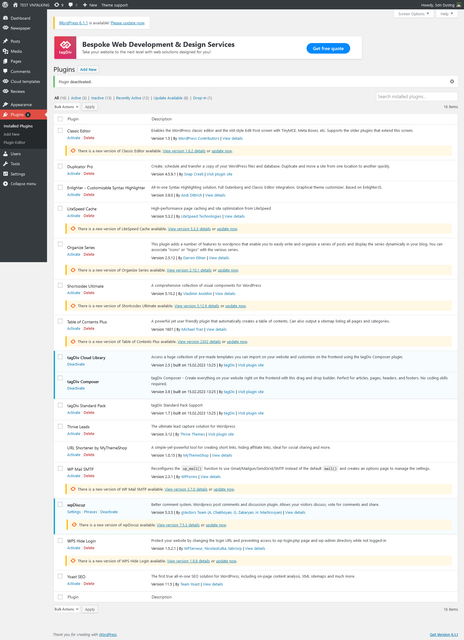
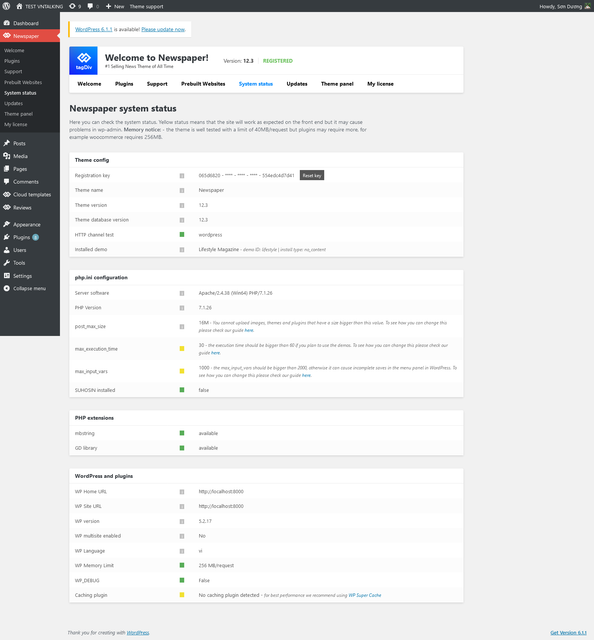
But the issue still occurs.
Please kindly help me
Igor88Hi!
My theme is called NewsHub Pro.
Using the tagDiv Composer plugin, I can change the HOME page (screenshot https://ibb.co/Bnthz86) Translate the menu into your language, change the font size…
But I can’t use the plugin to change exactly the page of the article (screenshot https://ibb.co/V2xfrk5), search, 404, tags, category. In most cases, the menu remains in English, the font does not change.
How do I customize all these pages with the plugin?
Bettina Hello!
There is a special field for Google Analytics (theme panel>analitics/js code) and you do not need to add the code in the multiple fields. Make sure it is not a plugin conflict issue. Please make a test and deactivate ALL plugins except tagDiv ones, also if you are using a cache plugin, deactivate it, clear all cache and try again.
Every template has its own settings and it shouldn’t interfere if you edit a different template.
“J’ai beau essayé, mais à chaque fois que j’effectue un changement dans la page d’une catégorie, le même changement s’effectue sur le reste des catégories. ” -> If the categories use the same template, then of course every setting will reflect on all your categories. If the category template has the same header, and you add a new element to it, then it will reflect on all pages that have been assigned that header template.
The responsive version should be the same as the desktop ( PC version ). Do not confuse the mobile pages with the responsive version. Some settings should be the same also, the elements should coincide with the desktop version and others could be set regarding the size of the screen. These are not bugs, but the way they are working.
Please provide an example, a screenshot or a video with the issue ( modification d’une page “catégorie” qu’on apporte sur TagDiV Composer ne se verra sur mobile ! ), so I can better understand and explain everything.
You have the right to ask everything, and I will always reply and try to help you as much as I can. Every “issue” or “bug” should be solved and clarified.
Thank you!
 laurenskok
Hello,
I had a question concerning the mobile menu. Is it possible to create and select a menu in mobile mode that is different from the desktop?
I’ve already tried with tag div composer but the problem is when I select another menu in mobile, it changes the desktop.
At the moment, I have this type of menu : https://pasteboard.co/jCmFSvYHQLgY.png
For example I would like to erase the avatar picture + logout button and replace them by a company logo.
Is it possible with Tagdiv and the prebuilt sport theme?
How can I proceed?
Thank you
Anamaria Hi,
Please continue the discussion on one topic https://forum.tagdiv.com/topic/tagdiv-composer-have-many-errors-cannot-change-color-of-any-item/
Thank you!
Anamaria Hi,
I recommend you use a Single Post Template from tagDiv Cloud Library, and you can design it with tagDiv Composer.
To display the related articles or more from the author, you can use Flex Block and filter it https://www.screencast.com/t/SEmxo13Fo2X -> https://i.imgur.com/YIg3nPP.png
Thank you!
Anamaria Hello,
I recommend you use a Single Post Template from tagDiv Cloud Library, and you can design it with tagDiv Composer.
To display the related articles or more from the author, you can use Flex Block and filter it https://www.screencast.com/t/SEmxo13Fo2X -> https://i.imgur.com/YIg3nPP.png
if you want to keep those templates the only way to remove the “more from author” tab is to use a custom CSS like this one:
.single .td-related-right{

display: none;

}
Set the code in Theme Panel ->Custom code -> Custom CSS
I hope this helps you!
Thank you!
Anamaria Hi,
This will not affect your page speed. Did you check for a plugin conflict?
There are a lot of factors which can make your site slow. Make sure you use only some templates and fewer functionalities and options.
Some factors which you need to take into account are:
External factors: server speed, if you are using CDN or not, the external resources loaded by your website like ads, fonts, tracking scripts like Facebook Pixel, Google Analytics, Twitter analytics, Hotjar and so on.
Internal factors: the number of elements on the page, image size, image formats, if you are using mobile optimized layouts, console errors, if you are using the Standard Pack plugin or not, if you are using the PRO demo or a standard one.
There are many optimization guides provided by our users here in the forum, some made by us; you could check some of them
– https://forum.tagdiv.com/cache-plugin-install-and-configure/
– https://forum.tagdiv.com/how-to-make-the-site-faster/
– https://forum.tagdiv.com/topic/high-number-of-ajax-request/
– https://www.infophilic.com/get-almost-100-pagespeed-newspaper-theme/
– https://forum.tagdiv.com/topic/score-100100-pagespeed-with-newspaper-wordpress-theme/
– https://www.andraware.com/wp-rocket-for-newspaper-theme/
– https://spraythemes.com/newspaper-theme/how-to-speed-up-the-newspaper-wordpress-theme-using-wp-rocket/
– https://forum.tagdiv.com/topic/page-speed-guide-for-2023-beginners-and-advanced/
– https://forum.tagdiv.com/topic/newspaper-theme-speedify-your-website/
– https://forum.tagdiv.com/topic/tutorial-chriss-custom-optimizations-for-functions-php-etc/
– https://forum.tagdiv.com/cloudflare-cdn/
– https://forum.tagdiv.com/topic/theme-causing-high-cpu-usage-2/
– https://forum.tagdiv.com/topic/sql-querys-high-cpu/
– https://forum.tagdiv.com/topic/newspaper-theme-slow-to-respond/
– https://premium.wpmudev.org/blog/optimizing-your-wordpress-database-a-complete-guide/
– https://underconstructionpage.com/optimize-wordpress-database/
– https://crunchify.com/better-optimize-wordpress-database-all-in-one-guide/
Also, pagespeed is not covered by support -> https://forum.tagdiv.com/newspaper-theme-support/
If you use Wp Rocket, you can try to exclude the following files
/jquery-?[0-9.](.*)(.min|.slim|.slim.min)?.js
/jquery-migrate(.min)?.js
/wp-content/plugins/td-composer/legacy/Newspaper/js/tagdiv_theme.min.js
tdBlocksArray
Thank you!
Anamaria Hello,
Maybe you have a header template from Cloud Library, you can edit the logo and header with tagDiv Composer => https://www.screencast.com/t/zuhG8uGZe, select the header and you can remove the logo image/text and add a new logo => https://www.screencast.com/t/WSquHPNqT https://www.youtube.com/watch?v=HXQQygkCCJo https://forum.tagdiv.com/add-logo-newspaper/
Please provide more details with screenshots to be able to help you.
Please note that support is Monday -> Friday -> 8:00 AM – 5:00 PM
Thank you!



