
 Bettina
 Hello!
In the cloud templates, you can add the ads when you edit the post with TagDiv Composer in the element called ” Single Post Content ” in the tab ADS. Documentation here: https://forum.tagdiv.com/article-ads/
Or you can use the element called “Ad box” from TagDiv Composer, and there you need to add the ads: https://forum.tagdiv.com/ads-adsense-overview/
Thank you!
Bettina Hello Marco!
1. You cannot have a page template for every page, unfortunately. For each page, you should have a different page template. However, while you have two pages open in TagDiv Composer, you can save or copy-paste elements.
2. There are no blank page templates.
3. If you import a template, then you should be able to edit it with the TagDiv Composer.
4. Yes. They are different from other templates.
Unfortunately, this is not possible. Only if you create the same page template for each by adding the same elements with the same settings.
Thank you!
 Opes
OpesHi,
as you will see on tagdiv composer opening an article everything is ok(video tag div composer).
Opening the same article on mobile that is what i see(on mobile)
I can send my credential if you need to enter and check in a private conversation. Actually there is mainteining mode on whit lightstar plugin under settings.
Thank you
Bettina Hello Tamas!
You need to edit the pages with the TagDiv Composer, click on every row and apply the paddings in the CSS tab of the row.
Thank you!
Bettina Hello @discovermh!
It is a little bit complicated when you want to customize the mobile theme. Sometimes the files are overwritten by Composer or the Standard Pack plugins.
For customization and other services, you can contact our custom work team here: https://tagdiv.com/premium-customization-services/ and they can fully help you.
Thank you for understanding!
 Anamaria
 Hello,
I think that I know what the problem is, please edit the cloud template with tagDiv Composer -> https://i.imgur.com/j8YvKks.png click on the block and remove the offset -> https://i.imgur.com/dJ0iFQu.png let that field empty.
Thank you!
 sebpre0805
 Hello,
No, I use Firefox and Chrome. both look the same. I just deactivated all plugins except for all of TagDiv. Looks exactly the same, nothing has changed.
The live search is of course switched on. Do you want to take a look at the site? Then I would send you a temporary admin account.
updated:
I got this solved with the live search. There was a custom css from the old theme version, which I apparently overlooked. I apologize for my mistake.
But what is still not solved is the issue with the Composer menu on the left, which could not be fixed despite deactivating the plugins. I really have no more ideas. The right edge stays cropped no matter what I do.
Another question about a CSS solution?
-
This reply was modified 3 years by
sebpre0805.
 Calin
Calin Hi dkempdesigns,
Let’s try to take each subject in turn:
To change the background color for some rows, select the row and check the css tab – https://i.imgur.com/OJ8d9Kl.png – for element menus colors you can check in style tabs (if elements have this tab).
‘Also I can create menus but the menus that are already there are what I want to access. I need to know what their names are as the names in the theme do not edit the existing menus I sent you pictures of.‘ – the menus are made in appearance > menu – https://i.imgur.com/MoqB5OQ.png from there you can edit the current element from the menu (add/delete) or you can make new menus.
Now to assign the menu on your website you need to edit it with tagDiv Composer the header, this can be done from the homepage – https://i.imgur.com/DVOZkt7.png select the menu and choose the menu you want to use – https://i.imgur.com/eDeupRH.png
‘ The blog page still does not have the sidebar (I chose the template with a sidebar) and the paragraph is shrunken and not full width under the featured image. I did include pictures and explain that I have used all your documentation. Please state clearly what each menu is called and where it is edited. State clearly why the template with sidebar for individual blog posts is not loading properly.‘ – I believe you are referring to this https://gjz.5cc.myftpupload.com/sharon-steele-unapologetic/ here you have a default post template that will use the widget sidebar elements, just make sure that you have elements in the widgets sidebars – https://i.imgur.com/FvnKPfB.png also you can use a single post template from the cloud and you can edit it using the tagDiv Composer.
‘I did not ask to remove image from footer, I asked why the default footer would not load properly on new pages when it was assigned specifically.‘ – I believe this is a plugin conflict, usually this is happening when you are using cloud templates and wpbakery plugin, we recommend to not using them together.
If I miss something, please let me know!
Thank you!
Calin Hi,
I’m glad you succeeded with scrolling!
Normally you can filter each block and grid in parts – https://i.imgur.com/Y6ikRMs.png – https://forum.tagdiv.com/flex-block-settings-guide/
Also, you can use the row and inner row to create a structure as you want and feel it with flex blocks (so you can make a greed layout) and in this way you can filter each block to display what you want and will have the greed layout. All those can be done using tagDiv Composer.
Thank you!
 partycaribbean
 Hi Calin,
This “There are possibilities to play audio directly in the block without opening the article, you just need to set the audio format for that post – https://i.imgur.com/3Ot7vM0.png you can import from the cloud the blocks for podcasts – https://i.imgur.com/BJ2KUF7.png” DOES NOT WORK EVER!
Our media library is in AWS S3 and we use WP Offload Media, our objects load perfectly across audio/media players but NOT in the theme.
We can try “The javascript in our theme can be set in the theme panel – https://i.imgur.com/BeRp5o3.png” but this will not address EVERY object media file from every post. We have over 600 media files, doing this individually will be frustrating.
None of these will work because it cannot be implemented in the flex box 1 element of the theme. “The javascript in our theme can be set in the theme panel – https://i.imgur.com/BeRp5o3.png or using tagDiv Composer in column text or text with title in text zone – https://imgur.com/xn721m6 -> https://imgur.com/D475ZN0 (but this method does not guarantee that it will work no matter what js code)”
What other suggestions do you have?
I need this fix to be work with the flex 1 block element.
Thanks,
Justin.
Calin Hi partycaribbean,
There are possibilities to play audio directly in the block without opening the article, you just need to set the audio format for that post – https://i.imgur.com/3Ot7vM0.png you can import from the cloud the blocks for podcasts – https://i.imgur.com/BJ2KUF7.png
The javascript in our theme can be set in the theme panel – https://i.imgur.com/BeRp5o3.png or using tagDiv Composer in column text or text with title in text zone – https://imgur.com/xn721m6 -> https://imgur.com/D475ZN0 (but this method does not guarantee that it will work no matter what js code)
Thank you!
Anamaria Hi,
For mobile please edit with tagDiv Composer, select the viewport on phone, select the header logo and change it => https://i.imgur.com/cR7F0v4.png https://www.youtube.com/watch?v=HXQQygkCCJo -> https://forum.tagdiv.com/add-logo-newspaper/
Thank you!
Anamaria Hello Raj,
Maybe you have used a Single Post Template, and for this, you need to change the font using tagdiv Composer, edit the Single Post Template, and select the Single Post Content.
This is a video about how to change the fonts => https://www.youtube.com/watch?v=rbkYVyj1__Q also, you can use global font from Manager(Website Manager) -> Global fonts -> https://i.imgur.com/iY0bh4Y.png
Thank you!
 Krimiwa
Hi there,
I just discovered this warning in frontend on my homepage:
Warning: Undefined array key “height” in /var/www/vhosts/mqhdcmzy.host246.checkdomain.de/schleswig-holstein.sh/wp-content/plugins/td-composer/includes/tdc_util.php on line 112
Warning: Undefined array key “width” in /var/www/vhosts/mqhdcmzy.host246.checkdomain.de/schleswig-holstein.sh/wp-content/plugins/td-composer/includes/tdc_util.php on line 113
(https://schleswig-holstein.sh)
Tagdiv composer also seems to cause an error in the EventOn event-post editor I am using. It worked with newspaper theme for years without any issues or conflicts so I have no idea what the problem might be. Do you?
Here´s the editor´s error message:
TypeError: el is not a function
at https://schleswig-holstein.sh/wp-content/plugins/td-composer/legacy/Newspaper/js/td_js_for_guten_blocks_editor.min.js?ver=969f3bb4333afe45565e713582b6de14:21:159
at ct (https://schleswig-holstein.sh/wp-includes/js/dist/vendor/react-dom.min.js?ver=17.0.1:9:43430)
at Bt (https://schleswig-holstein.sh/wp-includes/js/dist/vendor/react-dom.min.js?ver=17.0.1:9:50249)
at os (https://schleswig-holstein.sh/wp-includes/js/dist/vendor/react-dom.min.js?ver=17.0.1:9:112112)
at Ur (https://schleswig-holstein.sh/wp-includes/js/dist/vendor/react-dom.min.js?ver=17.0.1:9:77643)
at Ir (https://schleswig-holstein.sh/wp-includes/js/dist/vendor/react-dom.min.js?ver=17.0.1:9:77571)
at Dr (https://schleswig-holstein.sh/wp-includes/js/dist/vendor/react-dom.min.js?ver=17.0.1:9:77434)
at Pr (https://schleswig-holstein.sh/wp-includes/js/dist/vendor/react-dom.min.js?ver=17.0.1:9:74429)
at https://schleswig-holstein.sh/wp-includes/js/dist/vendor/react-dom.min.js?ver=17.0.1:9:30173
at unstable_runWithPriority (https://schleswig-holstein.sh/wp-includes/js/dist/vendor/react.min.js?ver=17.0.1:9:7431)
Thanks in advance,
krimiwa
Opes Hi,
as you will see on tagdiv composer opening an article everything is ok(video tag div composer).
Opening the same article on mobile that is what i see(on mobile)
I just sent to Anamaria my credential by mail if you need to enter and check. Actually there is mainteining mode on whit lightstar plugin under settings.
Thank you
 partycaribbean
Hi Folks,
What I am aiming to achieve is for a user to be able to play audio from the homepage, or any article/content element/box by clicking on the thumb/button of the audio post without having to click-through to the article/post and listen to the audio there.
Apollo – Sticky Full Width HTML5 Audio Player have provided an option of doing this by using the API Function/javascript provided.
Using tagDiv composer, I see no setting within the flex box 1 element or any of the alternatives to add javascript per audio post or audio category therefore saving the user click through time and improving the user experience.
I really hope you guys can help with this, thanks, Justin.
Post Format: Audio
tagDiv Composer: Flex Box 1
Apollo – Sticky Full Width HTML5 Audio Player:
Apollo – Sticky Full Width HTML5 Audio Player API Function: <button type=”button” “javascript:void(0)” onclick=”jQuery.audio7_html5.changeMp3(‘https://media.partycaribbean.com/2023/01/21085612/Rikki-Jai-KMC-Socavivor.mp3′,’Breathe’,’Nigel x Marvin’,’https://media.partycaribbean.com/2023/01/21085513/Rikki-Jai-KMC-Socavivor-mp3-image.jpg’);”</button>
Images:
 Amie
AmieHello!
This is a question about the “Header main menu” that appears when you scroll down the page.
I would like to change the color of the submenu-title to “Custom color #5” i.e. “#555555”.
However, even if I change it with TagDiv Composer, the color doesn’t change and it is set to the color “#111111”.


Could you guess why?
Thank you for your help!
Our page: https://blog.sumemiya.net/
Amie
 heathcliff
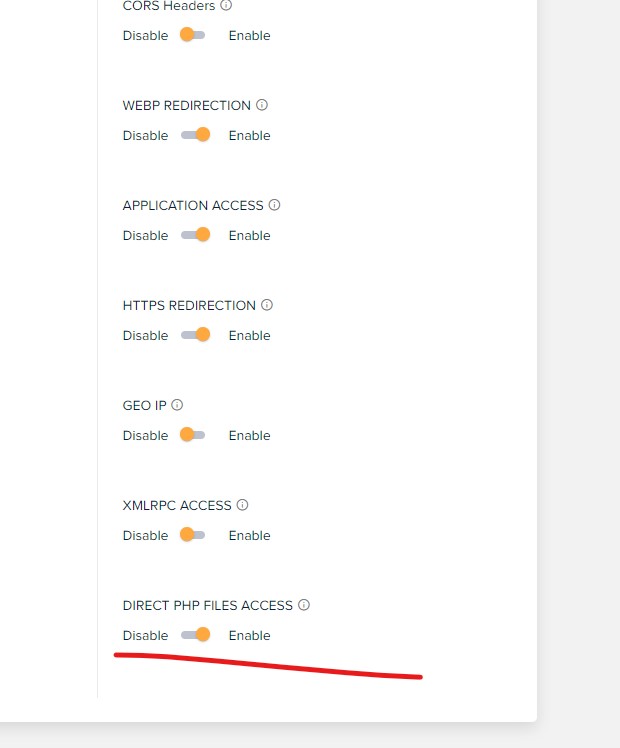
If you have exhausted all options and the editor is still not working enable “DIRECT PHP FILES ACCESS” (under application settings). This solved my problem with the editor but I am not happy I need to enable this for security reasons. So I suggest to enable it when you want to edit with the composer and disable it when finished.
sebpre0805 Hi,
website is https://phuketastic.com
By the way, the mobile search works very well and the article meta is also displayed there.
Yes, I have a mouse with a scroll wheel, but it doesn’t work. I can scroll from top to bottom within the composer with the wheel but not from left to right. My resolution is 1920×1080 everywhere.
The width of the bar also has nothing to do with the resolution, even with the highest resolution the Composer menu is not wide enough. Can’t this be adjusted with CSS?
Thank You
-
This reply was modified 3 years by
 philbo375
We are unable to create a new page via tag div composer but we are able to update the old pages. Can you please help us with this issue?
Calin Hi Hamid Fekhart,
To scroll in the tagDiv Composer sidebar, you must have a mouse and use the mouse wheel or a laptop with a touchpad that allows scrolling. This is not made for editing from the phone.
Also, our theme comes only in English (elements from the composer and from the theme panel).
Thank you!
Anamaria Hi,
You need to scroll inside this tab -> https://i.imgur.com/58o0iOv.png. If you have a mouse with the scroll, you can use it to scroll in tagDiv Composer. Also, this depends on whta resolution you have.
Please provide the link to your website.
Thank you!
Anamaria Hi,
You can create a sidebar with tagDiv Composer like in this article https://forum.tagdiv.com/sidebars-tutorial/ You can set the layout of row.
1. Add 1 row (or existing one) or more inner row
2. Split into 3 columns
3. You can add whatever element you want into the second column and consider it a sidebar.
Also, if you want to create the sidebar in Appearance -> Widgets and set the sidebar on pages, using the element from tagDiv Composer, Widget sidebar https://i.imgur.com/e1FPdYU.png -> https://i.imgur.com/q20UCZf.png
Thank you!
 Romi
RomiHi TagDiv support team
I have a condition where when I make changes to the menu bar, the changes only work on TagDiv NewsPaper, but as soon as I log out and open the homepage or any page, the menu is still the same as I haven’t made any changes to TagDiv, what’s the solution, I’m really confused.
Below I have included 2 screenshots to clarify what I mean so that you can easily understand me
This is the change I made in Menu Bar, and I have saved it already
<p></p><div class=”separator” style=”clear: both; text-align: center;”> </div><br /> <p></p>
And then I logged out and see the homepage and this what I get
<div class=”separator” style=”clear: both;”> </div>
Notes I don’t use any cache plugin
How to fix this?
It’s so confusing indeed
Thank you very much
Muhamad Nagib
 mdev
mdevIs there a way to create a taxonomy list in the tag composer page? I see that there is Posts Form Taxonomies but I want to display links on a page to these categories like category lists or do I have to create a shortcode for this?



