- NewsmagtagDiv Composer Tutorial
- NewsmagHow to use the Visual Composer plugin
- NewsmagHow to update a plugin
- NewsmagWhat’s included in Newsmag theme package
- NewsmagRequirements for Newsmag
- NewsmagInstall via WordPress
- NewsmagInstall via FTP
- NewsmagBlock settings tutorial
- NewsmagtagDiv Social Counter tutorial
- NewsmagHow to update the WPBakery plugin
- NewsmagPage Menu
- NewsmagCustom ad spots
- NewsmagSmart sidebar
- NewsmagVideo playlist
- NewsmagPage templates
- NewsmagHomepage – How to build and set it
 Adrian Celano
 Thanks for your answer,
sorry for putting wrong the links are now public
basically, the images are how I see it in the “tagDiv Composer” correctly and then on the page the title is not seen and the format varies, I already cleared the cache and the problem continues. I also notice that the same thing happens in the “Big Grid Flex” attached images
news ticker
https://drive.google.com/file/d/1sU1oK2QD_RU5YaefIXm7lkh_7zDJSbYW/view?usp=sharing
https://drive.google.com/file/d/1wtBTupY02yi7PKp7AH51b7libxBSK1Aw/view?usp=sharing
Big Grid Flex
https://drive.google.com/file/d/19b8Ebtf0EKVE3p6WejguTPA31rNtUtU1/view?usp=sharing
https://drive.google.com/file/d/1UphQKxWFbhRoH1UlfkZva1JvcYT083k5/view?usp=sharing
gracias !!
 Dibbes
 I’m also having troubles that my website is so slow, it even times out. Investigating the problem it turns it’s having 25 repeating slow queries on a ‘post’page looing and ordering the same post ID 39081:
SELECT post_id, meta_key, meta_value
FROM F5A9liKgu_postmeta
WHERE post_id IN (39081)
ORDER BY meta_id ASC
update_meta_cache()
Plugin: td-composer
 jamonkey
I’m having an issue with my site. I’ve selected the “Drop menu items in More” in the Header Menu element and it works in the composer but when I save and publish the site isn’t showing the same thing. I though it was slow caching or something but it’s still happening. Any tips?
jamonkey.com
 anseilen
 Good evening from Japan.
I have checked and it seems that there is no problem with the theme itself. However, when I turn on the tagDiv Composer plugin, I get an error in WordPress.
I have the latest version of PHP (8.1) and WordPress is also up to date.
 Anamaria
 Hello,
The tagDiv Composer is a builder and it can be used for building pages and cloud templates, but not for creating posts. For this, you’ll need to use the Gutenberg or classic editor.
Using tagDiv Composer, you can build/edit the single post template (the layout of the posts).
Here is a video that will show you how to use the builder to create a website from scratch https://www.youtube.com/watch?v=SoGQ0d5kIBg to do this you’ll need to already have the posts.
Also, on our channel https://www.youtube.com/channel/UCOT1RiNysIPCTPSnVZskwtQ, you can find more videos that can help you and documentation https://forum.tagdiv.com/newspaper-theme-documentation/ and you can ask us here on the forum or email if you have any questions.
I hope this will help you!
Thank you!
Anamaria Hello,
Our theme is a frontend theme for most of the elements and changes, you’ll need to use the tagDiv Composer to edit the pages and templates for posts/categories, etc => https://i.imgur.com/I3OUYxr.jpg -> https://i.imgur.com/mMrEufY.jpg
Please check this video about how can create a website from scratch https://www.youtube.com/watch?v=SoGQ0d5kIBg with tagDiv Composer.
The footer template does not have the button to be edited with the tagDiv Composer in the backend. Please check this guide:https://forum.tagdiv.com/footer-templates/
You can edit with tagDiv Composer the footer template can be edited only from the frontend if it is assigned, edit a page/post template with tagDiv Composer and go down to the footer => https://www.screencast.com/t/rpfNhfyrF
Also, on our channel https://www.youtube.com/channel/UCOT1RiNysIPCTPSnVZskwtQ, you can find more videos that can help you and documentation https://forum.tagdiv.com/newspaper-theme-documentation/ and you can ask us here on the forum or email if you have any questions.
Thank you!
 Calin
Calin Hi,
Normally, by setting the code in the theme panel should do the job -> https://i.imgur.com/jrthHDD.png in case that this is not working, then you need to set it in the theme files, for this please use our guide from here https://forum.tagdiv.com/topic/how-can-i-get-theme-header-section/
Also setting file in a child theme are usually working only if are from standard pack, but this file I think that can work from composer -https://forum.tagdiv.com/the-child-theme-support-tutorial/
Thank you!
Calin Hi Marica,
Indeed, it can be a little difficulty at the begin when you use the theme builder, but once you learn how is working you’ll see that you can do almost anything.
If you want to set margins or paddings around an element/block, select it and check the css tab -> https://i.imgur.com/YaysPFn.jpg also most of the elements can be edited per view port (if is not edited, then will inherit the options set on desktop).
Here is a video made by one of our designers on how to create a page from scratch with tagdiv Composer -> https://www.youtube.com/watch?v=SoGQ0d5kIBg this should help you to find more answers and tricks.
Thank you!
Calin Hi mmindex@268,
First please check the good practice, please make sure that all theme requirements are set https://forum.tagdiv.com/requirements-for-newspaper/ and you use a ssl plugin.
Then, please make sure that you do not have a plugin conflict.
In case that the “Error at zones: 6(models) : 7(dom). The model does not match the content Current state has involved an issue. You could try an UNDO operation (CTRL+Z / CTRL+SHIFT+Z)” persists, please check this guide https://forum.tagdiv.com/tagdiv-composer-not-working/
If the problem is only on one specific page, then it can be from some changes or code that was add, please use the revisions https://www.wpbeginner.com/beginners-guide/complete-guide-to-wordpress-post-revisions/
Let me know the results!
 doublesimon
Hi,
I’m very new with newspaper theme. I install black pro, I sucessfully modified the home page and the header, but I cannot modify the single post page (for example add the header even there, etc). If I click on tagdivcomposer in a article it doesn’t work.
Can you help me?
Anamaria Hello,
Please provide more details about your issues.
Also, if you have only shortcodes on the page/post, please make sure you have the tagDiv plugins activated, like tagDiv Composer, tagDiv Cloud Library and tagDiv Standard Pack.
Thank you!
Anamaria Hello,
Disconnect your Instagram and Facebook, please execute these steps:
1. disable tagDiv Composer and tagDiv Social Counter
2. uninstall(delete) tagDiv Composer and tagDiv Social Counter
3. clear cache (if cache plugin exists)
4. install tagDiv Composer and tagDiv Social Counter
5. activate tagDiv Composer and tagDiv Social Counter
6. clear cache (if cache plugin exists)
Reconnect the Instagram and Facebook account again -> https://forum.tagdiv.com/tagdiv-social-counter-tutorial-2/
If this problem is not solved after that, then we need to take a look and see what happened there.
Please contact us via email at contact@tagdiv.com and provide the following:
– wp-admin URL and credentials
– a link to this topic in order to identify you
Our team will take a look!
Thank you!
Calin Hi SAMYTHEBIGJUICY,
Yes, I was referring to some cache plugins, cache on host or cloudflare.
The WP Super cache plugins is the one that we tested with our theme and we made a guide for it, but you can use other cache plugins, all that needs is to find the right settings.
About the ads, it is possible to have some ads left on some pages or cloud templates, on those were are display, use tagDiv Composer and replace/remove them-> https://forum.tagdiv.com/ads-adsense-overview/ also this is still compatible and can be downloaded https://i.imgur.com/akfvnKC.png
Thank you!
Calin Hi AK Rayhan,
Our theme as a special filed that will set the code between the
Our theme has 3 header files, on in theme, one in tagDiv Composer (wp-content/plugins/td-composer/legacy/Newspaper/header.php) and one in tagDiv Standard Pack (wp-content/plugins/td-standard-pack/Newspaper/header.php), now if the standard pack is enable and you do not use a cloud template then you’ll use the file from standard pack, if this plugin is disable or you use a cloud header from tagDiv Cloud Library then it will be used the file from composer, if both of these are disable will be display the one from theme (wp-content/themes/Newspaper/header.php).
I hope this will help you!
Thank you!
Calin Hi dimitrisv,
Our tagDiv Shop plugin was made after our team created a shop and tested many plugins that in the end were not all compatible each other, so the tagDiv Shop is covering most of the settings that our developers needed to make that shop.
The only way to integrate the plugins by weLaunch and keep things saved is to get help from a developer because those are not covered by the support team.
In case that you want that one of our developers to help you, this can be done, but will be for a fee, for this you’ll need to make a request here -> https://tagdiv.com/web-development-services/
Unfortunately, for the moment the Group Attributes option was not added, as I know is set as a request on our list for the shop plugin.
After the last theme update there we added some new woo shortcode, for example for checkout -> https://i.imgur.com/MO4FHwX.png -> https://i.imgur.com/N8TMWL7.png those need to be added with tagDiv Composer on a new page that will be set in woocommerce as checkout page.
Thank you!
 Mediaguy2021
 I have looked an check:
1.Do you have a site map of the page where are all the blocks and sections. I have not found any on you support Site.
DIVTAG EDITOR does not work. It will not bring up the page. Like how your videos show.. I have full control of the backend of the site. None of these solutions work. I have tried them all. I need to change some other things also.. This is not the not only issue I have. I am trying to get this page ready so we can launch it. I have screen shots but can’t upload them here.. If possible it need to have someone reach out to me..
2.There is an error in Theme Panel the Footer has no Drop downs.
3. I have to change the headings of some of the blocks.
4.These are all installed Plugins
tagDiv Composer
tagDiv Cloud Library
tagDiv Social Counter
tagDiv Newsletter
tagDiv Shop
tagDiv Mobile Theme
Official AMP for WP
tagDiv Standard Pack
Revolution Slider
-
This reply was modified 4 years by
Mediaguy2021.
-
This reply was modified 4 years by
-
This reply was modified 4 years by
 PoliticaMagazine
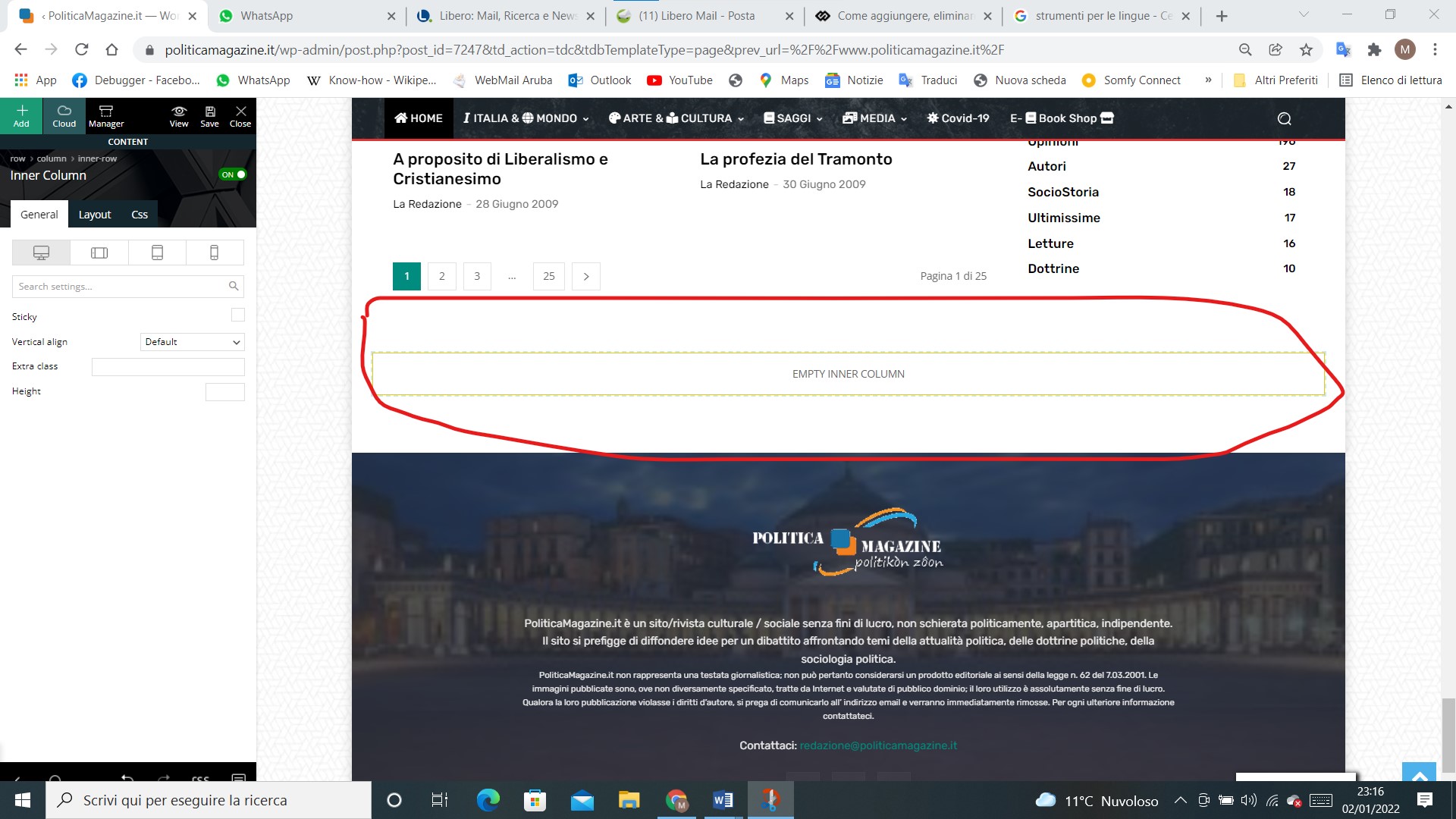
How can I delete this empty inner column space? (Edit with tagDiv Composer)
https://www.politicamagazine.it/wp-content/uploads/2022/01/Immagine-2022-01-02-231657.jpg
 Suphani
Hi,
we are not using a cloud template for header and footer, but since many years the TagDiv Composer footer on https://mrsbridal.de/
since a theme update, we cannot change the footer widgets anymore, f.e. the recomended post section on the footer is empty and we would like to add some posts here like we had earlier.
how can we edit the no-cloud-footer and no-cloud-header with Newspaper 11.4?
Thank you
Adrian CelanoHello team, I find a problem when loading the News ticker element while every time I see it in the “tagDiv Composer” it looks correct when I preview the page it looks with error
https://drive.google.com/file/d/1wtBTupY02yi7PKp7AH51b7libxBSK1Aw/view?usp=sharing
https://drive.google.com/file/d/1sU1oK2QD_RU5YaefIXm7lkh_7zDJSbYW/view?usp=sharing
 mmindex@268
Hi,
Please help with this error:
Error at zones: 6(models): 7(dom). The model does not match the content Current state has involved an issue. You could try an UNDO operation (CTRL+Z / CTRL+SHIFT+Z)
I have this error message on the right up corner, after I click “Edit with tagdiv composer”.
Thank you.
 haritajoshi27
there is bugs coming saving process is not showing and also not happening when any changes we do in tagdiv composer also site it getting huge time for loading kindly check give us the solution
 bidhi
bidhihttps://www.newsonlineindia.com/wp-admin
Getting error when edit homepage:
Error at zones: 6(models) : 7(dom). The model does not match the content Current state has involved an issue. You could try an UNDO operation (CTRL+Z / CTRL+SHIFT+Z)
 dimitrisv
Hello,
I am converting a Magento site to Woocommerce with TagDiv.
I opted to go for the brilliant (and affordable) woocommerce plugins by weLaunch https://www.welaunch.io/en/shop/plugins/woocommerce-plugins/ (and maybe use a couple of plugins by YITH).
It will be great if you help us integrate the plugins functionality with your work.
Here is an example:
The old site in the categories loop has this functionality:
https://femme-fatale.gr/aromata/eponyma-aromata.html
That is:
1. Quick View (offered in our case by WeLaunch – https://www.welaunch.io/en/product/woocommerce-quick-view/)
2. Add to wishlist (offered in our case by WeLaunch – https://www.welaunch.io/en/product/woocommerce-wishlist/)
3. Ratings (offered natively in Woo Loop)
4. Add to cart (ought to be offered by Woo Loop).
5. Tag of the exact discount (not just if it is on sale) (offered by WeLaunch – https://www.welaunch.io/en/product/woocommerce-ultimate-pricing/)
Here is what we get natively in our theme:
https://femmefatale.ecode.gr/product-category/%ce%bc%ce%b1%ce%ba%ce%b9%ce%b3%ce%b9%ce%ac%ce%b6/
The question is how to integrate all these features by welaunch without breaking our theme and make them resilient to changes.
Last but not least, there is the great feature of Group Attributes. Like, classes of products with specific attributes, to which we would like to filter. e.g. a parfume’s attributes have been grouped together so we can filtered based only the attributes of parfumes. Nails has a different set etc. I was unable to figure out how to do achieve this with TagDiv native filter, so I am currently experimenting with WOOF. But still, for each category, I have to retrieve the Group Attributes of the product category I am looking into, so that I can pass it on to WOOF.
Again please suggest a way to do this.
Last but not least.
I am using/will be using the checkout page of woocommerce. If I try to edit it using our visual composer it breaks. Please provide documentation so that we can modify the page and add the blocks we would like (e.g. include the native billing/payment modules from woo, or other items (related products, loyatly points) by other providers in a page that has been set up with the composer.
I know that the woo functionality is new and I am sure as the time goes by it will reach the perfection you have in displaying stories, but I feel that you ought to document these things to help us be more productive in the interim.
Best wishes for the New Year for the whole team. Thank you for everything so far!
 knthdgd
 Ok thanks.
I think that is a needed option in your Visual Composer.
Calin Hi,
All those change can be mad using tagDiv Composer, the theme builder. The pre-build website are made using cloud templates , also we have some video tutorials here -> https://www.youtube.com/watch?v=SoGQ0d5kIBg&list=UUOT1RiNysIPCTPSnVZskwtQ
I hope this will help you!
Happy New Year!