
- NewsmagtagDiv Composer Tutorial
- NewsmagHow to use the Visual Composer plugin
- NewsmagHow to update a plugin
- NewsmagWhat’s included in Newsmag theme package
- NewsmagRequirements for Newsmag
- NewsmagInstall via WordPress
- NewsmagInstall via FTP
- NewsmagBlock settings tutorial
- NewsmagtagDiv Social Counter tutorial
- NewsmagHow to update the WPBakery plugin
- NewsmagPage Menu
- NewsmagCustom ad spots
- NewsmagSmart sidebar
- NewsmagVideo playlist
- NewsmagPage templates
- NewsmagHomepage – How to build and set it
 divaspathak
https://www.bestsevenreviews.com/vpn/. I wanted to know whether this page is made by td composer or not. If yes then how make a page like this?
 rzarate
I just installed this theme but i just cant create or edit anything.
Every time i click on “Edit with TD Composer” i get an error 404 not found.
Console says this
Failed to load resource: the server responded with a status of 404 (Not Found)
wp-admin/post.php?post_id=3149&td_action=tdc&tdbTemplateType=page&prev_url=%2F%2Fdomain.com%2F
Only theme plugins needed are installed
And documentation site does not say anything about this error.
 emmalabbe
 To complete my previous message, I tried something different today : I imported a section from the library, it created a page, I customized it using only elements like column content, titles… (no block or big grid), and I renamed it within the TagDiv Composer.
It seems OK, I can find this page template among my pages.
Now, to create a new page using this template, what should I do? I clicked on “New draft” below this page template, a new page was created. I wrote a title and chose a parent page, and saved it. Then, when I edit this new page with TagDiv Composer, the same error message appears. There isn’t any problem (just the message) but I’m wondering if I understood the process to create a new page from a template.
Thanks for the clarification.
 princeenwerem
Hi, Im using the covid-19 italy newspaper template. I utilize the theme panel to change the theme colors, background images etc but they dont reflect. Now, I have the use the tagDIV composer to do so and thats not effective enough for this task. Kindly help with a solution. Thanks
emmalabbe Yes, 100% sure that they were built with TagDiv Composer, importing a template from the Library. I think that the error message appears after I modified the page name or SEO content. I did it with the WordPress editor. I didn’t modify the content of the page, only the page title and SEO content in Yoast editor. Is it something that I should do differently ?
After importing a template from the Cloud Library, can we modify the name the same way (choosing “Modify” and doing it in WP editor)?
Thanks.
 ludyma
 hello, I would like to install a popup on the web so that notices appear in the browser or through rrs by mail, for rss I use feedburner that, incidentally, in the box that is in the TagDiv composer gives me an error and I had to do one to hand … I attach a photo of one that I have seen on a website, or that you advise me …
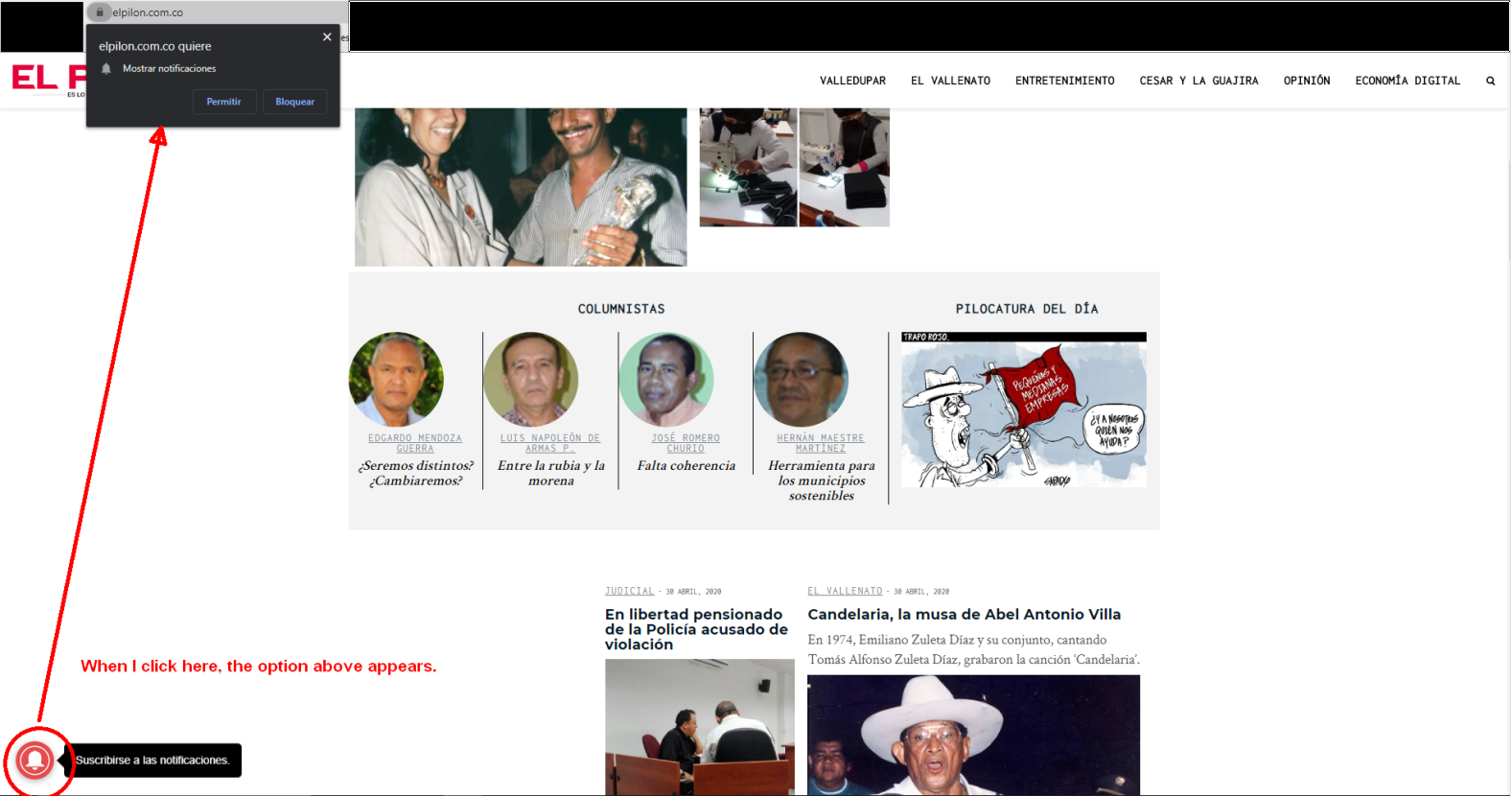
 Calin
Calin Hi,
If you use a standard header you need to check these places -> https://i.imgur.com/qFrrltE.png -> https://i.imgur.com/GzAOVdR.png
If is a cloud then you need to remove it with tagDiv Composer -> https://i.imgur.com/NKvHwvw.png
Thank you!
Calin Hi,
1. Please make sure that all the settings are like in our requirements, please follow the guide carefully
– https://forum.tagdiv.com/requirements-for-newspaper/
and please increase all requirements that are lower, and follow all steps.
2. You need to add the shortcode of that plugin in a text element -> https://i.imgur.com/psfzjh6.png or using tagDiv Composer in a column text or text with title like this -> https://i.imgur.com/uvZ6rFM.png -> https://i.imgur.com/iI7cKGE.png
3. This tdb_action=tdb_ajax is related to the infinite loading functionality, the ?tdb_action=tdb_ajax can be found in wp-content/plugins/td-cloud-library/includes/tdb_ajax.php
4. The icon that you click is in a link and the link have set the href “#”, when the icon is click/touch the action is generate and is set in url # -> https://www.w3schools.com/tags/att_href.asp
5. If you are using a pro demo, the footer is a cloud template, then you’ll need to edit it from a page, for example, you can edit the homepage, click on edit with tagDiv Composer -> https://i.imgur.com/uweNRrc.jpg after that go down to the footer end edit it how you want (now you can customize the the whole web-page from fronted).
You need to check in theme panel > footer > footer settings -> https://i.imgur.com/z3JQNuU.png there can be three options, you can have set a footer template from tagDiv Cloud Library -> https://i.imgur.com/r5DInHz.png or you can have set a footer page -> https://i.imgur.com/V8gU4MB.png or a standard footer styles -> https://i.imgur.com/rb4GIOm.png
I think that you are using footer style 1, if yes, this is a premade footer and it can not be edited -> https://i.imgur.com/a2Cnksj.png therefore you can not edit the elemnts from it, you can only add more in footer 1,2,3, if you want to edit the footer you can choose an empty footer and set the widgets you want in it -> https://i.imgur.com/dhVshoH.png -> https://i.imgur.com/WnezpeD.png or you can use a footer page.
6. If the header appear like this -> https://i.imgur.com/OBC4Z2P.png thene you use a cloud template, you need to edit it with tagDiv Composer like this -> https://i.imgur.com/u36fXKq.png
If you use a standard header -> https://i.imgur.com/B9H7fGR.png
Thank you!
 vallejato
 ok, I know how to create a new siderbar, what I wanted to know and if it must be managed with tagdiv composer for the pages or I must use the wordpres system
Thank you
 sscom
sscom Hi,
I have the code issue also everytime I edit a specific page without TagDiv-Composer, but sometimes it’s necessary – for example, to change sites title in Gutenberg.
I don’t want to use Standard Pack, because you recommend to build the site only with Composer + Cloud Templates (https://tagdiv.com/newspaper-theme-update-standard-pack-or-tagdiv-cloud-templates/). But the error still occurs also with Standard Pack activated, as you can see here: http://test3.skispringen.com (user / userpasswd).
So what do I do wrong?
-
This reply was modified 6 years by
sscom.
Calin Hi,
You can import any cloud header you want from tagDiv Cloud Library, edit it with tagDiv Composer and add the elements you want.
Also you can use the website manager for cloud header and footer -> https://i.imgur.com/OQ3zMSU.png
The ad can be added using the ad box element from tagDiv Composer and set it where you want -> https://i.imgur.com/rlpkm0H.png
Also you can try to optimize your websites -> if you follow the steps which are presented in this tutorial here -> https://tagdiv.com/how-to-increase-page-loading-speed/ you’ll be able to increase the speed of your website.
Also you can check this similar topic for more solutions: -> https://forum.tagdiv.com/topic/optimize-script-to-improve-site-speed/ -> https://www.infophilic.com/get-almost-100-pagespeed-newspaper-theme/
– https://forum.tagdiv.com/topic/a-few-tips-for-newspaper-x-speed-high-cpu-usage-issues/
Thank you!
Calin Hi,
Please make sure that all the settings are like in our requirements, please follow the guide carefully
– https://forum.tagdiv.com/requirements-for-newspaper/
and please increase all requirements that are lower, and follow all steps.
Make sure that you do not have a plugin conflict, please deactivate ALL plugins except tagDiv plugins, also if you are using child theme or cache plugin, deactivate them, clear all cache and try again
When tagDiv Composer is not working -> https://forum.tagdiv.com/newsmag-requirements-for-newsmag/
If there is still a problem, please provide me a link to your website and some more details and screenshots.
Let me know the results!
Thank you!
Calin Hi,
To achieve the Lowercase you need to edit the page with tagDiv Composer like this -> https://i.imgur.com/SV6T5Ha.png click on logo (text) and check the style tab -> https://i.imgur.com/lqa9DFl.png -> https://i.imgur.com/ejIFdD0.png
Hope this will help you!
 sansthanam
Hello sir/ma’am,
Today I purchased newspaperX from website and while installation plugin installation got failed and website got a fatal error and now I am not able to open website or websites wp-admin.
Fatal error: Allowed memory size of 134217728 bytes exhausted (tried to allocate 8192 bytes) in /home/sansthanam/public_html/wp-content/plugins/td-composer/legacy/common/wp_booster/td_util.php on line 2070
Please help!
ASAP
 Incomily
Hi, if I use a wp bakery for a blog post, and I try to edit a text with your composer, I am getting an error:
“Error at rows: 1(models) : 2(dom). The model does not match the content Current state has involved an issue. You could try an UNDO operation (CTRL+Z / CTRL+SHIFT+Z)”
Is there a way to edit a content if it’s made via WP bakery, or no?
Best
Calin Hi,
On mobile theme the sidebar will be remove and for pages you’ll need to use the mobile editor to set a new content.
If you are using the mobile theme plugin, you’ll gain a better speed then responsive version of theme, but in order to achieve that speed you’ll need to create a new content for pages because in the most of cases those were made with builders ( tagDiv Composer, WPBakery ) and you need to use only the mobile editor ( you need to set the content for pages in mobile editor and this content will be display on mobile theme)
-> https://i.imgur.com/9d0UWLT.png
Also you can show the responsive version on mobile theme -> https://i.imgur.com/m0bVB5T.png you can check more details about mobile theme in our documentation -> https://forum.tagdiv.com/the-mobile-theme/ or if you want to have the responsive version only, you can use the amp option from mobile theme -> https://i.imgur.com/oofST3D.png (to use the mobile theme template on amp) or you can disable the plugin.
Thank you!
Calin Hi,
Another thing that you can do is to choose another image size on flex element, for this you need to edit the page with tagDiv Composer -> -> https://i.imgur.com/YpFFI1Z.png choose the size that is look better.
Let me know the results!
Calin Hi,
You can add videos on homepage using tagDiv Composer and the video elements -> https://i.imgur.com/ICF42Es.png -> https://forum.tagdiv.com/video-playlist-2/ also you need to set the YouTube api ke in them panel -> https://forum.tagdiv.com/youtube-api-key/
Also you can embed the YouTube video in a column text or text with title like this -> https://i.imgur.com/uvZ6rFM.png -> https://i.imgur.com/iI7cKGE.png
Let me know the results!
Thanks.
Calin Hi,
Just make sure that all required theme plugins are activate -> https://i.imgur.com/Ilcsq0f.png
Also you can use tagDiv Composer to adjust/edit the theme layout and page content.
Thank you!
Calin Hi,
If you are using a single post template from tagDiv Cloud Library, then you can set the color by editing the template with tagDiv Composer -> https://i.imgur.com/Juif01I.png click on element and look for stars color -> https://i.imgur.com/EbkZsqS.png
If you are using a default post style, then you can achieve this with a custom css.
-> https://i.imgur.com/dK96iJ0.png
.td-review-stars{

color: red;

}

.td-review-overall .td-icon-star{

 color: green;

}
The code need to be set in theme panel> custom code> custom css.
Thank you!
 Vlad S
 Hello !
If you’re using a cloud library header you will have to edit your header using tagDiv Composer: https://www.screencast.com/t/urrNMccUhqu
Thank you !
Calin Hi,
1. That is a single post template (smart template) from tagDiv Cloud Library, it ca be edited with tagDiv Composer-> https://i.imgur.com/4ZzCXTu.png -> https://i.imgur.com/4FWUiWY.png unfortunately there are only few settings for the number, but you can use custom css to apply more style on numbers.
2. In order to achieve that you need to set an excerpt length on flex block, this can be set in theme panel -> https://forum.tagdiv.com/excerpts-introduction/ or individual on flex blocks -> https://i.imgur.com/TmbTCjo.jpg
Hope this will help you!
Thank you!
 SilvioC
 Hello
I find out that the problem is still there.
Every night all active Theme plugins (tagDiv composer, tagDiv Social Counter, tagDiv Newsletter) deactivate. Only theme plugins deactivate, all other WordPress plugins stay active.
This problem started with WordPress 5.4 upgrade.
What can be the reason that only theme plugins deactivate every night?
Calin Hi,
Are you sure that these pages were build only with tagDiv Composer?
Make sure that you do not have a plugin conflict, please deactivate ALL plugins except tagDiv plugins, also if you are using child theme or cache plugin, deactivate them, clear all cache and try again.
If there is still a problem, you can send us an email at contact@tagdiv.com and provide admin login, as well as cPanel. We will take a look. Include a link to this topic in the email.
Let me know the results
Thank you!
Vlad S Hello !
1. I pressume you mean the part wich includes the latest articles section. That one comes from the page building: https://www.screencast.com/t/uzXRgXTiHlH That part is NON Editable using tagDiv Composer.
2. Please simply disable the mobile theme and let us know so we can investigate your website with the mobile theme plugin deactivated. At the moment your website has mobile theme plugin and everything looks fine: https://www.screencast.com/t/sLsavTM589S ; https://www.screencast.com/t/8LP9EsTX
3. As you can see here. On one gutenberg block I have added an additional class: https://www.screencast.com/t/kaBcRBJqx5NS ; https://www.screencast.com/t/7OKjlDj0k ;
This allows you to have better targeting when you want to customize that specific block using css.
I hope this is more helpful !
Thank you !



