
- NewspaperCreate Custom Code with the browser’s Inspector or the Live CSS Box
- NewspaperScroll Animation
- NewspaperWP Rocket and Newspaper Theme: Optimization Guide
- NewspaperHow to setup Twitch for Social Counter
- NewspaperModal Popup
- NewspaperFlex Block Settings Guide
- NewspaperAutoptimize Plugin – install and configuration
- NewspaperAdding Multiple Authors to Your Articles
- NewspaperDesign your Post Pages using the Cloud Library Templates
- NewspaperBig Grid Flex Settings
- NewsmagtagDiv Composer Tutorial
- TutorialsFrom WPBakery to tagDiv Composer
- NewspapertagDiv Composer Tutorial
- NewspaperTheme modules and blocks
- TutorialsDefault Block Settings Guide
- NewspaperThe Mobile Theme
- NewspaperCompare theme files – Winmerge tutorial
- NewsmagBlock settings tutorial
- NewsmagLogo & Favicon
- NewsmagFooter templates
 Bettina
 Hello GentlemanJack!
1. Make sure you did not apply any margins or paddings to the elements in the CSS tab. They should be equal by default.
2. This is a setting in the flex blocks, Layout tab: https://prnt.sc/Yt6S3dxcOZ4H for a post with reviews: https://forum.tagdiv.com/reviews-2/ Unfortunately, you cannot place it after the title or in another position in that flex block.
Thank you!
 BuddhaNET777
hello I have been using newspaper for awhile, love it. I have installed a multivendor marketplace plugin called Dokan and had some alignment issues at first but was able to fix with [vc_row][vc_column][dokan-stores][/vc_column][/vc_row] vs [dokan-stores] so it displays centered in the column block vs to the right inside of it @ http://www.buddhanet.world/bazaar
my questions are
1) how do I make this display properly via the default mobile app mobile view? it just displays store list and doesn’t show the active stores. http://www.buddhanet.world/bazaar via mobile device
2) how do I change the text color for store nav menu text that is located left of shop view, displaying black no hover and gold hover currently. this is the font located in the menu nav for product pages of store under “Store Product Category”.
https://www.buddhanet.world/bazaar/user/
 VeriArtem
 Hello
Yes, I know that but how to title [Company] keep close to the inner text? When I do it its at least an inch of empty space or move somewhere else. Demo css paddings and margins are set to -.
Regards
Alex
 under23
hi how do i can change theme name in installed dir and also in style.css ?
 albertok
 Really thank so much for your answer and patience:
herewith enclosed you can see screenshot of:
Flexbox2 CSS settings

Row CSS settings

Column CSS settings

All settings are by default… I think
 Anamaria
 Hello,
Please select the block and go to the CSS tab and check if you have there some margin left set. Also, you can check the column and rows.
Thank you!
Anamaria Hello,
Please provide the link to your website.
Did you use a plugin for minifying the css and js?
Thank you!
albertokHi there,
I’m trying to build home of my Church’s site…
I choosed flex box 2 to create a sort o f slider of last articles…

As you see in the image.. I don’t know why image has been moved on the left out of limits; I saw in the HTML / CSS and i noted this
.tdc-row .tdi_79_326 .td-module-thumb {
  height: 460px;
  margin-left: -100px;
}
I never set a left margin for that!!!!!
Could you help me pls?
 Calin
Calin This is quite strange, when I test it seems to be ok – https://i.imgur.com/MSIat5g.png
Do you set the css in this place https://imgur.com/Nqe106v ? If yes, maybe it no longer applies to the amp. In this case please set the css in this place – https://i.imgur.com/FC5Ecz3.png (you need to set it between the style tags).
Let me know the results!
Anamaria Hi,
Usually, the color and image are set on the row, so please edit and select the row and go in the tab CSS https://i.imgur.com/UkgqKNM.jpg -> https://forum.tagdiv.com/topic/background-color-of-the-main-menu-be-changed/ please check each row/column and delete the background image.
Thank you!
Anamaria Hello,
I just checked, and now the font is Oswald, https://i.imgur.com/Jl0Z6ve.png, but it seems you have some plugin to minify the css and js; maybe this interferes with the theme.
Thank you!
 ddj
ddj Like I said, in TagDiv Composer, the font is set to Oswald in all the locations. I specified that font via the editing panel on the left side of the screen.
For the two sentences, it is set at General > Post Content > Oswald.
For the main navigation, it is set at Style > Fonts > Element Text > Oswald.
For the Image Box (buttons), it is set at General > Style > Custom Titles Text > Oswald.
In the TagDiv editor, the font displays as Oswald. After saving and viewing the live page, the font shows up as Alegreya.
I do have some custom CSS, but none of it mentions Alegreya. Here’s what the custom CSS looks like.
.entry-crumbs {
display: none;
}
.woocommerce-ordering select {
display: none;
}
.woocommerce .td-container .page-title {
margin-top: 50px;
}
.woocommerce .product .images .flex-control-thumbs li img {
cursor: pointer;
opacity: .5;
margin: 10px;
padding-right: 10px;
padding-top: 10px;
}
.woocommerce .added_to_cart {
font-size: 12px;
color: #222;
padding-left: 10px;
}
.woocommerce div.product .woocommerce-tabs ul.tabs li {
display: none;
}
.woocommerce.widget {
margin-bottom: 38px;
background-color: lightgray;
padding: 5px;
}
.tdb_mobile_menu {
z-index: 10;
}
.tdb_mobile_search {
z-index: 10;
}
.td-search-wrap-mob .td-search-input span {
font-size: 20px;
font-family: ‘Oswald’;
}
.td-search-wrap-mob #td-header-search-mob {
font-family: ‘Oswald’;
}
.td-search-wrap-mob .result-msg {
margin: 0 5%;
font-size: 20px;
font-family: ‘Oswald’;
}
.tagdiv-type ul, .tagdiv-type ol {
margin-bottom: 6px;
}
-
This reply was modified 3 years by
ddj.
 markwebbink
 Hi @Bettina,
Thank you for your reply.
I already have some code there (provided by a colleague of you) but the ‘structure’ of this code looks different from what you provide. Also the word ‘body’ is written in red after placing it in the CSS? Is that correct?
BR
Mark
Bettina Hello @ddj!
It appears to be Alegreya. Check the TagDiv Composer to see which font is set and select the right one. Make sure you do not have any custom CSS there.
Thank you!
Bettina Hello @markwebbink!
Add the CSS code in Newspaper -> Theme panel -> Custom code -> Custom CSS:
body{background-color:white;}
Thank you!
Anamaria Hello,
If you are using the Gutenberg editor, then there will be no sidebar in the editor, this will look like this -> https://i.imgur.com/F6PUBhU.png
If you are using some classic editor plugin, then the sidebar can be removed only from the files, for this, you need to go in -> wp-content/themes/Newspaper/editor-style.css and comment these lines of CSS -> https://imgur.com/EpWJhGZ
Hope this will help you!
Thank you!
Bettina Hello @herbalworld!
Add the CSS code in Newspaper -> Theme panel -> Custom code -> Custom CSS:
.td-header-row:before, .td-header-row:after{display:none!important;}
Thank you!
Calin HI,
that space can be reduced using tagDiv Composer – https://i.imgur.com/bYpYUwp.jpg, select the mobile viewport, click on the trending now element, and check the css tab, there you can set the top margin to 0 also you can use negative numbers for margins, so if the 0 is not enough, you can set it -10 – https://i.imgur.com/mn6Z3J0.png
I hope this will help you!
–
 tlonero
my client is convinced that the external css files are slowing the site down,
<link rel=”preconnect” href=”https://fonts.gstatic.com” crossorigin />
<link rel=”preload” as=”style” href=”//fonts.googleapis.com/css?family=Open+Sans&display=swap” />
<link rel=”stylesheet” href=”//fonts.googleapis.com/css?family=Open+Sans&display=swap” media=”all” />
I don’t think it is plus I don’t want to modify the files in case there are updates, they have the external adds running on the site I think that has alot to do with it
your thoughts?
 inspiredearth
 The only way I found to resolve the immediate issue described above was to load in a different cloud theme template, and then revert back to the original one.
But since doing that, header related issues persist. Now the issue is that if I don’t use a Cloud template for the header, the page goes up behind the header. If I do use a Cloud template for the header (as I was previously) I’ve been unable to get the default background colour to change. It has a blue gradient that I don’t see in any settings, nor have I been able to identify it’s source in the CSS (to over-ride it manually).
The header template I’m using is Tech News Pro.
 Abder Fath
Hello,
When I added negative margins in the CSS tab of the row (https://forum.tagdiv.com/topic/reduce-menu-height/), a space between menu and loaded page in the menu (https://i.ibb.co/hFDtB0L/menu.png) appeared and I would like to remove it.
I tried adding negative margins to the loaded page in the menu, but it didn’t work
Website: https://digitaloutloud.com/
Thank you!
 erfahrungsguru
Hi,
i have two websites with newspaper 11 theme. but on 1 page i got an error with the width – maybe you have an idea how to fix it?
see screenshot:
Site 1 – everyhting well:
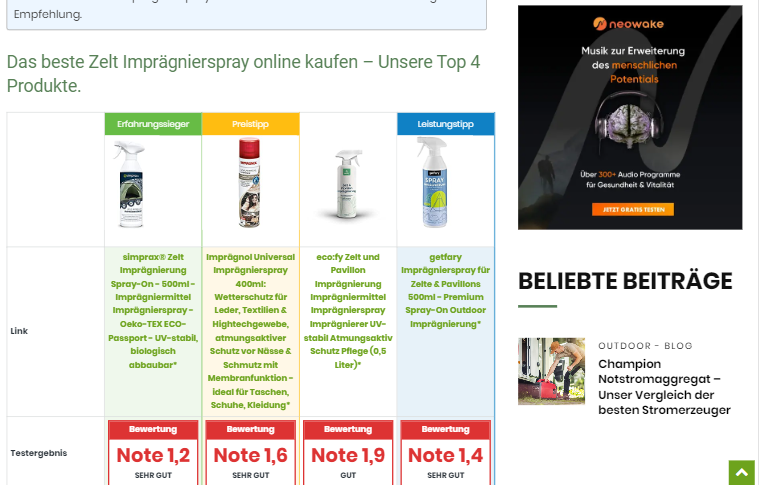
Site 2 – bugged
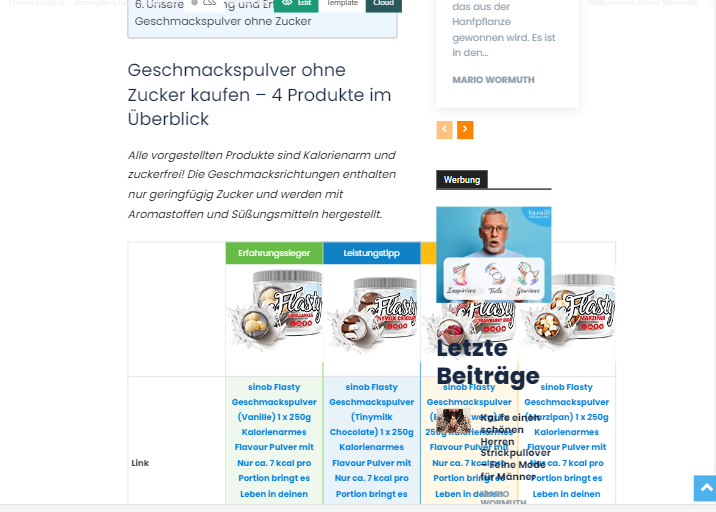
both pages have a different demo page as a basic framework. we have not set any css customizations.
Bettina Hello @khalilsoy!
Edit the page with the tagDiv Composer and check the CSS tab of the elements. There should be somewhere in that area a margin. Delete the value from there.
Thank you!
Bettina Hello!
Edit the page with the TagDiv Composer and select the row of that menu. In the CSS tab of the row, add negative margins.
Thank you!
Bettina Hello @desiree_kr!
You need to change the color from the Gutenberg editor or try to overwrite the color with CSS code: https://forum.tagdiv.com/create-custom-code-using-the-browsers-inspector/
Thank you!



