
- NewspaperCreate Custom Code with the browser’s Inspector or the Live CSS Box
- NewspaperScroll Animation
- NewspaperWP Rocket and Newspaper Theme: Optimization Guide
- NewspaperHow to setup Twitch for Social Counter
- NewspaperModal Popup
- NewspaperFlex Block Settings Guide
- NewspaperAutoptimize Plugin – install and configuration
- NewspaperAdding Multiple Authors to Your Articles
- NewspaperDesign your Post Pages using the Cloud Library Templates
- NewspaperBig Grid Flex Settings
- NewsmagtagDiv Composer Tutorial
- TutorialsFrom WPBakery to tagDiv Composer
- NewspapertagDiv Composer Tutorial
- NewspaperTheme modules and blocks
- TutorialsDefault Block Settings Guide
- NewspaperThe Mobile Theme
- NewspaperCompare theme files – Winmerge tutorial
- NewsmagBlock settings tutorial
- NewsmagLogo & Favicon
- NewsmagFooter templates
 Alin [tagDiv]
 Hi,
Using the theme package that it is available on themeforest should not be any issues with the Mobile Theme plugin as we have fixed those problems.
There is only a css issue with the article author, but it can be fixed using this custom css – https://forum.tagdiv.com/topic/mobile-theme-errors-since-7-3/
In the next theme version we will solve also this css problem, sorry for inconvenience!
Thanks!
 Andrei L.
 HI
Try this css in theme panel > mobile theme > custom code: http://screencast.com/t/mxWc1GBaf
.td-classic-sharing li {

    display: inline-block;

    height: 20px;

    margin-left: 0;

}

.td-post-sharing-top{

display: none;

}
This code will correct the button’s style and will hide top like and tweet bottoms.
Thanks!
Andrei L. Hi
Unfortunately the theme does not have an option to change the background color for poage contetn but you can achieve that using this css: http://screencast.com/t/GGLcbhkGM
.td-main-page-wrap{

background-color: aqua;

}
Hope this helps!
Thanks!
 Catalin
 Salut Alex,
1)Pentru a fix aceasta eroare, te rog sa folosesti codul CSS din acest topic -> https://forum.tagdiv.com/topic/author-and-date-all-over-the-place-after-upgrade/ deoarece acolo a fost explicat acest lucru.
2)Pentru a schimba aceasta denumire, incearca sa urmezi acesti pasi -> http://screencast.com/t/DbEwxePz0cF
Sper sa reusesti!
O zi faina in continuare!
Catalin Hello tcmc1313,
Unfortunately, you will need more additional customizations using CSS code in order to achieve as you wish that involves time-consuming and custom work and we cannot provide this type of services at the moment, sorry! Please try to change another header style which satisfies your expectations or if you want to change it and if you are not aware of the steps which are needed to take in this regard, please consider hiring a freelancer/developer to help you!
Thanks for your understanding!
 Bogdan B.
 Hi,
If you want to see which module corresponds to which block, then check this list: http://screencast.com/t/KnqUHogWg
As for the fonts, the title is affected by the general widget titles font: http://screencast.com/t/r2ugALnSo62X and the content of the text box is affected by the body general font: http://screencast.com/t/x7yH8CjXrvZc
If you want to target this element separately you can only do it with css like so:
.td_block_text_with_title, .td_block_text_with_title p{

font-family:arial!important;

}
Thank you!
Andrei L. Hi
The first css will underscore all links from post and pages. If this is not what you mean please provide more details about what you’re trying to do and maybe I can help.
Thanks
Bogdan B. Hello,
Please provide a link to your site so i can inspect the code for these elements and provide the css for it.
Thank you!
Catalin Hello mc_kot,
You can try the code below and place it in Theme panel->Custom CSS area. Also, if you want that code to be applied only to this post page, you will have to add the post ID at the top of the code, like this -> http://screencast.com/t/AqiBkDz7
.td_module_10 .td-module-title a {

pointer-events:none!important;

}

div.td_module_10:hover .entry-title a{

color:black;

}
or
.postid-182 .td_module_10 .td-module-title a {

pointer-events:none!important;

}

div.td_module_10:hover .entry-title a{

color:black;

}
Thanks.
Andrei L. HI
@alberto786 you can paste the css here: http://screencast.com/t/xNT1Zo9kl
Thanks!
Bogdan B. Hi,
The code that you added will only affect the externally added images, but not the ones added by uploading them. This is the case because their source code is different.
For the external ones, the caption has this code: http://screencast.com/t/YxyHnqjgNmiK while the ones uploaded in the media library get the caption like so: http://screencast.com/t/ddUiBkiuA7YU
They have a different html code and different classes. So there cannot be one css to affect them both. You need to create the code for the uploaded ones as well. Try something like:
.td-sml-caption div{

position:relative;

top:-25px!important;

left:10px

}
And if you add an a tag in the description then you should target it like so:
.td-sml-caption div a{} or simply .td-sml-caption a{}
I hope this helps.
Thank you!
Catalin Hello bvanrij,
If you want to do this customisation, please notice that you will have to add some conditions in Woocommerce template, archive-product.php core file , like this -> http://screencast.com/t/Zk0MikVOa You will have to use the do_shortcode method and you will have to replace the woocommerce_content() with your desired Block which you want to have as default, using this method. Also, please notice that you will have to edit each case *sidebar_left, *no sidebar, *default. Also, you will need to make some adjustments with CSS code in order to achieve best results.
Hope this helps and good luck into your project.
Thanks.
Andrei L. Hi
No because each container have its own style and basically there are two links one above the other.
You can reduce the margins above and below the logo only if you delete ad’s container which is in the right: http://screencast.com/t/y932Ovyg4tye Try this css in theme panel > custom code > custom css: http://screencast.com/t/A4fDmaJc
.td-header-sp-rec {

display: none!important;

}

.td-header-sp-logo a {

height: 80px;

}

.td-header-sp-logo img{

margin-top: 0;

margin-bottom: 0;

}
Thanks!
Catalin Hello mc_kot,
If you want to change the color title for modules, please notice that you will have to use a bit of CSS code to do that. Try the code below and place it in Theme panel->Custom CSS area.
The code is ->
.td-module-title a{

color:red!important;

}
The result -> http://screencast.com/t/IAFzLEnOA8hR
The background can be added from the Theme Panel, like this -> http://screencast.com/t/o1h3PcH9t9 and the color title entire the posts, you should change it from there -> http://screencast.com/t/HUu9ful3uO
For more information about these features, please check here -> https://forum.tagdiv.com/background-introduction/ and here -> https://forum.tagdiv.com/theme-colors-introduction/
Hope this helps!
If is not what you mean, please provide more details so I will be able to provide a more accurate response.
Thanks.
Bogdan B. Hello,
It seems this header style has it;s own css so you can change it with this custom code:
.td-what .td-header-style-6 .black-menu .sf-menu > li > a:hover, .td-what .td-header-style-6 .black-menu .sf-menu > .sfHover > a, .td-what .td-header-style-6 .black-menu .sf-menu > .current-menu-item > a, .td-what .td-header-style-6 .black-menu .sf-menu > .current-menu-ancestor > a, .td-what .td-header-style-6 .black-menu .sf-menu > .current-category-ancestor > a{

    background-color: transparent;

    color: #ff530d!important;

}
You can add the code in the theme panel->custom css box
Alternatiovely you can change the code directly in the demo style.css file like so: http://screencast.com/t/2tHrN70RP
Thank you!
 simchris
 You can add CSS to either your style.css file in your theme; or in the custom code panel in the theme panel. Note the option to add CSS to your header in the “custom code” panel in the theme.
Also note, I’ve also had to add some margin to the tags and category “pills” so that “tap targets are not too close to one another.”
 cangnt
Hi, Support Team
My website http://motosaigon.vn have problem with the google adsense banners usually not display, sometime display only 1 or rarely 2 banners. On android device the banners display okie and Desktop always display all. My website use google adsense banners to get income and most of my traffics from iOS devices (i attached the GA). What should i do to make it always display all banners for iOS Devices ?
i already try: (But not work)
1. Using fixed banners from google
2. Using responsive banners from google
3. Use div to cover the banner code and use css (@media) to fix width and height base on screen size.
Thanks a lot
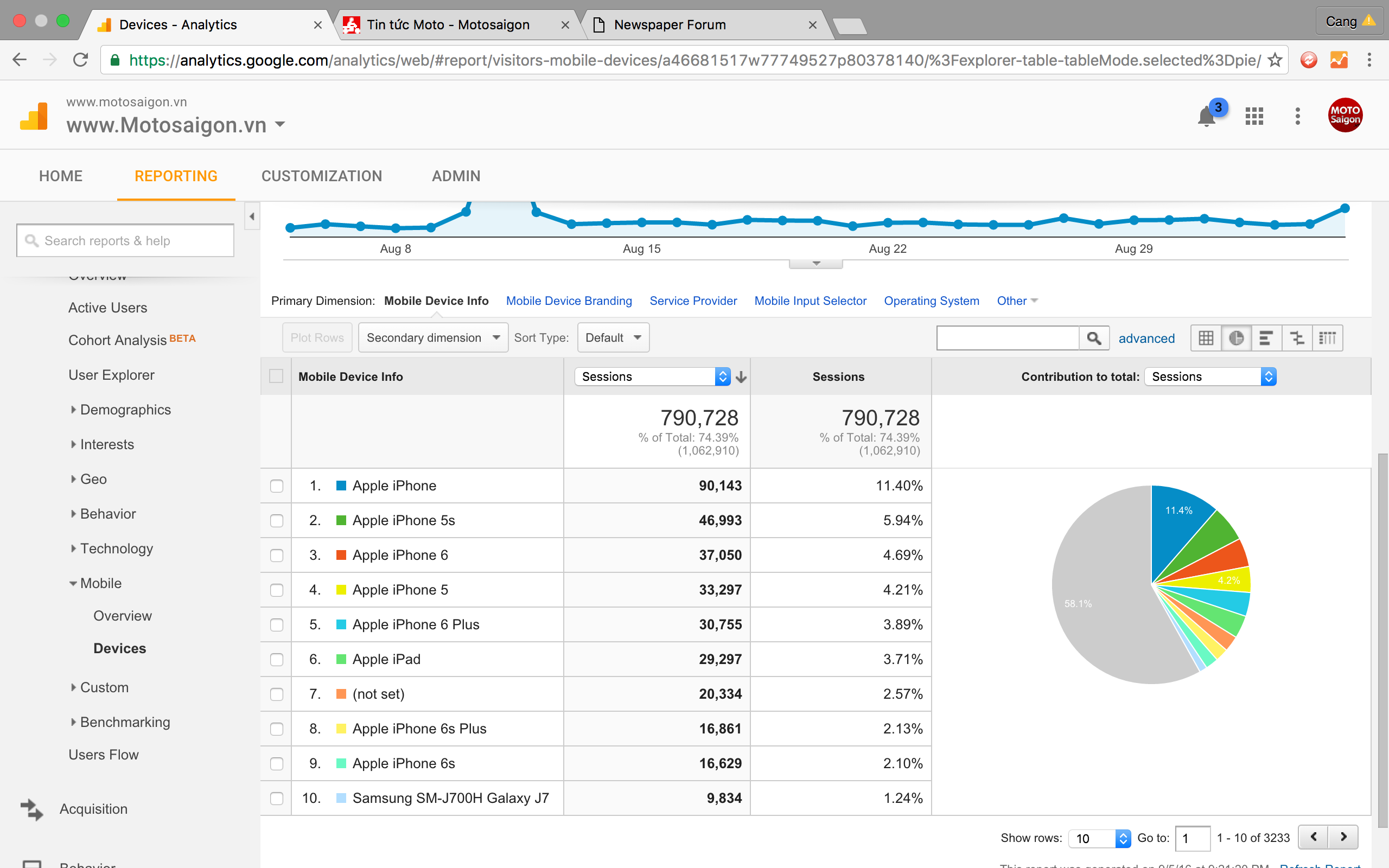
 Nano
Nano Thank you Bogdan. You should be our prime mentor here 🙂 🙂
It worked as it should… But I am really disappointed that Andrei didn’t try to check and solve my issue 🙁
Anyways..few things are still unsolved –
As I have earlier too that I have done some customisation with ( image caption text/link ) to make it look better and it’s working really well with default post without smart lists and even with images uploaded externally on smart lists.
The code is:
.wp-caption-text a {
background: rgba(0, 0, 0, 0.25) none repeat scroll 0 0;
display: inline-block;
padding: 0 3%;
}
.wp-caption-text, .wp-caption-text a {
color: #fff;
font-size: 10px;
margin-top: -28px;
text-align: left;
line-height: 20px;
margin-left: 3px;
}
Here is how it looks in smart-list-1:
Screenshot: https://i.imgur.com/hrL5MJr.jpg
But with internally uploaded there are two issues still left.
1. It doesn’t honor the above written custom CSS
2. The whole image is clickable and opens in the same after when clicked. the link is the one- we have written under “caption” to credit the source of the image.
Here is the screenshot : https://i.imgur.com/FfBwmOy.jpg
The example post is: https://tomatoheart.com/rishika01/23-girly-problems-men-never-understand/19/
You must be understanding that sending your visitors to the external site on the same page is never a good idea. So, please look at these two issues whenever you have time.
And please try to understand that these are universal issues with all the TagDiv theme users who want to use Smartlist the way I am using. So, please take this issue seriously for the benefit of the whole community.
Thank you very much 🙂
 zeeshan
 Hi,
Thanks for reply.
3) ok 🙁
4) I have remove costume CSS. Please check my website enewsvid.com
Kind Regards
Zeeshan
Bogdan B. Hi,
Unfortunately we have no solution to provide for multiple backgrounds. Sorry. You will need to hire a developer for this as it falls beyond what the theme support can provide. It will have to be coded in as css cannot change the background which is added through html. Css can only style html, not change it.
Thank you!
Alin [tagDiv] Hi,
The theme doesn’t have a specific spot for this. On post page the ads are implemented on post content.
You will need custom modification for it and if you want to make it sticky you will need to make also a css code for it. Try to implement it in the single.php(for default post style) for your specific case – http://screencast.com/t/SExM9G0z7r87
Please note that we cannot provide custom services at this time and you will need some php/html/css experience to implement it.
Thanks!
Andrei L. HI
That delay appears because the css from theme panel is applied after the main css from style.css file. To avoid the delay try to insert your code directly in style.css file: http://screencast.com/t/6XDiklEYlSK clear all caches then test the site again.
Hope this helps!
Thanks!
Catalin Hi,
First of all, please keep in mind that your bumps do not help you because when you write on your topic this one will become a newer topic and this will be in the front of our list. Sorry for the late answer but we answer from oldest to newest. If you post a reply again your post will refresh and move to the newer ones.
If you want to display the featured image only for mobile view for your post pages you will have to use the code below and place it in Theme panel->Custom CSS area.
@media (min-width:767px){

.td-post-featured-image{

display:none;

}

}
I have inspected your website and I think that you have disable the featured image from your panel, right? So, you will have to enable it and try the above code.
Thanks for your understanding!
Bogdan B. Hi,
In order to remove more from author you can use 2 methods:
The css method:
.td_block_related_posts .td-related-right {

display:none;

}
or you can edit the theme files: comment out or delete this part: http://screencast.com/t/Okmq7lxTDzGd
Thank you!
Andrei L. Hi
Try this css in theme panel > custom code > custom css: http://screencast.com/t/PivbWGX39m4I
.td-footer-bottom-full .block-title {

display: none;

}
Let us know how it goes!
Thanks!

