
- NewsmagInstalling pre-built websites
- NewsmagIntroduction
- NewsmagSmart Lists
- NewsmagTheme thumbs
 Smartesider
Hi,
I’m running into a fatal error when trying to import a demo in Newsmag 5.4.3.3 (registered) with tagDiv Composer on a Plesk server.
The issue occurs on PHP 8.2 and PHP 8.4 during the demo import process.
Error Details
swift
Kopier
Rediger
PHP Fatal error: Uncaught TypeError: Cannot access offset of type string on string
in /wp-content/plugins/td-composer/legacy/common/wp_booster/wp-admin/panel/td_demo_util.php:2620
Stack trace:
#0 /…/td_import.php(159): td_demo_widgets::add_widget_to_sidebar()
#1 /…/td_demo_installer.php(319): require_once()
…
Additional warnings/notices during import:
Multiple exif_read_data(…): Incorrect APP1 Exif Identifier Code warnings
_load_textdomain_just_in_time called too early (WordPress 6.7.0 notice)
The fatal error prevents the demo from completing.
Environment
Theme: Newsmag 5.4.3.3 (registered)
tagDiv Composer: bundled version (legacy importer paths)
WordPress: 6.7.0
PHP Versions Tested: 8.2.x (FPM), 8.4.x (FPM) — both fail
Server: Plesk Obsidian, Apache2 (proxy_fcgi)
What We Found So Far
The error happens inside the legacy demo importer, specifically in td_demo_widgets::add_widget_to_sidebar() — looks like a PHP 8.1+ type handling change is breaking it.
The /legacy/… path suggests the importer code hasn’t been fully updated for PHP 8.2+.
No public changelog entries mention a fix for this specific fatal error.
There’s no pinned forum post or KB article covering it.
Rolling back to PHP 8.1 might work, but my current server doesn’t have it installed — planning to try that as a temporary workaround.
If the vendor has already patched this in a newer Composer or theme build, it’s not mentioned in docs.
Questions
Is this a known issue with the current demo importer on PHP 8.2+?
Has it been fixed in a newer release of Newsmag/tagDiv Composer (non-legacy importer)?
Is there an official workaround besides downgrading to PHP 8.1?
If I install PHP 8.1 just for the import, will that be supported, or do you recommend patching the importer code for PHP 8.2+?
Thanks in advance — happy to provide full error logs or run tests if it helps.
— Terje
 moss8007
 how to add image box here like the demo
 Calin
Calin Hi,
Thank you for your message and your continued support,we really appreciate your feedback!
We’re currently estimating a theme update toward the end of the month, which will include fixes and performance improvements.
Many of the features you mentioned are already available in our theme and can be implemented using the tagDiv Opt-in Builder:
Pricing table with payment options
Examples:
https://demo.tagdiv.com/newspaper_coaching_pro/pricing/
https://demo.tagdiv.com/newspaper_downtown_pro/tds-switching-plans-wizard/
https://demo.tagdiv.com/select_demo/newspaper-prebuilt-websites/?demo-type=membership
Paywall for exclusive content (supports direct bank transfer, PayPal, and Stripe):
https://forum.tagdiv.com/subscriptions/
Frontend guest and sponsored post submission management with payment:
https://forum.tagdiv.com/create-frontend-submission-form/
As for dark mode, you’re right, this isn’t currently built into the theme. However, there are several compatible third-party plugins you can use to implement this feature, and we’re keeping modern design trends like this in mind for future updates.
If you need help setting up any of the above or have specific requirements, feel free to reach out, we’d be happy to assist you along the way.
Thanks again for your valuable input!
 dragzini
Hello.
Images and sidebar content are not visible on article pages (https://ibb.co/rf0tjQJR)
like in the demo theme (https://ibb.co/3my58TdN)?
What is the problem?
Thanks
Images and sidebar content are not visible on article pages. (https://ibb.co/rf0tjQJR)
What is the problem?
Thanks
 redaosman
I tried uploading the logo, and the retina logo for my site. But when I access the site, it still shows me the demo logo. https://wingsmonitor.com/
Calin Hi,
If you see only code, is because a demo from the theme has been installed and one of the theme plugins (tagDiv Composer, tagdiv Cloud Library) are disabled now.
The pages and cloud template scan be edited using tagDiv Composer, which is the theme builder and can be used to edit/create pages and templates (not articles)
Calin Hi,
I just checked your website https://3narratives.com/ https://i.imgur.com/9DbcZqT.png and this has a demo installed on it and looks good. The website can be edited using tagDiv Composer https://forum.tagdiv.com/tagdiv-composer-tutorial/
Can you provide some more details and some screenshots of the problem you are facing?
Thank you!
 cloverjimCalin
 Hi,
There is no bug, the Old Fashioned demo is an old demo of ours and it was made before the cloud template to be in the theme, this is why this does not have cloud templates and it is using standard templates from tagDiv Standard Pack and can be edited using the settings from the theme panel.
Thank you!
Calin Hi,
The notification you are receiving means that the theme cannot reach our server and verify the key. The theme performs a check to verify the validity of the key and tries to connect to our database. If something interferes with this check, the theme will display that message. The check is made when accessing the demo install panel, the theme updates panel, or the license panel.
This kind of issue can be caused by plugin conflicts, or conflicts with various security/firewall settings from plugins or from the hosting, or from website restrictions set by the hosting. If something blocks the theme from verifying the key, the respective message is displayed and the theme will have limitations, unfortunately.
The first thing to do would be to check with the hosting if there are any restrictions in place, which would not allow the theme to reach our server and verify the key. I will take a look as well, for this please contact us via email at contact@tagdiv.com, I will need wp-admin login for the respective website and the license key, and also cPanel or a similar server manager. Let me know.
Thanks,
 Stoyan
Hello,
I’m using this one:
https://demo.tagdiv.com/newspaper_free_news_pro/
I want to change the length of the text of the posts in the “Recent Posts” section.
I see that in the demo site (from the link above) the text is in three lines.
In my case the texts are longer.
Is there any way to control the length of these texts from the homepage editor or is it only done from the preview taken in WP
Thank you.
 chriswp
Hi there,
I am using the Town Talk Pro theme, and the very first image on the front page is resizing really badly. It is a big part of the design, so it is pretty frustrating that no matter how high-quality the image I upload, it still ends up looking bad.
I always use 1920×1280 (same as the demo), and I usually save my images in much higher resolution just to be safe but it still looks off.
Any idea what is going on or how to fix it? I dont use any image plugins yet but I have to do it because site is slow. Any recommendations?
You can check out the image here: https://money.dk/
 GulfAiMagazine
I have WP on a staging url locally. The only additional plugin I installed was the yoast duplicate post which I needed to clone the imported demo pages and configure them. I’m on the landing page with tagDiv editor but if I click the Manager button, the zone manager doesnt open. Clicking it also gives an error in the chrome console:
js_files_for_wrapper.min.js?ver=492e3cf54bd42df3b24a3de8e2307cafx:688 Uncaught TypeError: Cannot read properties of undefined (reading ‘router’)
at HTMLAnchorElement.<anonymous> (js_files_for_wrapper.min.js?ver=492e3cf54bd42df3b24a3de8e2307cafx:688:255)
at HTMLAnchorElement.dispatch (load-scripts.php?c=0&load%5Bchunk_0%5D=jquery-core,jquery-migrate,utils,wp-dom-ready,wp-hooks&ver=6.8.2:2:40035)
at v.handle (load-scripts.php?c=0&load%5Bchunk_0%5D=jquery-core,jquery-migrate,utils,wp-dom-ready,wp-hooks&ver=6.8.2:2:38006)
(anonymous) @ js_files_for_wrapper.min.js?ver=492e3cf54bd42df3b24a3de8e2307cafx:688
dispatch @ load-scripts.php?c=0&load%5Bchunk_0%5D=jquery-core,jquery-migrate,utils,wp-dom-ready,wp-hooks&ver=6.8.2:2
v.handle @ load-scripts.php?c=0&load%5Bchunk_0%5D=jquery-core,jquery-migrate,utils,wp-dom-ready,wp-hooks&ver=6.8.2:2
Calin Hi,
Could you please provide some screenshots or a short video demonstrating the issue you are experiencing? If is possible please get in touch with us via mail at contact@tagdiv.com and provide those informations via email along with a temporary wp-admin access. We’ll check it as soon as possible.
Thank you!
 Arturooooooo
Hello Team,
I am having issues applying category templates to my pages using tagDiv Composer on my website https://www.anglertest.de
As a starting point I used the aniglobe category template renamed it to koedertest-category and adjusted it to my needs but the changes are not beeing applied.
1) There is no way for me to switch the category in the composer to preview it in the composer
2) When visiting a category the “edit in tagDiv Composer” button is not visible
3) Not a single category template is ever beeing applied to categories. I have set the template as global without success. Changing the template on-the-fly from the frontend did not work. Setting the template from the theme panel category settings did not work either.
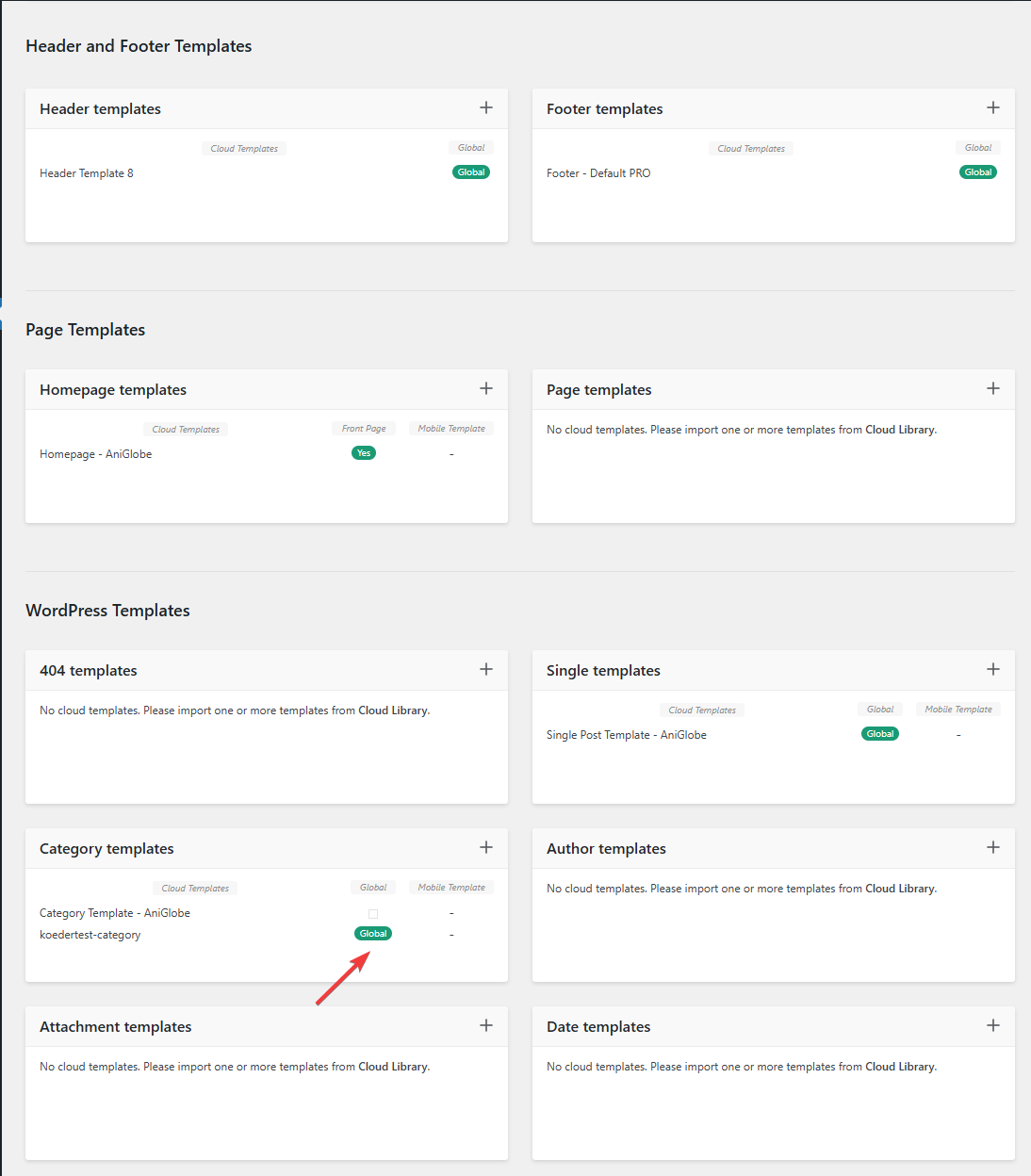
In this picture you can see that my template should be assigned globally
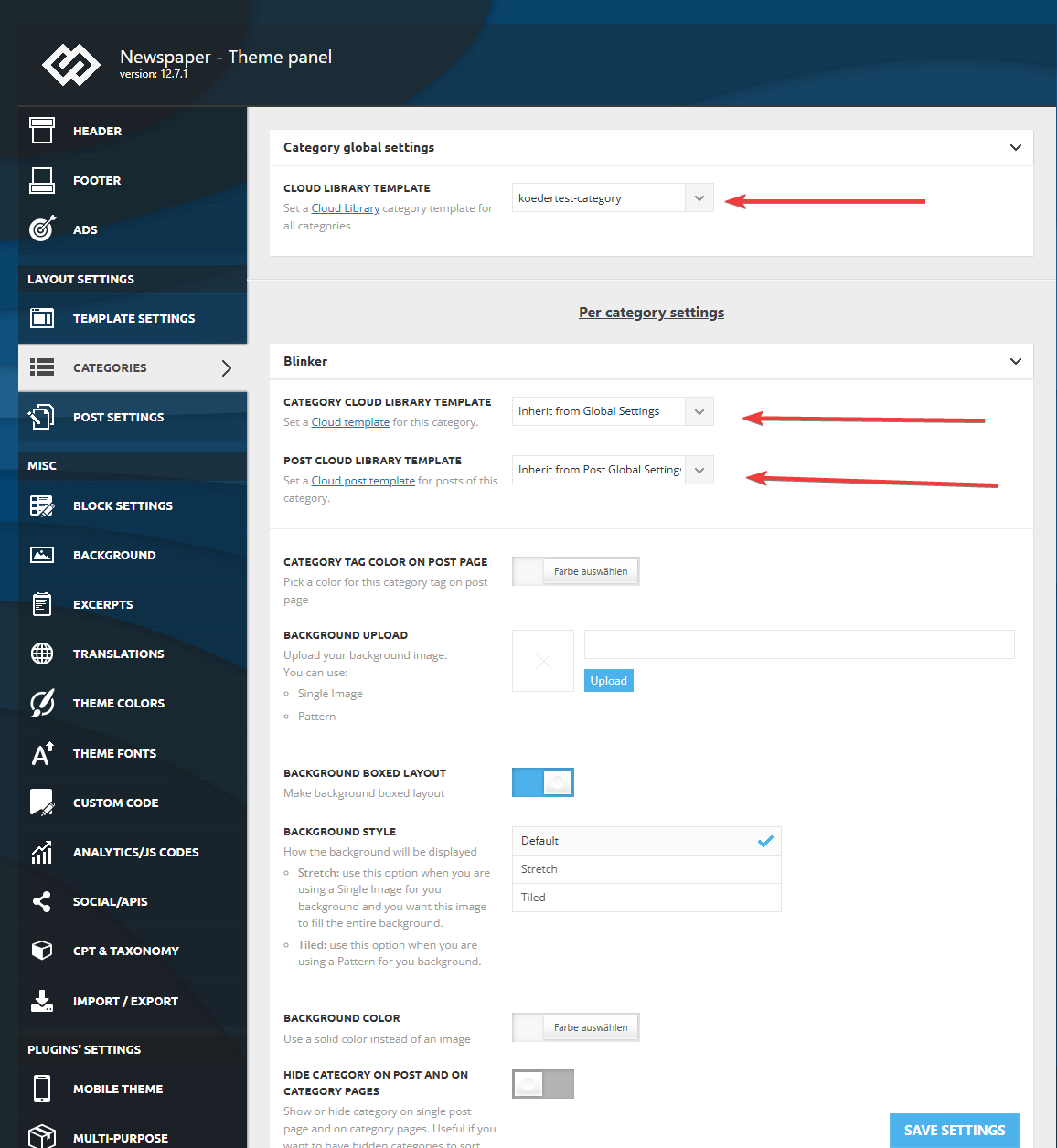
I made sure that in the theme panel under categories that the same template is globally set and checked every category underneath to inherit from global settings.
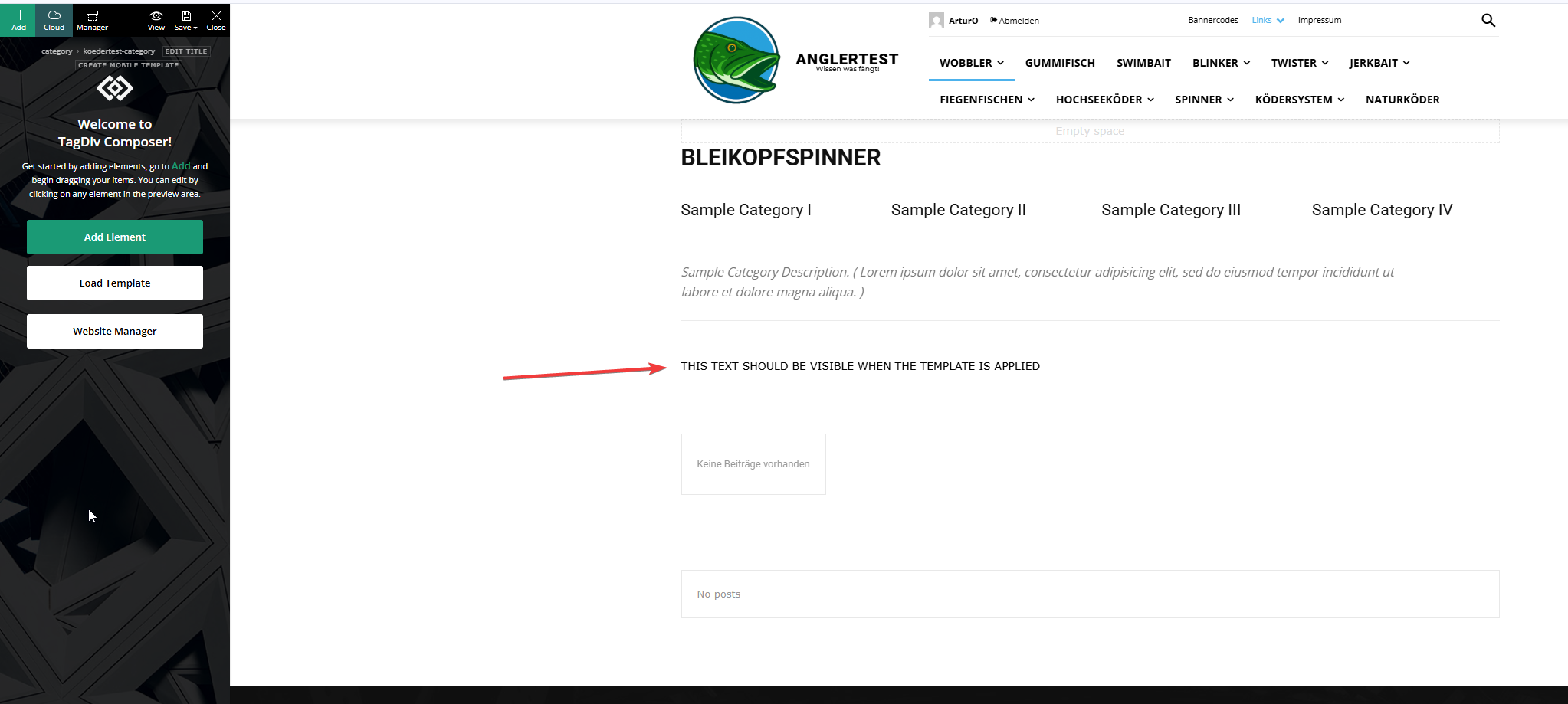
This is the actual template and I added an html block to verify if the template was assigned.
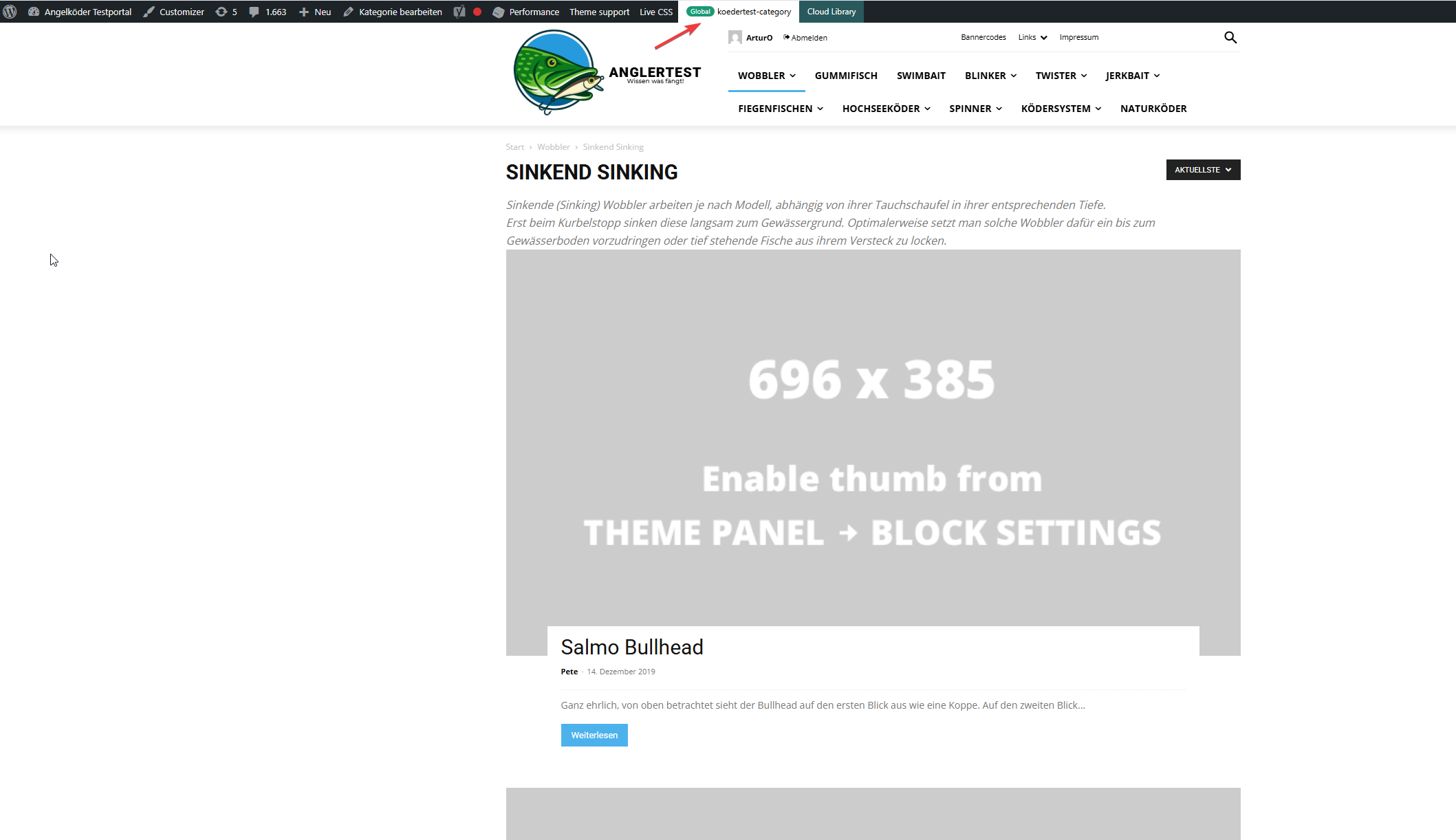
In this picture you can see that the template for the “wobbler” category looks completely different.
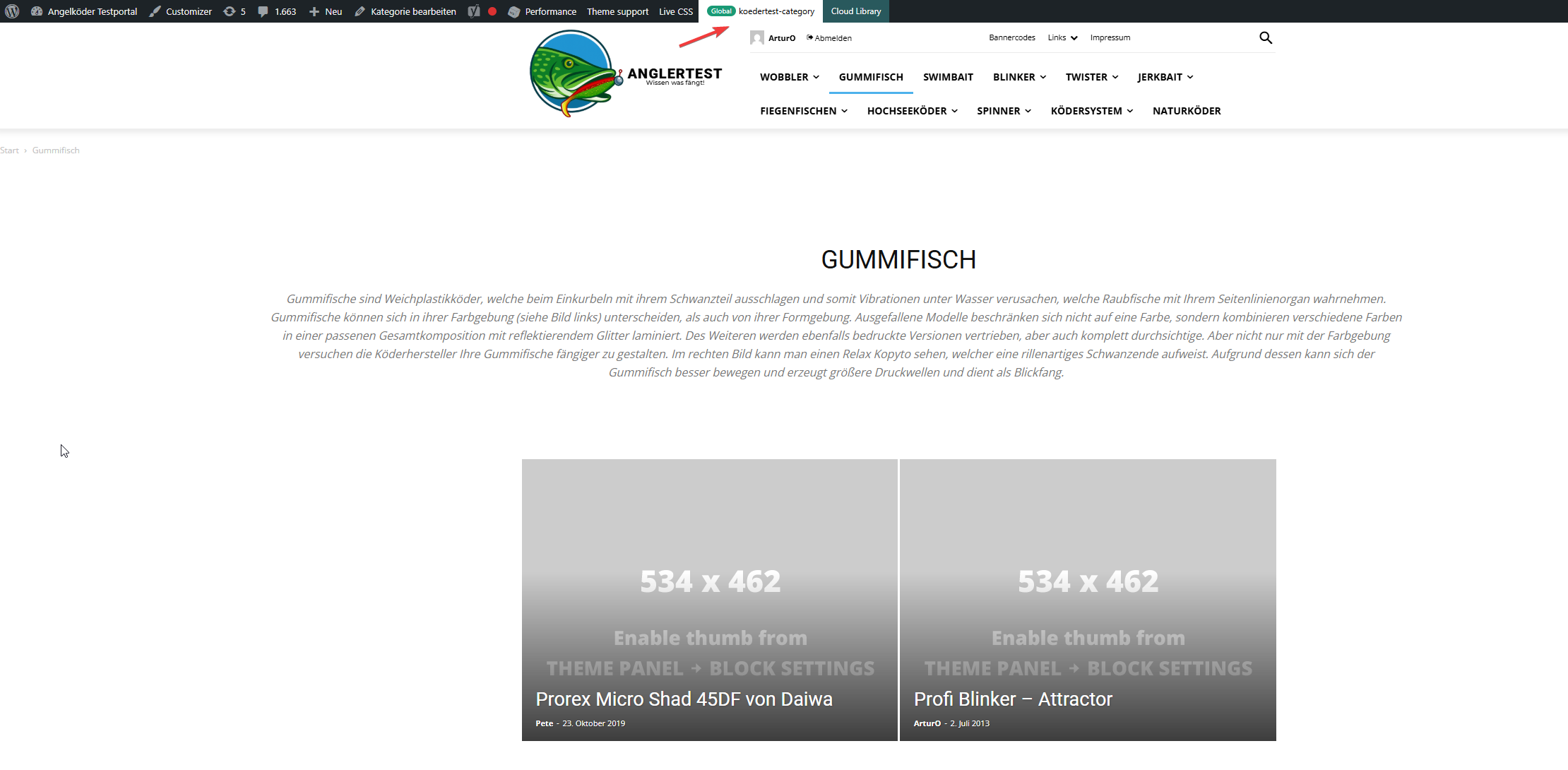
Strange enough, the template for the “gummifisch” category looks slightly different with the same theme applied (see arrow up top), the text I inserted to check was nowhere to be found (not even in source code)
In the very beginning I installed the aniglobe templates intially without demo content, but changed up the templates one-by-one. I did not find any option to disable or uninstall the prebuild website.
In my endless tries with different configurations I was not able to aplly the template, but I found something interesting which might explain the bugs I encounter.
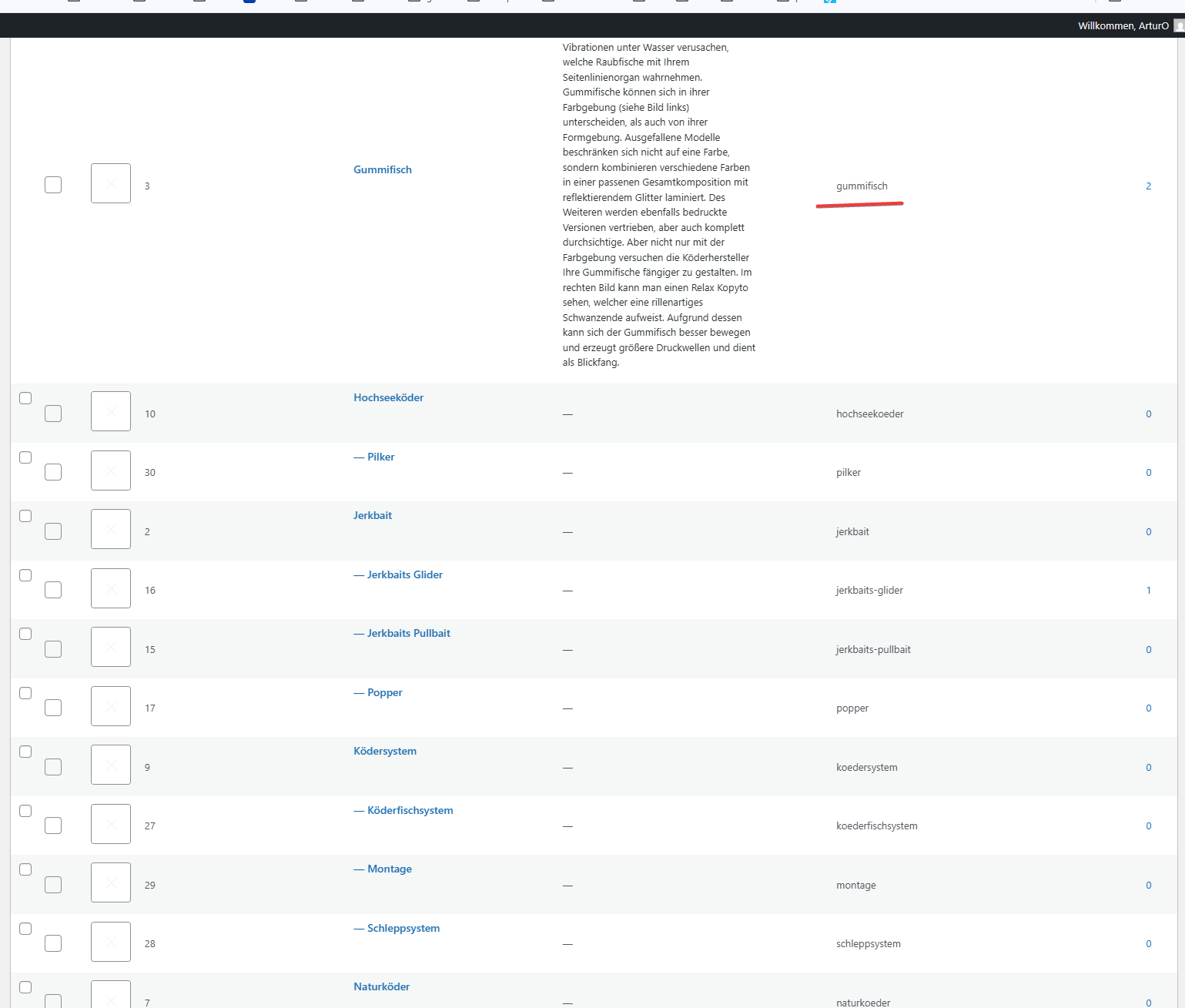
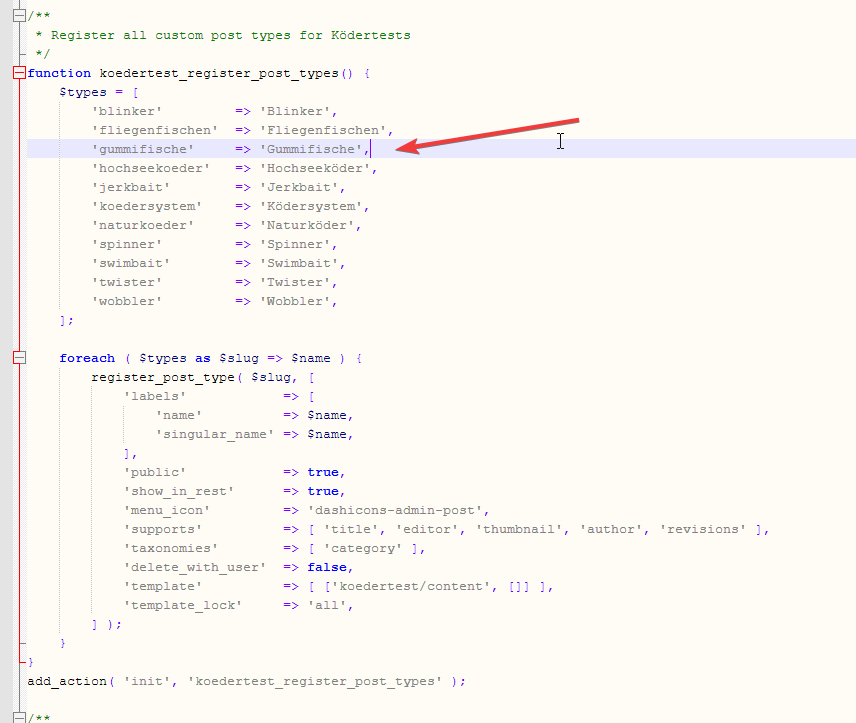
In those pictures you can see the categories I use and the post_types I register. The post_types are using those categories and I make sure that every post of those post_types has at least one category assigned. All post_types share the same categories (native category from wordpress).
The permalink structure is setup like /%category%/%postname%.html for every post_type. Category basis is set to “angelkoeder”.
Every category is named after a post_type. Nested categories are not named after post_types.
The only exception is the category “gummifisch” where post_type “gummifische” articles are categorized under. I might have missed the “e” when I set this up in 2013.
Somehow this category looks different as you can see in the above screenshot.
Furthermore I discovered that, when I change the template in the theme panel to “no template” (but do not save those settings) it reveals the settings I made previously with “Module 14” as article display view. You can see in the screenshot above for the “wobbler” category that this is the applied design even though the bar on top suggests my custom “kodertest-category” template is supposed to be applied.
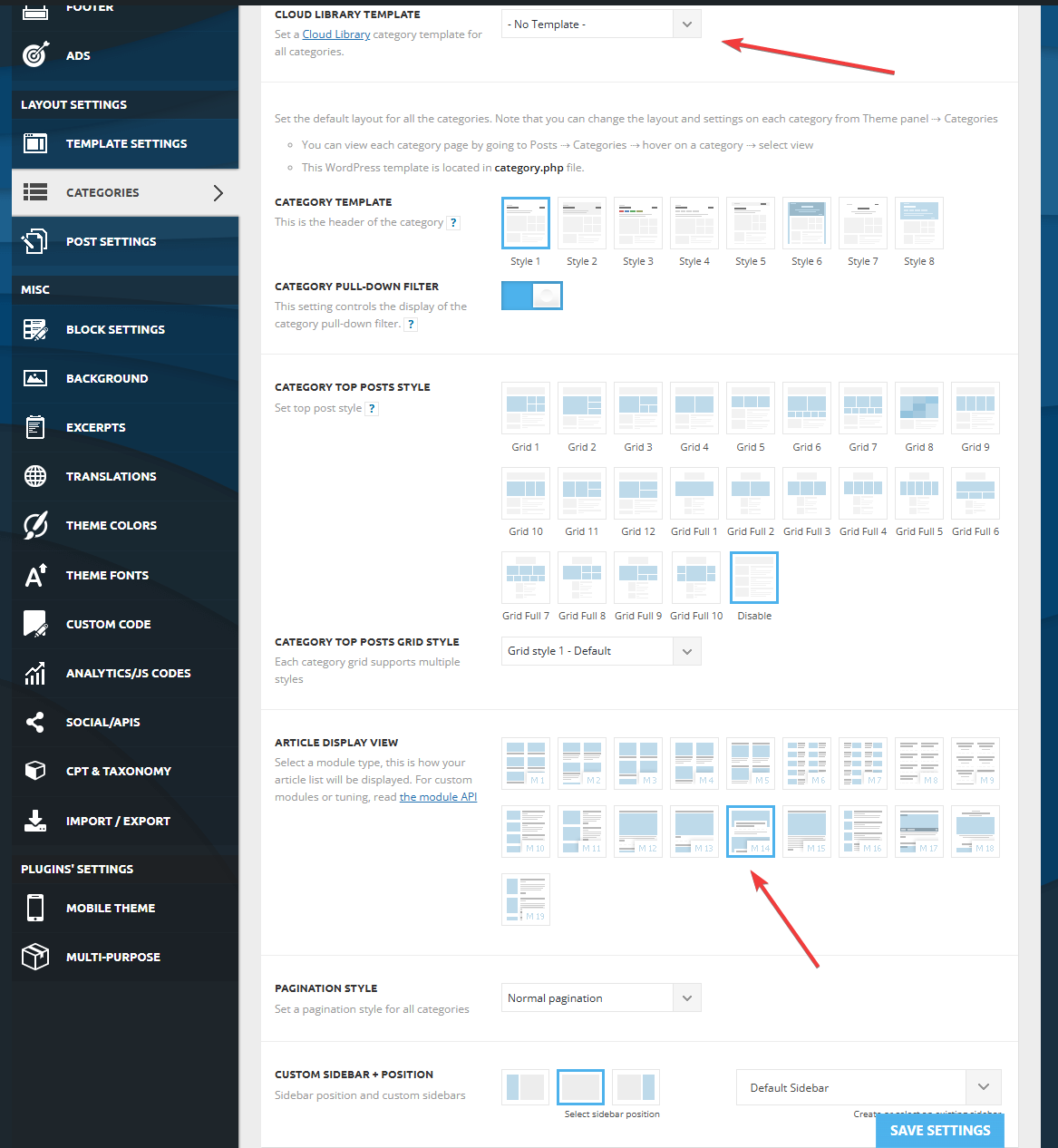
Any help is highly appreciated. If needed I can provide further screenshots.
Thank you for your help.
Calin Hi,
But why do you want to use the tagDiv mobile theme plugin with Directories Pro? All Demos have a responsive version that will look the same as the desktop version. Using tagDiv mobile theme will use a simple design that will be the same for all demos that you are using and the only elements that can be changed on it are the colors and fonts – https://forum.tagdiv.com/mobile-theme-introduction. The plugin is usually used by websites with simple blogs with a simple layout that will not differ much from the desktop version.
 Littletwos
is there any example theme demos that show a method or way to “insert” recommended products within the article – outside of the actual ads; like for example talking about dog leads and then have a box that recommends one with link to it on amazon etc.
Calin Hi,
In case you want to have this functionality https://demo.tagdiv.com/newspaper_podcasts/ and this one https://demo.tagdiv.com/newspaper_video_news_pro/, then you need to use video and audio formats for your articles, set the links for video or audio, and the featured image will be transformed into video/audio, as mentioned in the demos. Also, on your websites, you should use flex blocks to have the audio/video icon displayed. https://i.imgur.com/zceMuk7.png
Also, you can import from cloud the blocks you like for audio and video format and just adjust them using tagDiv Composer
Thank you!
Calin Hi,
It seems there may be a misunderstanding here. Perhaps you’ve previously used a different theme that handled things a certain way, and now you’re expecting all themes to behave similarly. If that’s the case, I’m sorry to disappoint you.
As I mentioned before, when you install a demo, only the content and layout specific to that demo are included. For example, if you want to set up a shop, you’ll need to configure it manually using tagDiv Composer and tagDiv Shop (please make sure the plugin is installed, as I mentioned earlier).
Once the necessary plugin is active, you can use tagDiv Composer to build your shop pages. There are also pre-designed templates available, which you can easily import from the Cloud Library:
https://demo.tagdiv.com/select_demo/newspaper-prebuilt-websites/?demo-type=shop
To clarify again: when you add new functionality like a shop that wasn’t part of the originally installed demo, the layout for those new features won’t exist by default. You’ll need to create or import the layout manually.
Thank you!
Calin Hello,
When you install a demo, only the pages, the templates and elements included in that specific demo will use its layout and design. If you create new pages or add additional features, such as a shop (using WooCommerce), forum pages, or other content, these will not automatically have a template applied, as they are considered custom additions.
However, there’s no need to worry! The theme allows you to fully customize templates to achieve the layout you want. You can do this using tagDiv Composer along with Cloud Templates.
For creating and customizing shop pages specifically, you’ll need to install the tagDiv Shop plugin. You can do this by going to Newspaper > Plugins in your WordPress dashboard. Once installed, you’ll be able to create and edit shop templates using the theme builder.
Thank you for your understanding!
 olejohan
 Hi again Calin
Maybe you misunderstand me.
Do you have a mail where I can send you screenshots?
I am creating the page in WordPress editor (and on the bottom you choose the Post template: (I assume that are how you would like the page to be setup (page layout))
And I assume you then should able able to edit it, independently without it then affect all other posts, including demos?
The strange thing are that all post was correct, I have been working on the site for about two weeks and all was ok, until suddenly every post was the same.
I assume if it was template affected, it would change all post in the same moment, not weeks later 🙂
I want to leave the side as it is (if you want to look at it) – if not I will reinstall it, staring over again, uploading the posts from xml file – so I not lost much (I hope), still it would be interessting to know why it actually happened.
website: http://www.pomeranian.dk
-
This reply was modified 1 year by
 Calin.
 Qplus Account
I purchased the Newspaper theme and imported the Beauty PRO template. The post pages are working fine and have the correct layout. However, other pages like Terms and Conditions, WooCommerce pages, bbPress forum pages, and other plugin-generated pages are not inheriting the template styles.
They should be using the same theme styles, right? But they’re not. I tried manually setting the font family, line height, and font size from the Theme Panel, but I’m not sure if I’m using the correct values.
I emailed contact@tagdiv.com regarding this, but I haven’t received any response. I’m not sure what to do at this point. When I checked their demo site, the shop page had a completely different layout from mine.
I’m not someone who knows coding. If they expect us to do everything manually, then what’s the point of purchasing this theme at such a high cost, especially if they don’t provide proper styling support?
 Iemlabs Development
In demo it is showing like these

But i am unable to place these in my site

So suggest me how can I add categories as shown in demo to my site.
 emssp
emsspHello,
Could you please tell where I can find the settings to change ‘flex block 1’ hover color exactly like in newspaper_kattmar_pro (Recent Articles, Homepage).
Thank you
Calin Hi,
Did you edit the articles that came with the theme, or did you create your own?
We recommend creating your own content, as the demo content provided with the theme will be removed if you install a different demo or uninstall the current one.
If you can provide some examples of the steps you took, we may be able to identify the cause of the problem.
Thank you!


