
No search results were found in Documentation!
 cruising-sea
Hi
I am trying to make my home page looks like this: http://www.screencast.com/t/i9QKFtzzIl1Y
But I don’t succeed with it. Can you send me a tutorial on how to do the same? I don’t want to download the demo because it causes me some issues with my site.
Thank you!
 Simion C.
 Hi,
I believe that is the case. We tried to optimize the demo website for good results. There will be overall performance improvements made in the theme in coming updates, to further optimize speed.
For general theme requirements this would be the guide for a proper functionality
– https://forum.tagdiv.com/requirements-for-newspaper/
There are many optimization guides provided by our users here in the forum, some made by us, you could check some of them
– https://forum.tagdiv.com/cache-plugin-install-and-configure/
– https://forum.tagdiv.com/how-to-make-the-site-faster/
– https://www.infophilic.com/get-almost-100-pagespeed-newspaper-theme/
– https://forum.tagdiv.com/topic/score-100100-pagespeed-with-newspaper-wordpress-theme/
– https://forum.tagdiv.com/topic/newspaper-theme-speedify-your-website/
– https://forum.tagdiv.com/topic/tutorial-chriss-custom-optimizations-for-functions-php-etc/
– https://forum.tagdiv.com/cloudflare-cdn/
Thanks
 kimjuliehansen
Hi!
I’m using the coffee demo from the newspaper theme and love it. My only issue is that whenever I open the homepage on Chrome instead of Safari, the featured image (the latest post) has a zoom in effect whenever I hover over it that I really don’t like. It doesn’t do it on Safari and i’m not sure if I’m able to remove that effect somehow? Appreciative of any advice! Thank you:) (the website is https://kimjuliehansen.com)
Simion C. Hi,
That is the post sharing section, it can be disabled in the theme panel for top and bottom of the post page
– https://forum.tagdiv.com/sharing/
That ad looks like the default ad. All ads can be managed in the Theme panel->Ads section. Remove all the demo ad codes from those sections and they will be removed.
Please let us know if you have more questions.
Thanks
 etheravion
 Hi Calin,
The demo is fast. Is the demo on dedicated server or SSD or something else? What do you recommend?
 Calin
Calin Hi,
Please take a look at our demo https://demo.tagdiv.com/newspaper/
There is no estimated time for live search because this depends on speed server ( the search mage a require to the database on the server ).
If you want you can Disable live search -> https://forum.tagdiv.com/topic/disable-live-search-function/
Thank you for your understanding.
Simion C. Hi,
The theme provides an image gallery, this one
– https://forum.tagdiv.com/gallery-2/
It will look like this – https://demo.tagdiv.com/newspaper/td-post-aston-villa-beat-liverpool-to-join-arsenal-in-the-fa-cup-final/
It can be used in posts and pages. In a page it can be used like this
– https://forum.tagdiv.com/topic/need-to-insert-a-grid-gallery/
The comments will appear in pages if this option is disabled, like this
– https://www.screencast.com/t/b5vlIwuaP
Also the page must not be using the latest articles page template.
This is an example of a page using the default page template, with comments
– https://www.screencast.com/t/YC3XSvYH
– https://www.screencast.com/t/ts4Pwqp56l
If you have any problems using any of the above, please provide some more details about what exactly is happening.
Thanks
Calin Hi,
Please provide some screenshots and some more details ( the demo you try to install), also please deactivate the plugins and try again.
Thank you for your understanding.
 DarkFall
 Hi Catalin,
I currently have newsmag Travel Demo installed, no other updates.
The screenshot i provided is from another blog, can i share that blog’s URL here or via email?
Let me know,
Thanks.
 Catalin
 Hi,
Please notice that the speed of your website depends on how well your site is optimized.
Notice that is not a simple task and if you do not have any experience in this regard you will do not bring good results for the theme. Also, notice that we have a speed optimization tutorial but this is addressed only to advanced users. So, if you follow the steps which are presented in this tutorial here -> https://forum.tagdiv.com/how-to-make-the-site-faster/ you can increase the page speed loading and if you are not aware of the steps in this regard, please consider hiring a freelancer/developer to help you because the speed optimization services are not covered by our support policy, as you can read here -> https://forum.tagdiv.com/support-policy-2/ Check our documentation here -> https://forum.tagdiv.com/requirements-for-newspaper/ regarding on dedicated server to fit our requirements.
Unfortunately, our theme does not have such an option to minify the style.css file and we cannot recommend any plugins with this functionality because is not tested with our theme. For minifying this file, we are using CloudFlare for our demo and works fine. If you want to read other views from our users, please check this topic -> https://forum.tagdiv.com/topic/tip-how-to-easily-minify-your-css-without-breaking-your-site/
Also, check all of your Ad Spots and if you have entered any suspicious code through them, remove all of them and check the results without them.
One of our top members here on the forum wrote his own optimization tutorial here:
https://forum.tagdiv.com/topic/tutorial-chriss-custom-optimizations-for-functions-php-etc/ and here -> https://www.infophilic.com/get-almost-100-pagespeed-newspaper-theme/
Basically, these are the theme requirements
– https://forum.tagdiv.com/requirements-for-newspaper/
Another useful guide for increasing the page speed can be found here -> https://kinsta.com/blog/google-pagespeed-insights/
Thanks for your understanding!
 ahmed589
 Let me provide an example of what I want. The Block 56 (in fast news demo) is very close to my expectation:
https://cloud.tagdiv.com/block-56-fast-news/
However, I cannot set the title fonts here. More importantly, after saving it as an element, I could not replicate the exact same thing, the output I got had the titles flashed with the left border unlike the demo.
Additionally, even though I can control how many posts I want to show, I could not control the filter as there was no option. Can I turn it on somehow?
This block has a lot of extra control (image size, width, padding for each elements etc). Is there a way to get these controls for other blocks as well?
 reddisl
Hello tagdiv !
1. How to remove latest articles in homepage? I’m using default demo, but I just want to delete latest article from front page but keep the same DEMO content!
2. As my website is in Arabic, and I didnt know that Newspaper doesnt support RTL, unfortunately among other errors there is this mistake in the theme.
== Below every post , there is “find related articles” , How can I fix this so that picture displays in left instead of appearing on right ( because they are hiding related articles titles ) this problem only appears when I navigate website with mobile.
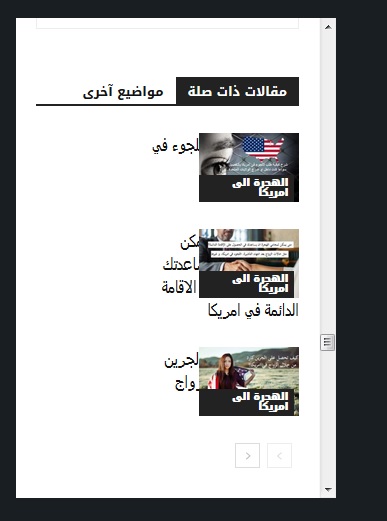
—- ————————————————————————–
I want to help NewsPaper in turning their theme into RTL support !
you might find this helpful! in the next update !
When website language turned to any RTL language , the menu is broken ! I used this CSS to fix it ! and PS Custom CSS in theme panel doesnt work at all!!!
#td-mobile-nav {
position:fixed;
}
.header-search-wrap {
display: none;
}
—– I hided search button because of an error in dispaly – it is mixed with menu button in the right! –
I will try my best to help TAGDIV !
 twinkle4starms
Hi tagdiv team,
I just notice today that the header of “Comments” is missing. Please check: https://ibb.co/2FFT1Ng
It should be like in your demo: https://ibb.co/wRJGZJW
I tried to deactivate some of the plugins and delete cache, still the same. I hope you can help me to fix it. Thank you.
 westcliff
Steps:
1. Install WordPress, Newspaper 9 theme, and all recommended plugins (using XAMPP local server).
2. Add settings in wp-config and .htaccess files to increase size and memory limits, as per directions.
3. Activate theme
4. Check the “System Status” tab in Newspaper setup – all checks show PASSED successfully – all parameters correct.
5. Go to “Install Demos” tab and select any of the demo files
6. Deselect the toggle for “include content” so that “only settings” will load
7. Click on Install – pop up box appears with Yes or No dialog. After clicking Yes, demo loads.
8. Try the same procedure with the “include content” toggle set to ON – load content.
9. Pop up box appears but there is NO option for Yes or No, or any other clickable button.
10. Tried same procedure on Firefox and Internet Explorer browsers with same results.
Unable to proceed with “include content” setting when attempting to install demos.
Please help!
 DamonMorgan
 I am having the EXACT same problem. Any solutions? I checked all of my system parameters to make sure the limits were set high enough to accommodate larger files. When I look at the system status built in to the Newspaper theme, all the boxes show up GREEN indicating that my system meets all requirements.
I thought it was a Flash problem at first but when I choose to install the demo without the sample content, the flash pop up box works fine.
DamonMorganWhen trying to include sample content with the demo theme layouts, it will not give me the option to continue. Pop up screen says “Install the full demo –
Are you sure you want to install the full demo? This will import homepages, sample content with images, backgrounds, template layouts, fonts, colors…” but there is nothing to click!
There appears to be a space where a “yes or no” dialog should be but there is nothing there, no way to click and proceed.
When I attempt to load a demo without the content, the popup box works fine and has a Yes or No selection that works.
Have ensured all of my php settings for max upload, max time, etc are correct. Have tried multiple browsers including IE.
Surely I’m not the first one to experience this!
reddislhello, I just bought this theme. It is amazing and easy to use, but I have been facing some real issues, which made me really unsatisfied and disappointed.
1. When I was uploading the default theme demo, it kept saying error connecting with server; however the demo was downloaded but in a weird way, as if it is broken.
A. The wide of the page is small then the demo
B. The Menu was totally broken, especially in mobile version!

thankfully, after spending 8H trying to fix this weird issue, I figure out the solution, which is this adding this custom CSS code.
#td-mobile-nav {
position:fixed;
}
The problem is why the hell, does this mobile-nav appears in desktop version? and it’s broken in mobile version.
Please I need the theme to be wider as the demo, and the menu work without this additional css.
—————————
2. Facebook counter is not working ! it is showing 0 followers!
Please fix this issue, I even uninstall and reinstall social counter from theme panel but facebook still not working.
—————————
3. The theme is far from being mobile friendly !!!! too many render blocking CSS and JS , I used TD booster but it said conflects with WP security plugin! and it is out of questions to delete this important plugin; so I used autoptimize plugin! he successfully combine CSS, but no JS are combined !!!!
Test in google test speed page, show 20% for mobile and 80% in desktop !!! huge difference !!
—————————
4. The menu in mobile is not working correctly until the whole page load !
5. when I activate TOP BAR, the mobile menu doesn’t work at all.
6. Lazy load is not working at all in mobile ! ( google test speed page ) show warning about lazy load in mobile.
—————————
I am tired, it is 02:14 A.M , I spend the past 11 Hours trying to figure out solutions! but I failed!
I need TAGDIV support !
Please help me, ^^
ps: my website is in Arabic, but that is not the reason for those issues anyway.
Simion C. Hi,
1. That is the code used for our live theme demo server, it is mentioned that the setup is different from server to server. Better check with your hosting provider for the best solution.
2. Can’t find much about zlib or what exactly it does, found a pretty complex topic here
– https://stackoverflow.com/questions/20762094/how-are-zlib-gzip-and-zip-related-what-do-they-have-in-common-and-how-are-they
Thanks
 charlessam
Hi,
May I know the font styles that were used in this demo?
Also what are their font sizes? Thanks a lot!
https://demo.tagdiv.com/newspaper_ink/
http://prntscr.com/lm0pw4
Simion C. Hi,
That would be possible. Are you using the default WordPress blog page? In that case you can choose a module that doesn’t display a thumb
– https://www.screencast.com/t/lrmCcahg
If you use a static page built with the tagDiv composer, use blocks that don’t display a thumbnail. Like these
– https://demo.tagdiv.com/newspaper/block-9/
– https://demo.tagdiv.com/newspaper/block-10/
Also note that flex blocks have an option to remove the thumbnail, and many other settings
– https://www.screencast.com/t/3C9J8naQJ
You can use those as well.
If you have more questions please let us know.
Thanks
 pavel_t
 Thank you for quick response!
In fact I mean general Latest Articles. Lets see Newspaper Theme with Business demo content: There is as a default Pages / Home / Template: “Pagebuilder + latest articles + pagination”
http://www.imagebam.com/image/ce1d061041359224
Of course I have all Meta Info on Modules / Blocks On:
http://www.imagebam.com/image/80bd1c1041359194
But Latest Articles on bottom of the page are still without Date and Author name…
http://www.imagebam.com/image/a0a8e81041359274
The same situation is when you go through pagination to archive posts…
Calin Hi,
Please read this topics:
-> https://forum.tagdiv.com/topic/fast-news-newspaper-9-1/
-> https://forum.tagdiv.com/topic/fast-news-demo-header-colour-change/
-> https://forum.tagdiv.com/topic/fast-news-newspaper-9-1-main-menu-problem/
Thank you.
Catalin Hello Bryanlim,
Please notice that the speed of your website depends on how well your site is optimized.
Notice that is not a simple task and if you do not have any experience in this regard you will do not bring good results for the theme. Also, notice that we have a speed optimization tutorial but this is addressed only to advanced users. So, if you follow the steps which are presented in this tutorial here -> https://forum.tagdiv.com/how-to-make-the-site-faster/ you can increase the page speed loading and if you are not aware of the steps in this regard, please consider hiring a freelancer/developer to help you because the speed optimization services are not covered by our support policy, as you can read here -> https://forum.tagdiv.com/support-policy-2/ Check our documentation here -> https://forum.tagdiv.com/requirements-for-newspaper/ regarding on dedicated server to fit our requirements.
Unfortunately, our theme does not have such an option to minify the style.css file and we cannot recommend any plugins with this functionality because is not tested with our theme. For minifying this file, we are using CloudFlare for our demo and works fine. If you want to read other views from our users, please check this topic -> https://forum.tagdiv.com/topic/tip-how-to-easily-minify-your-css-without-breaking-your-site/
Also, check all of your Ad Spots and if you have entered any suspicious code through them, remove all of them and check the results without them.
One of our top members here on the forum wrote his own optimization tutorial here:
https://forum.tagdiv.com/topic/tutorial-chriss-custom-optimizations-for-functions-php-etc/ and here -> https://www.infophilic.com/get-almost-100-pagespeed-newspaper-theme/
Basically, these are the theme requirements
– https://forum.tagdiv.com/requirements-for-newspaper/
Another useful guide for increasing the page speed can be found here -> https://kinsta.com/blog/google-pagespeed-insights/
Thanks for your understanding!
Simion C. You can download the theme from your themeforest account. The latest theme version will always be available for download. You can update through the Envato plugin as well if you want to, the method is described in the guide.
I provided the page content from the demo so you can use it as an example, not to use it all in your page. I meant that you simply check how the top flex grid was made, so you can recreate it on your website.
As I mentioned above simply using the same grid type as the demo is not enough to get the same result. The grid has additional customization, flex grids have many options
– http://prntscr.com/llgait
This is the code for the grid itself, not the whole page – https://pastebin.com/t6BfN1pG
I have separated it from the rest of the demo page content, use it as you wish.
 mikewatson111
Hi there,
I can’t seem to see where I can change the gradient colour for the fastnews demo of Newspaper.
Where should I be looking?
I would prefer to just make it solid one colour of my choosing.
Thanks
Mike Watson
