- NewsmagInstalling pre-built websites
- NewsmagIntroduction
- NewsmagSmart Lists
- NewsmagTheme thumbs
 Calin
Calin Hi,
Unfortunately Newsmag theme does not have RTL support, only Newspaper theme has, and that one it also provide a RTL demo -> https://demo.tagdiv.com/newspaper_rtl_newsmagazine_pro/
Thank you for your understanding!
 alsehamy
The design of the template after installation is not the same as it looks in the demo version that is in the Forest theme , A large white area appears to the left of the template and shows the menu and social media icons
Calin Hi,
Usually this is taking 1-2 minutes but not more.
Do you got some messages during the demo installation? Or did you saw some errors in console?
When you tried to install the theme you were using only the theme plugins?
Did you made the theme requirements?
If you did all those, then please let us know to take a look at this problem, for this please contact us via email at contact@tagdiv.com and please provide wp-admin access to your website. We’ll check it as soon as possible.
Thank you!
 grezako
Hi.
I specify once again that we are currently using the Theme “Newspaper – The Rimont Pro” whose demo link is: https://demo.tagdiv.com/newspaper_the_rimont_pro/.
I would like to know how to reduce the WIDTH of the very first line circled in green on our following screenshot: https://imgur.com/a/aLzlU3U, so that it occupies exactly the SAME MEASUREMENT AS THE WIDTH of the line directly below following the RED line who shows the cut ???
Please inform us very urgently.
Please, answer us through sample demonstrations in screenshots because it will help us best to quickly understand and solve our problems.
Awaiting your reply.
 Kazan2210
Hi there,
How long does it takes to install a demo? Ive waited for a hour but still not done
 Bettina
 Hello!
We have already a RTL demo. Please try it out: https://demo.tagdiv.com/newspaper_rtl_newsmagazine_pro/
Thank you!
Calin Hi,
This is because you are using a demo that is being edited from the font and does not take into account the settings in the standard pack (please disable the tagDiv Standard Pack plugin and if everything works fine, leave it disabled). To edit a page or a cloud template you need to use tagDiv Composer. Here is a video showing you how to use this editor -> https://www.youtube.com/watch?v=SoGQ0d5kIBg
Thank you!
Calin Hi,
If you are using a pro demo, then you can edit the single post template with tagDiv Composer and add that element -> https://i.imgur.com/uZmTptH.jpg -> https://i.imgur.com/Tt5Y33n.jpg
If is a standard template, then you need to use the settings from the theme panel -> https://i.imgur.com/BsRxNGo.png
I hope this will help you!
Calin Hi,
Yes these demos are stored in the cloud. If you want, only the items you want can be imported from the cloud.
All the changes you mention can be made using the tagDiv Composer, edit the pages and cloud templates with the theme editor to make them look the way you need them.
For example the logo on NewsWeek is a text -> https://i.imgur.com/7U303RG.jpg -> https://i.imgur.com/K8HhS77.jpg -> https://forum.tagdiv.com/add-logo-newspaper/
The same options can be apply on the amsonia demo.
Thank you!
Calin Hi,
The ads can be changed using our guide from here -> https://forum.tagdiv.com/ads-adsense-overview/
When you install a demo this is coming with banners, so to change them you need to use tagDiv Composer to edit the page and the cloud templates. Select the banner and check in image tab, remove the image from there and set you ad using the above guide.
I hope this will help you!
 tnbc
tnbcWe have shortlisted two pre-built theme which you have included in your bundle. these two demo are closely matching our needs and requirement however we require some minor customisations to make it fit directly for our use. Customizations like –
https://demo.tagdiv.com/newspaper_week_pro/
For the above theme, please let us know how could we change the color and logo placement and other minor changes.
https://demo.tagdiv.com/newspaper_amsonia_pro/2022/03/07/td-post-protesting-the-injustice-in-the-local-community-or-even-throughout-the-entire-country/
For the above theme we need to change the entire color from Blue to Red and also require to change the logo placement from central to top left.
I see the themese are all stored in your cloud library and therefore we are unable to understand how to change this
Regards
 karlinex
 Ok. I have done lots of settings and that will go away if I reinstall the demo, is there no way you guys can upload the single page for the demo so I can see it and download and work with what I already have, don’t want to lose my settings.
Calin Hi,
That demo has set a background image, this only changes the look of the website, but not its functionality, it normally displays the information as before with the only difference that the content is boxed and below it is set an image. It has nothing to do with the links, they will be the same as before -> https://i.imgur.com/6K0cLcc.jpg
Thank you!
Bettina Hello!
You can import whole demo and use it from Newspaper -> Prebuilt Websites.
You should add the ads when you edit the post with TagDiv Composer in the element called ” Single Post Content ” in the tab ADS. Documentation here: https://forum.tagdiv.com/article-ads/
Or you can use the element called “Ad box” from TagDiv Composer and there you need to add the ads: https://forum.tagdiv.com/ads-adsense-overview/
If you want to use auto ads(are displaying randomly in your website), then they should be placed in the Theme Panel -> Analytics/Js Codes.
You need to install the Yoast SEO plugin and apply this setting: https://prnt.sc/kGujESd3PqDK (Taxonomies)
You can use an offset for your blocks. For more information about offset feature, please check this tutorial: https://forum.tagdiv.com/offset-feature/.
Yes, you can edit a post/article with the TagDiv Composer and delete the element with the featured image or you can set as HIDDEN from the CSS tab of the element.
In homepage from blocks, we have this setting: https://prnt.sc/3DRu227sGWIZ -> https://forum.tagdiv.com/flex-block-settings-guide/
Click on the mobile viewport: https://www.screencast.com/t/XDQJedlggSB ; there you can see your mobile version and you can edit the elements there.
Thank you!
Bettina Hello!
A workaround there could be only to install the demo again without content, so you should have all the templates in the Cloud Templates again.
Thank you!
 ibabucuresti
Hello,
I want to change the header background image, please help. At this moment is under construction, bun you can go inside. I have instaled the Gourmet PRO demo.
Thank you.
 ludyma
Hello, I have taken a great surprise when trying to personalize the subject to make it lighter.
In the first place, the idea is but poorly developed by failure failures of dependencies of the different modules separately from the subject.
Example If loading a header that does not have the dependencies in the Tagdiv editor will error and there is no way to fix it, because the subject does not load all the dependencies in the serial editor, if not that each topic brings its own dependencies and these are loaded In the editor, but if you delete the issue, the dependencies is also deleted, so it is more complicated to modify or use ideas from other topics at a different one because of that problem.
The solution would be that Editor will charge all the dependences of the demos that are for each one can use them on the subject as better Paesca and BO mode to abide a subject ENSI, nor does it apply to load cloud modules if it does not load the dependencies.
Attached capture of failures and missing dependencies.
In this example, charge the Header of the Demo (Header Template – Crypto Gaming Pro) and the position in the Cloud Templete (photo1)
When loading the header, the list of codigos is output if option to edit since the dependencies are not in the editor. (Foto2)
When loading the subject if you load the missing dependencies to be able to modify them on the Ditor (Foto3).
This says that the series theme does not bring everything or is not updated with new blocks of the demos that there is more complicated to adapt and create or improve the subject that one already has, I hope in the next update can solve that or create A new section in Cloud Template dependencies separately and loaded into the editor.
Greetings.
 mgiannelis
Hello
I wanted to ask. If I was to configure my site like this theme using the background https://demo.tagdiv.com/newspaper_sport/ would this make it has the background being the main HTML page and all flexblocks, images and titles will actually get “Lifted” off the front page and not be counted as internal links (Which is what I am hoping it will do)
 kimstipguide
hello.
I want to make it like the picture below.
https://verywellinfor.com/wp-content/uploads/2022/04/2022-04-17-100.jpg
—–
The design I want to make is the header of the demo below.
https://demo.tagdiv.com/newspaper_health/
I’m sorry,
Please explain easily with pictures, etc.
thank you.
 anuragjain1405
Hi,
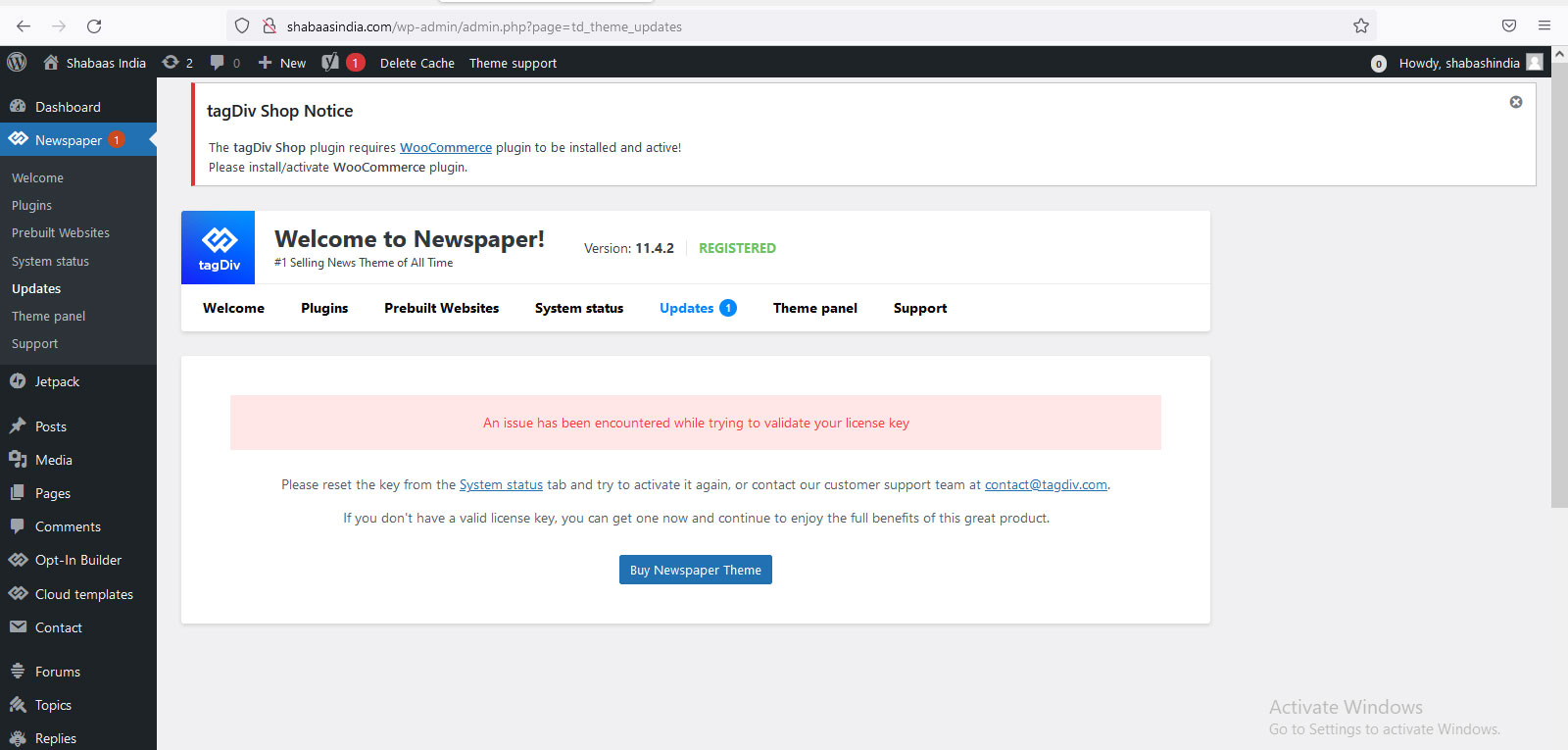
I have developed the website on demo account and activate the license key there but when I moved the website on live and activate the license key on live account shabaasindia.com after deactivate the license on demo account shabhasindia.itpeople4u.com, we received an error on live account related to license key “An issue has been encountered while trying to validate your license key”
Please check the error on screen through below link
http://shabaasindia.com/wp-content/uploads/2022/04/123.jpg
Waiting for your urgent reply
grezakoHi.
I specify once again that we are currently using the Theme “Newspaper – The Rimont Pro” whose demo link is: https://demo.tagdiv.com/newspaper_the_rimont_pro/.
We want to add videos on the Home Page in the form of Stories on Facebook and a bit like the CGTN news site already does as you can see on the part circled in RED on this screenshot: https://imgur.com/a/NOZ1qNV.
So, we would like to move the avatar located at the bottom of the Title of each post from the “STORIES” part circled in RED on the following screenshot: https://imgur.com/a/Bf82Q1D.
So that it goes up and positions itself at the bottom of the post card like this: https://imgur.com/a/3dB5uac.
But, the problem on my end is that when I try to do that, adding a margin-top: -122px; for example, hoping to succeed in bringing up the icon of the avatar in question, it does not work at all. Here is the code and CSS class of the avatar in question that I am trying to pull up to the bottom of the post card:
img.avatar.avatar-96.photo.td-animation-stack-type0-2 {

  margin-top: -122px;

}
How then, manage to move this icon of the avatar in question to the bottom of each post so that it looks like the second screenshot above ???
Please, answer us through sample demonstrations in screenshots because it will help us best to quickly understand and solve our problems.
Thank you please help me.
 huurneman
We have purchased the theme and want to create an exact copy of this demo:
https://demo.tagdiv.com/newspaper_today_news_pro/
What is the easiest way to do that? Can we import all settings automatically somewhere?
karlinex thank you for your response.
I have seen that here, but from this screenshot, https://paste.pics/GOYNU I do not see the template for CRYPTO PRO, which is the template I am using, it is missing and I don’t know why this is so, kindly look at it for me. https://demo.tagdiv.com/newspaper_crypto_pro/ This is the template I am using and I can’t find single post template for it.
-
This reply was modified 4 years by
karlinex.
Bettina Hello!
Yes, I understand this situation, but every page should have at least one H1.
For future demos, we will try to let only one h1 active by default.
Thank you!
Bettina Hello!
You can import single cloud templates from any demos you like from the Cloud Templates: https://prnt.sc/-p3-SZNqQRVy
Check this guide and make sure you do not have in the .htaccess file some lines with “Deny all”!: https://forum.tagdiv.com/general-options-may-interfere-newspaper-theme/
We have also a guide with some tips why our Composer is not working properly, please check: https://forum.tagdiv.com/tagdiv-composer-not-working/
Thank you!