
- NewspaperFlex Block Builder and Flex Loop Builder
- NewspaperHow to use the Flex Blocks cache option
- NewspaperHow to edit modules for Flex Block X
- NewspaperFlex Block Settings Guide
- NewspaperBig Grid Flex Settings
- NewspaperSingle Post Excerpt
- NewspaperWP Rocket and Newspaper Theme: Optimization Guide
- NewspaperSearch setup for custom post type
- NewspaperBookmark – Save For Later
- NewspaperModules Builder in Newspaper Theme
- NewspaperFilters and sorting for taxonomies
- NewspaperHow to insert a block inside the content of a post
- NewspaperCustom Post Type Support
- NewspaperMeta Info on Modules and Blocks
- TutorialsFrom WPBakery to tagDiv Composer
- NewspapertagDiv Composer Tutorial
- NewsmagSocial counter styles on Newsmag
- NewspaperSocial Counter Styles on Newspaper
- TutorialsOffset Feature
- NewspaperCloudflare (CDN)
 Bettina
 Hello!
In this video you can see that I create something similar using flex block 4: https://www.screencast.com/t/DWctPM7H0gK
Hope that helps you!
Thank you!
Bettina Hello!
It seems you use a cloud template, so in this case you can edit the page with TagDiv Composer plugin( documentation here: https://forum.tagdiv.com/tagdiv-composer-tutorial/ ).
You can move the element with drag & drop in another place. Read more about flex blocks setting here: https://forum.tagdiv.com/flex-block-settings-guide/
If you put the same elements on the same post, then they will show exactly the same. You need to change the template for the second one and also for the “Love Letters” post.
Thank you!
 Patrick93
Hello,
is there a possibility to rebuild the block 14 module with a flex module?
>> https://nimb.ws/AaJwWp
The reason: I don’t want to have a category and date displayed. But this can be set only with flex modules.
Bettina Hello!
It seems you use Flex Block 2 element and if you edit the page with TagDiv Composer, click on the button, you will be able to see the element’s settings. There you can find some settings in Layout tab called PAGINATION: https://www.screencast.com/t/uovzQ3Fv and in the Style tab: https://www.screencast.com/t/g4y2v8ysveC
Thank you!
 stringbenderb5
 Sorry, but the instructions you sent did not solve my issue. Please see below.
Filter by Categories gives me All, Business, Crime, Development, Eat & Drink, More (dropdown)
Filter by Taxonimies gives me only the selection “All”
Filter by ID Tags gives me All, lebanon, tn, tennessee, mt. juliet, obituaries, events, more (not sure why these are not capitalized.
So, none of the above settings gives me the below.
Element Used: Flex Block 3
Ajax Categories has been enabled.
I need it to display the below.
Parent Category: Latest News
Alax Tabs: Eat & Drink, Entertainment, Events, Health & Fitness, Kids & Family, Things to Do, Travel.
How do I get these specific categories to show up in those tabs?
As you can see in screenshot below it does not give me these options to select from.
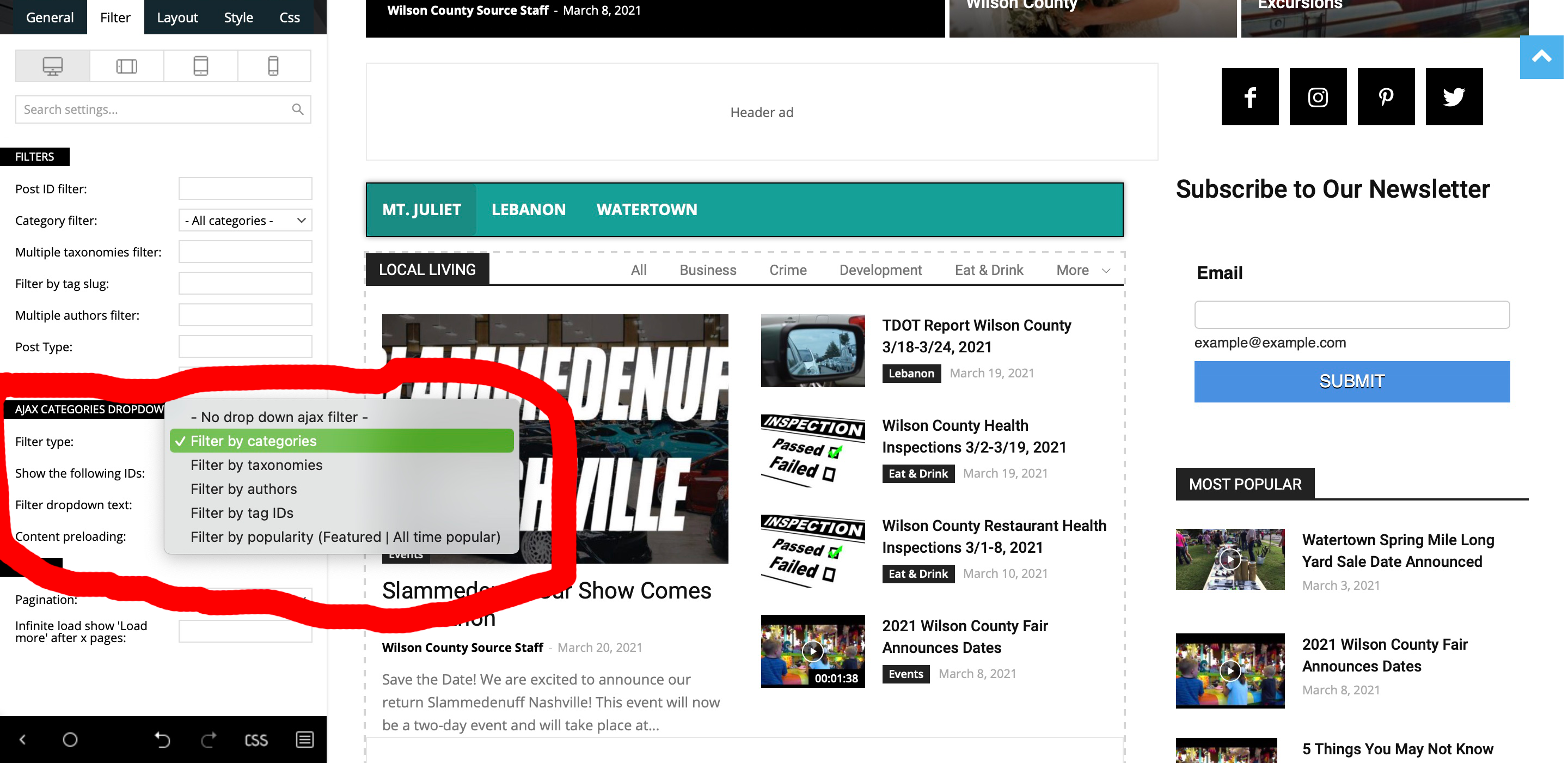
 Anamaria
 Hello,
You can change the title with tagDiv Composer => https://www.screencast.com/t/cHCwlOfbj select the block and in the tab called “General”, you can change the Custom Title => https://www.screencast.com/t/B9cKPy4Jl after save it.
Please check our guides from here to more information:
– https://forum.tagdiv.com/tagdiv-composer-tutorial/
– https://forum.tagdiv.com/flex-block-settings-guide/
– https://forum.tagdiv.com/big-grid-flex-settings/
Hope that helps you!
Thank you!
Bettina Hello!
Edit the page with TagDiv Composer, add element, search about “Column text”, click on the element and then you will see a black button on the settings: https://www.screencast.com/t/jfkQKhgvyU
Click there and then you can write your text in the window modal called “WP Editor”.
In order to edit with TagDiv Composer, you should use a cloud/PRO template: https://forum.tagdiv.com/tagdiv-composer-tutorial/
Please use flex block 2 if you need this design.
Thank you!
Bettina Hello!
You should review the filters applied in every elements by editing the homepage with TagDiv Composer plugin. If the filter is not set correctly, then the posts are displaying wrong.
Click on the element and you will see some settings for that element and also more tabs there like filter also.
Please check our guides from here:
– https://forum.tagdiv.com/tagdiv-composer-tutorial/
– https://forum.tagdiv.com/flex-block-settings-guide/
– https://forum.tagdiv.com/big-grid-flex-settings/
Hope that helps you!
Thank you!
 Rony123456
 And while we are at it, what’s the best approach to put the title over the image on flexbox 5. The title needs to be aligned at the bottom of the image.
Anamaria Hi,
I don’t understand exactly what you referring to “to adjust the position of photos” if you referring to adjust the image width and height you can make this only on flex elements (Big grid flex or flex block) from tab “Layout” on each module => https://www.screencast.com/t/cCA3ffYVhuZ
Hope this helps you!
Thank you!
 Benedict Paramanand
 Sorry I meant 3 rows for general grid not flex blocks
Bettina Hello!
If you follow this guide: https://forum.tagdiv.com/mega-menu/ ; then you will find out how to achieve that menu.
There is a flex block set it up. Read more about the flex blocks settings here: https://forum.tagdiv.com/flex-block-settings-guide/
Please note that you need to use a cloud/PRO template in order to edit with TagDiv Composer plugin.
Hope that helps you!
Thank you!
Bettina Hello!
You can achieve that by using a flex block element and select a filter which is taking the related posts. For example, these 3 filters from the flex block element: https://www.screencast.com/t/oWjxcIAl
Thank you!
Bettina Hello!
Unfortunately, there is no flex blocks on 3 rows grid and this will require custom work which is not covered by the support team.
Thank you for your understanding!
 Mark Gilbert
I am using Flex Block 1. Excerpt length can only be set globally, not for each viewport. The ability to set for each viewport would allow far better design. Is there some CSS code to achieve this – for iPad Portrait, for example?
Thanks
Mark Gilbert
Benedict Paramanand Thanks, I have applied a flex blocks design. In future will it be possible to adopt a 3 rows grid so that if there are many posts we can display all the posts at one time?
Bettina Hello!
We have a lot of flex blocks design, so you can choose one which is looking similar with what you need there.
Thank you!
Bettina Hello!
You use an element with exactly 8 modules, so you can not add more posts in that element.
Please use another element which has more modules, for example flex blocks: https://forum.tagdiv.com/flex-block-settings-guide/
Thank you!
Anamaria Hello,
The only option to add an ad in the Flex Block or Post Loop is to use a video pop-up ad => https://www.screencast.com/t/enxL2JTKFTng that appears only if the post is set to featured video.
Thank you!
 partha
Hi
I have created a page with Flex block 1 – https://labinmotion.com/classifieds-pro/
I want to have paging enabled on this page that also shows the total number of records (based on the search filter result set). I am ok to exploring a customized paid solution for this functionality.
I wanted to know if this is possible. Request a private thread if this can be done.
Looking forward to a positive response
Regards
Partha
stringbenderb5Hi,
Can you please watch this short video and teach me how to enable these options?
If you just tell me Dashboard > TagDiv Composer > Flex Block > General, Layout, Style, or CSS > Setting > Selection > etc….
I should be able to fix.
Thanks
 Smartegy
hi,
I would like to display tags in the “category tag” in posts blocks (see screenshot https://prnt.sc/10kvaaq)
 janamtrup
Hi,
How can I lock, like 5 specific posts to a f. instance a BIG GRID FLEX with 5 spots ?
https://gyazo.com/bf155e9ba5a79e5f87d34ab6eb499b37
Making sure, exact position of posts between the 5 Grid spots. I know I can create a category, but how to lock the position 🙂
Thanks for any help/advise..
Jan
 Richardrady
 Thank you this worked for me. Can I ask other question ?
Is the way how to add advertisement into flex box 1, or post loop ?
-
This reply was modified 5 years by
Richardrady.
 Calin
Calin Hi bzeegers,
The options from theme panel are not apply on all elements. For example if you are using cloud templates, those can be edited only with tagDiv Composer individual per template.
Also there are blocks that has individual settings, those will apply over the settings from theme panel (blocks and grids) also the flex blocks and flex grids are also special blocks.
Also if you set in theme panel a font on H2 H3 this do not mean that it will apply on all H4 from a page, that option is usually for content set with the editor.
So like Anamaria said, the theme panel settings are more for tagDiv Standard pack elements/templates.
Thank you!

