
- NewspaperFlex Block Builder and Flex Loop Builder
- NewspaperHow to use the Flex Blocks cache option
- NewspaperHow to edit modules for Flex Block X
- NewspaperFlex Block Settings Guide
- NewspaperBig Grid Flex Settings
- NewspaperSingle Post Excerpt
- NewspaperWP Rocket and Newspaper Theme: Optimization Guide
- NewspaperSearch setup for custom post type
- NewspaperBookmark – Save For Later
- NewspaperModules Builder in Newspaper Theme
- NewspaperFilters and sorting for taxonomies
- NewspaperHow to insert a block inside the content of a post
- NewspaperCustom Post Type Support
- NewspaperMeta Info on Modules and Blocks
- NewspapertagDiv Composer Tutorial
- NewspaperSocial Counter Styles on Newspaper
- NewspaperCloudflare (CDN)
- NewspaperPage templates
- NewspaperFeatured Posts
- NewspaperTheme Colors Introduction
 Anamaria
 Hello,
For section 1, if I understand correctly, you want to remove the PODCAST category, for this, you need to know the category id, and add a ‘-’ symbol in front of category ID => https://www.screencast.com/t/uOSFPWf7f2n .
For section 2, you need to select the category filter for podcast => https://www.screencast.com/t/2EBmEGAkmQe
For more information about the Flex Block follow this guide => https://forum.tagdiv.com/flex-block-settings-guide/
Hope this helps you!
Thank you!
 Bettina
 Hello!
The only way is to add an element by TagDiv Composer called “Posts Loop”, and you will have in General tab a setting called “Sort Order”. From this list, you have the option called “Popular(all time)”.
Unfortunately, Flex Block element haven’t that option for that.
Thank you!
 fkvs
fkvsHi, I’d like to know if there’s a way to insert, say a custom ad 1, when creating a new post or page via an html shortcode or any way that would allow me to have full flexibility on ads placement and doesn’t require a template to be present, so I could for instance place an ad after the first paragraph, after the 5th paragraph and after the 10th paragraph – basically at any spot in the content.
 Miroslav Glavić
I am using Magazine Pro by the way.
So here: https://imgur.com/H5t94q4
I want to make section 1 ALL CATEGORIES, except the PODCAST category.
I want section 2 to be only Podcast (this part I know).
Section 1 is Flex Block 3
Section 2 is Flex Block 4
Bettina Hello!
Please first verify this element(Flex Block 1) with TagDiv Composer plugin and check if the article image size is correct or not, then set it correctly.
If the article image size is correct and also you didn’t solved the issue, then you can upload again the images in full size and set it again.
Let me know about your results!
Thank you!
 chellofr
Good morning and best wishes to all.
I would have liked to know if it was possible to display the subcategories associated with an article on my site?
I am using Flex Block 1 to display the articles. I would like the other categories to be displayed with the main category.
Is this possible?
 vampireprincess
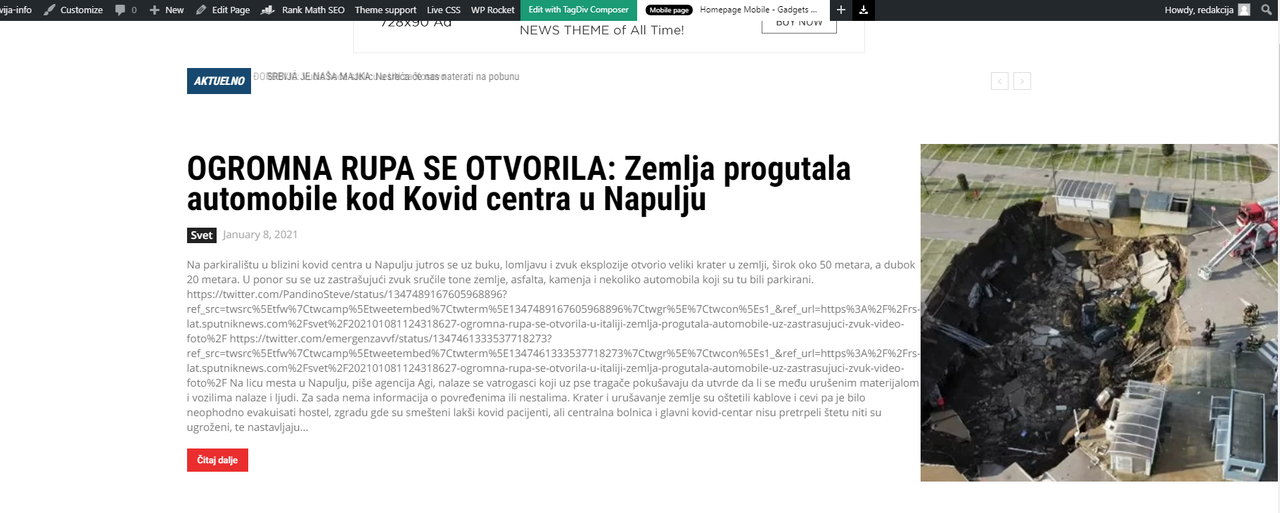
 Hi I here is the link to website address to inspects what is wrong with the twitter followers https://slavija-info.com/
I have a few issues more
1. How can I hide from ALL Mega Menu the “All” Section
2. I have an issue with the Flex Block 1 on the main page
when we embed twitter tweets to a regular post … part of the text become codes
and it pushes the image to right. What would be the workaround for the flex block to
show only the regular text from the post, and not the gibberish codes.
This way its looking very ugly and unprofessional, and nowadays everybody embedding
tweets on the posts.
 simo-2
 That I got it, But How to show the same category page with different tag slug?
How to show different tagid/tagslug posts to the same category.
(not getting limited to one tag)
If I set the tag in Big Grid Flex to Current Category, But want it to show different tag posts of that category.
If I mention the tag name then, the posts will always be the same for that selected category & tag pages.(obviously, that’s how it is meant to be)
How can I have the same category and different tag posts be shown?
The point here is websites can have multiple tags..
Like in normal function:
/?cat=1&tag=1
This Shows Posts of Category1 and Tag1
/?cat=1&tag=2
Posts of Category1 and Tag2
If you will last chart: https://prnt.sc/wiu1fz (sorry I made it in hurry earlier)
Here is a new one with an example: 
You can see, we can have multiple categories and tags…
How to filter tags with categories? or get a URL without creating extra pages for each tag we create?
Bettina Hello!
In the “Big Grid Flex” element, at that option you can add posts by category name and not an URL. It can not automatically get a tag from the URL, and you need to do it manually like in this screenshot: https://www.screencast.com/t/3PJuG6vM . Here you can see the name of slug you need to write it in the “Big Grid Flex” element and this is how it functions.
Hope that helps you!
Thank you!
Anamaria Hello,
The block 14 don’t have the option for full width.
You can import a Flex Block or Big Grid Flex from tagDiv Cloud Library, https://tagdiv.com/tagdiv-cloud-library-blocks/ =>https://www.screencast.com/t/V9Du6uZRi which looks like block 14, where you can set the full width => https://www.screencast.com/t/IEne3SHQuici
Hope this helps you!
Thank you!
 pensivedog
Hello,
I have used the “Style, Fashion, Outfits – Lifestyle PRO” section from the cloud template library to display posts of a custom content type. I would like the titles/images displayed in this section to NOT link to the post, but instead link to an external URL which is stored in a field of the custom content type.
Can you please provide some instruction on how to achieve this? I’m using a child template and happy to edit some files as needed if you can indicate which ones.
Thanks in advance!
Anamaria Hello,
Posts Loop don’t have the option to filter by tags, has only these filters => https://www.screencast.com/t/qdVUKSWiXgyj.
You can set the filter tag on the blocks, flex block => https://forum.tagdiv.com/flex-block-settings-guide/ and big grid flex => https://forum.tagdiv.com/big-grid-flex-settings/ https://www.screencast.com/t/TLK28UfUiM2
Hope this helps you!
Thank you!
Bettina Hi @irmankarim!
As I said to you, all the elements which include the word “Grid” has this option, but the others include Flex Block doesn’t have that option.
Thank you!
 Komal
KomalI want to amplify my tags page by showing a post loop or flexbox of posts having a particular tag only but I believe there is no such option available.
Can you guide me regarding this?
 irmankarim
 Hi! How can I apply it to Flex Block?
Bettina Hi @irmankarim!
For “Big Grid Flex” element you can see in the tab Style the option called “Lightsky” and for other grids you can find in tab General -> Big grid style and you can choose from that list “Grid style 6 – Lightsky”.
Hope that helps you!
Thank you!
Bettina Hello!
For this effect, you need to add “Big Grid Flex” element and you can see in the tab Style the option called “Lightsky”.
Thank you!
Bettina Hello!
Yes, you can add this hover effect also in “Flex Block 1” element for example like in this screenshot: https://www.screencast.com/t/mtUqAwp3
Thank you!
 bekapublishing
 Thanks, but what about the flex blocks?
Bettina Hello!
The only way for having the more articles box is to add “Flex Block 1” element with TagDiv Composer. Apply a filter into the element like this: https://www.screencast.com/t/LzmlAPPO ; select the row and add these settings like in this screenshot: https://www.screencast.com/t/MrmnTfQs7Gf
After this, you will have more articles box sticky at the bottom of the page, but then you need to customize the design by yourself.
Hope that helps you!
Thank you!
 Vlad S
 Hello !
My suggestion would be to install the new pro demo, uninstall the Standard pack plugin. You will see that all the elements in the composer that were using the old code will show up as text, all those have to be removed. We recommend you to use the flex blocks which are way more customizable in the tagDiv composer.
Thank you !
 vdaatland
 Wow, that is awesome news. Especially the ability to mass-edit pages via templates with Tagdiv composer would be a dream come true, save a lot of time/money and add to flexibility.
Stay safe. Wish you all the best 🙂
Bettina Hello!
Unfortunately, this is not possible in a flexblock or homepage, just in post page.
Thank you!
Anamaria Hello,
This option isn’t implemented in the Block, you can do these changes if you use the Flex Block 1, which have the same structure of Block 24.
To change the color, you need to add the custom code in Theme Panel -> Custome Code -> Custom CSS => https://www.screencast.com/t/fdQ8qsNzqgeC -> https://www.screencast.com/t/gFyPSpYTK8.
The code is:
.td_block_24 .td_module_19 .td-read-more a

{

background-color: red;

}
and for hover is:
.td_block_24 .td_module_19 .td-read-more a:hover

{

background-color: blue !important;

}
Hope this helps you!
Thank you!
Bettina Hello!
You can modify the color background when you edit the page with TagDiv Composer, click on that flex element and in the tab Style you can find an option to change it.
Hope that helps you!
Thank you!
