
- NewspaperFlex Block Builder and Flex Loop Builder
- NewspaperHow to use the Flex Blocks cache option
- NewspaperHow to edit modules for Flex Block X
- NewspaperFlex Block Settings Guide
- NewspaperBig Grid Flex Settings
- NewspaperSingle Post Excerpt
- NewspaperWP Rocket and Newspaper Theme: Optimization Guide
- NewspaperSearch setup for custom post type
- NewspaperBookmark – Save For Later
- NewspaperModules Builder in Newspaper Theme
- NewspaperFilters and sorting for taxonomies
- NewspaperHow to insert a block inside the content of a post
- NewspaperCustom Post Type Support
- NewspaperMeta Info on Modules and Blocks
- NewspapertagDiv Composer Tutorial
- NewspaperSocial Counter Styles on Newspaper
- NewspaperCloudflare (CDN)
- NewspaperPage templates
- NewspaperFeatured Posts
- NewspaperTheme Colors Introduction
 Bettina
 Hello!
Yes. We have some special filters that will apply depending on the page you are on: https://app.screencast.com/BjL89PWCkwePU -> https://forum.tagdiv.com/flex-block-settings-guide/
Or you can choose a post loop element, and the filter will apply automatically.
Thank you!
 nolandolce
 Hi Bettina,
The block was from the theme. We didn’t add any custom code to it. I did try to add a new flex1 block and you’re right the pagination works, however, in mobile the blocks don’t stack the way they do in the current block. So it’s possible the theme had added code in order to get the blocks to stack? Either way, we do need that block to operate in the same way as it does now (as it came in the theme). As such, do you know how to get a new block to stack OR any idea of how to fix the pagination in the theme’s block?
Thanks!
Megan
Bettina Hello @actusIA!
Unfortunately, this is not possible to achieve with our theme. Our blocks are not integrated with the Jetpack statistics.
You can add our block: https://forum.tagdiv.com/flex-block-settings-guide/ and display the most popular sort order: https://forum.tagdiv.com/7-days-post-sorting/
A shortcode can be inserted by using the element called “Column text” or “Text with title”.
Thank you!
Bettina Hello Megan!
I think you have some custom code on that block. Try to add other flex blocks and enable pagination. It should work well.
Thank you!
 Anamaria
 Hi,
Please provide a screenshot of where you want to have the image.
You can create your own module https://forum.tagdiv.com/modules-builder-newspaper-theme/ and use flex builder loop to display it https://forum.tagdiv.com/flex-block-builder-flex-loop-builder/ -> https://i.imgur.com/fGCzDxe.png
Thank you!
Anamaria Hello,
You can create your own module -> https://forum.tagdiv.com/modules-builder-newspaper-theme/ and use the flex block builder to display it -> https://forum.tagdiv.com/flex-block-builder-flex-loop-builder/
Thank you!
Anamaria Hi,
You can customize the category template. For the category template, please use posts loop; if you have set a posts loop then will display all posts in this category or you can use Flex Block/Big Grid Flex and set the filter to “Category -Current category” => https://i.imgur.com/7P99qx0.png and this is why the block will display posts for each category. So, please check the settings.
Thank you!
nolandolceHi Team,
For some reason the “next prev ajax” isn’t working correctly. So when I’m using flex block 1, and turn pagination on, using next prev ajax, within designer it shows as two right/left arrows appearing below the content. However, in the published version, the two arrows appear at the sides of the row of content (an arrow on each side). This is a problem because the arrows are partially hidden behind the content, so a user can’t actually find them. Any ideas about this? You can see our homepage, https://rareparenting.com to see what I mean. First row.
Thanks!
 nagi
nagiRespected Sir/Mam,
I am a developer at Mallemaala Entertainments, located in Hyderabad. our website 123telugu.com. I am hereby mentioning that requirement.
In the slider, we need black as the background color for the content at the bottom. Also, we need five-point buttons in black color below the content. We need it to be flexible, and it should support all devices. Please send us in the form of css code.
I want look slider border background
———————
https://gallery.123telugu.com/images/theme_test/Narender12-02—9.jpg
https://gallery.123telugu.com/images/theme_test/Narender12-02—12.jpg
https://gallery.123telugu.com/images/theme_test/Narender12-02—11.jpg
Thanking you,
Regards,
Narendhar.
 Romi
RomiHello TagDiv Team
How to add By Author Name (The Name Of Author) beside the Author Photo. Just like in the image for example.

In the Flex Block 1, Fleck Block 2, Flex Block 3 or Flex Block 4?
Thank you very much
Muhammad Nagib Alaydrus
Anamaria Hello,
You need to create modules to display the custom fields -> https://forum.tagdiv.com/modules-builder-newspaper-theme/ and use flex builder loop -> https://forum.tagdiv.com/flex-block-builder-flex-loop-builder/
Thank you!
Anamaria Hi,
You can copy and paste the style from one block to another block -> https://tagdiv.com/flexibility-rows-columns-newspaper-theme/
-> https://tagdiv.com/right-click-menu-tagdiv-composer/
Thank you!
 RPECAdmin
How or where can I change the font color for the Flex Block ajax categories dropdown text?
http://2024.rpecwa.org/
 Stexs
StexsHi, I would like the list of categories filter of a flex box to be closed by clicking on the word “other”. I’ll explain better with photos.
When the category filters do not fit in the filter tab of the flex box, they are grouped in a drop-down menu that opens on hover (see here https://drive.google.com/file/d/1NzKXpeny3oNiYmUgknVtS5zkPc1UOQGd/view?usp=sharing). The problem is that in some cases, especially on the mobile version, it is not possible to see the articles relating to the category that was clicked because the list does not disappear and hinders viewing. I would like the list to close when clicking “more” (Where is the icon, see the photo https://drive.google.com/file/d/1OYPReizLbnukfTyA3zvEBpIBeygYTrtb/view?usp=sharing) or when a category is chosen. Thanks!
Anamaria Hi,
You can’t set the ads on Flex Block, only using posts loop block, if you say in the category.
Thank you!
 vallartamirror
We currently use Flex Block 1 to display articles within sections of our publication.
I don’t see how we can insert our ad code to display an ad at regular intervals. Am I missing something?
We must be able to show ads within our sections (categories) in order for the theme to work for us.
Can you help?
Thank you for your time.
 c386
c386 Bumping this as I have run into the same issue. Using Flex Block 2 and would really like to be able to make the whole image clickable.
Anamaria Hi,
You can use flex block 1 and set the layout to 3 https://i.imgur.com/BU1ON4m.png, set the limit post https://i.imgur.com/6MsTIMM.jpg and disable the pagination.https://i.imgur.com/v5lvjoB.png
Thank you!
 Calin
Calin Hello,
Our blocks and grids can display posts, pages and other custom post types – https://i.imgur.com/xoXGyWs.png – https://forum.tagdiv.com/flex-block-settings-guide/ – https://i.imgur.com/QZeGav1.png
Thank you!
Anamaria Hello,
You need to import a module template -> https://i.imgur.com/sosPmkb.png and after set it to the flex loop builder https://i.imgur.com/irYyvOk.png -> https://forum.tagdiv.com/modules-builder-newspaper-theme/
-> https://forum.tagdiv.com/flex-block-builder-flex-loop-builder/
Thank you!
Anamaria Hello,
You can edit the Single Post Template, select the block and use one from those filter options -> https://i.imgur.com/cgUwruv.png -> https://forum.tagdiv.com/flex-block-settings-guide/
Thank you!
 mukesh24932
Flex Loop Builder The Cloud Library Module Template set for this block is not valid or it no longer exists. Please select another Module Template. When try to change Categories Template Always I face Issue Anything Do it tough to understands All Tutorial Old When Watching Youtube try Then option in theme Video Document all old Your video never show Categories Page How to change One video see then try get above mention error
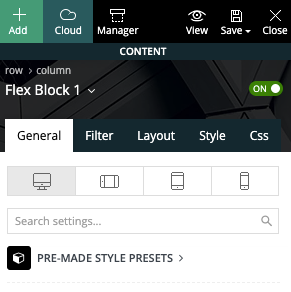
vallartamirror Here is a screenshot showing the block used (Flex Block 1).
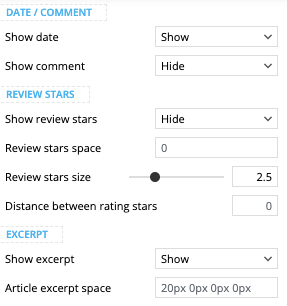
… with settings set to show excerpt and hide comments.
Here is also a screenshot of the category sections from my mobile…
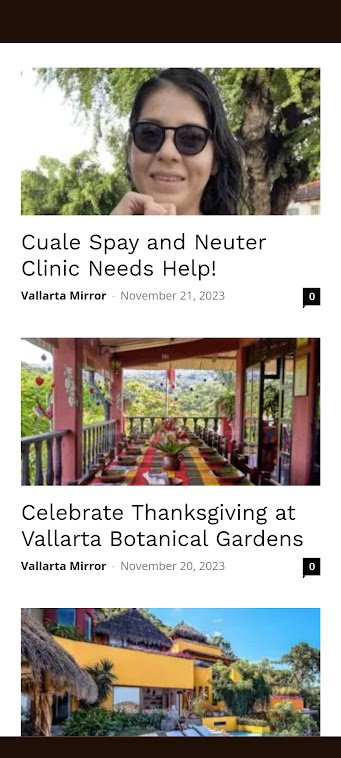
The page shown above can be found here. It displays correctly on desktop but not on mobile.
 bananaj
 OK please tell devs to fix this so the Big Grid flex inherits global default font like the other elements.
Thanks
J
Anamaria Hello,
I recommend using cloud templates, flex blocks, and big grid flex because are more flexible.
Also, using a cloud template, you can change the design as you want.
The templates that you see in theme panel are for standard templates, and you need to activate the tagdiv Standard pack plugin.
Thank you!



