- NewsmagFooter templates
- NewspaperDesign your Post Pages using the Cloud Library Templates
- NewspaperFooter Builder
- Apitd_api_footer_template::delete
- Apitd_api_footer_template::update_key
- Apitd_api_footer_template::update
- Apitd_api_footer_template::add
- ApiAPI – Footer Template – Introduction
- NewspapertagDiv Composer – Website Manager
- NewspapertagDiv Opt-In Builder – Emails
- NewspapertagDiv Cloud Library Plugin
- NewspaperUsing the Theme Translations with WPML
- NewspaperThe Mobile Theme
- NewspaperChild Theme Support
- ApiThe Theme API
 journalagency
The footer on LittleRiverPost.com won’t edit. I tried adding a new template in Cloud Templates as it’s not showing up. It won’t add. I just did the update.
 Calin
Calin Hi,
Each template that is assigned can be edited directly from frontend -> https://i.imgur.com/bDARQY9.jpg also all cloud template except for the footer templates (this can be edited only from frontend when is assigned), the rest of them can be edited from here -> https://i.imgur.com/JjbE39I.png
The footer template can be edited only if you are edit a page or cloud template, there is no button in cloud templates to edit it, therefore, it can be edited only from the elements where is set (pages/cloud templates).
-> https://i.imgur.com/OpYJe2p.png -> https://i.imgur.com/ci9p54S.jpg
Hope this will help you!
Thank you!
 llkv
llkvHello,
when I use theme category template (category.php) for category page I get error in the footer:
wp_booster error:
td_api_base::get_default_component_id : no component of type td_api_category_template . Wp booster tried to get
the default component (the first registered component) but there are no components registered.
/hermes/walnacweb04/walnacweb04ac/b2827/moo.2noobcom/inground-pool-lightscom/wp-content/plugins/td-composer/legacy/common/wp_booster/td_api.php
For clouds category templates everything works.
Please advice
 dansteeby
I have a page that my client wants to be able to edit with the “Classic Editor”. I have designed the site’s header and footer with the TagDiv editor, and have two “single” templates in my “Cloud Templates” page in the Dashboard. One of these templates has a sidebar via the Widget Sidebar element in the TagDiv editor, while the the other template is full width and does not have the sidebar. The ‘with sidebar’ is the default page template and is currently being applied to all the pages on the site. My client wants the full-width template on an individual page, but I don’t see a means to set the TagDiv “single” template on a page-by-page basis, nor is it available as an option in the page’s “Page Template” dropdown menu. Setting the sidebar options in the Page Template Settings Metabox to “no sidebar” likewise does not remove the sidebar. How do I assign the alternate “single” template from the TagDiv Cloud Templates to an individual page that is using the Classic Editor to manage its content? Thanks for any assistance!
 Billy
BillyNot sure what is going on, but when I create a footer with cloud templates, but when I go back to edit it the option to Edit with TagDiv Composer is gone. It is only happening with the footers, I have created multiple ones with the same issue.
 a.abraham
Hello!
Currently I’m building a template for my magazine on a dev environment. In the near future I would like to move the entire theme panel configuration to the production site.
Question: I’m using customized Cloud Templates for the header and footer. When I use the theme export/import feature, are these Cloud Templates also included or is it just the regular theme panel configuration?
Thanks and best regards,
Andrej
 antiquark
Hi,
I’m building a new website with the Newspaper Theme (I have been using it on another website for a few years now).
With this new website, I have a problem with the footer :
– In the Theme Panel, there are no settings in the footer section

– When I import a footer template, there is no “Edit with Tagdiv Composer” link in the templates section for the footer (no problem with other templates like headers, singles, pages…)

– Moreover, when I try to import the “Art blog pro” footer template, it seems it imports a full page without any footer

Is there anything I’m doing wrong?
The website url is http://www.antiquark.me (currently set with no footer)
Thanks for your help
 Anamaria
 Hello,
The duplicate option is available for cloud templates (header, footer, author, single post template, etc), for the homepage you need to copy the current page content and paste it into a new page, like in this video => https://www.screencast.com/t/9Np5yBAAO or import only the template for the homepage.
Thank you!
Calin Hi,
I think that for this you need to add a separate search, or change the search that the theme provides.
Now the easiest solution, as you said it is to add an widget in sidebar the add it with tagDiv Composer on your website. It is indelicate to use cloud template in this way you can set it anywhere on website, on header, sidebar, footer. -> https://i.imgur.com/mZqP1RR.jpg -> https://i.imgur.com/zQojeBJ.jpg
In some situations the code can be set directly in tagDiv Composer, in raw html -> https://i.imgur.com/4iEzPB1.jpg or in column text or text with title in code section -> https://i.imgur.com/u88UHh0.png
I hope this will help you!
Thank you!
Calin Hi,
I just made a test and for me when I set an empty footer (only on empty footers you can add more widgets) I can set widgets in footer zone without problems -> https://i.imgur.com/OYPv0GX.png -> https://i.imgur.com/kT15Psd.png -> https://i.imgur.com/WKMDlTj.png just make sure that you do not have other plugins interfering with the theme.
Also the latest articles section from pages can be added and removed using the page template, this will be display when you use “Page builder + latest articles + pagination” -> https://i.imgur.com/xVh78uK.png if you set it on default, that section will be removed. Also you can use the theme builder (tagDiv Composer) to add on pages the blocks you like.
I hope this will help you!
Thank you!
 Emmnppp
 For anyone having the same problem the future:
I’ve found the solution! Check Simion’s answer here: https://forum.tagdiv.com/topic/right-click-is-not-working-in-tagdiv-composer/
The thing is the footer can’t be edited via the template, like the other templates. It has to be edited directly from a page.
Suggestion for TagDiv: If this could be a little clearer (maybe stated in the Theme Panel, for example), it would save us a lot of trouble 🙂
Emmnppp I’ve found the solution! Check Simion’s answer here: https://forum.tagdiv.com/topic/right-click-is-not-working-in-tagdiv-composer/
The thing is the footer can’t be edited via the template, like the other templates.
Suggestion for TagDiv: If this could be a little clearer (maybe stated in the Theme Panel, for example), it would save us a lot of trouble 🙂
 Startupclub701
Hi,
The footer can’t be edited with the TagDiv Editor. Although when I make a new footer template it can be edited the first time but can’t be edited again after saving.
And also in the theme panel – Even after choosing a different template the footer isn’t changing. All other templates for other elements such as header, post etc work well.
Can I be helped. I am not a developer and I have no strong knowledge in coding.
Thank you
EmmnpppHello,
I’m able to use TagDiv Composer to edit all my templates, except the footer, strangely.
I’ve even downloaded a new footer template, and the Composer is unavailable for that one as well.
It’s as if I had toggled off the possibility to use TD Composer for footers… which is strange.
Any idea what could be causing the issue?
Thanks a lot
 Cagatay
 This problem still persists with Cloud Templates (Estates PRO in my case)
Auto Ads cannot insert ads in posts, but only right before the footer.
I purchased Newspapaer theme years ago and not used it for 5 years. Nowadays I decided to give it a try, but you’ve made it so complicated and with full of bugs.
 Simion C.
 Hi,
@ToHoBe So what are the remaining problems now? I believe you mentioned an issue in another topic, with the cloud templates. Do they work now? This is somewhat confusing.
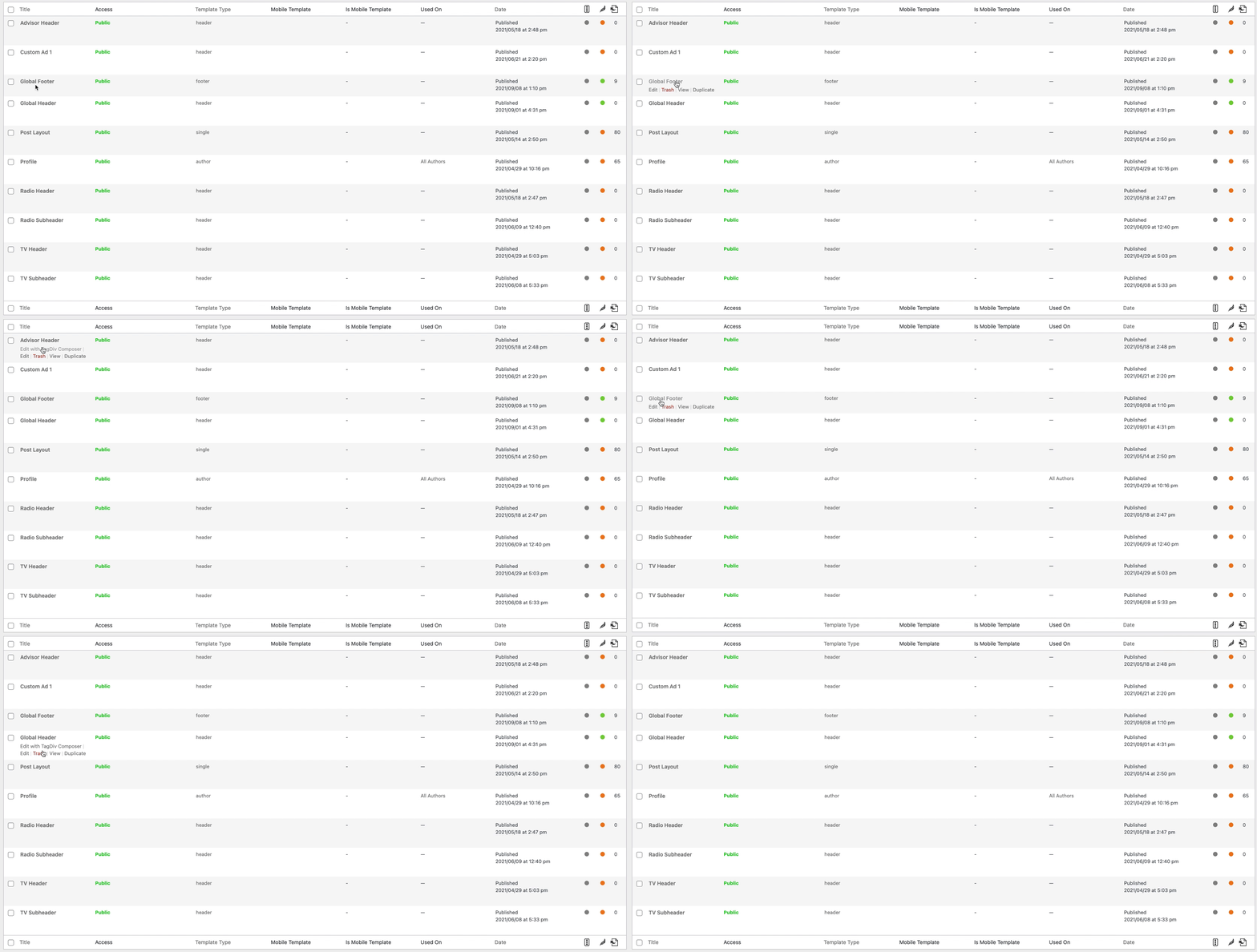
The cloud footer template do not have the edit with composer option https://i.imgur.com/N8L7U1C.png
They can be edited from where they appear. So for example if you have a footer template set globally https://i.imgur.com/qHWbO1m.png then by editing the homepage for example, you can edit the footer https://i.imgur.com/vKps2Ms.png -> https://i.imgur.com/8EhVt77.png
So basically the footer templates are the exception, they are the only ones that cannot be edited directly with the composer. They can be edited from a page or another template where they are displayed.
Let me know.
Thank you!
 VikasKushanavi
I’ve updated theme to latest version but after update all headers and footers are gone and thankfully I had a backup and and restored later. SO for security reasons, I have to update theme but please help me how to keep all my pages and templates as same as before while updating to new version
 sprottenjunge
 Out of sheer desperation, I re-installed WordPress. All cloud templates except for the footer template can be edited with the TagDIV Composer
Anamaria Hello,
The header and footer are taken from the standard ones. All you have to do is edit the mobile page, and in Manager (Website Manager) you need to import or the easy way is to convert the existent header/footer like this => https://www.screencast.com/t/HrjOBNayd -> https://www.youtube.com/watch?v=SpGkOnJeNZY (03:11 – Mobile Templates & Pages)
Thank you!
Anamaria Hello,
@usmanramzan,
Please make sure that the tagDiv Standard Pack plugin is active on your site because I saw you have a standard template. If it isn’t, please install and activate it.
@theflashupdate,
The footer templates do not have the button to be edited with tagDiv Composer in the backend, the footer can be edited only from the frontend if it is assigned, edit a page/post template with tagDiv Composer and go down to the footer. => https://www.screencast.com/t/rpfNhfyrF that page can be private, but the header template has the button to edit with tagDiv Composer => https://www.screencast.com/t/aFaeEdEpT
Thank you!
 shpetimH
Hi all,
I have a WP 5.8 and Newspaper 11.2 version (https://observeri.com/).
Everything is working perfectly fine but I have a complex scenario and I ran into some issues which I will try to explain.
– I have few categories, each of them have different headers and footer (body almost the same to all)
– For all categories I also have different mobile versions (those are working as they should)
– Every Single Posts under certain category have also different layout (those are working fine as well)
– When I try to create mobile templates for Single Posts for different Categories, those are getting overwritten 🙁
For example:
– Category X desktop / mobile is fine
– Single Post under Category X uses header and footer as Category X and both desktop / mobile templates are fine
– When I try to design Single Post Mobile Templates for Category Y, all other Single Posts templates are getting overwritten.
Everything is set to use specific templates to “Theme Panel > Categories” and Desktop version is working perfectly, this is happening only on Mobile Templates.
PS: Every mobile template I create from Template itself using “Create Mobile Template”, and on “Cloud Templates” they seem to be correctly linked for example 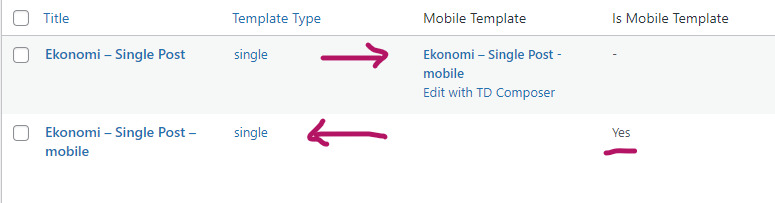
Everytime I create a new single post mobile templates all single posts will start using the latest one!
I would really appreciate any help.
Thanks and regards.
Anamaria Hello,
The header and footer are taken from the standard ones. All you have to do is edit the mobile page, and in Manager (Website Manager) you need to import or the easy way is to convert the existent header/footer like this => https://www.screencast.com/t/HrjOBNayd -> https://www.youtube.com/watch?v=SpGkOnJeNZY (03:11 – Mobile Templates & Pages)
Thank you!
 victorchiq
I create a footer with the TagDiv Composer, but when i go to Cloud Templates and select the Footer, the option “Edit with TagDiv Composer” is not showing up. How am i suppose to edit the footer now? Can anyone help me?
Also, the sidebar, footer and website header on mobile are with some problems only in the homepage, in others pages are the way they are suppose to be. Why is this happening? Can anyone Help me please?
If you want to see the problem, just go to https://cinepoca.com.br/
Thank you
 WalnutHillDesign
is there a way to lock down the header and footer so they can’t be accidentally modified in tagdiv composer while editing a page? We have had a few situations where site editors have been using tagdiv composer to edits pages and unknowingly dragged an element into the header and footer.
We are using cloud templates for header & footer.
 Peter_86
Hello,
I am not a programmer (know only basics of some html and css – with the help of uncle google 🙂
I am creating new newsportal for https://www.modre-novice.si
I have downloaded default newspaper layout and activated it. Now I would like to customise some elements like header, footer, fonts, clours etc…
1)
I have a problem customising footer, because it look slike TD composer is not available for footer? (see images in links)
image 1
image 2
2)
How do I change top bar colour in the header? I can’t find option to change this anywhere. Help would be very much appreciated.
see image
3)
I see there Is a lot of templates (under cloud templates) like attachment template, date template, search template, 404 etc. How do I make these pages or templates “reachable” on front end?
Because modre-novice is also a magazine that comes out each month in printed version too and I would like to have a page where visitors could download low-res PDFs of the magazine. Do I need to create a page first and somehow apply attachment template to it or?
This theme is pretty huge and I’m a bit lost in all those setting and options 🙂
Thank you for your help.