- NewspaperHow to Install Newspaper via FTP
- NewspaperNewspaper theme documentation
- NewspaperHow to Update the Newspaper Theme
 Catalin
 Hello oneavenuetv,
Please try to make a fresh install of the theme and then only install the visual composer version that comes with the theme. Please remove any other version from the plugins section (disable and remove) and then install it from here: http://screencast.com/t/DwZN21u0VR -> https://forum.tagdiv.com/install-via-ftp/
Hope this helps!
Thanks.
 durgatripathy
 Hi all,
I faced the same problem and solved it. For now I solved it by downgrading WordPress. You can downgrade WordPress only Via FTP. Download WordPress 4.4 from WordPress download archive. Upload only wp-admin & wp-includes directory and replace all files via ftp. Don’t forget to take a database & file backup before you start this process. After you are done an try logging into wp-admin you will be prompted to update the database, click update database. Now after done you can check all your images reappear.
Till now I have this solution. After I get another solution with WordPress update + image view, will post here for sure.
Thanks all !!!
Catalin Hello emalgumlugardomundo,
Please try to make a fresh install of the theme and then only install the visual composer version that comes with the theme. Please remove any other version from the plugins section (disable and remove) and then install it from here: http://screencast.com/t/DwZN21u0VR -> https://forum.tagdiv.com/install-via-ftp/
Hope this helps!
Thanks.
 Bogdan B.
 Hi,
You have to delete the files for visual composer. If the option is no longer available in the dashboard, then you have to access your files via FTP and delete this folder: http://screencast.com/t/HnUayOX0BT
Thank you!
Catalin Hello Harrison,
Please notice that the latest version of WordPress ‘broke’ the Visual Composer and you need to install the latest version of this (4.11.2). For updating the theme, you have 3 way to do it -> installing via FTP (recommended), via WordPress or automatically update via Envato Toolkit. For more information about these ways, please check here -> https://forum.tagdiv.com/how-to-automatically-update-newspaper-theme/ -> https://forum.tagdiv.com/how-to-update-the-theme-2/
Thank you for your understanding!
 firetoss
 So trying to use WP Ajaxify Comments. I enabled the setting pagination for comments in the discussion settings. Then inspected the comment page element and it showed as .comment-pagination.
But the older comments does not seem to load by Ajax.
http://2c6.950.myftpupload.com/sharon-mcdowell-may-3-1957-july-15-2014/
http://2c6.950.myftpupload.com/sharon-mcdowell-may-3-1957-july-15-2014/comment-page-10/#comments
 beermoney
Tried to edit the homepage….but the Visual Composer wouldn’t work. So I did what the instructions were on how to update it…..but I can’t update through WordPress. Its to big and has to be FTPed. Problem is….I think I screwed up and deleted all files when I probably shouldn’t have. Now I am unsure as to what the name of the plugin folder should be to upload it via FTP. Please let me know what the name of the folder should be so I can get the updated plugin uploaded via FTP and I can fix the site.
Should the folder be….. wpbakery-visual-composer
 RachelG
 I fixed mine, it required a Newspaper update and a WP Bakery plugin update that is included with the download of the Newspaper update. It was a bit of a convoluted process, because the plugin was too big to be uploaded from within my WP Dashboard and I had to FTP it. And, normally I wouldn’t download the Newspaper update because I use Envato Toolkit to update the theme from within the site. The Envato Toolkit update did not update WP Bakery.
Bogdan B. Hi,
In order to remove a part of the code you need to access your theme files via ftp. your host should have a guide for this as it can be done through the cpanel in most cases and then you need a text editor. Notepad++ is a good tool for this and is also free of charge. Depending on the hosting you use, you may or may not be able to edit the files directly. In most cases you have to download the file to your PC, edit it using notepad++ and re-upload it replacing the existing file.
Hope this helps.
Thank you!
 Andrei L.
 Hi
The message appear because the old folder wasn’t deleted. Login in your account using a ftp client, navigate at your-wp-install/wp-content/plugins and delete js-composer folder. After this step you should be able to update the plugin from your dashboard.
Before making any changes make sure you do a full backup to your current wp-install and the database also: https://codex.wordpress.org/WordPress_Backups
Thanks!
 raynaldoverde
 Hey guys, I’m learning how to use FTP software. Can someone walk me through on how to delete the code step-by-step as seen here: http://screencast.com/t/llK8ex6aI?
Is it possible to delete the code on WordPress?
firetossIf you go to a post category
http://2c6.950.myftpupload.com/category/sweetwaternow-community-coverage/sweetwater-county-news/
That the post categories related would not show under the category title.
Andrei L. Hi
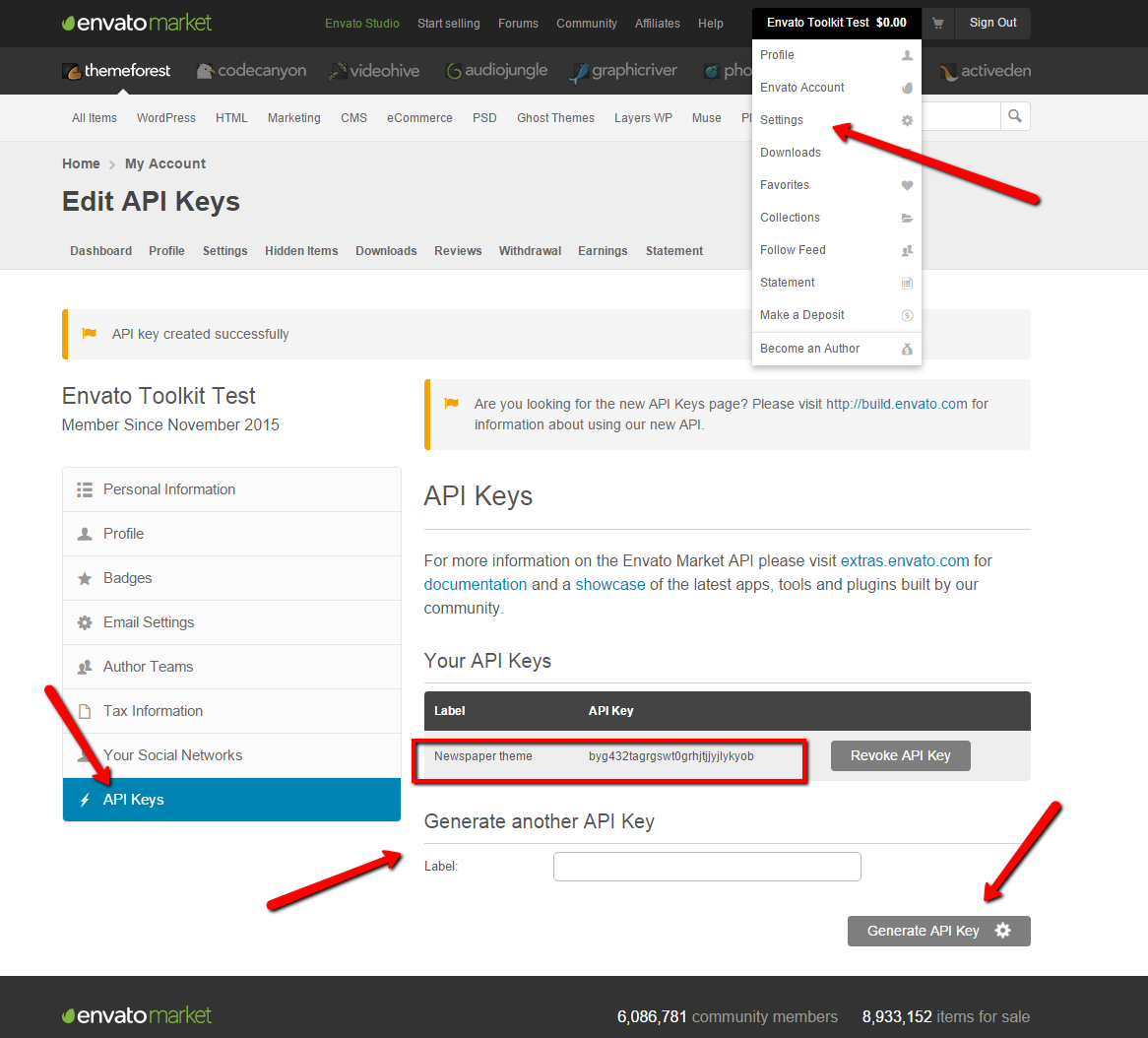
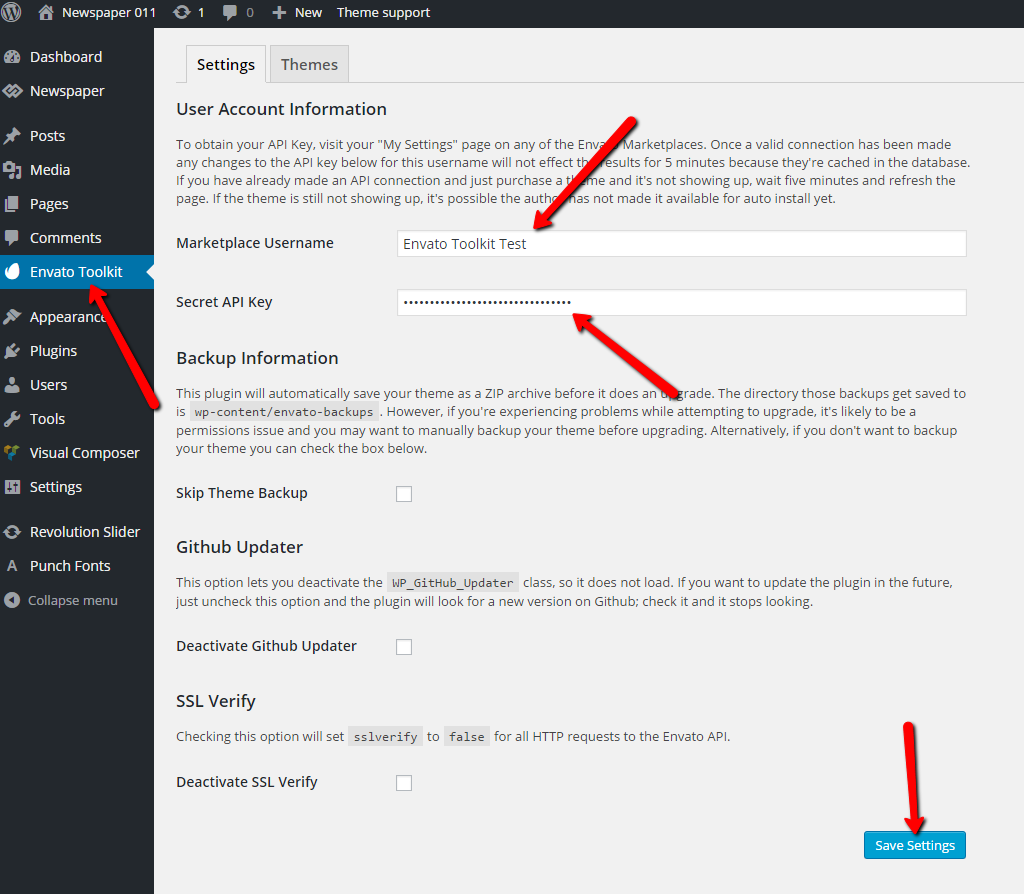
The API key can be found in your envato account following this image: https://forum.tagdiv.com/wp-content/uploads/2015/11/2015-11-18_1503.png The key must be add in plugin’s panel as it’s indicated here: https://forum.tagdiv.com/wp-content/uploads/2015/11/2015-11-18_1505.png
If you still can’t manage to connect with you themeforest account use the ftp method to make the update, or update it via wordpress. Both methods are detailed in our documentation: https://forum.tagdiv.com/how-to-update-the-theme-2/
Thanks!
 Alin [tagDiv]
 Hi,
Please address this question to your host. I’m sure that he can help you with this.
Also you could upload your plugins manually via ftp.
You can also search for an online solution – https://wordpress.org/support/topic/missing-zlib-extensions
Thanks!
Bogdan B. Hello,
This depends on the version you want to update from. If you already had the latest version before the update was released then you can use the patch that comes with the theme and simply replace the files provided there via FTP: http://screencast.com/t/et2UQjUG2T1j and then update your plugins especially visual composer as it has issues with the new version of wordpress.
Thank you!
Bogdan B. Hi,
You can try the ftp method and replace the files directly. (option A) and the use this guide to update visual composer: https://forum.tagdiv.com/how-to-update-visual-composer-plugin/
Thank you!
Catalin Hello blackout17,
Unfortunately, this plugin is not tested with our theme and we have no idea about the behaviour of the theme with this type of plugin and also, we cannot provide support for untested plugins, sorry!
Please try to make a fresh install of the theme and then only install the visual composer version that comes with the theme. Please remove any other version from the plugins section (disable and remove) and then install it from here: http://screencast.com/t/DwZN21u0VR -> https://forum.tagdiv.com/install-via-ftp/
Please let us know if you still have problems afterward and let us know when you have the theme active so we can inspect your website.
Thank you!
 simchris
 How are you trying to install it? When do you get the error?
Normally you would install from your theme panel and upload the zip from your hard drive. Theme does not control that. You would use the single newspaper.zip file, not the all files zip.
Or, install via FTP by unzipping the files on your HD then upload with software like Filezilla.
See the docs right side of page for how to install properly.
simchris I update via FTP so that I can do a full “snapshot” of the site, folders, images, plugins, etc.
Also reminds me to delete oooold themes or plugins I’m no longer using, in case I sometimes forget to do that.
Then when I do the updates, if anything goes wrongo reindeer (as a co worker used to say), I can roll back to the safe one.
Obviously best to do this before the WP 4.5 update too.
Also worth considering “disabling” any “auto-updates” – which you can do in your wp-config file, if not already done. I hate auto updates — WP thinks they’re great, except every 8th time it breaks the site completely!
 rowby
rowby*****************************************************************
UPDATE –I Realized I needed to unzip that file, and indeed I found the correct file to upload to WordPress and it worked fine. Here’s the file that you upload: Newsmag.zip
I do have one question. I see this file in the folder: patch_2.3.5_2.3.6 Do I just upload those files (via ftp, for example) to the server? Or are those files already included in the latest version — which I purchased and downloaded today.
BTW I installed the demo (Tech News demo) and it looks really great. So many features!
Rowby
*********************************
Hello
Just purchased and tried to install themeforest-9512331-newsmag-news-magazine-newspaper.zip
Wordpress Version 4.5
I get this error:
Unpacking the package…
Installing the theme…
The package could not be installed. The theme is missing the style.css stylesheet.
Theme install failed.
Please advise what to do. I need to make this site live ASAP.
Thanks
Rowby
 CtrlP Press
 Thank you for your response, Andrei.
Updated exactly as per Tagdiv documentation. This is the 4th or 5th update since my theme purchase, and not my only site, so I am aware of the FTP process.
Also, looking at the File Manager through the cpanel shows the updated files.
De-activating the Child Theme has fixed the errors, however what do I do next to restore my site to its original look? This site has a considerable amount of customization… it looks nothing like the demo content.
The whole point of having Child Themes is to prevent the loss of customization and site settings when themes update. But it is beginning to look like your theme and its update process does not support the use of Child Themes?
Please advise on my next step.
-
This reply was modified 10 years by
CtrlP Press.
-
This reply was modified 10 years by
-
This reply was modified 10 years by
 rflmedia
Hello,
Using the default “td-api-plugin” files, I receive a 500 internal server error. I have to delete the folder via FTP to gain access to the site again.
When I customize the files in the folder to have my own plugin’s name, and even go as far as to change the function names, I still get a 500 server error.
What am I missing here? What conflicts could possibly arise from using the td-api?
It’s crucial we extend one of the blocks to add custom functionality. Thank you for your time.
Andrei L. Hi
Please make sure updated the theme following our documentation: https://forum.tagdiv.com/newsmag-how-to-update-the-theme/ also deactivate the child theme if you’re using then test again.
You can also try to make a new wp-install on a sub-domain or on your local computer and check if the problem is still there.
Let us know how it goes and if you still can’t manage to solve this please send us an email at contact@tagdiv.com and provide wp-admin and ftp access so we can have a closer look at this issue, also include a link to this topic.
Thanks!
Bogdan B. Hi,
Please make sure you installed the theme correctly by following this guide: https://forum.tagdiv.com/install-via-ftp/
You can also try to disable all plugins except visual composer, clear cache and reset cdn files to rule out a plugin conflict.
If the error is still there, please send us an email at contact@tagdiv.com and provide wp-admin sop we can take a look. Please also include a link to this topic so we can identify you.
Thank you!
CtrlP PressHowdy
Just uploaded the most recent update (by FTP) and now getting a string of wp_booster errors:
wp booster error:
td_api_base::mark_used_on_page : a component with the ID: td_block_1 is not set.
/home/ctrlpp5/public_html/wp-content/themes/Newsmag/includes/wp_booster/td_api.php
(all the blocks… ending with 16 below)
wp booster error:
td_api_base::mark_used_on_page : a component with the ID: td_block_16 is not set.
/home/ctrlpp5/public_html/wp-content/themes/Newsmag/includes/wp_booster/td_api.php
wp booster error:
td_api_base::mark_used_on_page : a component with the ID: td_block_popular_categories is not set.
/home/ctrlpp5/public_html/wp-content/themes/Newsmag/includes/wp_booster/td_api.php
wp booster error:
td_api_base::mark_used_on_page : a component with the ID: td_block_slide is not set.
/home/ctrlpp5/public_html/wp-content/themes/Newsmag/includes/wp_booster/td_api.php
wp booster error:
td_api_base::mark_used_on_page : a component with the ID: td_block_ad_box is not set.
/home/ctrlpp5/public_html/wp-content/themes/Newsmag/includes/wp_booster/td_api.php
wp booster error:
td_api_base::mark_used_on_page : a component with the ID: td_block_text_with_title is not set.
/home/ctrlpp5/public_html/wp-content/themes/Newsmag/includes/wp_booster/td_api.php
wp booster error:
td_api_base::mark_used_on_page : a component with the ID: td_block_authors is not set.
/home/ctrlpp5/public_html/wp-content/themes/Newsmag/includes/wp_booster/td_api.php
From searching prior comments, this looks like it might b a category template that got overwritten (yet I’m using a child theme)… but I can’t access my theme panel at all. Well its kind of there but missing menu and content.
Instead I have this in the menu panel:
Warning: Invalid argument supplied for foreach() in /home/ctrlpp5/public_html/wp-content/themes/Newsmag/includes/wp_booster/wp-admin/panel/panel_core/td_panel_core.php on line 62
and this in the content panel:
Warning: Invalid argument supplied for foreach() in /home/ctrlpp5/public_html/wp-content/themes/Newsmag/includes/wp_booster/wp-admin/panel/panel_core/td_panel_core.php on line 119
I have cleared the caches multiple times and deactivated all the plug-ins and cleared again, but its having no effect.
These errors, of course, are writing to the site pages too, as well as page specific errors.