
- NewspaperHeader Builder
- NewsmagHeader styles
- NewsmagHeader ads
- NewspaperHeader ads
- NewspaperHeader styles
- Apitd_api_header_style::delete
- Apitd_api_header_style::update_key
- Apitd_api_header_style::update
- Apitd_api_header_style::add
- ApiAPI – Header style – Introduction
- NewspaperSearch setup for custom post type
- NewspapertagDiv Composer – Website Manager
- NewspaperBookmark – Save For Later
- NewspaperWooCommerce: Happy “Add to Favorites!”
- NewspaperModal Popup
- NewspaperFlex Block Settings Guide
- NewspaperPosts Loop Element
- NewspaperHow to Add a Logo in Newspaper
- NewspaperDefault Category Settings
- NewspaperWhen tagDiv Composer is Not Working
 Diana
DianaHi, guys:
I am running a few sites on Newspaper 9 and I see that you have come up some time ago with v.10.
I didn’t see any specific instructions on migration from 9 to 10 and I was reluctant to do it, due to the fact that if I install another theme, the previous content gets wiped (BTW, why didn’t you release it as an update to 9?). Also, please let me know if you have a version higher than v.9.7.2
Yet, I am running now into some problems, such as misalignment of objects in the page (in the composer I place them in a certain location in the tagDiv composer and they show up somewhere else on the live page), as well as page changes failing to save (I only get the message that the header changes have been saved, not the page content changes).
What do you suggest?
Please let me know as soon as possible.
Many thanks,
Diana
 FietsersbondHZ
 Ok, the new category layout eventually updated on my desktop but now I get to see the old layout on my tablet and mobile phone…Also my tablet and mobile phone is still showing the old header image while on the desktop I get to see the new one.
Loading more articles in the category works fine on the desktop but no new articles are loaded on tablet and phone, the loading icon just keeps spinning and nothing happens.
-
This reply was modified 6 years by
FietsersbondHZ.
 webmastermetrozita
Hello,
I had a staging where the site was good in regards of layout. However I did change the header/footer etc, some colors, logo, the way a post looks basically.
However after transferring only specific tables like wp post, wp postmeta, wp users, usermeta, terms, termrelationship and taxonomy, everything of layout is gone…
How does this come? How can I prevent this? I need to transfer it this way.
Best regards
FietsersbondHZI have come across a annoying issue where layout changes in tagdiv composer don’t save correctly, when I make a change in the category template this new change is saved on some categories but not on others and this while I have set the correct template in the themepanel global settings for the category, same for the header, I set the new header image which displays correct on my desktop and tablet but the old header image is still visible on a my mobile phone. What could be causing this?
 Calin
Calin Hi,
If you are using a standard header template you can change sit using the settings from theme panel -> https://i.imgur.com/ONiEaaR.png
If is a cloud header you can edit it with tagDiv Composer https://i.imgur.com/fZf2cP7.png -> https://i.imgur.com/6houQWR.jpg
Thank you!
 japjeet1
I am getting an error : [td_block_1 custom_title=”Must Read” limit=”4″ f_header_font_transform=”uppercase” ajax_pagination=”next_prev” category_id=”13″ sort=””]
it’s in the sidebar. Can you please help.
I can’t fix this from tagDiv composer for the template ( i thought that would be the correct way). I am not sure if i can correct this from the widgets area.
here is the link for your reference: https://travelnewsy.com/2020/04/26/what-is-the-world-doing-to-revive-tourism-industry/4/
Calin Hi,
That is because on that class was set an extra css, and removing the class will remove the css too, but you can use a custom css for this, for example, please set this custom css
.header-search .polylang-flags {

  display: none;

}
in theme panel> custom code> custom css
and this css
.td-header-menu-wrap .header-search .polylang-flags {

  display: block;

  margin-right: 20px;

}
in theme panel> custom code> advance css> phones.
The above codes should remove the button from desktop, but display it on mobile.
Hope this will help you!
Thank you!
Calin Hi,
You can adjust it using tagDiv Composer edit the header and choose the mobile port view -> https://i.imgur.com/vve8Vv9.jpg after that select the row and in css tab add the background color -> https://i.imgur.com/o4sz9Bp.png
Hope this will help you!
Thank you!
 terryally
Hello,
Is there a way to allow the Ad Manager to parse “article top”, “article inline” and “article bottom” ads on cloud templates?
Ad boxes on custom templates can only pull in header, footer and five custom ads.
Thanks
Terry
 thenews24goaweb
 I have installed default pro version of theme and imported Technews header from the cloud.. everything was working fine. Its was sticky. But when i changed the header by importing other cloud themes after that its not showing sticky header in mobile version. Kindly help to ressolve this. When editing with td composer, while scrolling down in movile version its instead of showing sticky header its shows Empty Column. I tried deleting wordpress and reinstalling but this still exixt. Are you storing our template design in your server data ? How can this happen suddenly!
Calin Hi,
In order to change that color and you are using a cloud header, you need to use tagDiv Composer and check the settings from mega menu style -> https://www.screencast.com/t/A9xVnbYzP8 -> https://www.screencast.com/t/tT6S0YK6lJP
-> https://tagdiv.com/header-main-menu-newspaper-theme/
Thank you!
thenews24goawebI have installed default pro version of theme and imported Technews header from the cloud.. everything was working fine. Its was sticky. But when i changed the header by importing other cloud themes after that its not showing sticky header in mobile version. Kindly help to ressolve this. When editing with td composer, while scrolling down in movile version its instead of showing sticky header its shows Empty Column. I tried deleting wordpress and reinstalling but this still exixt. Are you storing our template design in your server data ? How can this happen suddenly!
 turma99
Hi! How can I make the header (and footer) add to fill the width of the site? The max size in add options is 970px.
screenshot: https://nimb.ws/HYRAKx
Thanks!
 Sarbjit Grewal
 Hello Calin,
Thanks for giving valuable Guidance, but I want to make our blog more professional, where I can add Javascript Blocks, which looks like this:- http://prntscr.com/sj7brm
Unordered List Style:- http://prntscr.com/sj7ch3
Highlighted Javascript Block:- http://prntscr.com/sj7crn
Header Style Changes :- http://prntscr.com/sj7d9i
 marclaude
Dear TagDiv Team,
I have just updated the Newspaper Theme from 9.7 to the latest 10.3.3 version, the update worked fine, thank you.
I want to make a new header, I wonder if you can explain me how the Style Demo Template Header works, because it seems like that they are two Header Menus with Mega Menu on the same header menu position.
I really cannot understand how the POPULAR item works.
I imported the Header 63 – Style Demo Template Header, but it allows me to edit on the same position only one header main menu, but on Style Demo Template Header it seems that there are two menus on the same row, or at least the POPULAR item is separated and aligned on the right, with its own Mega Menu.
Style Demo Template Header
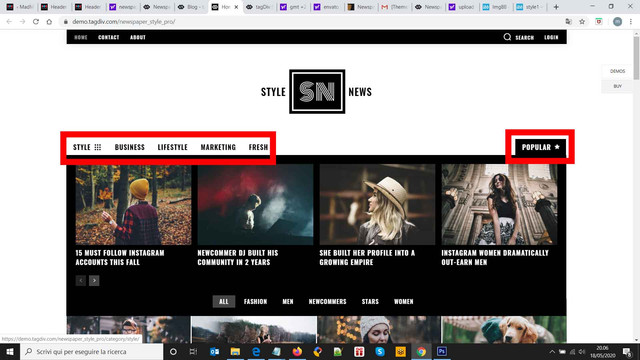
Import
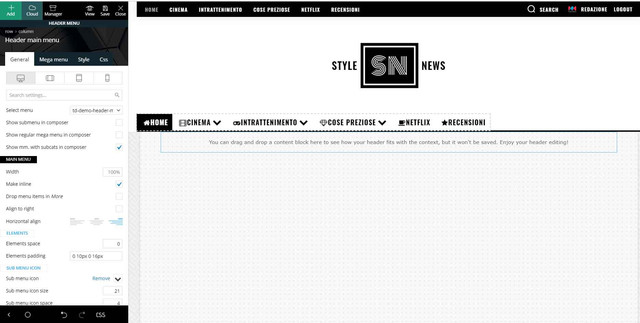
The final result is really nice, but I really cannot understand how to set a header main menu on the left and then add another item with its mega menu on the right on the same row / available position.
I hope I was able to explain you my need.
I really I hope you can help me – I have renewed the support for this – because I think that with 10.3.3 version I can further improve the style of my magazine.
Waiting your courteous reply,
Best Regards,
Marco
 Frydenborg
I have imported newspaper header, it is 1400px width but I can figure out to change it to 1200.
But I create pages, but with TC composer and with WordPress blocks (for my toolset output) and they do not have the same width as the Newspaper header. Is there a way I can set page width so they automatically have the same width as the header?
 sloope
 Update: When I deactivate Yoast, at least the zodiac footer is imported… Anyways, I can’t save it most of the time and I can’t edit inside Tag Div Composer at the old footers…
Also I found out, whenever I am able to save it… and I watch the preview, the footer is imported two times and there is this message:
Warning: getimagesize(https://www.annaobermeier.at/wp-content/uploads/2020/04/logo-1.jpg): failed to open stream: HTTP request failed! HTTP/1.1 403 Forbidden in /www/htdocs/w014a910/lovely-photos.at/wp-content/plugins/td-cloud-library/shortcodes/header/tdb_header_logo.php on line 792
-
This reply was modified 6 years by
sloope.
 guidozik
Hello,
though I downloaded a new template for my header and modified it, when I select its template in Theme Panel > Header I keep seeing the old template.
Since everything in back-end looks configured correctly and is saved, I tried to wait and use different browsers, but nothing changes. Can I have support, please?
The website is: zichichi [.] info
 Ron
RonIn Admin mode, Top EDIT bar somehow just recently added an additional Search, AND an additional COmments icon. When I click on the new Comments icon, a blank pop-up window opens with headings: ALL – Unread – Comments – Follows – Likes.
It’s blank except for those headings.
I can’t find how to get rid of it.
At 100% VIEW, it obscures my Facebook icon on the Header Bar. If I minimize VIEW to 90%, it shows up on top Edit header bar!
 allxssunder
 Thanks for reply, i try it i paste the autoads code into the header, but didnt work i mean some ads show up at the sidebar of in foofer but not inside the post, the only way to make it work is put each code manually in the ads section of the theme, i use a template from the cloudlibrary i dont know if may this be the reason, same thing happen with amp i put both codes and there any ad is showed, i desactivate all the plugins till cache one, and didnt work. i dont know what more can do for make the autoads works.
 NMI
NMI Hi Calin!
Thank you for your quick response. But whatever I try, it won’t work! Whenever I replace the code you suggested with anything that doesn’t have your id=”td-header-search-button-mob”, this new content will also show in all other sizes of the website. If I leave this id in there, it works, but then the search button is still working whenever I click the language selector.
Screenshots Situation 1 (with id=”td-header-search-button-mob”):
https://www.dropbox.com/s/owk3yj37zpn62h6/SC1_id%3Dtd-header-search-button-mob.png?dl=0
https://www.dropbox.com/s/6ul33oe987z9q2q/SC2_id%3Dtd-header-search-button-mob.png?dl=0
https://www.dropbox.com/s/wsihi79rfgkpl7b/SC3_id%3Dtd-header-search-button-mob.png?dl=0
Screenshots Situation 2 (with id=””):
https://www.dropbox.com/s/suj5vpx8quuwhjw/SC1_id%3Dnone.png?dl=0
https://www.dropbox.com/s/oe34s1ry98s6qkz/SC2_id%3Dnone.png?dl=0
https://www.dropbox.com/s/e4crjel7m9rugwv/SC3_id%3Dnone.png?dl=0
I have done so much web developement in my life, but here I’m not getting results. I really don’t know why. That said, thank you again for your patience and help!!!
It seems like such a small problem …
You can see it currently and live here: https://fm.lujong.org
(I left the version without id=”td-header-search-button-mob” online for you to check).
Calin Hi,
Usually the h1 is set on logo, if you are using a cloud header from tagDiv Cloud Library, you can have a different H1 per page/posts, another way is to using the Page Builder + Page Title on page template, this should set your page title as h1 and remove the h1 from logo.
If you want that your title to have the h1 set instead of logo, then please check if you are using a cloud header, if yes, then you can edit it with tagDiv Composer and disable the h1 -> http://prntscr.com/q1ohji from desktop and make sure that you do the same for mobile logo -> https://www.screencast.com/t/xVUjIMUelXA2 -> https://www.screencast.com/t/ABTw6DUnbMjH and the problem will be solved!
The “Tagline ” can be set in theme panel -> https://i.imgur.com/vMwPIyD.png or if you are using the mobile theme plugin -> https://i.imgur.com/5OgBswQ.png
Hope this will help you!
Thank you!
Calin Hi,
This can be adjusted with a custom css, you can check this similar topic -> https://forum.tagdiv.com/topic/offsetting-a-page-jump-to-adjust-for-fixed-header/
If you need help with the css, please provide me a link where I can inspect these elements.
Thank you!
 ttz
ttzHi,
Would you please advise how can I decrease the row height of the Header Template 5?
https://www.screencast.com/t/MrH2zHpr
Thank you for your help,
Calin Hi,
You are using only cloud templates, these can be edited with tagDiv Composer.
Please activate tagDiv Standard Pack plugin and the header styles will appear.
-> https://i.imgur.com/RgHALdD.png
Hope this will help you!



