- TutorialsFrom WPBakery to tagDiv Composer
 blazenews.in
ANOTHER ISSUE IS OCCURED NOW 🙁
IT IS SHOWING THE HEADER ON
BUT NOT ON THE HOMEPAGE, WHAT SHOULD I DO?
blazenews.in ANOTHER ISSUE IS OCCURED NOW 🙁
IT IS SHOWING THE HEADER ON
BUT NOT ON THE HOMEPAGE, WHAT SHOULD I DO?
 agenzianova
Hi there,
could you explain me how to integrate GAM360 into https://www.agenzianova.com/ site (tagDiv Newspaper theme), with a specific configuration for each type of page (homepage, home category, post)?
Thank you in advance!
Fabrizio Del Gaudio
IT Manager
Agenzia Nova Srl
Via Parigi, 11
00185 – Roma
ITALIA
 Calin
Calin Hi,
If you tried with all theme plugins enabled and the problem is still there, then I think that it is possible that the shortcodes to be corrupted.
If the problem is only for the homepage, please check to see if you can use the page revision -> https://www.wpbeginner.com/beginners-guide/complete-guide-to-wordpress-post-revisions/
If the problem persists and you agree I will like to see what happened there, for this I will need wp-admin access, so please contact us via email at contact@tagdiv.com and please provide wp-admin access.
Thank you!
 Campus Courier
Hello Support Team,
I bought Newspaper theme and activated it for a domain, then, I discovered that I needed to change the domain name. However, I successful got my domain name changed with my hosting provider.
My website came live with the new domain however, every click on the links on the homepage on the new domain url is currently landing on the changed domain url from which I have removed my contents.
My live website url is https://www.campulse.com.ng while the previous website url which I changed is https://www.campuscourier.com.ng
Please how can I solve this problem.?
Thank you very much
Kolawole
 Nickolas Combatente
 right, im using only the home mobile page, im not using mobile page templates in nothing besides the homepage. So, my problem is this home mobile page that i createad is being indexed and displaying in mobile devices and in destktop, what i wanna to do is stop the home mobile page that i created of displaying in desktop devices, have a way to do this?
 drjeff_007
 Hi Calin,
I did do that but… Still the same.
Please note that is only on the homepage and not the others…
https://nextlevelonlinemedia.com/
Thank you!
 RECORD EUROPA
 Hello, we are developing a site identical to ours in staging, when we upgraded the problem appeared.
For example, on the homepage, we have a trending now block that has a filter for a specific slug. But all the latest posts appear.
How can we give you access to verify?
Calin Hi,
Yes we also thought about this, but unfortunately it takes a long time for every time all the documentation to be reviewed.
We are trying to make an article/guide with the new options.
1. We added a new functionality for the users that are using the subscription plugin and use the menu login -> https://i.imgur.com/HbbWn1n.png this option can be enabled from theme panel -> https://i.imgur.com/r0TMyAy.png and the guide for FB api key is this one -> https://forum.tagdiv.com/how-to-generate-facebook-app-id/
2. This option was added on single post template on the single post content shortcode for ads -> https://i.imgur.com/LPsgnCx.png
3. The sticky menu from the mobile theme plugin has not an option for on off -> https://i.imgur.com/uMrcLAB.png
4. This option it is referring to this -> https://i.imgur.com/1oxTRj6.png before the header live search needed to be licked to be open the search modal -> https://i.imgur.com/HgVsZuR.png
5. It is about the “Exclusive” label -> https://i.imgur.com/Dwhb33x.png that until now was set only on flex blocks and now was added on flex grids too
6. This is a new implementation in our theme so you can see the sites where you license key is set this will look like -> https://i.imgur.com/YguNv09.png you can find more details in this article -> https://tagdiv.com/update-version-11-4-3-newspaper-theme-is-rtl-ready/
7. Those options were added in cloud template to can import in backend homepages and pages-> https://i.imgur.com/Lbwsujb.png
I hope this will help!
Thank you!
 Peter_86
Hello,
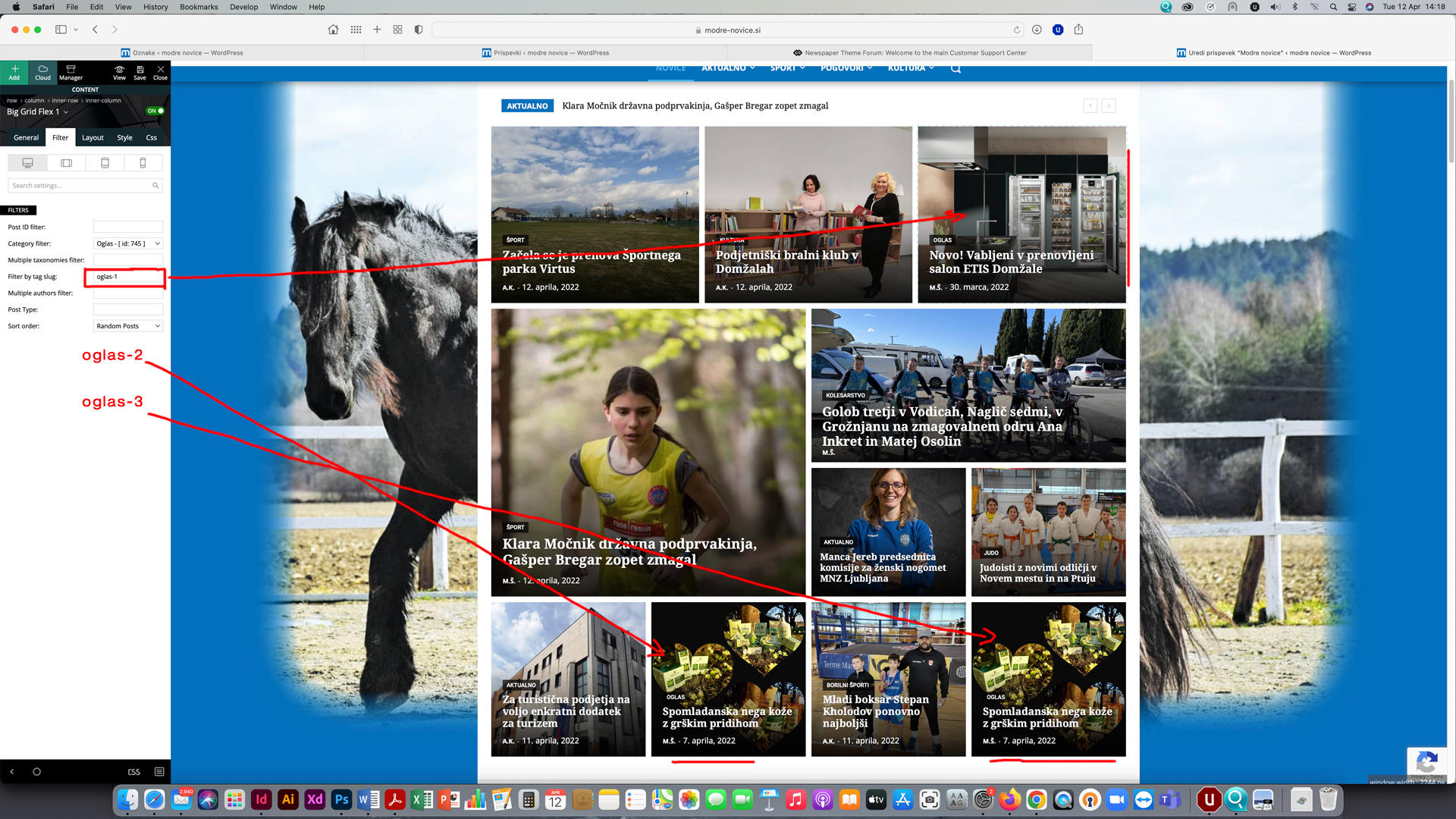
on homepage I have 3 modules set to show advertorial content (payed articles). In top right sections only articles with category ‘Oglasi’ AND TAG ‘Oglas 1’ (tag slug: oglas-1) should randomly appear, on bottom left module there should only be randomly visible articles with category ‘Oglasi’ AND TAG ‘Oglas 2’ (tag slug: oglas-2) and on bottom right module articles with category ‘Oglasi’ AND TAG ‘Oglas 3’ (tag slug: oglas-3).
Afer update articles are not filtered by tag-slug anymore.
Now article with tag ‘Oglas 3’ appears also on top right position and in position 2 instead only in position 3. Main problem now is that one article appears on two positions at once. With tags I have filtered advertorials to appear on predetermined positions only and now I can’t filter them anymore.
See image here: https://www.modre-novice.si/wp-content/uploads/2022/04/modre-novice.jpg
Help here would be very much appreciated.
 ludyma
 Hello, every time there is no update there is no information about where it is done and how it is done, person bother you with these issues but it would be advisable to make small tutorials of improvements and new functionalizades or tualize the ones that are already, so that users Let’s know how maximum the subject.
You could inform me about these.
- new: Added Facebook Login functionality;
- new: Option to set margin for Single Content Ads;
- new: Option to disable the sticky menu on the Mobile Theme;
- new: Added the option to show only the form on the Header Live Search shortcode;
- new: Added the option to show the “Exclusive” label on posts from Flex Big Grids and live search shortcodes;
- new: Manage License System – Easily assign your key to a specific domain to access all the theme features. The new system allows you to manage multiple license keys on multiple domains;
- new: Option to import Homepage and Pages from Cloud templates interface;
 Good Day
 Hi,
1) I had deselected the ad spot from the dropdown. But the ads does not work.
– My website: http://www.adventurecounts.com
– Here are three ad boxes on the homepage in total.
I also have other questions as below:
2) Can I change the background color of newsletter block?
– https://prnt.sc/NbZWUC_qLI1J
3) The CSS settings of elements across four devices affect each others.
That is, the footer on desktop version should be like this: https://prnt.sc/Jm5l7_rJTzIG
After I completed the design of mobile version: https://prnt.sc/RfnvBI2piIe5
The footer of the desktop became: https://prnt.sc/8x3xGD2jKQ1k
May I know how to design the respective device layout safely?
4) May I know is there the Undo function in tagDiv composer? I did not find the button as the website claimed. I found Undo is only for some specific settings? https://tagdiv.com/embrace-the-undo-and-redo-buttons/
Thank you
 Bettina
 Hello!
If you use responsive version, then edit the homepage with TagDiv Composer, click on the mobile viewport: https://www.screencast.com/t/XDQJedlggSB ; there you can see your mobile version and you can change/remove the logo there.
If you use mobile pages, then you should edit the mobile page and change the logo: https://prnt.sc/agGRcsVxFMRA -> https://tagdiv.com/newspaper-10-3-7-update-brings-customizable-and-fast-mobile-pages/
If you use the Mobile Theme plugin, then you have some settings in the theme panel: https://prnt.sc/x09C3DVPyFAM
Thank you!
Bettina Hello!
This is an old demo with the standard default single template, so the changes there must be done from the settings Dashboard -> Appearance -> Widgets. As I said, we will investigate this issue.
A workaround there could be to use a cloud single template and add this element there. For example, you can copy-paste the element from homepage.
You can build the template for your articles from scratch also by importing a blank template: https://www.youtube.com/watch?v=SoGQ0d5kIBg
For cloud templates, you can add the sidebar from tagdiv Composer. Steps:
1. Add 1 row
2. Split into 2 columns( 2/3 + 1/3 )
3. You can add whatever element you want into the second column and consider it a sidebar.
Thank you!
Bettina Hello @GeorgeBayliss!
Edit the homepage with the TagDiv Composer, click on the row and change or remove the image background: https://prnt.sc/NkaOE7fWzB2e
Thank you!
Bettina Hello!
Make sure you have the footer from homepage set as global on every page/template.
You need the Standard Pack plugin if you use the default templates. Although, we recommend to use cloud/PRO templates in order to have the possibility to edit them with the TagDiv Composer which contains a lot of functions and features, please check our tutorial here: https://forum.tagdiv.com/tagdiv-composer-tutorial/
Documentation here:
– https://forum.tagdiv.com/cloud-library-templates/
– https://forum.tagdiv.com/design-post-pages-using-cloud-library-templates/
– https://forum.tagdiv.com/cloud-library-category-templates/
Check also our video tutorials here: https://www.youtube.com/c/tagdivThemes/videos
For cloud templates, you can add the sidebar from tagdiv Composer. Steps:
1. Add 1 row
2. Split into 2 columns( 2/3 + 1/3 )
3. You can add whatever element you want into the second column and consider it a sidebar.
Edit the homepage with the TagDiv Composer, click on the mobile viewport: https://www.screencast.com/t/XDQJedlggSB ; there you can see your mobile version and you can change the logo and the elements there.
Thank you!
 sinowells
 cool! Thanks!!! and how could i hide the cover photo in the post? because now it showed like this:
https://www.screencast.com/t/v9RpWJVvVkE
please help to check.
And one more thing, our growing guide homepage also has problem.
It’s now it shows:
https://www.screencast.com/t/i2TDbjcBCnc
but we want this one:
https://www.screencast.com/t/gVChxFSIPJ4
I set it up on wordpress backgroud, and published, but it doesn’t work.
please help to check.
And our category also has problem:
https://www.screencast.com/t/Jx8DF6pCzs
my setting
https://www.screencast.com/t/6ObrBMDakQ
and setting per category is all default, I don’t change them.
So in fact all categroies have the same setting but “product review” doesn’t have pull-down filter.
Please help.
 jojo99
My homepage is not showing correctly – the alignment is off. Flushing the cache used to fix it, but that is not helping now. https://best-romantic-vacations.com/ if you scroll down you see that the images are too big and text is crowded.
The other pages are ok and if I am signed into my wordpress dashboard – the homepage looks fine but when I sign out or look from another browser – it is off.
Can anyone help?
 Thomas
In previous theme versions, there was an option to be sure a same article will be present more than one time in the homepage (even it appears in other blocks).
Right now last 4 articles appear in top of the site and in the list below. 🙁
https://www.virtualmagie.com/
How to correct that?
Bettina Hello @hobnobmediaventures!
Did you check this guide: https://forum.tagdiv.com/flex-block-settings-guide/?
Check the special filters which can be set only on a special template and not on homepage or any other page.
Please let me know if you mean anything else.
Thank you!
Calin Hi,
1. That should be the sticky header, it can be enabled using tagDiv Composer, edit the homepage and click on manager -> https://i.imgur.com/GFtZqwa.png, here is a complete guide for this -> https://forum.tagdiv.com/header-manager/
2. Is the same part from the sticky header, the first one is related to the logo and the header ads and the one with green is the header menu. This will be enabled when you enabled the sticky header.
3. This can be done by setting an individual header on those pages where you want it to be different (it can be set on page and cloud templates, for example on a category template). For this duplicate the cloud header -> https://i.imgur.com/lszYvTx.png then edit with the composer the page or the cloud template where you want the header to have a different style select the manager and assign the header -> https://i.imgur.com/DepvS1X.png
I hope this will help you!
Calin Hi,
The cloud header can be edited using tagDiv Composer, please edit the homepage and select the elements that you want to edit the cloud header.
I hope this will help you!
Bettina Hello!
We have 3 options of mobile versions that you can use:
1. Responsive version: A responsive version of your website is looking similar like on desktop, edit the page with TagDiv Composer, click on the mobile viewport: https://www.screencast.com/t/XDQJedlggSB ; there you can see your mobile version and you can edit the elements there.
2. Mobile pages: https://tagdiv.com/newspaper-10-3-7-update-brings-customizable-and-fast-mobile-pages/
3. Mobile theme plugin: The Mobile Theme is a performance optimized theme included in the Newspaper main theme and it loads only for mobile devices. It comes with its own templates/design for page, post, category, etc so your current templates from the desktop theme will get converted to the mobile theme layout. For more details, please take a look here: https://forum.tagdiv.com/the-mobile-theme/ and https://forum.tagdiv.com/mobile-theme-introduction/
A full explanation you can find here: https://www.youtube.com/watch?v=SpGkOnJeNZY
You can choose to use which one is more affordable and useful for you.
For a different mobile homepage, I suggest you to use option 2, mobile pages.
Please make sure this is not a plugin conflict or a cache issue.
Thank you!
Calin Hi fahadumar,
First, I want to make sure that I was able to inform you of all data about the mobile versions that our theme can have.
1. Responsive version, this is by default when you install the theme and you do not use mobile page or mobile theme plugin.
2. Mobile page/template this allows you to create with tagDiv Composer and cloud a different layout and set different elements for mobile and iPad/tablet and it will overwrite the responsive version.
3. Mobile theme plugin, this is a light theme version for mobile that will overwrite the mobile page and responsive version if enabled.
So when you have a mobile page/template this will be used instead of a responsive version, but if you also have the mobile theme enabled, this one will override both of them.
How to combine them? Yes, this can be possible, for example the mobile page/template will apply only on that page or cloud template that is assigned. But what to do if you want to use a mobile theme plugin too? If you use mobile theme, in Gutenberg editor it is an option to disable the mobile theme in current post/page, if you use the option, then it will be use the mobile page/template (if is assigned) or the responsive version.
So in your case you can disable the mobile theme on the homepage -> https://i.imgur.com/NX57q4t.png or if you do not want it at all, disable the plugin or use it only for amp -> https://i.imgur.com/Grlz5Ee.png.
Here is also a video that explains all those -> https://www.youtube.com/watch?v=SpGkOnJeNZY
Hope this will help you!
Thank you
 DutchReview
Hey TagDiv team,
1. After updating to 11.4.2 last week our custom mobile homepage is no longer displaying.
I have read through the documentation and the previous posts and can confirm that the “Disable mobile theme” setting is turned on: https://jmp.sh/06VjFc7
I have also cleared our cache. Can you please assist?
Two other small enquiries:
2. Some of our pages that were previously displaying responsively on mobile are not anymore (one displays but there is a large gap at the top and many of the images are out of proportion, and the other two load an empty page). The first doesn’t have mobile theme disabled and the other two do. When I view these pages on desktop using Inspect and scale them for mobile devices they scale perfectly.
https://dutchreview.com/dutch-language-schools/
https://dutchreview.com/dutch-tax-accountants/
https://dutchreview.com/recruitment-agencies/
3. I enquired recently about why we couldn’t see headers when working in the Block Editor after the latest WP update. These are semi-fixed (they show as a different font) but still appear very small. Is there a way to fix these so that they appear closer to WYSIWYG yet?
Thanks in advance!