
No search results were found in Documentation!
 byothe
 Hello Bettina
No I did nothing and I still have the issue
THe problem appears for all posts vs homepage :
https://byothe.fr
 Bettina
 Hello!
You need to switch off the mobile theme from your screenshot, also disable the plugin from Dashboard -> Plugins.
If you want to use a mobile page, then you need to assign it to your homepage. For more information about this mobile version please take a look in this article: https://tagdiv.com/newspaper-10-3-7-update-brings-customizable-and-fast-mobile-pages/
A full explanation you can find here: https://www.youtube.com/watch?v=SpGkOnJeNZY
Thank you!
Bettina Hello!
If you want to use a mobile page, then you need to assign it to your homepage. For more information about this mobile version please take a look in this article: https://tagdiv.com/newspaper-10-3-7-update-brings-customizable-and-fast-mobile-pages/
Try to delete your cache(also from your browser).
We recommend using WP Super Cache plugin https://forum.tagdiv.com/cache-plugin-install-and-configure/
Thank you!
byotheHello
I came accross a weird thing…
The font of my MENU appears different on the homepage vs on post pages…
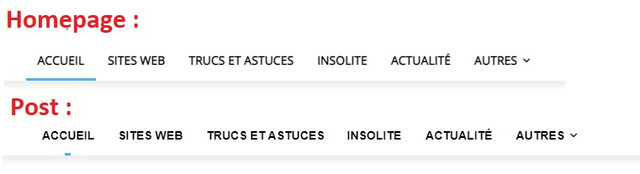
I tries deactivating my cache plugin and emptying all caches but it’s not coming from that..
Any idea ?
 twsillimanian
 Update, I’m trying to look into it, it looks like the problem is with wordpress, instead of loading the mobile version of the page, it loads the desktop version like an automatic modified version of the desktop homepage designed for mobile
another update: I get what you mean by mobile responsiveness, I guess that’s it, it loads the mobile responsiveness version instead of the custom mobile-homepage and header I made. Sad to say, I still need help with it.
-
This reply was modified 5 years by
twsillimanian.
-
This reply was modified 5 years by
twsillimanian https://www.twsillimanian.com/
I’m not sure but where the mobile responsive version is, but I think I’m using the mobile page one since I had to make my custom header, homepage layout in mobile, and category page.
I’m thinking im using mobile page because that’s the one I clicked on and edited, the button right at the top right in /wp-admin
Also I disabled the mobile theme plugin since I was thinking that was the problem. I disabled it earlier and the wrong homepage and header still appears. I tried it on phone, and different browser the same problem occurs too.
 jiboyeolaoye
 Hello , i recently tried uploading posts to these categories, when i uploaded them the footer changed colours. However the posts do not come up on the homepage and also when i click on the categories . They only pop up on “Popular Posts” . Please i really need your help resolving this .
twsillimanianToday I accessed the live site, everything is good on the desktop version, but once I tried to see the mobile version through Developer tool in chrome it loads the wrong header and homepage.
But once I refreshed it a few more times and wait a few minutes it loads the correct homepage and header, how to remove the wrong homepage and header from loading?
Here is how it should look like: https://postimg.cc/1fJBNKyV
This is what the wrong homepage and theme looks like, it loads initially sometimes: https://postimg.cc/Hcw4WwSx
 amitfahad
1. Suddenly I got a problem that on my mobile, my website’s front page is not showing the menu bar and footer. If you check from the desktop you will see everything is okay. But when checking from mobile and google’s pagespeed insights or with lighthouse (mobile test), you will see that the front page of the website has default elements and no menu and footer that I have created. The problem is only on the homepage. You can see the pictures I have added. How can I get rid of it? I have added the snapshot.
https://imgur.com/a/1xlHWTc (default menu on front page)
https://imgur.com/a/uZyDfGy (actual meu on mobile)
2. After this, now I see many articles do not show ads whether some of the articles are showing. I want to get rid of this problem too. I am using ad inserter but I don’t know why this happened.
Thanks. Regards.
 Calin
Calin Hi,
Make sure that you have set for the homepage a static page https://forum.tagdiv.com/newsmag-homepage-how-to-build-and-set-it/ if you have it, then you can also edit the page from here -> https://i.imgur.com/ICxW8AW.png
Hope this will help!
Bettina Hello!
I just explained you above that you are not able to customize so much the mobile theme version. So, unfortunately, you can not move the elements on the page, but what you can do there is to deactivate some elements(show/not): https://www.screencast.com/t/mrZoW8PdiQUm
Also, with mobile theme plugin enabled, you can not change your footer.
The Mobile Theme is a performance optimized theme included in the Newspaper main theme and it loads only for mobile devices. It comes with its own templates for page, post, category, etc so your current templates from the desktop theme will get converted to the mobile theme layout. For more details, please take a look here: https://forum.tagdiv.com/the-mobile-theme/
If you want to use a mobile page, then you need to assign it to your homepage. For more information about this mobile version please take a look in this article: https://tagdiv.com/newspaper-10-3-7-update-brings-customizable-and-fast-mobile-pages/
Please note you should deactivate the Mobile theme plugin if you want to use mobile pages.
Thank you!
 _edwin_
 Hello Anamaria, I really don’t know what is happening. Now I see the good page and I do the same as before. I have an other issue, I used a template for the homepage (pc) but when i go in tagdiv to the mobile version I see something else than the one on te mobile phone?? What I am doing wrong??
Thanks
 inpeaks
 After performing CSS analyzer to the homepage, the site got distorted. Then i reverted to the previous version of the theme (10.3.9.1) it looks fine. Whenever it is updated to 10.4 version, it again gets distorted.
Request your support on the same.
 pietro1789
Hi, I insert columns in the home with div composer tag but on the site the changes of the columns are not saved. Can anyone tell me why?
 Rodrigobolivar
Hello, I hope you are doing good.
I’m experiencing an issue on my blog’s images at the homepage.
my website (https://nutrindobem.com.br/)
Some blocks are not showing images, according to the links:
https://www.screencast.com/t/4tWFQ2NW
https://www.screencast.com/t/MqeONV1OZ
If I go to edit my homepage at TagDiv Composer, the images displays how they should be:
https://www.screencast.com/t/Ol0k1PLmim
https://www.screencast.com/t/DV0sdUAsR
I have already regenerate all images multiples times, following the steps on this link: https://forum.tagdiv.com/using-the-theme-with-existing-content/
right after I had change on block settings.
Thanks for all your help.
 jasonpel
 Hi,
All of the templates have the same “active & hover style” (style 3 background). When the homepage is selected, the style is correct BUT when any other menu item is selected, or 404 page, search from menu page, or tag page is selected, the style is broken.
The menu style on the home page, author page, and single post page are correct.
Please see the following screens:
Correct: https://imgur.com/a/R5tOC2q
Broken: https://imgur.com/a/s8Ow5Vn
I have emailed login info to contact@tagdiv.com so you guys can login to my site and help fix this issue.
Thank you!
 dcaceres
 <quote>1. If you want to use AMP, you can use the Mobile theme plugin with AMP, and set the mobile theme template on AMP version</quote>
I activate the option AMP but I still see all this info on my homepage logged as Admin:
https://imgur.com/3gSHC3q
For 2 and 4 seems that the box is not from our theme, but from the GDPR plugin used.
Ok. I change to WP GDPR Compliance plugin. It’s solved
3. Please make sure if these titles are translated in Theme Panel -> Translation -> Translations =>
I already made it, but don’t work: https://imgur.com/QTD0BxU
-
This reply was modified 5 years by
dcaceres.
 Anamaria
 Hello,
For the comments on homepage please enable this option from Theme Panel -> Template Settings -> Page Template => https://www.screencast.com/t/oZDjmaCk1JnL
Hope this helps you!
Thank you!
 tarakenny
I tried all the suggestions in the support, regenerate thumbs etc.- but nothing works.
Please help! this is very frustrating. I don’t see how to add an image showing you how blurry the photo looks?
I don’t want to provide the URL in a public forum? It needs to be private.
All I’m doing is uploading a replacement image to this block, and it’s ridiculously blurry.
PLEASE HELP! I’ve spent way too much time trying to get a simple thing to work. Never had these issues in WordPress before.
IN FACT: Can you please email me so I can send you log in details – because really nothing seems to be working as it should. If I add padding, it subtracts space instead of adding it.
I’ve spent all day trying to get ahead, and I’m about 10 days behind.
I’m working on the front page.
Pretty desperate to get this theme working like it promises.
Thank you in advance.
 digit
digitMobile homepage created through tagDiv composer is not showing on mobile device. The desktop site is showing up responsive. How to integrate mobile homepage with desktop homepage?
 Demir
Demir Hello!
Here you see the normal situation, that is, no mobile page has been assigned to the page.
Then, following all the steps in the video, I created a new mobile page and assigned it to the homepage.
This is the situation after cleaning the entire cashe. As you can see, although the mobile page came the way I wanted, the desktop page was broken. However, when I enter the admin panel from the browser, the page looks normal. I’ve tried Firefox, Chrome, Safari, Opera browsers, the page comes up with a change like here. The mobile page was exactly what I wanted, but the desktop view of the home page was distorted. I think there must be a mistake here.
I reverted the changes because the view of the site was corrupted.
Summary, I couldn’t change the mobile homepage as I wished.
Regards
-
This reply was modified 5 years by
Demir.
Anamaria Hello,
You need to add the favicon, in Theme Panel -> Header -> Logo and Favicon => https://www.screencast.com/t/H4ucPC2wwz
Also, on the homepage there’s an option Customize icon => https://www.screencast.com/t/I2uVvP4b -> Site identity -> Site icon -> Change image -> publish => https://www.screencast.com/t/lY9WEOZEj
Please make sure that you have cleared your cache.
Hope this helps you!
Thank you!
Anamaria Hello,
1. To set a specific color for each category, if it is so, then you can use a custom CSS like this one => https://www.screencast.com/t/WLgD2hJNMWN3
This is the code
.td-module-image a[href$="/music/"], .td-meta-info-container a[href$="/music/"], .td-module-container a[href$="/music/"], .single .td-category a[href$="/music/"], .tdb_single_categories a[href$="/music/"] {

background-color: green;

}

.td-module-image a[href$="/architecture/"], .td-meta-info-container a[href$="/architecture/"], .td-module-container a[href$="/architecture/"], .single .td-category a[href$="/architecture/"], .tdb_single_categories a[href$="/architecture/"] {

background-color: red;

}

.td-module-image a[href$="/video/"], .td-meta-info-container a[href$="/video/"], .td-module-container a[href$="/video/"], .single .td-category a[href$="/video/"], .tdb_single_categories a[href$="/video/"] {

background-color: blue;

}

.td-module-image a[href$="/architecture/"], .td-meta-info-container a[href$="/architecture/"], .td-module-container a[href$="/architecture/"], .single .td-category a[href$="/architecture/"], .tdb_single_categories a[href$="/architecture/"] {

background-color: red;

}
You need to change the category with your category (example: art with music) and also, you can change the color.
Set the code in Theme Panel ->Custom code -> Custom CSS -> https://www.screencast.com/t/St204VtFl3NU
2. The Posts Loops settings are divided into 4 tabs: General, Layout, Style, and CSS. The Posts loop is a special block and doesn’t have filtering options, you can only sort it =>https://www.screencast.com/t/geckLSYd5sa, so if you have set the Posts Loop on the homepage, then will display all post of all categories, if you have set the Posts Loop set on the category template, then will display the posts only from that category.
Hope this helps you!
Thank you!
 angiseserman
Hello,
I have 2 questions.
1. Can I change the color of a particular category and have it change everywhere on the site (in the mega menu, in the homepage, in the sidebar). I used the option in the Theme Panel but it only changes on the Single Post Page.
See this screenshot
https://imgur.com/FFj7qk4
2. I would like to use a filtering menu for a Posts Loop, see screenshot. The way I managed to set it up now, the Category title link takes me to the Category Page. I would like for the posts in the grid to filter according to the category chosen.
https://imgur.com/7s5nggc
Thank you,
Angela
 beckib
Hi – I created a mobile page for my homepage (not using mobile theme) and edited it with TD Composer. It looks great on mobile, but is also displaying on tablet where it looks horrible. Further, I can’t adjust the tablet layout when revising mobile page and selecting tablet (it also adjusts mobile). I’d rather use the original page’s tablet layout. Is there a way to fix this?

