
- NewspaperHomepage – How to build and set it
- NewspaperHow to edit modules for Flex Block X
- NewspaperGeneral Options that May Interfere with the Newspaper Theme
- NewspaperThe Newspaper Mobile Theme: Introduction
- NewspaperHow to Add a Logo in Newspaper
- NewspapertagDiv Shop
- NewspaperHow to Use tagDiv Cloud Library
- NewspaperDesign your Post Pages using the Cloud Library Templates
- NewspaperHeader Builder
- NewspapertagDiv Cloud Library Plugin
- NewspapertagDiv Composer Tutorial
- NewspaperNewspaper theme documentation
- NewspaperThe Mobile Theme
- NewspaperPage templates
- NewspaperTheme Colors Introduction
- NewspaperFooter Builder
- NewspaperMain Menu
- NewspaperPre-built Websites: Introduction
 Skylar20
I created a footer page using the Showcase footer from the Cloud Library. In TagDiv on the footer page, I added an Ad Block and have it referring back to Custom Ad1 on the Ads theme panel so that I can choose the ad size. The footer will appear on category pages and blog post pages successfully, but it does not show on the homepage. I went through all of the footer settings, template settings, etc in theme panel to see if there was something for a home page setting that was not switched on. How do I get the footer custom ad1 to show on homepage?
2nd question: – is there a setting or way to make the footer custom ad sticky? I would like for the ad in the footer to be visible even if a visitor does not scroll down to the bottom.
Thank you.
 antoj
antojHello, all of the sudden I`m getting this error when I try to edit homepage via TD composer:
Error at rows: 9(models) : 0(dom). The model does not match the content
website is aktuelno.me
 Benedict Paramanand
 According to screenshot it says we can disable the mobile theme for pages or posts we can do it. Is it possible disable the mobile theme for homepage?
 minilittlethings
 Thank you very much for your answer. And just one more question. I installed the footer template “Footer Fashion Pro” on my homepage and modified several things. And as you can see in the link photo https://we.tl/t-MTlmpTol5g, you will see that I have created a submenu with four sections (Privacy policy/ Magazine/ About us / Contact). I would like to know how I can create pages for each of these sections. I mean, I if I click on contact section, I want a new page to open with the contact information. And the same for the rest of the sections. I need to create 4 pages and linked o connect them to the sections.
I’ve been trying to figure out how to do it through the footer part from the theme panel but I can’t find it. Because when I imported the template I have not created any footer menu and I just renamed the parts that were already in the template. Excuse me if I haven’t explained myself well.
 learn4funs
Hello,
I want to create my website https://www.learn4funs.com home page just like this.
3 posts on horizontal row, Then vertical row is already there, after that another 2-3 horizontal row for 3 post each.
Just like this …
but currently, category page views show this, I mean I managed to show this way but the home page not able to show in this way.
The homepage is just looking like this.
https://prnt.sc/ph8m54
any help regarding this would very help ful.
 Excelbud
Is there a way to remove homepage posts. Instead of limiting them to 10 posts. I just want to remove the entire section. I attached a screenshot.
Excelbud
 notizieoggi
 works but appears on all pages and not only homepage.
is there some file .php wheither I can put the code?
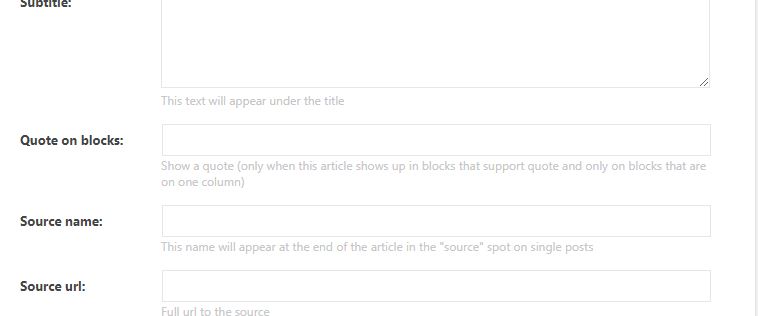
notizieoggiHow can I put the “Quote on blocks” into homepage?
Which are the blocks available to use this?
 meri
meriHi,
I’m using a Cloud template for the header on http://www.mondeoz.com (thanks again Bogdan for your help).
But now the sticky menu is wrong. I read a post from Calin explaining how to modify the sticky menu and I did it from the homepage. But it doesn’t apply everywhere!
1/ How can I make sure my new sticky menu applies everywhere?
2/ The Search icon won’t go at the right like on the main menu. I double-checked all the setting but couldn’t find where the problem was. Can you help?
3/ When you click on the Search icon, you can read “Search” next to the field. I modified that by “Rechercher” in Search Form > Button > Text but it doesn’t apply. Can you help?
Thanks
 Vlad S
 Hello !
The page speed is established on the actual page that is loading. For example. If your homepage (which is the first to load when you go to your site like http://www.example.com) the page speed will be calculated based on that. So the answer is no, your page speed should not be affected by using more templates. Also you can use the Category Description element which is located in the tagDiv Composer and it will automatically pull the Category Description that was set by you in the wordpress as you can see here: https://www.screencast.com/t/GVUqafZJb
I hope this was helpfull !
Thank you !
 Anonymous
Hello TagDiv,
i have a problem with my instagram ID. i putted it in my setting as it was instructed:
“INSTAGRAM ID
Enter the ID as it appears after the instagram url ( ex. instagram.com/myID ) ”
but when i refreshed my website it didn’t worked and instead this message appeared in my homepage: (Instagram data error: Instagram data is not set, plese check the ID)
could you please help me with this issue?
Regards.
 findlay
Hi,
I would like to get rid of the second instance of this sidebar widget on my homepage https://wagglydogs.combecause it’s a duplicate
of the one before it.
How can I do That?
 divike
I have customized the homepage into different news sections, it worked find at some point. But after a few days ago I realized the home page techafriqa.com which is the ‘news’ page now shows blank, but I can see and read a single post if I visit with the exact post url eg: this post
When I try to visit the pages module inside word-press to see the individual pages, it throws this error: The site is experiencing technical difficulties. Please check your site admin email inbox for instructions.
Vlad S Hello !
That can be inserted by editing your homepage and post template in order to achieve the similar layout.
Find out more about it here: https://forum.tagdiv.com/design-post-pages-using-cloud-library-templates/
Thank you !
 CyberNews
 Hi,
How can we use the newsletter in homepage with same style in the post pages.
 ipp_family
Hello !
I just bought newspaper template and install animal demo, unfortunately it displays an error message on my homepage. Could you resolve it ?
Best regards
 Mariak
 1 I want to remove crumb borders and remove the blank space there. Check here: http://www.talkofjuba.com/entertainment/ just under the 728×90 advert banner. Please help.
2. I want to remove the border on homepage under the 728×90 advert banner. Check here: http://www.talkofjuba.com/
3. I want to remove the same border also on the top of pages
Please help
Mariak Thanks you ae right. There are more borders on the homepage, on the top of the categories and single pages.
Please give me code to remove these
 UsmanSwift
 I’m that custom thumbail placeholder is not showing on all posts…. see on homepage… https://newsangels.com/
notizieoggiI need to insert code like this:
<head>

<script type="application/ld+json">

{

  "@context": "https://schema.org",

  "@type": "Organization",

  "url": "http://www.example.com",

  "logo": "http://www.example.com/images/logo.png"

}

</script>

</head>
only in the homepage. If I use the “Google Analytics” section in the theme panel, this code will spread to all pages.
How can I put this only into homepage?
 GiadaBenassi
Hi,
I have a problem with the AMP version of the THEME. I have installed Mobile Theme of TagDiv and AMP plugin for WordPress. But when i try to see the mobile website, the AMP page isn’t linked in this version. I can reach them only put ‘?amp’ at the end of the URL. I have the AMP version of the category archive and single article. The homepage and contact page they must remain with the original version. How can i do?
Thanks
 virendradesai
 I tried disabling mobile theme on Homepage and few other pages but they are still shown as mobile theme. Can you help me resolve the issue?
 Calin
Calin Hello,
Make sure that the embed posting of your Facebook/Instagram are set on your homepage using a column text or text with title in text section, also make sure that your accounts are public -> http://prntscr.com/pftz76
Thank you!
CyberNewsHi,
Author name, Category, and Date not Displayed on the homepage.
Screenshot: https://ibb.co/CnDqcVq
Domain: https://cybersecuritynews.com
virendradesaiHello. I activated the Official AMP plugin as well as mobile theme. However, while I love AMP , I want my homepage and few other pages to be non-AMP…
But, it is just not happening, even after localised selection of pages as non-AMP and deselection of ‘Pages’ and ‘Homepage’ in official AMP plugin, they still appear as AMP. Please help. My website link is Website
http://www.e18finance.com
Regards,
Virendra
