
- NewspaperRetina Images
- Thumbnails vs. Featured image size
- NewspaperIntroduction to CPT and ACF with Newspaper Theme
- NewspaperFlex Block Settings Guide
- NewspaperThe Newspaper Mobile Theme: Introduction
- NewspaperBig Grid Flex Settings
- NewspaperAd Box Element and Ads Overview
- NewspapertagDiv Composer Tutorial
- NewsmagAbove footer ads
- NewsmagSmart list ads
- NewspaperThe Mobile Theme
- NewsmagUsing other ads
- NewsmagArticle ads
- NewsmagSidebar ads
- NewsmagHeader ads
- NewsmagTheme thumbs
- NewsmagFont customization
- NewspaperUsing Other Ads
- NewspaperTheme Thumbs
- NewspaperHeader ads
 InstallationComplete
Is there a documented list of what sizes each of the blocks are?
Thanks!
IC
 simchris
 Basically create a strategy of the images thumbs you will actually need based on the block sizes actually used, plan to perhaps use more of the same module/block than a whole bunch, then turn off all the image sizes for blocks you’re not using from the theme panel.
Also, trick we use here is making the two smaller sizes in the WP > admin > media the same as the most popular block sizes, which cuts two sizes out of the images also.
Upshot, if you have 5 thumbnail sizes used, you will get 5 thumbs made for each image uploaded.
Also, another trick we use here, for images ONLY placed inside of posts, we just FTP them to our media folder, and then just load them by name in the HTML of the post. 🙂
 slashedbeauty
Is there a way to limit thumbnail generation so that the different thumbnails only generate for featured images instead of each and every photo uploaded? They’re putting a load on my server, but I’m afraid to turn certain sizes off on the chance that I change which blocks I use and then images will be missing.
 Andrei L.
 Hi
The import function won’t work properly from Newspaper to Newsmag because the selectors are different from one theme to another. For example if in Newspaper theme you have a background color set for main menu by importing the style in Newsmag this option won’t work. Some of the options will e recognized bot some will not be because of the difference between the css selectors.
The pages built with Visual Composer will be recognized by Newsmag theme as the shortcodes are the same. It won’t be recognized for example a block 18 because in Newsmag theme this block does not exist, but the commune elements will be recognized fine.
Also you will have to regenerate all thumbnails as Newsmag uses different sizes then Newspaper: https://forum.tagdiv.com/thumbnails-fix-strange-looking-images-on-blocks/
Before making any changes make sure you do a full backup to your current wp-install and the database also: https://codex.wordpress.org/WordPress_Backups This is a security measure, in case something goes wrong you can always get back to the previous version.
I hope this help.
Thanks!
 Bogdan B.
 Hi,
There is no ideal size. Different containers use different thumbs. You will need to assess the elements you will use on your site and make sure you have the proper image sizes that will fit the biggest container you use. Then you can check the aspect ratio for the images so they will not be cropped badly.
If the big grid 1 container is the biggest container used you can use images of 800×600 for example (in order to have high quality on posts as well.) The post template you use is again a variable in this as the big image templates 3, 4, 6, 7 and 8 require bigger images to display properly.
Hope this helps.
Bogdan B. Hi,
At the moment you have a js error due to plugin conflicts so none of your images show up. You need to identify the plugin that causes it and remove/replace it so your images will show up again. Then you need to upload bigger images if you want them to display properly inside the big grid. Here is a list of thumbnail sizes our theme uses: https://forum.tagdiv.com/theme-thumbs/
In your case this image: http://screencast.com/t/wZHFkad7vXUf is 672×336 and the container for the biog grid 1 is 534 X 462 (although yours is modified) You need to have at least the container size width and height.
Thank you
Bogdan B. Hello,
This is not a problem but a feature. Our theme uses different thumb sizes for every picture in order to decrease loading times. Here is a list of thumbnails used by our theme: https://forum.tagdiv.com/theme-thumbs/
Imagine if the theme would load the full size image every time it loaded the homepage (which contains lots of small images) that would be a very very slow page to load.
In order to remove the unused thumbnails you need to figure out exactly what elements you use on your website and simply remove the thumbnail from here: http://screencast.com/t/LNrJhB7UeAe After this operation you need to use the “force regenerate” plugin.
I hope this helps.
Thanks.
 AlexaB
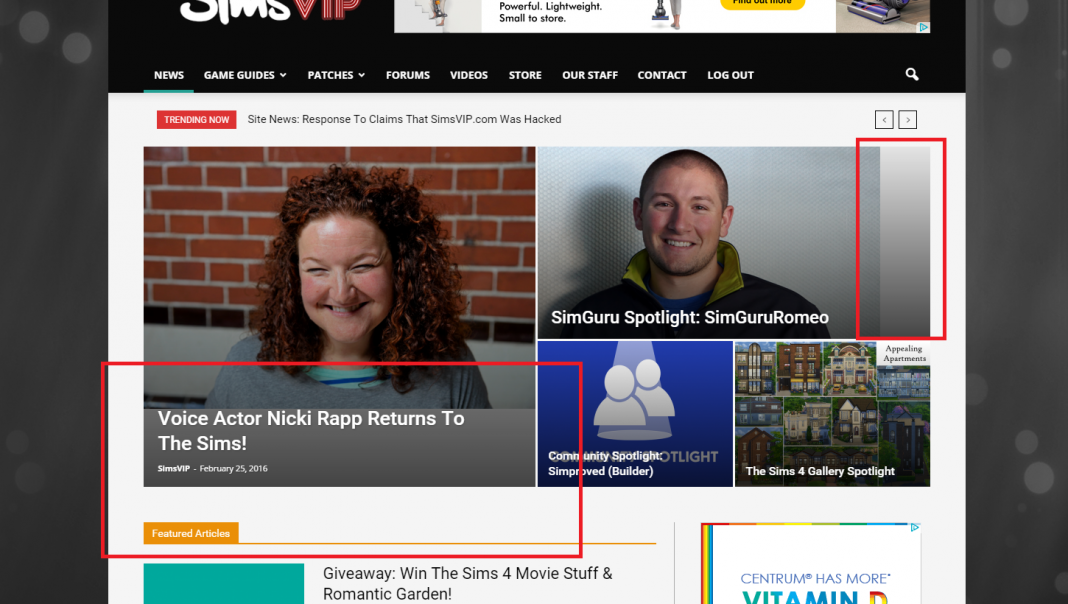
I’ve recently noticed an issue with featured images, where they are cut off in Big Grid 3, and are also not filling the space in the article lists. They are above and beyond the sizes required (min size) but I cannot seem to narrow the issue down.
I have disabled plugins to test if they were causing a conflict, and none of them resolved the issue. I feel as though the theme is no longer stretching them to fit? I can’t really explain what I mean, but here’s a pic.
Any help? – Link http://simsvip.com/
Bogdan B. Hello,
The background click ad is meant for the full background of the website. You will need to upload a big image for the background. A full HD one is recommended.(1920×1080) You can try different sizes though and see how they fit.
Thank you!
simchris I think you have to set the image as a ‘featured’ image on a post for it to fire off all the thumbs; which is how WP works now. I think if you upload an image from media manager, it may only create the three ‘default’ sizes you set in WP admin > settings > media.
Correct me if wrong, but that seems to be how it works on our sites. 🙂
 supremefactory
Hi,
I’m using ajaxify wordpress site pro plugin in order not to reload #fap-wrapper id that contains the fullwidth audio player.
So I only reload td-outer-wrap or td-container, and the player in #fap-wrapper works but the page doest’t load the menu’s dropdown, tweet button, some images, video sizes, and the load more pagination.
Can you please help me what to ajax and how to reload the theme js files?
Please find the private link below:
http://www.dmcworld.net/dev/
Many thanks.
Bogdan B. Hello,
Different header styles use different logo sizes. Unfortunately the theme has no settings for image dimensions. If you want to control the logo dimensions, you need to use a header style that displays the full logo. This way the image you upload will be displayed full size without re-sizing.
You can check different header styles here: https://forum.tagdiv.com/header-styles/
Thank you!
simchris Yes, see the theme docs. It shows you how to put in your own ads.
You just need to use HTML to create the three div sizes for responsive layouts, and each of those wraps your ad elements, whether locally hosted graphic, or external one.
Of course knowing the very very basic HTML helps, like an anchor tag (a) or image tag (img) will help.
 cstyn
cstynHello. How to add a background image like this to fit perfectly ? site is: usac lea ts.com/images/background.jpg
What sizes ? I know is 1980×1020, but the size in background what is it to leave it black to now overcome the margin ON ANY RESOLUTION ? Thank you for help. Any template around ? I can’t make it the have because of the pixels count.
 Andrii
demo content, image ок http://joxi.ru/ZrJNb3nh1RejNr my image content, different sizes Photo http://joxi.ru/823bq0ws6MKRMm
Why?
what to do ?
Andrei L. Hi
I am not sure why this error appear on your site as the cede it’s tested and works fine. Try to replace only this function in td_module.php file. The function begin here: http://screencast.com/t/s9R3SxjokIL and ends here: http://screencast.com/t/5DMZLPKdApi Delete the origilanl function then paste this one:
function get_image($thumbType, $no_link_image = false) {
        $buffy = ''; //the output buffer
        $tds_hide_featured_image_placeholder = td_util::get_option('tds_hide_featured_image_placeholder');

        // do we have a post thumb or a placeholder?
        if (!is_null($this->post_thumb_id) or ($tds_hide_featured_image_placeholder != 'hide_placeholder')) {

            if (!is_null($this->post_thumb_id)) {
                //if we have a thumb
                // check to see if the thumb size is enabled in the panel, we don't have to check for the default wordpress
                // thumbs (the default ones are already cut and we don't have  a panel setting for them)
                if (td_util::get_option('tds_thumb_' . $thumbType) != 'yes' and $thumbType != 'thumbnail') {
                    //the thumb is disabled, show a placeholder thumb from the theme with the "thumb disabled" message
                    global $_wp_additional_image_sizes;

                    if (empty($_wp_additional_image_sizes[$thumbType]['width'])) {
                        $td_temp_image_url[1] = '';
                    } else {
                        $td_temp_image_url[1] = $_wp_additional_image_sizes[$thumbType]['width'];
                    }

                    if (empty($_wp_additional_image_sizes[$thumbType]['height'])) {
                        $td_temp_image_url[2] = '';
                    } else {
                        $td_temp_image_url[2] = $_wp_additional_image_sizes[$thumbType]['height'];
                    }

                    $td_temp_image_url[0] = td_global::$get_template_directory_uri . '/images/thumb-disabled/' . $thumbType . '.png';
                    $attachment_alt = 'alt=""';
                    $attachment_title = '';

                } else {
                    // the thumb is enabled from the panel, it's time to show the real thumb
                    $td_temp_image_url = wp_get_attachment_image_src($this->post_thumb_id, $thumbType);
                    $attachment_alt = get_post_meta($this->post_thumb_id, '_wp_attachment_image_alt', true );
                    $attachment_alt = 'alt="' . esc_attr(strip_tags($attachment_alt)) . '"';
                    $attachment_title = ' title="' . esc_attr(strip_tags($this->title)) . '"';

                    if (empty($td_temp_image_url[0])) {
                        $td_temp_image_url[0] = '';
                    }

                    if (empty($td_temp_image_url[1])) {
                        $td_temp_image_url[1] = '';
                    }

                    if (empty($td_temp_image_url[2])) {
                        $td_temp_image_url[2] = '';
                    }
                } // end panel thumb enabled check

            } else {
                //we have no thumb but the placeholder one is activated
                global $_wp_additional_image_sizes;

                if (empty($_wp_additional_image_sizes[$thumbType]['width'])) {
                    $td_temp_image_url[1] = '';
                } else {
                    $td_temp_image_url[1] = $_wp_additional_image_sizes[$thumbType]['width'];
                }

                if (empty($_wp_additional_image_sizes[$thumbType]['height'])) {
                    $td_temp_image_url[2] = '';
                } else {
                    $td_temp_image_url[2] = $_wp_additional_image_sizes[$thumbType]['height'];
                }

                /**
                 * get thumb height and width via api
                 * first we check the global in case a custom thumb is used
                 */
                if (($td_temp_image_url[1] == '') and ($td_temp_image_url[2] == '')) {
                    $td_thumb_parameters = td_api_thumb::get_by_id($thumbType);
                    $td_temp_image_url[1] = $td_thumb_parameters['width'];
                    $td_temp_image_url[2] = $td_thumb_parameters['height'];
                }

                $td_temp_image_url[0] = td_global::$get_template_directory_uri . '/images/no-thumb/' . $thumbType . '.png';
                $attachment_alt = 'alt=""';
                $attachment_title = '';
            } //end    if ($this->post_has_thumb) {

            $buffy .= '<div class="td-module-thumb">';
                if (current_user_can('edit_posts')) {
                    $buffy .= '<a class="td-admin-edit" href="' . get_edit_post_link($this->post->ID) . '">edit</a>';
                }

                if ($no_link_image == true){
                    $buffy .= '<img width="' . $td_temp_image_url[1] . '" height="' . $td_temp_image_url[2] . '" class="entry-thumb" src="' . $td_temp_image_url[0] . '" ' . $attachment_alt . $attachment_title . '/>';

                    // on videos add the play icon
                    if (get_post_format($this->post->ID) == 'video') {

                        $use_small_post_format_icon_size = false;
                        // search in all the thumbs for the one that we are currently using here and see if it has post_format_icon_size = small
                        foreach (td_api_thumb::get_all() as $thumb_from_thumb_list) {
                            if ($thumb_from_thumb_list['name'] == $thumbType and $thumb_from_thumb_list['post_format_icon_size'] == 'small') {
                                $use_small_post_format_icon_size = true;
                                break;
                            }
                        }

                        // load the small or medium play icon
                        if ($use_small_post_format_icon_size === true) {
                            $buffy .= '<span class="td-video-play-ico td-video-small"><img width="20" class="td-retina" src="' . td_global::$get_template_directory_uri . '/images/icons/video-small.png' . '" alt="video"/></span>';
                        } else {
                            $buffy .= '<span class="td-video-play-ico"><img width="40" class="td-retina" src="' . td_global::$get_template_directory_uri . '/images/icons/ico-video-large.png' . '" alt="video"/></span>';
                        }
                    } // end on video if
                  }
                else{
                    $buffy .='<a href="' . $this->href . '" rel="bookmark" title="' . $this->title_attribute . '">';
                    $buffy .= '<img width="' . $td_temp_image_url[1] . '" height="' . $td_temp_image_url[2] . '" class="entry-thumb" src="' . $td_temp_image_url[0] . '" ' . $attachment_alt . $attachment_title . '/>';

                    // on videos add the play icon
                    if (get_post_format($this->post->ID) == 'video') {

                        $use_small_post_format_icon_size = false;
                        // search in all the thumbs for the one that we are currently using here and see if it has post_format_icon_size = small
                        foreach (td_api_thumb::get_all() as $thumb_from_thumb_list) {
                            if ($thumb_from_thumb_list['name'] == $thumbType and $thumb_from_thumb_list['post_format_icon_size'] == 'small') {
                                $use_small_post_format_icon_size = true;
                                break;
                            }
                        }

                        // load the small or medium play icon
                        if ($use_small_post_format_icon_size === true) {
                            $buffy .= '<span class="td-video-play-ico td-video-small"><img width="20" class="td-retina" src="' . td_global::$get_template_directory_uri . '/images/icons/video-small.png' . '" alt="video"/></span>';
                        } else {
                            $buffy .= '<span class="td-video-play-ico"><img width="40" class="td-retina" src="' . td_global::$get_template_directory_uri . '/images/icons/ico-video-large.png' . '" alt="video"/></span>';
                        }
                    } // end on video if

                    $buffy .= '</a>';
                }

            $buffy .= '</div>'; //end wrapper

            return $buffy;
        }
    }
If you still can’t manage to solve this issue please address us via email at contact@tagdiv.com and provide wp-admin and ftp access so we can take a closer look at this issue.
Thanks!
-
This reply was modified 10 years by Andrei L..
Andrei L. Hi
All thumbs sizes can be fount in theme panel > block setting: http://screencast.com/t/IYZnAHswX For more details about featured image please check this topic: https://forum.tagdiv.com/topic/ideal-for-featured-images-size/
If you need further assistance please let us know.
Thanks!
 RBKMTM
 Andrei you are awesome!!! Thank you so much!!!!
I did everything and it seems to be fine.. Now my only question is regarding installing the demo.. If i install the demo as is (to mimic the newsmag site) how can i make it look like the newsmag site? Where can find i image sizes etc.
Also my link of the website is http://www.Tathaastu.com
Again.. thank you so much for helping.. love this template!
 bisstavanger
In the newspaper theme, how can i change the size and image of the social icons on the top menu and the footer?
 correiodoporto
 I do not like this … I can not for the way I want … I do not want the two image make a cut … I want the image from top to bottom …
http://imgur.com/RVMYvZl -> Img two (Vai no Batalha)
It is possible to add new sizes ? create a different size for a block ?
simchris You can try adding the free “thumbnail upscale” plugin which will allow your smaller images to be enlarged to fit the theme sizes 🙂 You may need to run regenerate thumbnails plugin after you add the upscale one to fix existing images —
hope that helped!
Andrei L. Hi
You need to name your images with exact same names as the ones already present in the indicated folder like here: http://screencast.com/t/2tcUoDss8kE Also you have to make the images at the exact same sizes in order to fit well on blocks and modules.
Thanks!
simchris Try uploading an image via the media manager and make sure the file is actually there ; if so, then it’s writable (or learn to use FTP and what CHMOD and file permissions on web server folders are). If it’s not, then theme cannot create pictures in the folder for the thumbnail sizes.
One also presumes you didn’t turn “off” all the image sizes for thumbs in the theme panel. 😉
Also make sure you’re not using any “auto minify” plugins as that can break stuff too.
 newtag
Hi,
i deactivated in the setting the thumnail size 0 x 420
when i upload a image in exactly 696×420 pixel – it uploads the original image example.png and ALSO creates a image in 696×420. In this case i have two times the same image in the upload folder. One time with example.jpg and the second one wiht example-696×420.jpg
1.How can i avoid the creation of the second image?
2.How can i call the default image in the modul.(i tried td_696x0 – works fine – it pics up the example-696×420.jpg image) – but how can i call the default full uploaded image (example.jpg) ?
Thank you
 gregy1403
Hi guys
I see on my server that every uploaded featured image is made in approx. 10 different sizes. How can i find out which sizes are in use and disable making of other sizes not needed?
Thank you
