
- NewsmagInstall via WordPress
- NewsmagInstall via FTP
- NewsmagInstalling pre-built websites
- NewsmagUsing the theme translations together with WPML
- NewsmagHow to update a plugin
- NewsmagNewsmag theme support
- NewsmagCustom Post Type Support
- NewsmagImport / Export theme settings
- NewsmagHow to add icons in the menu
- NewsmagRequirements for Newsmag
- NewsmagNewsmag documentation
- NewsmagHow to update the theme
- NewsmagBlock settings tutorial
- NewsmagHow to update the WPBakery plugin
- NewsmagIntroduction
- NewsmagMain menu
- NewsmagFeatured image or video
- NewsmagAuthor card
 deep16
Hello, i just bought this theme & after installing my website goes slow & can’t even handle 15-20 concurrent connections hosted on cloud server on Hostgator. can you please suggest some optimisation for the theme. the domain is karnalbreakingnews.com
 enjoypclife
 Hi Bogdan,
I am a Japanese user. I am poor at English, so I use Google translation.
I am also suffering from the same problem, and as a result of trying variously, I am working on it now.
1.From the WordPress management screen, change the theme to the default “Twenty Seventeen” and so on.
2.Stop & delete all plug-ins attached to “NEWSPAPER” below.
[revolution_slider_5][js_composer][td-amp][td-composer][td-mobile-plugin][td-multi-purpose][td-newsletter][td-social-counter][td-speed-booster]
3.Delete the installed “NEWSPAPER” theme.
4.Delete the illegal media being uploaded.
「tdm_pic_1」「tdm_pic_2」「tdm_pic_3」「tdm_pic_4」「tdm_pic_5」「tdm_pic_6」「tdm_pic_7」「tdm_pic_8」「tdm_pic_9」
5.Access the database using “phpmyadmin” etc. Delete the invalid post in “wp_posts”. The posting status was “inherit”.
6.Upload and activate the downloaded latest “NEWSPAPER” theme.
7.I just reset the setting of the theme just in case. It may not be necessary to do, as it is not possible to verify it is essential.
【WordPress>Newpaper>Theme panel>Import / Export>RESET THEME SETTINGS>Write[reset]>Click[Reset theme settings]】
8.Upload necessary plug-in plug-in and activate it.
9.Reset the “NEWSPAPER” theme as necessary.
10.Initialize cache plug-in and CDN.
・When changing the theme of “NEWSPAPER” from “8.7.2” to “8.1.2”, no symptoms appeared.
・I did not fix it even if I reinstalled the theme of “NEWSPAPER”.
・After deleting all the plugins that came in, I fixed it again by reinstalling theme and plugin.
・It is also displayed on the “tagDIV” site.
https://tagdiv.com/tdm_pic_1/
~
https://tagdiv.com/tdm_pic_9/
Here is the background.
https://zurap.jp/tdm_pic_1-delete-images-appear-agein-tagdiv-wordpress-newspaper-theme-hacked-repair/
 veteranstoday
Hi,
We are trying to debug this issue since 10-12 days, but still no luck, Every-time we post article on fb it shows other articles featured image and same image was showing for every new post we add,So we started testing by checking og:image url etc by installing yoast SEO plugin and it didn’t worked then We are getting lots of error from theme, our site was crashed so we deactivated all the plugin or u say normal troubleshoot we did as described in wordpress support, now after changing theme to default 20-17 theme it works fine, I disabled every plugin on VT today at 3:45pm (Sunday) except for WP Bakery (Theme) And then I tried to debug a VT post on FB Debugger
https://developers.facebook.com/tools/debug/sharing/ NO WORK.
this is the website url https://www.veteranstoday.com
So I disabled the THEME NEWSPAPER and put in the generic FIFTEEN Theme from WP
Then I went to debug on FB and it worked! Boom! The correct title and featured image were showing, so we know it’s theme error how to solve the pblm plz let us know
thanks
 jeumpanews
 Hello,
I have search through this forum concerning tagdiv composer error which is:
“Errors happened during tdcIframeData.init() -> bindViewsModelsWrappers()!”
But unfortunately there is no good fix that I can find so far.
1. I have uninstalled my SEO Yoast just in case, clear all cache including my browser, but still got error.
 bindViewsModelsWrappers()!” />
2. I’ve also checked the WP Super Cache settings and is according as intructed.
3. Since I updated the theme I didn’t use JS Composer plugin, and I’ve mentioned it on previous discussion in this forum, since I created a brand new page instead making a transition.
With all due respect, I sincerely hope that there can be a very fast solution on this matter, since I’ve been given a task from my office to complete their site soon.
Frankly speaking my schedule is very tight right now.
Thank you for your kind understanding.
-
This reply was modified 8 years by
jeumpanews.
 SLIndustries86
So, I have installed the social counter on my home page, setup the APP ID’s and everything, got the access token….the Twitter one works fine, however, the Facebook one keeps showing 0.
You can see i got it all configured correctly here.
 ctoweett
 Try this plugin to regenerate your images https://wordpress.org/plugins/force-regenerate-thumbnails/. Check it under the tools section of the wp-admin dashboard after installing.
 apgudkov
Hi, can’t install a demo, it shows an overlay and nothing happens.
 popek1990
Expanding post tekst after install and turn on ‘tagDiv Composer’
Screenshot : https://screenpresso.com/=HwzCg
When i Turn off plugins – it’s ok.
 arnimation
Hi, i installed the them on multisite so I can demo first to clients before purchasing a copy for them.
But despite several attempts on regen thumbnails and fixing wp setup based on instructions, making sure gd library is there, still.. the images inside the blocks are not resizing properly.
 waltlily
Hello,
I just installed a demo and i have got this weird code message displayed on top of the front page (index):
window.tdwGlobal = {"adminUrl":"https:\/\/lemonorail.com\/wp-admin\/","wpRestNonce":"dc7435532e","wpRestUrl":"https:\/\/lemonorail.com\/wp-json\/","permalinkStructure":"\/%year%\/%monthnum%\/%day%\/%postname%\/"};
Do you have any idea or any solution ?
Thanks,
Sam
 bhanu039
Hey Guys, I like the header style of craft Ideas demo and the way top menu + logo + main-menu looks and wants to do the same without installing the demo cuz it then affects another styling of category tags etc. So it would be really helpful if u can provide the styling or the code snippet which I can then put in my child theme stylesheet.
I have tried it by selecting the same header style and all but cannot achieve the same style for top menu + logo + main menu.
reply ASAP.
Thanks
 misterloop
Hi all,
Recently I installed the coffee blog theme of Newspaper8. Everything looks but at the homepage, the featured image of my blog looks way bigger than the real theme image and the title looks too small as compared to real theme title.
1. I tried adjusting the title length at the homepage via TD composer. It only increases the size of the featured image not the title.
Theme: https://demo.tagdiv.com/newspaper_blog_coffee/
My homepage image: https://prnt.sc/j20suz
 Anil
Anil I installed demo which available in theme and not used visual composer for any elements. So can i remove this plugin??
 diegpl
 My db was corrupted, I`ve reinstalled it. Problem solved. Tks!
 ckaraca
While i am installing newspaper 8.7, while upload the theme;
i see this message on browser;
“The link you followed has expired.
Please try again.”
 aldariann
 Error message from chrome.
Tried to uninstall and reinstall theme, same problem.
Uncaught TypeError: Cannot read property 'shortcode' of undefined
at js_files_for_wrapper.min.js?ver=__td_aurora_deploy_version__:434
at Function.m.each.m.forEach (load-scripts.php?c=1&load[]=jquery-core,jquery-migrate,utils,underscore,backbone,wp-util,moxiejs,plupload,jquery-ui-core,jquery-ui-widget,jquery-ui-mouse,jq&load[]=uery-ui-sortable&ver=4.9.5:15)
at js_files_for_wrapper.min.js?ver=__td_aurora_deploy_version__:434
at Function.m.each.m.forEach (load-scripts.php?c=1&load[]=jquery-core,jquery-migrate,utils,underscore,backbone,wp-util,moxiejs,plupload,jquery-ui-core,jquery-ui-widget,jquery-ui-mouse,jq&load[]=uery-ui-sortable&ver=4.9.5:15)
at Object.updateSavedShortcodes (js_files_for_wrapper.min.js?ver=__td_aurora_deploy_version__:433)
at Object.init (js_files_for_wrapper.min.js?ver=__td_aurora_deploy_version__:411)
at js_files_for_wrapper.min.js?ver=__td_aurora_deploy_version__:436
at js_files_for_wrapper.min.js?ver=__td_aurora_deploy_version__:436
 hinterlandgazette1
I recently installed the speed booster plugin but when I checked the status area it says it was disabled due to a conflict with Akismet. Is there some way around this because Akismet is a needed plugin to avert spam. Please advise.
I also looked at the page source for my site and I don’t see the following information after doctype and before head:
xmlns=”https://www.w3.org/1999/xhtml”
xmlns:og=”https://ogp.me/ns#”
xmlns:fb=”http://www.facebook.com/2008/fbml”> <!–<![endif]–>
Does that make a difference?
 Atelier Shen
 Hi @soaresrey,
This is caused by lacking of php-xml extension. You show install it on your server and restart apache or php-fpm ( if your are using nginx ). Hope this helps!
 architecture
 I have tagDiv Composer plugin installed and activated but I have NO Access to any screens shown on your Tutorial: https://forum.tagdiv.com/newsmag-block-settings-tutorial/
Something is not working, can you check my Theme? How do I send you my WordPress Login info privately?
 Edward
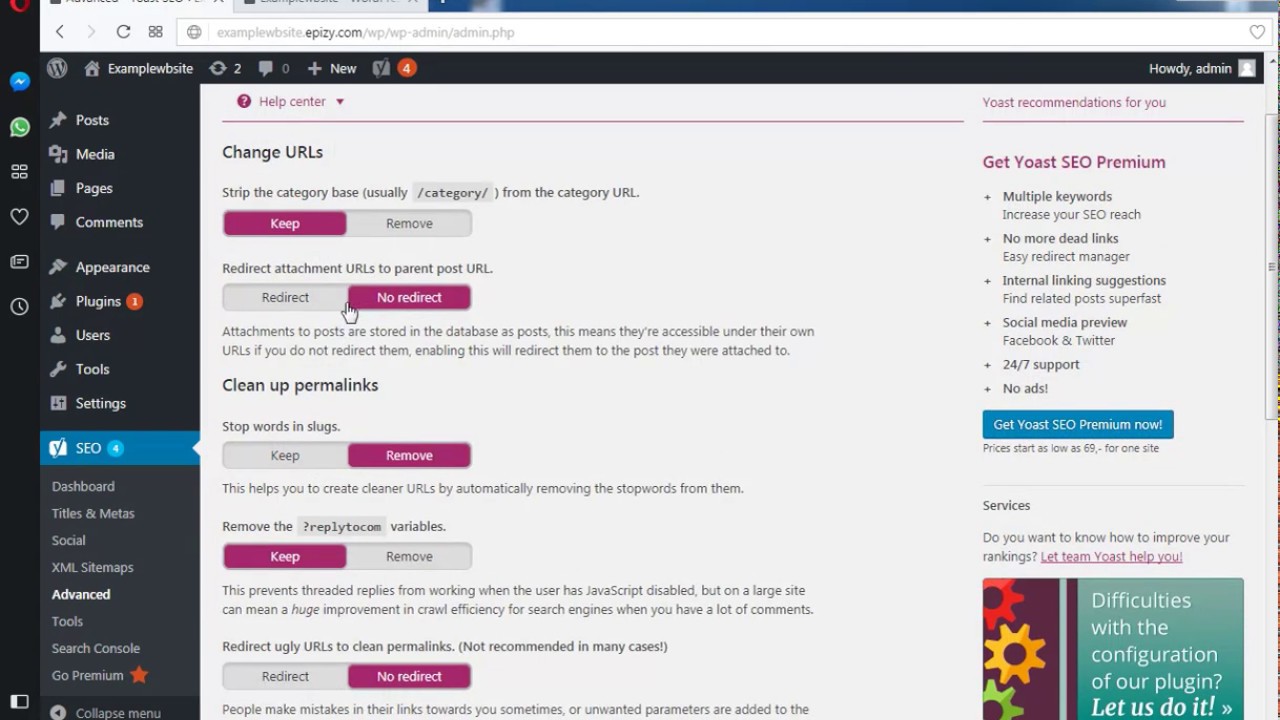
 When you upload an image or a video to WordPress, WordPress automatically creates an attachment URL for it, next to allowing you to link to the media item directly. This is much the same as a post URL, but it has no real SEO value. Most sites therefore never use these attachment URLs, but because WordPress sometimes links to them, they do start being indexed by search engines.
Install Yoast SEO plugin:
Yoast SEO long had a feature that allowed you to redirect attachment URLs for images to the post they were embedded in.
https://yoast.com/testing-yoast-seo-7-0/#media
 Catalin Catalin
  fahmineo
Hi Authors,
MY website: http://kissfmmedan.com have Popular (last 7 Days) in:
- News Ticker: https://i.snag.gy/dqIbHP.jpg, and
- Footer 1 widget: https://i.snag.gy/LHpnwb.jpg
But, based on my observations, since March 27, 2018 until now (Apr 5, 2018) the all the post not changes at all.
It’s like popular in all time.
I have set enable the Ajax Counting from panel: https://i.snag.gy/VR8pAr.jpg
And enabled 7 days post sorting: https://i.snag.gy/hmuZBL.jpg
I installed WP Super Cache plugin.
Should i install Jetpack? I don’t like Jetpack, it makes my website slowed down. I read this article Avoid these 35 WordPress plugins and your site will load faster
What I missed here?
Best Ragards
 Akpan Promise
 Hi Choyyer,
I just resolved this right now.
Check the system status here [your-domain.com]/wp-admin/admin.php?page=td_system_status
Follow the directive, ensure no missing PHP extensions, increase the maximum execution time.
Also use PHP 7 when possible.
Here are mine:
post_max_size ——— 128M
max_execution_time —–90
max_input_vars— —- -3000
SUHOSIN installed— —false
mbstring — —- — —-available
I hope this helps, you can edit them from your php.ini file if you have access to it.
 Bogdan B.
 Hello,
If you get a blank screen after the update please disable the tagdiv composer beforehand and delete the plugin. The composer will then install the new version automatically.
You can also try to add code in your htaccess as mentioned in this topic:
https://forum.tagdiv.com/topic/tagdiv-composer-goes-blank-when-i-try-to-edit-my-pages/
Thank you!



