
- NewsmagInstall via WordPress
- NewsmagInstall via FTP
- NewsmagInstalling pre-built websites
- NewsmagUsing the theme translations together with WPML
- NewsmagHow to update a plugin
- NewsmagNewsmag theme support
- NewsmagCustom Post Type Support
- NewsmagImport / Export theme settings
- NewsmagHow to add icons in the menu
- NewsmagRequirements for Newsmag
- NewsmagNewsmag documentation
- NewsmagHow to update the theme
- NewsmagBlock settings tutorial
- NewsmagHow to update the WPBakery plugin
- NewsmagIntroduction
- NewsmagMain menu
- NewsmagFeatured image or video
- NewsmagAuthor card
 Catalin
 Hello,
I suggest you download again the latest version of the theme from Theme Forest and install it via FTP way because this is the surest method in this case. Notice that plugin has been fully tested with the theme and should work without any problems. You have to do this again, clear all the caches and if you are using some untested plugins, try to disable all of these and leave just to active only the plugins that come bundled with the theme core files and check the results.
Hope this helps and let us know how it goes!
Thanks for the message!
 Acheterchinois
Hello everyone,
I installed the new theme yesterday however I have a problem with my web host since the installation.
There were more than 436 queries recorded over a period of 5 minutes to Facebook.
I specify that I use the Facebook API for Counter tagdiv. I also have an autopost plugin for Facebook and Twitter however it has never been a problem until the installation of the theme. It does not work anymore since installation (other problem).
Could you help me to tell me what is causing these massive queries?
Thank you in advance,
A +
 Simion C.
 Hi,
You could simply search for it in the Add new plugin section, in the WordPress dashboard
– https://www.screencast.com/t/Jw9QnQrryojk
Then install and activate the plugin.
Thanks
Catalin Hello vojta,
Make sure that you have installed the latest theme version via FTP way. Check your system status parameters to be increased according to our documentation here -> https://forum.tagdiv.com/system-status-parameters-guide/ and also, if you are using some untested plugins, try to disable all of these, leave just to active only the required plugins which come bundled with the theme and check the results.
Thanks for the message!
Catalin Hello brent,
Ensure that you are using the right version of the child theme. To be sure, try to download the latest theme packet from Theme Forest and install it again via FTP way.
Thanks for the message!
 Roman1012
I tried to do a theme update on option # 3. After I have installed the latest version Newspaper 8.5, the system requires me installation key. I enter the old key – you receive the answer that this key is already used. Had to restore previous version from a backup… Why?
Catalin Hello José Roberto Monteiro Faria,
Most likely, this error happens due to a bad theme installation. I recommend you to download again the latest theme version from Envato Market, Theme Forest and install it via FTP way because this is the surest method in this case. Check here -> https://forum.tagdiv.com/newsmag-install-via-ftp/
Thanks for the message!
Simion C. Hi,
Only one demo can be active at a time. If you have installed the Gadgets demo, installing a different demo will uninstall the current one. If you are interested in the Smart app demo homepage, you can create such a page using the newly introduced multi-purpose elements in the tagDiv composer.
The demo files like the demo design or homepage content, these can be seen in the theme files here
– https://www.screencast.com/t/WyOcZnyujN6E
Thanks
Simion C. Hi,
The header search seems to be in the right place at the moment
– https://www.screencast.com/t/11g8ja79V9ZY
In all cases until now the issue has been solved by clearing installed caches.
Thanks
Simion C. Hi,
I have inspected the website and I see the issue, there seems to be a delay before the stylesheet is loaded. Please try to disable the optimization plugin you have installed, clear all caching and check if the issue is still present.
Some optimization plugins or configurations can interfere with the loading of the resources and cause such issues.
Thanks
 nute
nute I installed the version of theme 8.1.2 and the comments come back,can someone of the support answer to solve the problem?
Please it is a serious problem and it is days that no one has written a solution !
thanks
Simion C. Hi,
Seems to be an issue with SSL. Try installing the plugin by FTP
– http://www.wpbeginner.com/beginners-guide/step-by-step-guide-to-install-a-wordpress-plugin-for-beginners/
Let us know the results.
Thanks
 nomoretechno
 Hi, the plugin seems to work now for desktop after uninstalling all plugins and the reinstalling.
However, a new problem keeps happening.
Every time I switch on the mobile plugin, my widgets in the sidebar (two tagdiv ad spots and a post block) disappear.
I add them back and they dont save. The only way I can get my sidebar back is by disabling the mobile plugin.
I tried switching off all plugins/cache etc but cant get the sidebar to work alongside the mobile plugin.
Please help.
thanks
 vamsinani24
I’ve updated to 8.5.1 manually, and cleared cache and everything, but facing this issue.
I can access the website in the mobile theme template, but the wp-admin is showing error – ‘HTTP ERROR 500’. I’m able to access all posts, but the wp-admin is not working on mobile.
Also, I’m facing an issue with revolution slider
1. I’ve installed demo slider and selected categories, but it only shows sometimes, and once I change to other categories, it stops showing the slider.
2. Why can’t I use a template I create on my own rather than using demo sliders? Becuase the one I created is showing in the preview, but not in the tagdiv composer.
 bindaslife
Hi
I am unable to open Per category settings (under Categories setting), just spinning. Installed version 8.5.1.
Please help.
 brent
brentI’m experiencing issues with the Theme Colors section of the theme panel. When I click a section I see the loading squares but nothing appears. The only menus that appear are under ‘Header > Header’, and ‘Footer > Footer / Sub-footer’.
I haven’t touched the Theme Colors area since my initial install but recently required some changes. This area was working fine back then.
Also within the ‘Theme Panel > Plugin’s Settings > Multi-Purpose’ section I get the following error:
<div class="td-box-control-full">
        <br><br>wp booster error:<br>td_api_base::mark_used_on_page : a component with the ID: tds_api is not set.<br>/var/www/html/wp-content/themes/Newspaper/includes/wp_booster/td_api.php<br><br>wp booster error:<br>Missing parameter: 'file'<br>/var/www/html/wp-content/themes/Newspaper/includes/wp_booster/td_autoload_classes.php<br>
<b>Fatal error</b>:  Uncaught Error: Class 'tds_api' not found in /var/www/html/wp-content/plugins/td-multi-purpose/td_panel_settings.php:22
Stack trace:
#0 /var/www/html/wp-content/themes/Newspaper/includes/wp_booster/wp-admin/panel/panel_core/td_panel_core.php(139): require_once()
#1 /var/www/html/wp-content/themes/Newspaper/includes/wp_booster/wp-admin/panel/td_view_panel.php(3): td_panel_core::render_panel(Array, 'theme_panel')
#2 /var/www/html/wp-content/themes/Newspaper/includes/wp_booster/wp-admin/panel/td_panel.php(103): include('/var/www/html/w...')
#3 /var/www/html/wp-includes/class-wp-hook.php(286): td_panel->td_theme_panel('')
#4 /var/www/html/wp-includes/class-wp-hook.php(310): WP_Hook->apply_filters('', Array)
#5 /var/www/html/wp-includes/plugin.php(453): WP_Hook->do_action(Array)
#6 /var/www/html/wp-admin/admin.php(224): do_action('newspaper_page_...')
#7 {main}
  thrown in <b>/var/www/html/wp-content/plugins/td-multi-purpose/td_panel_settings.php</b> on line <b>22</b><br>
</div>
Thank you,
Brent
 goodmandesign
Hello,
Under Theme Fonts> Custom font files> Custom font file 1, can you add a whole font family there? or just a single font?
As of now I have only been able to install 3 custom fonts, one font for each Custom Font File, but I have more then 3 fonts that I would like to use.
If theres away to add a whole custom font family under Custom font file 1 please let me know.
Thanks,
Matt
 simchris
 Generally you delete the old folder, and upload new one; not merge them via FTP. Then you’d likely need to clear cache in web browser, and possibly clear transients in WP using something like WP-Optimize plugin.
You may have to manually install plugins from the /zip > allfiles/plugins
Works for me.
 rfdempsey
Hi All
I created a child theme when I installed Version 7 on our site. We are hosted on WPengine.
Im not sure how to update to 8.5 and preserve all the work we have done over the past year.
Im also worried about the upgrade to WP 4.9.1 – how will this change anything.
site is https://icapeace.org
 dalekurt
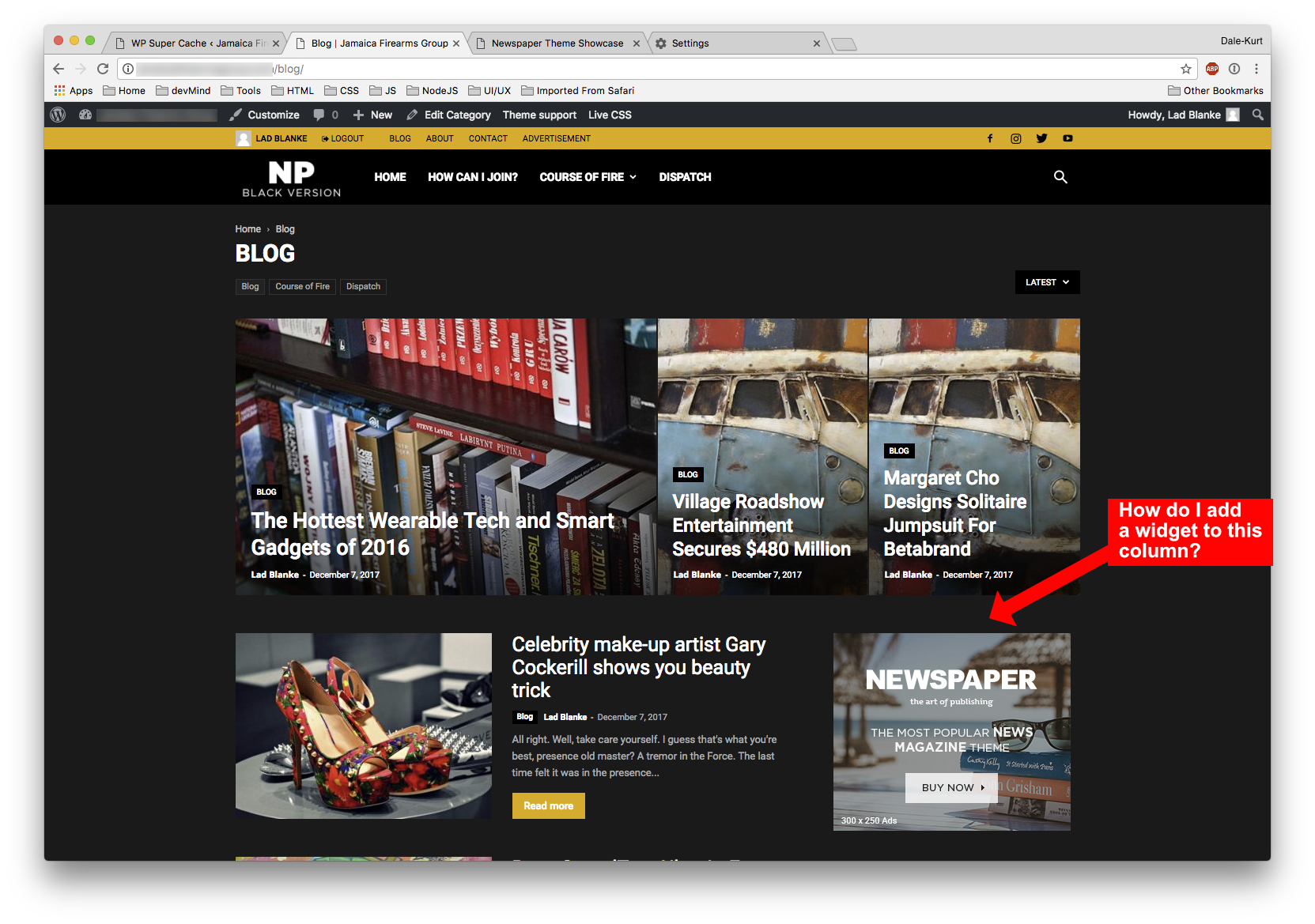
I’ve installed the WP Subscriber plugin and would like to add to the right column of my template, can anyone help me with this?
 irfan.id
Hi… currently I use “Gadget” demo as my default theme setting.. but I want to use “Smart App” too. Can I Install other demos without losing my current setting?
Thank you
 janetsville
We just installed Newspaper because we were under the impression that no coding was necessary. We are having trouble finding how to assign categories to either templates or blocks (not sure which). Any suggestions. Please help.
Not new to WordPress but new to this theme.
 Olya
OlyaHello!
Today I installed the plugin mobile version. Glad that the site is now faster to load in your phone. But this plugin broke my site, here is the screenshot https://yadi.sk/i/-T1jDQgl3QSPa5
What is the reason? Prohibited do not install plug-ins, especially in the mobile version of this plugin works, it breaks only the computer version
 hatrick
I installed the theme and gets this error when installing plugins:
Pobieranie paczki instalacyjnej z https://xxxxxxx.pl/wp-content/themes/Newspaper/includes/plugins/td-multi-purpose.zip…

Pobieranie nie powiodło się. cURL error 60: SSL certificate problem: unable to get local issuer certificate
Catalin Hello Immam,
If you want to move your theme to another domain or subdomain, try to use the WP Duplicator plugin to duplicate your theme install.
Hope this helps!
Thanks for the message!
