
- TutorialsHow to install Revolution Slider
- TutorialsHow to Install bbPress forum
- TutorialsFrom WPBakery to tagDiv Composer
- TutorialsDefault Block Settings Guide
- TutorialsImport Revolution Sliders
- TutorialsSystem status parameters guide
- TutorialsHow to Update the WPBakery Page Builder plugin
- TutorialsExisting content
 johnoei
Could you tell me how many websites can I install with this?
742f9129-568e-4cf3-8f18-ecac3206ccb5 – 24 Aug 2017
 benh_82
Hi,
Yesterday i noticed that the website had developed an issue. The problem was that when navigating between pages on the website there was a flash of the mobile menu background before the page would load. So before the pages load theres a quick flash of the purple background used on mobile menu.
I decided to look in my envato account to check on theme updates. I saw that i was on version 7.7 so needed to update my theme.
Since updating the the latest version of the theme my website layout has broken.
Now the website homepage has changed to full width. Now there is also something called TD composer in place of visual composer tab on the homepage.
The website also seems much slower to load now. https://news.lovepattayathailand.com
Anyway,if possible i would like to re-install the previous version of the theme and go back to how it was before.
Or id like some support in fixing the mess my update has caused please.
Thanks
 esellercafe
I am at a loss (using 7.7 with provided VC plug-in)
All of a sudden I am no longer able to edit my page using VC Backend Editor. I can’t recall that I did anything to cause this (probably did, just don’t know what it might be). Only way I can edit page using Classic editor, but that is a pain.
See image in this link
https://www.dropbox.com/s/xstp8tcctln4ckc/backend-editor.jpg?dl=0
I removed the theme with VC as well, and reinstalled it, but same results (I do reimport theme settings)
Any ideas? Thanks,
Richard
 eterrazasm
hi i just recently install the theme and i get this error
weather ai error: Invalid API Key Please see:
 daniella2685
Hi I am getting an HTTP error when trying to upload photos of any size. I contacted Hostgator (my hosting provider) and spent hours trying to troubleshoot with technical support. They raised all of my upload limits to the max and it’s still not correcting the issue. We determined that it is something within the newspaper theme that is causing the error as this started as soon as I installed it. I already reinstalled twice with no luck.
Can someone please help?
 cwamerica
 Okay. Makes Sense.
So if I use the wordpress method of updating, i have to uninstall the theme first before reinstalling. I know i wont loose content, but will i loose my settings such as colors, filtering etc.? Thank You
 Edward
 https://forum.tagdiv.com/topic/update-tagdiv-8-1-1-october-18/#post-197966
Support (Catalin) was wrote:
Sorry for this but please notice that way of theme installing is not a stable one and could appear some problems with installing the theme, sorry! Please use the FTP method because this is the surest theme’s method.
 rico11
Really sucks the updated Visual Composer limits. Spent hours on creating a design, with the update it sucks. The older version of VC broke the page design. Do I have to spend time to reinstall 8.1 and older VC to get my site looking the way I want?
cwamericaI followed the instructions here (https://forum.tagdiv.com/how-to-update-the-theme-2/) to set up the auto update as i was nervous of deleting the theme and reinstslling as to how it will affect settings etc.
After i installed and the token api keys etc it shows i have a theme update. However, clicking update doesn’t do a darn thing. No spinning, loading, pending, just sits there for minutes like nothing was clicked.
How am I supposed to do this update?
Thank You
 Simion C.
 Hi,
There seem to be many errors on the website at the moment
– https://www.screencast.com/t/sGKJ3rNhr
A suggestion would be to make a clean install by FTP
– https://forum.tagdiv.com/install-via-ftp/
Deactivate all plugins except theme provided plugins, clear all caching. Remove or check any custom code in the theme panel. Do not modify any of the theme files. If you use a child theme, deactivate it as well.
Check the theme system status and these parameters
– https://forum.tagdiv.com/system-status-parameters-guide/
Basically these are the theme requirements along with the mentioned parameters
– https://forum.tagdiv.com/requirements-for-newspaper/
The theme and theme plugins should work properly under these circumstances.
Thanks
 luchogf
Hi! I have all ready install Say What? demo but i would like to configure de Craft Ideas Header.
I tried setting it up by putting:
HEADER STYLE 10, like in Craft Ideas Demo but de Logo upload is limit to 272 x 90px and 544 x 180px.
And the site looks like this: https://www.dropbox.com/s/9py8brntlwy83wo/Captura%20de%20pantalla%202017-10-19%20a%20la%28s%29%2010.50.58.png?dl=0
What I can do? Thank you
Simion C. Hi,
1. Please note that the theme width overall cannot be changed. It should not be attempted by custom code. The theme has a fixed width, and all the elements used are dependent on this fact. Modifying the width will most likely break the website. There are precise values used that will not display properly under different circumstances.
On pages you can stretch rows to full width, using the composer. Header and footer elements can be stretched in the theme panel. But a general setting for width is not available.
2. You could adjust the line height for the header menu
– https://www.screencast.com/t/ki24ggk4sU
Increasing the line height value will affect the header menu height.
3. The search icon is a font, it could be increased with some CSS
– https://www.screencast.com/t/WobUXDutVP4
Hamburger menu icon as well
– https://www.screencast.com/t/hOC404fGB
This is the code used in the example, adjust it as you like
.header-search-wrap .td-icon-search {

font-size: 50px;

}

#td-top-mobile-toggle i {

font-size: 50px;

}
The Travel blog demo uses a different header style, so the code will not work. Either change the header style to 6, or modify the header style in the code. Might need to adapt more of the code as well.
When you uninstall the demo, this will remove all the demo settings. The theme panel will be reset. The theme has an option to export/import theme panel settings
– https://forum.tagdiv.com/import-export-theme-settings/
That should be the only case that the theme panel is affected.
Thanks
 DigitalConsulting
Hi, hope you can help!
Since earlier in the week (October 12th), our Home Page keeps showing the same version, despite the daily news updates.
All the other section and article pages will show current, and sometimes if we go from a current page to the Home Page it will present the current version. But then later it reverts back to the Oct 12 version.
We’ve cleared our browser cache, used incognito, installed an entirely new browser (Opera), and regularly are seeing the Home Page cached form Oct 12.
On Firefox it seems okay, and on mobile iPhone Safari it will show the current site (although delayed an hour or so), but desktop Safari is the always showing the old Oct 12 version.
Chrome is intermittent depending on what we are doing for new Post publishing, so if we make a change to the Home page color scheme for example it will show, but only 30 minutes or so.
We’ve installed and uninstalled WP Super Cache several times in the last week, deleting all files. Currently there is no cache plug in on the site.
We’ve called our hosting company GoDaddy 3-4 times, they insist our shared hosting environment has no server-side caching.
When we add /?nocache=1 to the web address it will show the current Home Page from today. But clicking back to the Home Page serves up the old Oct 12 version.
We have a Dev version of the site in a sub directory and that testing seems to show it serves the current page.
Our thought is maybe there is something in the route directory that was reverted/changed (we’ve had a lot of problems in the last couple months) to no Cache Control as intended, but not sure how to fix that.
Any suggestions, can someone help us solve this?
 Catalin
 Hello manuovi,
Try to make a new clean install from scratch without that untested plugin via FTP way according to our documentation here -> https://forum.tagdiv.com/install-via-ftp/
Hope this helps!
Thanks for your understanding!
 Kundurnews
Hi,
Newspaper theme For My Site has not been working since the last update. Since Version 8.1 on August, and Version 8.1.1.on this month.
We successfully on installing both version, but the website loading only half way. after few Seconds its stop suddenly and not working at all.
We have been trying install the theme using ftp, file manager, and direct to WordPress.
we also try to remove all the plugins, and remove all temp also cache script on file manger.
can you help me please,…Thank’s
http://www.kundurnews.co.id
Catalin Hello clueguru,
Notice that the Revolution Slider does not have to be activated. Please check our useful manual here -> https://forum.tagdiv.com/import-revolution-sliders-on-demos/ -> https://forum.tagdiv.com/how-to-install-revolution-slider-v5/ Also, if you want to use our Sliders, please send us an email at contact@tagdiv.com and request them there and we will provide them.
Thanks for your understanding!
Simion C. Hi,
If you use the WP Super Cache please make sure it is configured according to this guide
– https://forum.tagdiv.com/cache-plugin-install-and-configure/
The plugin settings may look different since it has been updated, but the configuration is similar.
What you can try additionally, is to deactivate all plugins except theme plugin as a test to spot possible conflicts. Clear all caching after doing this. Then create a new page and use the composer to edit it. Let us know if there is still a problem.
Thanks
 Prokhorov
 We install this as we install theme for the first time trougn wp-admin?
Do we need to deactivate current update first? Are all my data and posts (layout) safe?
 simchris
 Clear it?
https://premium.wpmudev.org/blog/understand-caching-in-wordpress-part-1-the-basics/
see if your hosting platform using cache plugin (e.g., GoDaddy); see if you have a caching plugin installed/active (good to know WHAT plugins you’re running); clear your browser cache.
You can also try
a) clear transients with free WP-Optimize plugin (I use it literally every day!)
b) resave permalinks
But, see the article link to understand what caching is.
 airdailyx
Hi there,
I just installed the Newspaper 8 (v8.1, downloaded today), and the tagDiv Composer editor does not load the page within the iframe because of mixed content warnings. My website is hosted on WPengine (which uses HTTPS) but the tagDiv Composer plugin doesn’t seem to recognize that the URL it needs to load in the iframe also needs to be HTTPS.
Is there a setting somewhere that I’m missing that would turn on HTTPS for this, or is this legitimately a bug that needs to be fixed? I’m sure I could dive into the code myself to resolve but that’s not in my client’s budget, it wouldn’t be a maintainable fix, and I’ve got 6 months of support from you guys.
My stop-gap solution is just using Chrome dev tools to change the protocol to HTTPS, which seems to completely resolve the issue, it’s just a super pain to do that every time and… ultimately, my client may end up making these kinds of changes in the future and that’s not something that I would expect them to do.
Any help is appreciated. Thanks,
-Nick
 clueguru
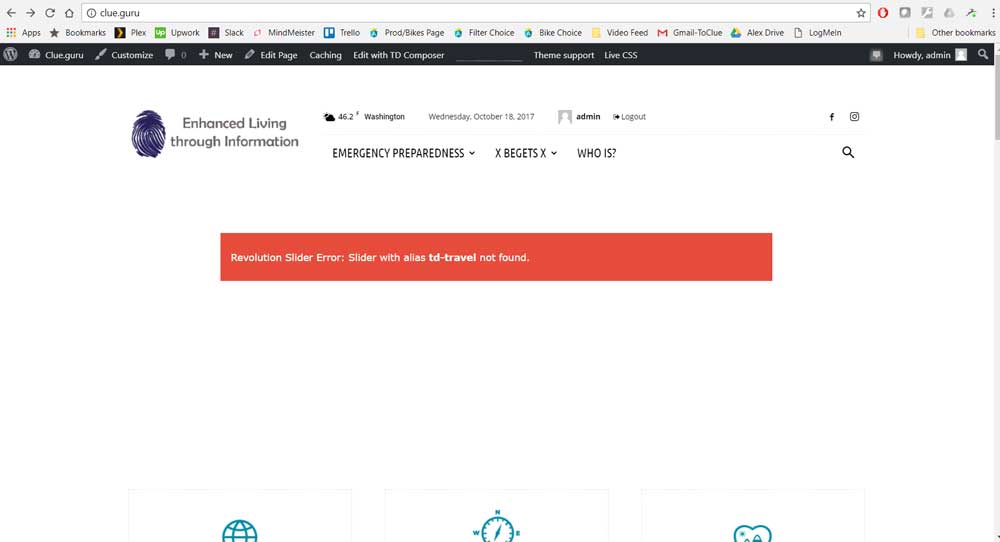
Upon install the Slider Revolution was not able to be activated. A red bar shows where the slider should be. Please help activating?
 ioannajo29
No matter how many times i try to change my IG widget it doesnt change. What am i doing wrong? I have already deleted and re installed the Social Counter plugin and cleared my cookies.
Plus i cant find the where i change the author’s name in the same side bar.
 meri
meri Ok, so we have to update the plugins and not only the file “Installable WordPress Theme” as explained on this page https://forum.tagdiv.com/how-to-update-the-theme-2/ ?
Catalin Hello barronlau,
Sorry for this but please notice that way of theme installing is not a stable one and could appear some problems with installing the theme, sorry! Please use the FTP method because this is the surest theme’s method.
Thanks for your understanding!
Simion C. Hi,
@NegomboToday There are some similar topics that you could try
– https://forum.tagdiv.com/topic/share-icons/
– https://forum.tagdiv.com/topic/add-email-sharing-button-2/
Or you could simply install a sharing plugin that might have the option you need.
Thanks


