- NewspaperHow to Add a Logo in Newspaper
- NewsmagLogo & Favicon
- NewspaperShortcodes
- NewspaperHow to Set the Image Avatar
- NewspaperThe Mobile Theme
- NewsmagWhat’s included in Newsmag theme package
- NewsmagMain menu
- NewsmagHeader styles
- NewsmagFooter templates
- NewsmagTheme colors introduction
- NewspaperFavicon & iOS Bookmarklet
- NewspaperHeader styles
- NewspaperWhat’s Included in the Newspaper Theme Package
 accursi
 I moved the custom css-desktop to the top of the style.css file. This is to avoid the full-page zoom effect of the header SVG logo.
Two problems remain.
1) One concerns the topbar: the menu items are no longer centered in the gray bar.
2) The logo performs in mobile resolutions.
Example:
https://assets.cagliaripad.it/wp-content/uploads/2025/03/05085711/SCREEN_0503.png
Many Thanks!
 Simion C.
 Checking now.
1. It looks like the skin has a z-index which makes it appear over parts of the header https://prnt.sc/6QPbkPTLTdM5 I made the header use a higher z-index https://prnt.sc/SdXI3-1WXGrq Now the social links are getting through https://prnt.sc/L_PDsAYFjW4e
2. The code for the background color should target the header logo specifically, like this https://prnt.sc/wdmFEbU_6nXv That way the footer logo will not be affected https://prnt.sc/QWKTV-jVtOeB
Please let me know if I can help with something else.
Thank you!
accursi Good morning!
I managed to fine-tune the header and the logo with the skin… using custom css.
Some header-related issues remain:
– the topbar no longer allows connection to social icons, but the skin covers the URLs (very strange because the WhatsApp subscription on the left works)
– the svg logo in the footer inherits the .td-retina-data of the logo in the header (this is bad because as you can see the white background and the top-bottom padding make it wrong. What solution can we follow?
Many thanks
Michele
–
 Bettina
 Hello!
Please edit the homepage with the tagdiv Composer, click on the logo and check the options from there. You should hide the SVG icon from there: https://app.screencast.com/K5gVCJLK2wXq9 You can also delete the current logo shortcode and add another one with no settings applied, so the logo from the theme panel should display on your website. Check the guide here: https://forum.tagdiv.com/add-logo-newspaper/
Thank you!
 thetraders
Dear Team,
Can you help to remove the icon beside the logo on my website?

Simion C. I see the skin ad isn’t appearing anymore. Did you turn it off perhaps? I adjusted the ad vertically https://prnt.sc/BrZH7VLUypiJ but if there are still issues we may have to think about modifying it in a different way. The modifications I made with the top menu being below the logo are the ones causing spacing issues. I could modify the header template in a child theme which could produce better results. Or I could continue adjusting it based on how it is now, but it seems to be a bot tricky to get it right. Please let me know when the skin ad is back, in caser there are problems with the header again.
Thank you!
accursi Sorry! But the logo is not centered!
please, take a look.
Furthermore, this still occurs:
– background header all filled: white (if you now scroll the page the header is transparent and not completely white. This impacts the vision of the SKIN advertising format surrounding the page).
Many Thanks
michele
accursi Thanks Simion!
Charged and working.
But the header is still not correct.
I’ll write down the other needs of the task header:
– logo centered
– header height 118px with logo centered in height and width
– background header all filled: white (if you now scroll the page the header is transparent and not completely white. This impacts the vision of the SKIN advertising format surrounding the page).
Thank You!
Best regards
Michele
Simion C. Hi,
I’ve set the svg logo https://prnt.sc/_nvAucjCkl0_ and it seems to display correctly https://prnt.sc/XG9SXm3D1zJ6 But without the CSS code you entered in the theme panel it would not.
The thing is that header style 7 does not have any size limitation for the header logo https://prnt.sc/UZxlj1nDUGw2 It will be displayed as it is originally, limited only by the width of the theme. Your code will limit it however.
I didn’t leave the svg logo set, in case there are problems that I am not seeing. I set the old one back. But you could set it again, and with the code from the theme panel the logo should be displayed better.
Thank you!
 Anamaria
 Hello,
You have a header template from Cloud Library, then you need to edit with tagDiv Composer https://www.screencast.com/t/Y5j6ArY8Ug, select the logo and set there the image, make sure that is set to show and delete the logo text or SVG code-> https://imgur.com/ve11Fwt -> https://forum.tagdiv.com/add-logo-newspaper/ For mobile please edit with tagDiv Composer, select the viewport on phone, select the header logo and change it => https://i.imgur.com/cR7F0v4.png
Also, if the logo is in a modal popup, you need to edit that page to change the logo.
Thank you!
Anamaria Hello,
You have a header template from Cloud Library, then you need to edit with tagDiv Composer https://www.screencast.com/t/Y5j6ArY8Ug, select the logo and set there the image, make sure that is set to show and delete the logo text or SVG code-> https://imgur.com/ve11Fwt -> https://forum.tagdiv.com/add-logo-newspaper/ For mobile please edit with tagDiv Composer, select the viewport on phone, select the header logo and change it => https://i.imgur.com/cR7F0v4.png
Thank you!
accursiDearest,
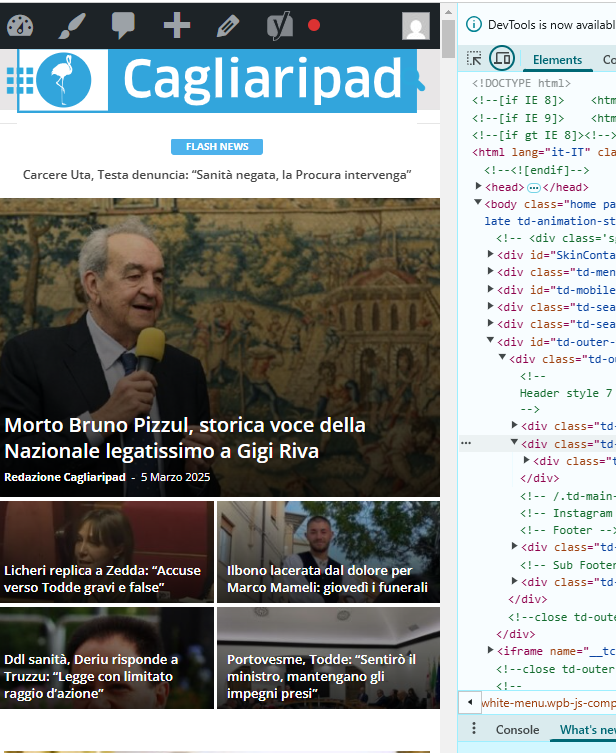
we need to load an SVG vector logo in the header.
We have already updated wp to receive SVGs.
When I load the svg logo, it appears full page width.
I would like to know how to give these measurements:
– logo 400x66px
– header height 118px with logo centered in height and width
– background header all filled: white
Thank you so much
https://www.cagliaripad.it/
 Davidjpp
Hi. One some articles like the one I just published (Link below), I get two logos displayed at the top of the article in the header. My own logo and the default Newspaper theme logo.
Does this show for other people (I’m using an iPhone and Chrome)? How can I get rid of the default logo and how can I find the settings to only show one logo not two (different ones)?
Link to JPP News Article Showing Two Logos in Header
Many thanks in advance.
JPP
 manishc
 I figured it out. It was a display problem. The “Save Settings” button was hidden off-screen. https://ibb.co/M5KZFCw5
I have another problem. I changed the logo, retina logo and the favicon. (https://ibb.co/fYLHvbrH) But it still shows me the default demo logo (https://ibb.co/wFvvshP5)
I don’t have any plugins active on the site, except the TagDiv composer, cloud library, and opt-in builder.
 bporciuncula
I tried change the color black to white in header menu mobile, but I can´t. I read how to change it, I put WHITE, but it’s still black, as shown in the attached image
The website is fatobahia.com.br (mobile version). The Logo is white, but the background still black.
 miguel_dimase
 Good!
And how can I disable some elements, like the menu or the social media icons but keep my logo, etc?
By duplicating the header/footer and removing the elements in the duplicates?
 Tony
Tony
Trying to figure out why I get the default template header when loading up the site on a mobile phone. I have turned off all the mobile options, and even the footer seems to display properly.
What I have done to this point…
In THEME PANEL under Header>Mobile Header, I have changed the Logo Mobile/Retina Logo Mobile to the Yin/Yang design.
In THEME PANEL under THEME COLORS>Mobile Menu, I have changed the background colors to the deep red.
In Newspaper Plugins, I have deactivated ‘tagDiv Mobile Theme’ and ‘Official AMP for WP’
In CLOUD TEMPLATES, I have ‘Main Header’ as Global (as I do with Main Footer, which is showing up).
I feel like I am missing something fairly obvious and just overlooking a setting or a checkbox somewhere. But I’m all out of ideas at the moment. Would love to display the proper header when viewing page from a mobile device.
Thank you!
 ReyLagarto
Hi guys, just want to set a normal mobile menu. A logo + hamburger menu. Why nothing is working?!
 Guelven
 Problem with homepage on mobile phone
Hi, newspaper theme does not display some areas on mobile, logo, menu and other important areas, only displays most recent articles. any solution?
//Solution
Hello!
Please uninstall the Mobile theme plugin.
Thank you!
 petar777
 Hey,
I am sharing you my WP Rocket settings and I think they might be useful for you:
ON THE FILE OPTIMISATION TAB
1. Activate Minify CSS Files
2. Optimise CSS Delivery > Remove unused CSS with these exclusions:
(.*).tagdiv-type(.*)
(.*).bhcrow-(.*)
3. Minify Javascript Files
4. Load Javascript Defered with these exclusions:
\/jquery(-migrate)?-?([0-9.]+)?(.min|.slim|.slim.min)?.js
5. Delay Javascript Execution with these exclusions:
\/jquery(-migrate)?-?([0-9.]+)?(.min|.slim|.slim.min)?.js(\?(.*))?( |’|”|>)
tagdiv_theme.min.js
tdTrendingNow.js
tdPopupModal.js
tdBlocksArray
hammer.min.js
tdbMenu.js
tdLoadingBox.js
tdb_p_autoload_vars
blockClass
tdAjaxCount.js
tdTabbedContent.js
tdStickyRow.js
tdSmartSidebar.js
OneSignalSDK
Important – delaying Javascript will make your ads load after any movement on the page so if you just reload the page they will not be loaded as soon as you move anything on the page it will load them immediately. For me this isn’t a problem.
ON THE MEDIA TAB
1. Activate Enable for images
2. Activate Enable CSS for background images
3. Exclude your logo
4. Activate Add missing file dimensions
5. Activate self host fonts
ON THE PRELOAD TAB:
1. Activate preload
2. Enable link preloading
3. Prefetch these:
//fonts.googleapis.com
//www.googletagmanager.com
//www.googletagservices.com
//tpc.googlesyndication.com
//use.typekit.net
//netdna.bootstrapcdn.com
//www.google-analytics.com
//ajax.googleapis.com
4. Preload fonts – /wp-content/themes/Newspaper/images/icons/newspaper.woff
ON THE DATABASE TAB
Enable everything without scheduling auto cleanup
ON THE HEARTBEAT TAB
Enable it and make everything reduced
Important – if you are self hosting your site on nginx you can enable this https://github.com/SatelliteWP/rocket-nginx – this enables Nginx to serve directly previously cached files without calling WordPress or any PHP
Important – if you are self hosting your site on nginx you can enable FastCGI and Redis (use redis cache plugin and nginx helper). When it comes to FastCGI MAKE SURE TO ENABLE SEPARATE CACHE FOR MOBILE AND DESKTOP OTHERWISE IT WILL WORK BADLY!
Important – if you have a large installation and you notice that your queries become slow (e.g. search page takes a lot of time to load or non-cached pages load for more than 1-2 seconds) you can buy Scalability Pro and Super Speedy Search from here https://www.superspeedyplugins.com/shop/ for me this plugins changed the way the theme worked immensely. My non-cached pages loading time dropped form 10 seconds down to 1-2 seconds.
Important – WPRocket offers a plugin that converts all your images to webp format and this is also crucial for your page speed. Their plugin works well for my site.
I hope this is useful for you!

 jrh
jrhHow do I set a featured image on a page–not a post. Currently, it displays the Old Fashion logo when submitting to social media platforms, even though I deleted it through the theme panel / Logo & Favicon settings.
The
https://johnrhall.com is the URL to the site and homepage.
Thank you
 GYANPAL
 Okay, thank you it’s changed but tagline is still there:
Also, footer logo is not changing in the same way. why?
GYANPAL Please check, I have added there logo too but it’s not showing on frontend.
Bettina Hello!
If you use a cloud template, you should edit the homepage with the tagdiv Composer and add your logo.
Thank you!
GYANPALHi,
I have tried to change logo from the backend but it’s not appearing on frontend.