
- NewspaperHow to Add a Logo in Newspaper
- NewsmagLogo & Favicon
- NewspaperShortcodes
- NewspaperHow to Set the Image Avatar
- NewspaperThe Mobile Theme
- NewsmagWhat’s included in Newsmag theme package
- NewsmagMain menu
- NewsmagHeader styles
- NewsmagFooter templates
- NewsmagTheme colors introduction
- NewspaperFavicon & iOS Bookmarklet
- NewspaperHeader styles
- NewspaperWhat’s Included in the Newspaper Theme Package
 Anamaria
 Hello,
You can change the layout of the row -> https://i.imgur.com/oFEdskD.png and set the logo.
Thank you!
Anamaria Hello,
I recommend you to use cloud header, and in this why that error for missing valuename will be removed.
You can import de default cloud header which is similar to yours and make the changes with the tagdiv Composer to set the logo and menu.
Thank you!
 nwnuyhs
Please see the picture below, I want to adjust the LOGO to the line above, how should I do it, thank you
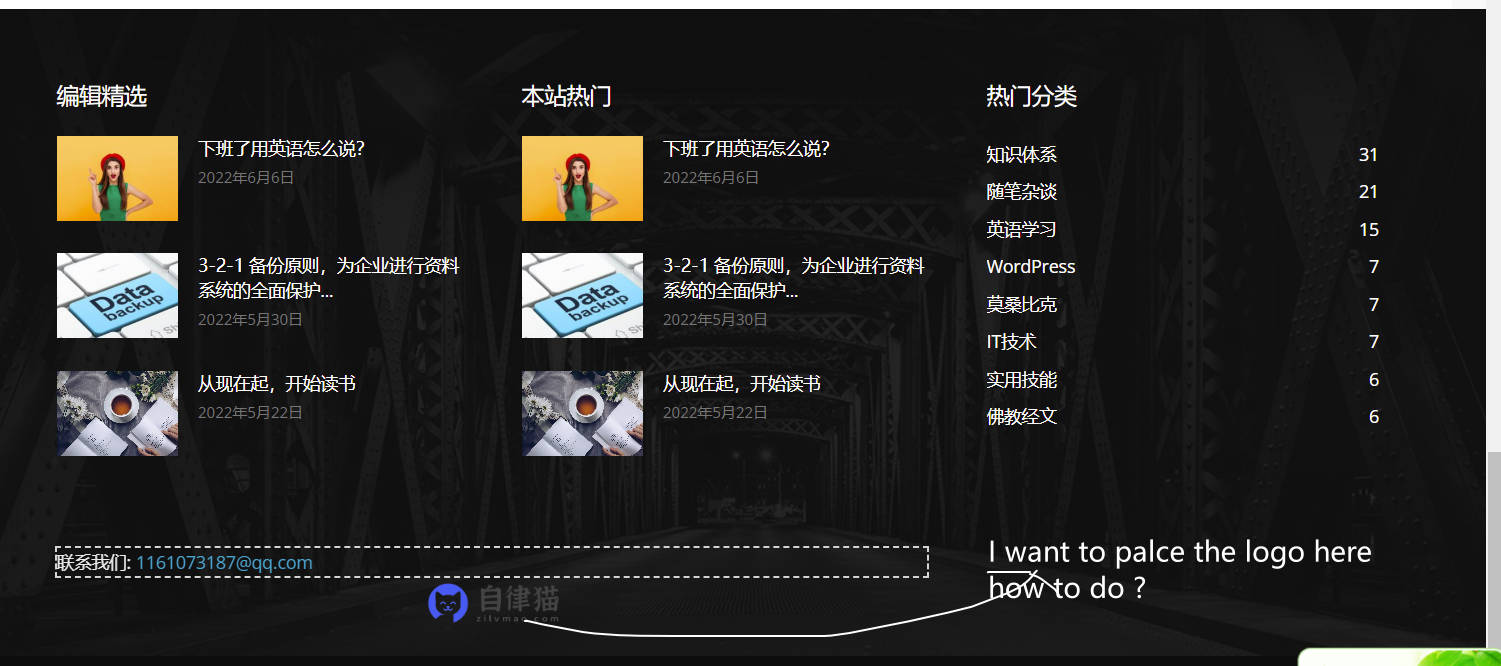
 airanee
Hello, I updated the theme from 11 to 11.5.1 and this error occurred. How do I resolve?
https://vilogogostei.com/wp-content/uploads/2022/06/Captura-de-ecrã-2022-06-04-às-19.54.22.png
Anamaria Hello,
Yes, you can import what template you want, it doesn’t matter if you have another imported template.
You can duplicate a template, or install a new one and assign on the posts you like or create one from scratch by importing a blank template and build it as you like.
Check this topic: https://forum.tagdiv.com/topic/different-logo-in-categorypage/ ; Here is explained how to duplicate a header template correctly and do some changes for single post template
Thank you!
Anamaria Hello,
Our theme is a frontend theme for most of the elements and changes, you’ll need to use the tagDiv Composer to edit the pages and templates for posts/categories, etc => https://i.imgur.com/I3OUYxr.jpg -> https://i.imgur.com/mMrEufY.jpg from the frontend, no in the code -> https://www.screencast.com/t/LDdokrHPl
Also, this is a video on how to change the logo -> https://www.youtube.com/watch?v=HXQQygkCCJo -> https://forum.tagdiv.com/add-logo-newspaper/
This is a video about how to change the fonts => https://www.youtube.com/watch?v=rbkYVyj1__Q also, you can use global font from Manager(Website Manager) -> Global fonts -> https://i.imgur.com/iY0bh4Y.png
Also, for flex blocks please check this topic https://forum.tagdiv.com/topic/how-to-make-boxes-all-the-same-height/
Thank you!
 joannatruncali
Hi, I need some help locating this line of code that is still generating the “All About Parenting(dot)com” demo (pictured below). I’ve set a global header and a mobile version, and have disabled the mobile plugin, but some mobile pages (not articles) are still displaying the “all about parenting.com” next to my logo. I’ve searched the theme panel and all the elements in the header and deleted all demo content. I cannot find what is generating this. I’d like to just delete it since several pages are still displaying this next to my logo. Can you please help with which file might be generating this so I can erase it?
It appears in two places in this element under Inspect. Again, I’ve left all my text logo spaces blank and erased demo content in both the theme panel and the individual elements in the global header and global mobile header in TD Composer, and also selected “Hide” under Show Text and Show Tagline. https://drive.google.com/file/d/1EpEl0UIhHvckc1q1h1J6ACKoew97UAQg/view?usp=sharing
Example of mobile header being generated: https://drive.google.com/file/d/1zoxwyZczM9jZZjAQrY-8Mz4Ph4rAft5e/view?usp=sharing
 burns16
I just purchased your product and I find that it doesn’t work.
I can’t change the logo, the video post is all messed up, the blocks on the front page are not lined up, the colors won’t change, I can’t change the link colors. I find that it’s a mess.
 brianweis
 The topic you provided is not helpful. The screen shot you shown helped but the logo/ad and menu is in the same row. So when you stretch it expands both the menu and the logo/ad. Full stretch it moves the entire logo/menu to the left (content is not in content box). When i select what you selected it brings it back into the content box but the blue of the menu is NOT full width.
https://www.golfguide.com
I know you can achieve what i want to do because this site has it.
https://newengland.golf/
Once again, I want the navy blue menu to be full width with menu in the content box. It works for the top top nav in black on golfguide.
Anamaria Hello,
I verified your and now the logo seems to look fine -> https://i.imgur.com/WkW0OVo.png
Thank you!
Anamaria Hi,
I’m glad!
Also, this is a video on how to change the logo -> https://www.youtube.com/watch?v=HXQQygkCCJo
Have a nice weekend!
 zvonchuk
Hello,
site header has two positions, expanded and compact.
I wanted to ask if it is possible to assign one logo to the expanded header, and another one to the compact header.
 Bezukhof
 I finally did that update and things seemed to transfer correctly…
I would love to fix this scroll up header logo issue. It occurs on all devices, not just mobile.
I still can’t trigger that scroll up in the TagDiv Header editor so that I can fix the logo.
What should I do?
joannatruncali I have also gone in and edited each individual Cloud Template with my header/logo info, and as I said, erased all demo content from the Theme Panel. So where would the demo content still be generated from?
Anamaria Hello,
For this, you should use cloud templates. You can have different ads in every post/article/header/footer if you use a different template for each. If you want the same design, you can duplicate the templates.
Check this topic: https://forum.tagdiv.com/topic/different-logo-in-categorypage/;
We recommend using cloud/PRO templates in order to have the possibility to edit them with the tagDiv Composer which contains a lot of functions and features, please check our tutorial here: https://forum.tagdiv.com/tagdiv-composer-tutorial/
Check also our video tutorials here: https://www.youtube.com/c/tagdivThemes/videos and more theme documentation on the left side: https://forum.tagdiv.com/newspaper-theme-documentation/
Thank you
Anamaria Hello,
Please let me know how look the old logo, I donțt have access to the screenshots https://i.imgur.com/B86qleP.png
Thank you!
 ceointermidia
Hi guys,
I changed my logo and updated everywhere possible in Theme options but when I type the URL of the page the old logo still appears how can I solve this?
my URL http://www.mbnchannel.com
https://drive.google.com/file/d/1SWl_OMGHjvhZmchyCm4eO8alfOD2ClZI/view?usp=sharing
https://drive.google.com/file/d/1j9TLCdQ2JOzHIjQPn0ixrDE51qwv5iBf/view?usp=sharing
https://drive.google.com/file/d/1j9TLCdQ2JOzHIjQPn0ixrDE51qwv5iBf/view?usp=sharing
https://drive.google.com/file/d/1j9TLCdQ2JOzHIjQPn0ixrDE51qwv5iBf/view?usp=sharing
Thanks guys
 meugamer
After creating an earlier thread, about “amp” problems, still unresolved.
I found other problems. When I add a new post by “CPT”. The tagdiv logo appears giant on the screen.

Also, when trying to create a specific home page, by “mobile page creator”. Simply when I click “OK”, nothing happens.

What would be the solution to this?
Anamaria Hello,
Please let me know what prebuilt website you have installed.
You can change the logo like in our guide https://forum.tagdiv.com/add-logo-newspaper/
If you install a Pro Prebuilt Website the changes from the Theme Panel will not apply, (only some settings) for example, to change the color on block/post you can edit with tagDiv Composer -> https://prnt.sc/10grx77, select the block/post and in Style, you can change the color => https://www.screencast.com/t/sUE7ug4UIAR5 also, after you can copy the style and paste it -> https://i.imgur.com/WCHxXlr.png
Also, the settings from the theme panel are saved? if not, then please check this topic -> https://forum.tagdiv.com/topic/newspaper-theme-panel-settings-are-not-being-saved/ and try the suggestions.
Thank you!
 pixerize
 Hi Calin,
It is getting really weird with carousel logo plugins. I have found another one (https://wordpress.org/plugins/logo-slider-wp/), this one does not hide “Post Settings”, but breaks the text editor in your composer 🙁
I really don’t understand why your theme have problems with logo sliders, maybe you guys should investigate it…
Except for that bug, everything else is working really well and the website is fast, even with me implementing a custom radio player, custom advertisement, and custom rotating several categories.
I had to manually input the shortcode in order to proceed with my work. The website, for now, is finished I will deploy it like this, I hope the client doesn’t invent more changes to the website 😀
You can check it out here: https://djordje.rs.ba/radio/
Have a good weekend.
Djordje
 MaritP
I have recently bought Newspaper theme and was about to upload my logos into the theme panel, but it will not save my changes? I have deactivated all plugins besides tagDiv Composer but it still not work.
 PetrSycha
Hi, I purchased and installed the Newspaper 11.5.1 template and uploaded the Gadgets layout. The problem is that no changes made in the template editing will take effect: I uploaded a new logo, translated the element texts, set other colors. However, no changes will be reflected on the front end.
I also have the WP super cache plugin installed.
Can you help me, please?
Thanks Petr
 ynom09
Hello,
Question1: I’m using the “news hub pro” newspaper theme (as seen in the demo https://demo.tagdiv.com/newspaper_news_hub_pro/) and I see that the header is not sticky in the mobile version. How do I fix it? in the Header template manager I do not see any option to fix this. I see only global fonts and colors options.
Question2: How do I make the top row sticky as well? This is the row that includes the logo, title, my account, search button, etc. Do I need to create child theme and my own CSS?
Anamaria  Calin
Calin Hello,
I think that this plugin can be made compatible with the theme only with custom work.
Unfortunately, we didn’t tested this kind of plugins, so it is hard to recommend one.
What I can recommend is to try some free plugins:
-> https://ltheme.com/wordpress-logo-showcase-plugins/
-> https://wplift.com/logo-showcase-plugins
Thank you!



