
- NewspaperHow to Add a Logo in Newspaper
- NewsmagLogo & Favicon
- NewspaperShortcodes
- NewspaperHow to Set the Image Avatar
- NewspaperThe Mobile Theme
- NewsmagWhat’s included in Newsmag theme package
- NewsmagMain menu
- NewsmagHeader styles
- NewsmagFooter templates
- NewsmagTheme colors introduction
- NewspaperFavicon & iOS Bookmarklet
- NewspaperHeader styles
- NewspaperWhat’s Included in the Newspaper Theme Package
 almawdue
Good evening, please I have a problem with the h1 heading, if I disable the h1 in the logo, the pages become without h1, and if I enable the heading in the logo, there are also multiple h1 headings, please help me to solve this problem. Thank you for your reply
 Calin
Calin Hi,
The orange color is a global color on the demo you are using, so what you can do is to use tagDiv Composer, edit a page, select the manager and in colors, change the color from orange to the new color you want https://imgur.com/lwb7sNv
The situation with the menu on mobile can be resolved by using tagDiv Composer, slect the mobile view port, then select the top row, the one holding the logo and check the css tab – https://i.imgur.com/DNsPpin.png that -10 margin should be remvoed and the problem will be resolved.
 edbenton
Hi folks,
I’m in the process of migrating WordPress to a more modern OS/wordpress/db stack, and working on adopting Newsmag as our new theme (currently on a temporary host)
I have one small niggle that is preventing the final go-live. The title appears to be showing up in the wrong place – up at the top over the top of the title header.
You can see it on blog post pages only. For example:
http://62.100.205.144/realmeal-meal-replacement-bars/
Youll see some distortion in the HikersBlog logo, select it to reveal that it is the title text.
AFAIK, none of my currently active plugins impact upon page layout
 thebackbenchers
hi this is my installed theme – https://bookreviews.forum/
I am aunable to chage orange colour all over the theme, i want to keep it something else.
Also on mobile screen there is a critical issue, the main header (where the logo is) on left hand side there is an empty white bar, please help me to make it sync with black header, it looks really cheap see screeshot – https://prnt.sc/XNiaBkl1mlPI
Calin Hello,
Please use tagDiv Composer, edit the homepage and choose the mobile viewport to change the logo https://forum.tagdiv.com/add-logo-newspaper/
Thank you!
 dlogan2023
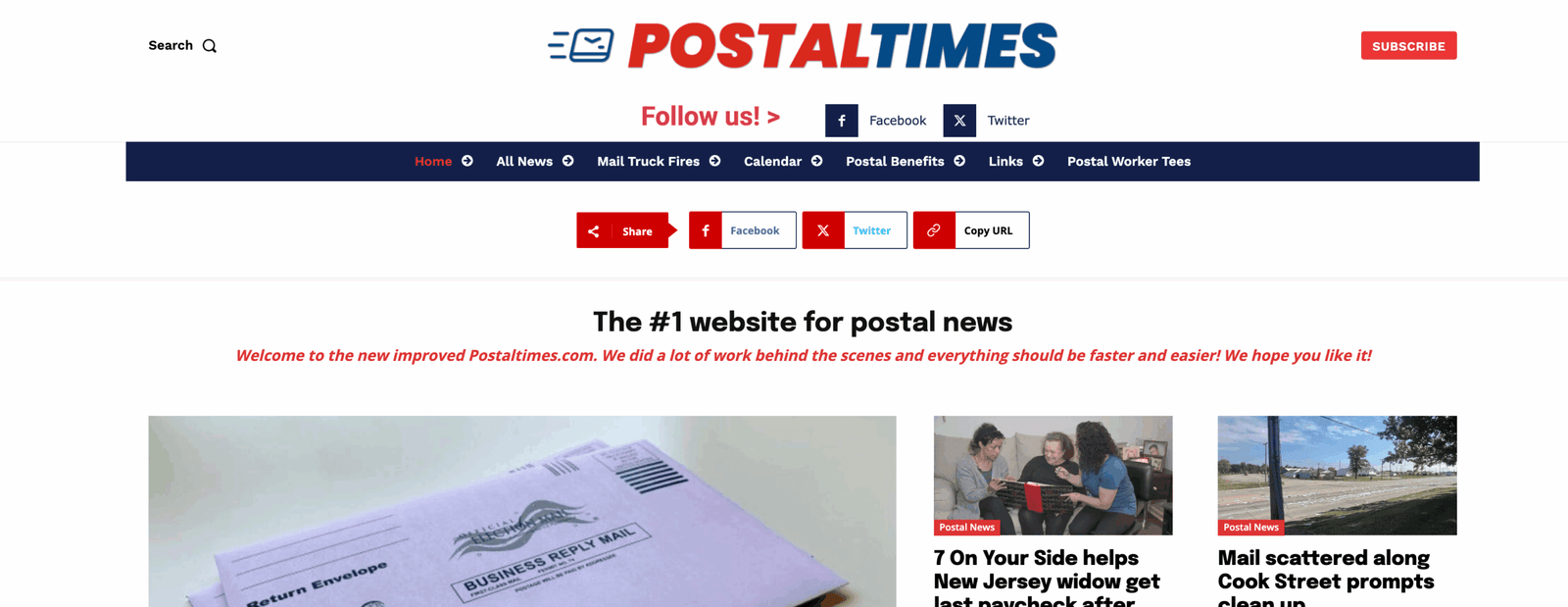
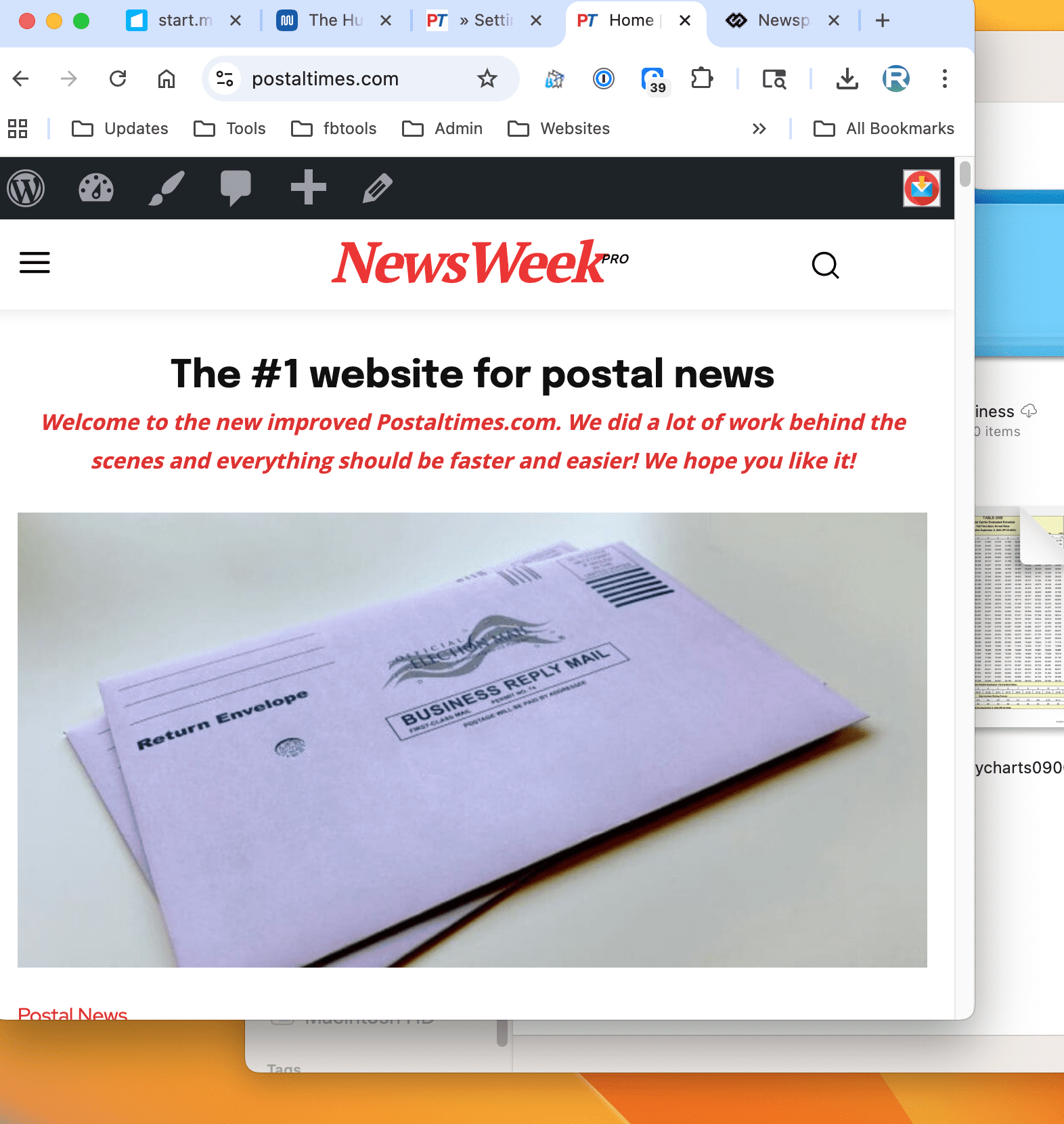
Hello, the default logo shows when you resize the page. https://postaltimes.com/
First screenshot – Full size
Next – Screen resized
Calin Hi,
Ok, so the first step is to have an RTL language selected on wordpress, for example, I will select Arabic – https://i.imgur.com/90vPjA9.png, then go to Cloud templates and click on + on Header templates – https://i.imgur.com/XguMYXz.png, then search for “makeup” https://i.imgur.com/GW3D4L2.png open the template in tagDiv Composer – https://i.imgur.com/Kuk7maO.png, then it should look like this https://i.imgur.com/gpGfdsC.png then just drag and elements in the palce you want (change logo) …. for example drag the left column with the menu in the right – https://i.imgur.com/TK0k9vI.png https://i.imgur.com/AM5hv6u.png the menu elements to be display from ltr to rtl use this custom css :
.rtl .tdb_header_menu .tdb-menu {

       flex-direction: row-reverse;

}
I hope this will help you!
Calin Hi,
There are a few recommendations:
I will recommend using a good cache plugin, if you have the possibility WP Rocket will be the best, if not, Litespeed is one of the free cache plugins that provide the best results in the free version. Also, we recommend using Cloudflare (CDN), which will help you prevent attackers from getting on your website and also has options to improve the speed. The free version can be used; there is no need for a premium account.
For accessibility, you should check the H elements to be in order on your website, for example, there are 3 H1 and no H2 – https://i.imgur.com/co6Twat.png H1, is usually coming from logo and if you have the logo on the header, footer and mobile header, for the start there are 3 H1, what can be done is tu use tagDiv Composer, select the footer logo and also the mobile logo and make sure taht the option to disable H1 is checked – https://i.imgur.com/8yxrxU9.png – https://i.imgur.com/c7c0DPU.png
Thank you!
Calin Hi,
Please do like this on mobile view port the row that is for the header when it’s empty, should be something like this – https://i.imgur.com/XeVFXhX.png drag the elements like you want to be, should be the search, logo and mobile. https://i.imgur.com/Ogyc0A6.png after that select the column and in Layout tab select the settings like this – https://i.imgur.com/tAtAuGY.png
I hope this will help you!
 Simion C.
 Hi,
Indeed, the image is not displayed. I see only the text logo and tagline. If there is an image logo set as well, it should be displayed.
I will take a closer look at this, please send us an email at contact@tagdiv.com and provide admin login for the website. I will check as soon as possible.
Thank you!
 kalacosolutions
I have the header set to mobile view so I can create my own mobile header. The Header Logo is not displaying the logo image I have set for it. I have the logo and tagline text entered; however, the logo does not display, regardless of whether the logo and tagline text are there or not. Please advise how to resolve the situation for the logo on the mobile view to display. Site is BYLocalNews.com
View screenshot: https://www.dropbox.com/scl/fi/qoi1ds3m04hbx2wxtm7is/Screenshot-2025-08-13-121216.png?rlkey=q91666dvxnf4r236rr2lgm9mv&st=yufdtu67&dl=0
 jaumemerca2
 Thanks, it works !!!!! .. now I just need to figure out how to show on top, before the logo/menu
thanks!!
Calin Hi,
Use tagDiv Composer to change the logo https://i.imgur.com/HgCpJ5P.png select the element and check the text and svg logo – https://i.imgur.com/aC8gVlR.png https://i.imgur.com/8NILLxD.png check it on mobile header too – https://i.imgur.com/2xn9Bba.png
Thank you!
 redaosman
I tried uploading the logo, and the retina logo for my site. But when I access the site, it still shows me the demo logo. https://wingsmonitor.com/
Calin Hi,
The logo can be changed using tagDiv Composer
How to Add a Logo in Newspaper. Just select the element and check the image, text, icon and svg logo – https://i.imgur.com/S7Xe7Hq.png https://i.imgur.com/zerQVgl.png https://i.imgur.com/YHNUGUa.png
Thank you!
 kashan20bCalin
 Hi,
By default, the H1 is set on logo, if it is a cloudyou can use tagDiv Composer to disabnle the h1 (it is need to be done on all logo elements from bith mobile and desktop viewport) https://i.imgur.com/0BjZdOj.png, but when you get on an article the h1 will be set on article title, for pages to remove the h1 from logo you’ll need to set the page template on pagebuilder + page title -> https://i.imgur.com/ElmwJQR.png then the H1 will be set on page title. The H1 is an important element for SEO and it should be present on the page.
Thank you!
Calin If you want to remove the link effect from logo I can provide a CSS.
.tdb-logo-a{

    pointer-events: none!important;

}
Set the CSS in the theme panel > custom code> custom CSS.
 cryptobeginnersclub
 Well shoot, that makes sense. The thing is I’ve used the logo element on just about every image. Is there something I can add somewhere that disables that code in the logo element?
Calin Hi,
If you are referring to this one https://i.imgur.com/pWZHwaM.png, this situation is because you use the logo element and the logo element uses a link on it, if a custom link is set, then it will go to that link, if no link is added, then it will link to the homepage. What you should do is to replace the logo element with an image element using tagDiv Composer.
Thank you!
Calin Hi Badri,
For the logo part, you should use tagDiv Composer, select the row that is holding the row and stretch it https://imgur.com/hpDp0E3
For the title to align it to left with the featured image, you should check the settings of the flex block 1, you have set a padding 25px 0 0 64px for meta info https://i.imgur.com/tc2GhbY.png
Thank you!
Calin Hi,
Please do not share private credentials on the forum. I recommend changing the password.
The elements from the top bar should be easy to change, just make sure that you select the element – https://i.imgur.com/tuwlklT.jpeg – https://i.imgur.com/zGHPsbx.jpeg https://i.imgur.com/s3y22P3.png
For logo is used a SVG image is used that should be removed or replaced – https://i.imgur.com/bhdfiyM.jpeg This should be done for all logo elements from your website (footer, header logo and sticky logos)
The image with the track is set on row in CSS tab. The image is set as background image – https://i.imgur.com/5xICgBj.jpeg
I hope this will help you!
 Ecofame
Hi!
I would like to move the logo and article title to the left. How should I do that? Could you please assist me?
Best regards
Badri
http://www.wargeystv.com
thebackbenchersthis is my website – https://bookreviews.forum/
I need to change following 5 things but i am having problem don’t know why the settings dont works:
here are the 5 thing i want to change – https://prnt.sc/DL1NJK4koFEr
1) I want to change the logo icon TS to a book icon, i am attaching that icon here –
White – https://prnt.sc/0nn996xCMgYo
Black – https://prnt.sc/tcUmDYkY0INe
2) Phone number on top header
3) Day-time on top header
4) Location on top header
5) The background image from truck to books i am not finding the place where to change
here are my credentials – https://bookreviews.forum/wp-admin
Please help me
 bts026
 All plugins are deactivated (except tagDiv plugins) and after replacing td composer and td cloud library I am getting this:
Logo
VESTI
BTS PODCAST
KONCERTI I DOGAĐAJI
RECENZIJE
RAZBIJANJE TIŠINE
O NAMA
More
Fatal error: Uncaught ValueError: Unknown format specifier ” ” in /home/milosbts/public_html/wp-content/plugins/td-cloud-library/parts/tdb-comments.php:177 Stack trace: #0 /home/milosbts/public_html/wp-content/plugins/td-cloud-library/parts/tdb-comments.php(177): sprintf() #1 /home/milosbts/public_html/wp-includes/comment-template.php(1629): require(‘/home/milosbts/…’) #2 /home/milosbts/public_html/wp-content/plugins/td-cloud-library/state/single/tdb_state_single.php(2110): comments_template() #3 /home/milosbts/public_html/wp-content/plugins/td-cloud-library/shortcodes/single/tdb_single_comments.php(470): tdb_state_single->{closure}() #4 /home/milosbts/public_html/wp-content/plugins/td-cloud-library/shortcodes/single/tdb_single_comments.php(470): Closure->__invoke() #5 /home/milosbts/public_html/wp-content/plugins/td-composer/legacy/common/wp_booster/td_global_blocks.php(27): tdb_single_comments->render() #6 /home/milosbts/public_html/wp-includes/shortcodes.php(434): td_global_blocks::proxy_function() #7 [internal function]: do_shortcode_tag() #8 /home/milosbts/public_html/wp-includes/shortcodes.php(273): preg_replace_callback() #9 /home/milosbts/public_html/wp-content/plugins/td-composer/includes/tdc_composer_block.php(222): do_shortcode() #10 /home/milosbts/public_html/wp-content/plugins/td-composer/includes/shortcodes/vc_column.php(440): tdc_composer_block->do_shortcode() #11 /home/milosbts/public_html/wp-content/plugins/td-composer/legacy/common/wp_booster/td_global_blocks.php(27): vc_column->render() #12 /home/milosbts/public_html/wp-includes/shortcodes.php(434): td_global_blocks::proxy_function() #13 [internal function]: do_shortcode_tag() #14 /home/milosbts/public_html/wp-includes/shortcodes.php(273): preg_replace_callback() #15 /home/milosbts/public_html/wp-content/plugins/td-composer/includes/tdc_composer_block.php(222): do_shortcode() #16 /home/milosbts/public_html/wp-content/plugins/td-composer/includes/shortcodes/vc_row.php(1204): tdc_composer_block->do_shortcode() #17 /home/milosbts/public_html/wp-content/plugins/td-composer/legacy/common/wp_booster/td_global_blocks.php(27): vc_row->render() #18 /home/milosbts/public_html/wp-includes/shortcodes.php(434): td_global_blocks::proxy_function() #19 [internal function]: do_shortcode_tag() #20 /home/milosbts/public_html/wp-includes/shortcodes.php(273): preg_replace_callback() #21 /home/milosbts/public_html/wp-content/plugins/td-composer/includes/tdc_composer_block.php(222): do_shortcode() #22 /home/milosbts/public_html/wp-content/plugins/td-composer/includes/shortcodes/tdc_zone.php(771): tdc_composer_block->do_shortcode() #23 /home/milosbts/public_html/wp-content/plugins/td-composer/legacy/common/wp_booster/td_global_blocks.php(27): tdc_zone->render() #24 /home/milosbts/public_html/wp-includes/shortcodes.php(434): td_global_blocks::proxy_function() #25 [internal function]: do_shortcode_tag() #26 /home/milosbts/public_html/wp-includes/shortcodes.php(273): preg_replace_callback() #27 /home/milosbts/public_html/wp-includes/class-wp-hook.php(324): do_shortcode() #28 /home/milosbts/public_html/wp-includes/plugin.php(205): WP_Hook->apply_filters() #29 /home/milosbts/public_html/wp-content/plugins/td-cloud-library/wp_templates/tdb_view_single.php(189): apply_filters() #30 /home/milosbts/public_html/wp-includes/template-loader.php(106): include(‘/home/milosbts/…’) #31 /home/milosbts/public_html/wp-blog-header.php(19): require_once(‘/home/milosbts/…’) #32 /home/milosbts/public_html/index.php(17): require(‘/home/milosbts/…’) #33 {main} thrown in /home/milosbts/public_html/wp-content/plugins/td-cloud-library/parts/tdb-comments.php on line 177
There has been a critical error on this website.
As soon as I move back from any php 8.x version to php 7.4 the error message is gone.



