
No search results were found in Documentation!
 Calin
Calin Hi ivan.ibarra, indeed the WP_MEMORY_LIMIT it is one of the elements that need to be checked, also another one is to have a ssl plugin, you can use https://wordpress.org/plugins/really-simple-ssl/ and see if the problem is still persisting.
If the problem is still not solved, please contact us via email at contact@tagdiv.com and provide wp-admin and cPanel access.
Thank you!
 ivan.ibarra
Been reading the forums and i seem to have everything set up correctly but its still not working
i have my setting in wp-config.php like this:
define( ‘WP_DEBUG’, false );
define( ‘WP_MEMORY_LIMIT’, ‘256M’ );
and this is how my system status are:

 iptwins
 Hello Bettina,
thank you for your answer.
I am with the version of Newspaper 8.6
I already tried to put the last version 11x, but I lose all my layout and my site does not look like the current one … 🙁
on the other hand, on the status page, I am offered Newspaper 8.7.2, should I try to install it ?
I also uninstalled tagDiv Composer and reinstalled, but it didn’t change anything.
for the plugins, I only have “tadDiv Composer” and “tagDiv Social Counter” activated and up to date.
On the status page I have the following elements:
Speed Booster v4.9 – Disabled – incompatible plugin detected: akismet/akismet.php
Server software i Apache/2.4.25 (Debian)
PHP Version i 7.4.24
post_max_size i 50M – You cannot upload images, themes and plugins that have a size bigger than this value. To see how you can change this please check our guide here.
max_execution_time 300
max_input_vars 5000
SUHOSIN installed false
mbstring available
WP Home URL i https://www.plongee-infos.com
WP Site URL i https://www.plongee-infos.com
WP version i 5.8.1
WP multisite enabled i No
WP Language i fr_FR
WP Memory Limit 64 Mo/request
WP_DEBUG False
Caching plugin No caching plugin detected – for best performance we recommend using WP Super Cache
I added the missing element in .htaccess, but as it is, it doesn’t change the problem.
thanks for your help.
 Calculatorescu
Hello, can website theme affect server response time?
I have two websites with Newspaper theme and I got the error Root document took 1.6s or more. (bucharestjournal.ro/calculatorescu.ro on same host provider, different cpanel)
The website that does it more often is calculatorescu.ro
I’ve also tested on two different hosting and other blogs hosted there have no problem with initial response time (sometimes some ms, but that’s it)
For reference: I scan both calculatorescu.ro and mariuscalin.ro (one has newspaper theme, the other doesn’t) that are hosted in the same place. Only calculatorescu always have problems with response time.
It has php version 7.4.23
WP version 5.8.1
Wp memory limit 256
And using LiteSpeed caching plugin (I tried to deactivate it and it doesn’t improve response time)
Can you take a look at this and give me some ideas on how to improve server response time? It causes me problems with LCP and SEO.
Thank you!
 Dave
Dave Hi,
Thankyou for your answer
I think we have added settings about memory limit and also our php version is on 7.3
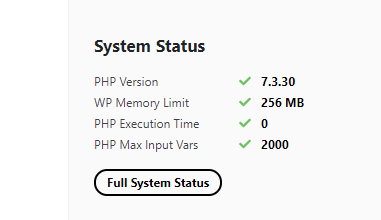
but the errors are keep going like what I posted before
 Anamaria
 Hello,
Please make sure that all theme requirements were set as in our guide https://forum.tagdiv.com/requirements-for-newspaper/ you can try to double the wp memory limit, and please make sure you do not have a plugin conflict.
Here is an article about how to fix this problem:
There has been a critical error on your website.
Also, please check the permalinks and re-save them -> https://i.imgur.com/MQPtVzl.png
Hope it will help you!
Thank you!
Anamaria Hello,
Please check what version of PHP you have, we recommend version 7.3
Please make sure that the theme install was done correctly
Install via WordPress -> https://forum.tagdiv.com/install-via-wordpress/
Install via FTP -> https://forum.tagdiv.com/install-via-ftp/
Also, please make sure you have added the limit also in your wp-config.php file, in config is WP_MEMORY_LIMIT not PHP Memory Limit (there is a typo, sorry) – https://forum.tagdiv.com/requirements-for-newspaper/
and please increase all lower requirements, and follow all steps; make sure that the theme is activated.
Also, if you have other plugins activate, please disable them and see if the problem persists.
Thank you!
 MarleneBrewer
 Calin
If the tag divcomposer is active I cant add content via the wp admin page and the publish page appears readable
If I deactivate TagDiv Composer I can add content however the Published site appears with a critical error.
I have disabled all the other plugins and ran a WP troubleshooter. I have identified 4 plugin’s affected. The others I can leave disabled as they are not critical to the page function and me adding content. Tag DIv composer is needed.
Your advice found here https://forum.tagdiv.com/requirements-for-newspaper/ I have attempted previously
WP SUper Cache isnt intallable I have looked at that
I have upgraded my hosting PHP memory and requirments as the theme required. Still no solution
MarleneBrewerI have been through the process of diabling plugins to source the error in WP.
The error is “Idling in save and auto save with no result”, this happens within the WP-admin page when posting content.
I have increase memory and updated the Newsmag theme 5.1.
If I disable the TagDiv Composer the admin page saving content works, but the publish page appears with a critical error
When enabled the publish page appears fine but I can’t add content within Admin.
Anamaria Hello,
You need to ad wp memory limit in wp-config.php https://i.imgur.com/4XIkf4Y.png -> https://forum.tagdiv.com/requirements-for-newspaper/
Thank you!
 Mjmusicguy
the theme does not seem to recognize when i change php via the cpanel php selector example memory limit
 Mark Gilbert
 You mean make it 512mb? I am no expert in manipulating memory. I added the line define( ‘WP_MEMORY_LIMIT’, ‘256M’ ); as follows to wp-config.php. Is this correct, but now make it 512?
define(‘WP_DEBUG’, false);
define( ‘WP_MEMORY_LIMIT’, ‘256M’ );
/* That’s all, stop editing! Happy blogging. */
I should say I have never had memory above 40mb before and never had this problem, with the same plugins. I have very few plugins over the standard Newspaper ones and have tried deactivating the main ones. Still cloud template library doesn’t load.
Anamaria Hello Mark,
Please try to double the wp memory limit, this problem is when you use plugins that in turn require a wp-memory limit (WPML, revolution slider) each, in turn, requires 256 MB wp memory.
Thank you!
Mark GilbertHello – I just tried to access cloud templates and like many am getting no load and the message “Invalid reply from server endpoint error”. I have not previously had a problem (last time I looked – about 6 months ago – it loaded ok).
I have:
Newspaper 11.2
WP 5.8
Apache
WP Memory Limit 256 MB
PHP 7.4.22
MySQL 5.5
WP Super Cache
Thanks
Mark Gilbert
Calin Hi asdsawn24,
This situation it is quite strange and I say this because if should be something from the theme, I think that always should display hat error or if is a particular part of the theme, then it should display the error when you access that section.
Now this problem can be from different situations, for example it can be from a plugin conflict, for some settings or from some custom code set in the theme, theme files or .htaccess, wp-config.php or functions.php so we need to identify exactly from where it is coming the problem.
First please make sure that all theme requirements are set like in our guide -> https://forum.tagdiv.com/newsmag-requirements-for-newsmag/ (make sure that you set the wp memory limit and that you add that code in htaccess).
After that another think that need to be checked it is to make sure that the theme and theme plugins were installed correctly, for this you can reinstall the theme via FTP/cPanel and install/update the theme plugins from Newsmag > plugins.
In case that you made all above steps and the problem it is still persisting, then we need to make some deep investigations, starting with the extra plugins that you use.
Let me know the results!
Anamaria Hello @bolanka,
Usually, this error appears when the requirements aren’t set like in our guide, please make sure you have added the limit also in your wp-config.php file, in config is WP_MEMORY_LIMIT not PHP Memory Limit (there is a typo, sorry) – https://forum.tagdiv.com/requirements-for-newspaper/
please increase all lower requirements and follow all steps => https://www.screencast.com/t/3eF7oKMSOr2J, this problem is when you use plugins that in turn require wp memory limit (WPML, revolution slider) each, in turn, requires 256 MB wp memory.
The easiest way to solve it is to double the wp memory limit.
Thank you!
Anamaria Hello,
Please make sure that all theme requirements were set as in our guide https://forum.tagdiv.com/requirements-for-newspaper/ you can try to double the wp memory limit, and please make sure you do not have a plugin conflict.
Here is an article about how to fix this problem:
There has been a critical error on your website.
Also, please check the permalinks and re-save them -> https://i.imgur.com/MQPtVzl.png
Hope it will help you!
Thank you!
 medriad
 Our memory limit is set to 512M
Also, all requirements are fulfilled and more, we surely have an SSL certificate.
Please notice, our website was working smoothly till recently, we are assuming because of the last update or the one before.
Furthermore, we used an old template that contains a smart list from the previous designs, but we faced the same problem…
Please, check the link now: https://www.techonnect.com/save-on-electricity/
Thank you
Calin Hi cyberhrc,
1. It is normal that Newspaper theme to use a little more resources because this have many options and possibilities then Newsmag then.
2. If you already have an account then, please use our guide from here -> https://forum.tagdiv.com/newspaper-6-how-to-activate-the-theme/ -> https://i.imgur.com/cM3pSuM.png
3. Make sure that al theme requirements are set as in this guide https://forum.tagdiv.com/requirements-for-newspaper/ the wp_memory_limit it is essential for cloud templates. Also once that all those are set the cloud should load faster and work better. Also please notice what when you access the cloud templates those are store on our cloud and you need to get them on your website therefore you need to have a good internet connection and sometimes it is require to use a ssl.
In case that you have other problems, please make a test and see if on local host is not working better, if is then the problem it is on host, most probably it is provide few resources.
If this is not what you mean or you have other questions, please let me know!
Thank you!
Anamaria Hello,
Usually the “Invalid reply from server endpoint error” is caused by insufficient WP_Memory_limit, in config is WP_MEMORY_LIMIT not PHP Memory Limit (there is a typo, sorry) if you’ll set it to 256M, (you can try to double the value) and if it is still not working, please check the rest of the settings from our guide -> https://forum.tagdiv.com/requirements-for-newspaper/ and please increase all requirements that are lower, and follow all steps. Also please make sure that you use an SSL to have https.
Also, for the smart list, if you import it from the cloud library, you need to have the Single Post Template with the Single Post Smartlist => https://www.screencast.com/t/tPsQsmVdNFs.
Hope this helps you!
Thank you!
 cyberhrc
Hi
Ive used newsmag but last night i switched to newspaper.
I’ve disabled all plugins while still on old theme, uploaded and activated all new plugins from newspaper.
Everything went kind of smooth, i’ve set up homepage and edited whats needed but few issues occured:
1. Memory usage is 30mb [ opposite of 3-4 on newsmag ]
2. I cannot activate theme since after pasting envato purchase it wants me to make new acc for this forum which i already got [ since i had newsmag theme ] . How can i activate if i am already user ?
3. Opening “Cloud templates” makes browser hang for some reason, memory peak jumps super high [ and its default number of templates there from your theme ] so i cannot edit any template from that menu.
Using latest WP, php 8, no new plugins added
Page: http://www.sisak.info
 rjs34
rjs34 Hi Vlad,
I verified that all the requirements are met. I increased the WP_MEMORY_LIMIT, but still having the same spinning circle issue.
Randy
 Vlad S
 Hi,
Please try to increase wp memory limit in wp-config.php – https://forum.tagdiv.com/requirements-for-newspaper/
Thanks!
 Codicem
 Already incrased the WP memory to 980M and still I’m getting the same error:
“Invalid reply from server endpoint.”
Any other solution, potential cause?
 ishwar35
 Thank you for your reply.
I have tried disabling all plugins, with using only newspaper theme plugins it gives same error. I did not get which child theme you are referring to ? I am using only Newspaper theme, no other themes, no caching plugins or other plugins installed. Also latest version of newspaper theme installed. Tried with PHP versions 7.3, 7.4, 8.0. Memory limit 256MB already set, no errors in theme system status. Anything else need to check?



