
- NewspaperWhen tagDiv Composer is Not Working
- NewspaperCache plugin – install and configure
- NewspaperRequirements for Newspaper
 GetJuicy
On my staging site i’m getting a 403 error in the console when I try to click “edit content” and the content editor pop up should open.
My memory limit is 256M, before I play around with all the .htaccess settings and removing other plugins it would be good if someone could look/advise to see if there is a common issue i’m missing
 Anamaria
 Hello,
Please check the wp-memory to 256M, and is still not working, please double it and check the rest of the settings from our guide -> https://forum.tagdiv.com/requirements-for-newspaper/ also make sure that you are using SSL and you have a good bandwidth, the one from our server is 1GB/s and the one that I use at home is 500MB/s, if you have low bandwidth, then you can access parts of the cloud, this can be done from the frontend, for example, if you are on a post -> https://i.imgur.com/4G74M7F.jpg or from tagDiv Composer -> https://i.imgur.com/2F6MhfI.png or from backend -> https://www.screencast.com/t/wekHmc7kJ8J
Thank you!
 Paata
Paata Hello Anamaria,
I tried twice, both times I installed with content, but cours page, or other content doesn’t work 🙁
I have a YouTube channel, but, I don’t khow where is YouTube API, or how to conect with wordpress 🙁 If you can, Please send me a link to the instructions so I can find it.
Paata
P.S. I also corrected the System Status with the requested parameters like this:
PHP Version – 7.4.33
WP Memory Limit – 256 MB
PHP Execution Time – 60
PHP Max Input Vars – 2000
Anamaria Hello,
Please make sure that all theme requirements were set as in our guide https://forum.tagdiv.com/requirements-for-newspaper/ you can try to double the wp memory limit, and please make sure you do not have a plugin conflict.
Here is an article about how to fix this problem:
There has been a critical error on your website. Also, please check the permalinks and re-save them -> https://i.imgur.com/MQPtVzl.png
Hope it will help you!
Thank you!
Anamaria Hello,
Please make sure that all theme requirements were set as in our guide https://forum.tagdiv.com/requirements-for-newspaper/ you can try to double the wp memory limit, and please make sure you do not have a plugin conflict.
Here is an article about how to fix this problem:
There has been a critical error on your website. Also, please check the permalinks and re-save them -> https://i.imgur.com/MQPtVzl.png
Hope it will help you!
Thank you!
 MedicareNews
I cannot activate the key associate with my purchase. I worked but needed to delete install and re-install on the same server. Getting activation error.
Version: 12.6.6 UNREGISTERED Activate now
System Status
PHP Version7.4.33
WP Memory Limit256 MB
PHP Execution Time300
PHP Max Input Vars10000
Thank you for your support.
 Man Kam
 my theme & php:
newspaper v12.6.6 / wordpress 6.6.1
[System Status]
PHP Version 8.3.9
WP Memory Limit 512 MB
PHP Execution Time 300
PHP Max Input Vars 10000
server : AWS server
-
This reply was modified 2 years by
Man Kam.
 CEDFeducation
 I refreshed my memory on enough of the Tag Div functions to get a reasonable layout. But one problem I have is that you did some custom programming for us to create what amounts to subcategories for our webinars on demand. When I use the ID for these resources I get a blank post. To do the custom work you recatagorized the replay posts as Replays in a separate function. Any workaround possible for this?
Thank you.
 simchris
 could be permalinks…try resaving and making sure htaccess is writable, make sure enough memory allocated in both php settings and also wpconfig file
 asisrodriguez
 Hola AnaMaría, not at all, just the theme.
This is me system status from panel control:
Newsmag system status
Here you can check the system status. Yellow status means that the site will work as expected on the front end but it may cause problems in wp-admin. Memory notice: the theme is well tested with a limit of 40MB/request but plugins may require more, for example woocommerce requires 256MB.
Theme config
Registration key i
246e73a5 – **** – **** – **** – 8009b38986d9 Reset key
Theme name i
Newsmag
Theme version i
5.4.3
Theme database version i
5.4.3
HTTP channel test
wordpress
tagDiv advertisement i
Theme Mobile
Newsmag mobile version
php.ini configuration
Server software i
Apache
PHP Version i
7.4.33
post_max_size i
16M – You cannot upload images, themes and plugins that have a size bigger than this value. To see how you can change this please check our guide here.
max_execution_time
300
max_input_vars
2000
SUHOSIN installed
false
PHP extensions
mbstring
available
GD library
available
WordPress and plugins
WP Home URL i
https://www.diarioelectronicohoy.com
WP Site URL i
https://www.diarioelectronicohoy.com
WP version i
6.6.1
WP multisite enabled i
No
WP Language i
es_ES
WP Memory Limit
256 MB/request
WP_DEBUG
False
Caching plugin
No caching plugin detected – for best performance we recommend using WP Super Cache
thanks, it happends in all our webs (11)
Anamaria Hi,
It appears that your resources are insufficient. You likely need to increase the minimum memory for PHP through the hosting panel and also in the wp-config.php file. A good starting point is 256MB.
Thank you!
 ebrianrose
 Thanks for the response. The PHP memory limit is at 512m. Any other ideas as to why it is so slow to publish or edit posts?
simchris You probably need to increase the minimum memory needed for PHP via the hosting panel and ALSO in the wp-config.php file. 256MB is a good starting point for minimum.
 random123
Hello,
I’m contacting you because I’m having two major problems that are preventing me from taking full advantage of my newspaper theme.
The first is that I have a caching problem and I don’t know if it’s linked to the theme or not. I’m using LiteSpeedCache and every day I have to clear my cache, otherwise my site doesn’t display and the images no longer display.
Regarding the PageSpeed test, I can’t solve the following problem:
Avoid excessive DOM size / A large DOM uses more memory, leading to longer style calculations and costly layout adjustments. Find out how to avoid excessive DOM size. Here is the screenshot:
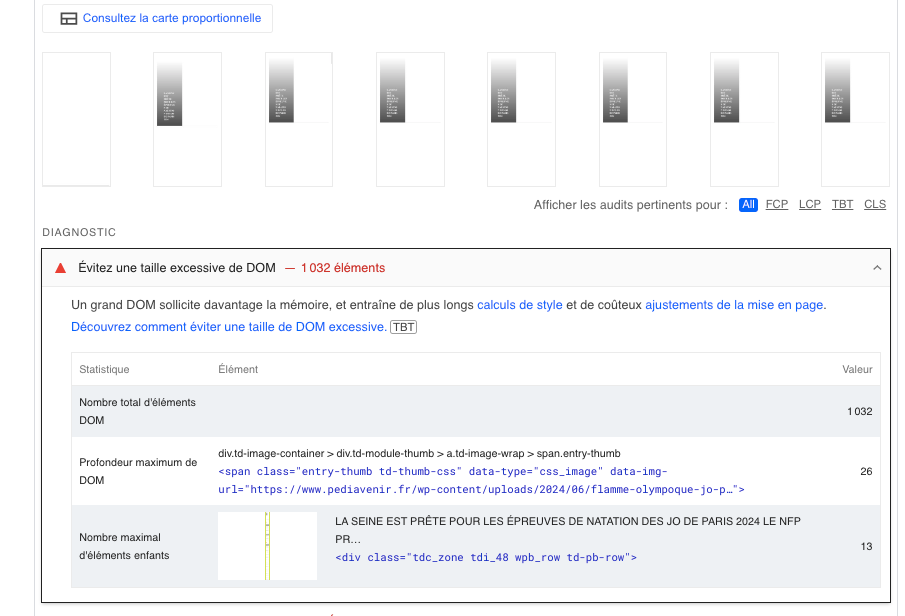
Thanks for your help!
simchris No issues here. (( I don’t work for tagdiv; just long time user. ))
Maybe turn on debug in wp-config.php and then paste your error log here if unable to grant temp access to the support team.
Common 500 error issues:
Browser cache
Corrupted database
Corrupted .htaccess file
Corrupted WordPress core or installation files
Database server problems
Incorrect file and folder permissions
Problem with the PHP memory limit
Third-party plugin
-
This reply was modified 2 years by
simchris.
 gachugbu
 Good morning, please.
First, I get “Invalid Reply From Server Endpoint” when I try to access the templates from Composer. Please tell me how to resolve this. My server resources are fine; I have 256 MB of WP-php memory. The problem started two weeks ago.
Second, my web pages are behind a category; Eg. joliba.com.ng/category/world
I would like it to be joliba.com.ng/world
How can I put the URL correctly?
Thank you for your time and expertise in anticipation of your guidance.
Godson
 HumBot
Hello! I have been using your wonderful Newspaper theme for 6 years! Sadly, I am now getting a wordpress critical error when TagDiv Composer plugin is activated.
I have tried different php versions and am currently using 8.3.
I increased memory to 256mb
I have deleted Composer plugin, cleared cache, and reinstalled Composer plugin
I contacted my host and they told me it is a problem with the Composer plugin and to contact TagDiv
Will you please help me with this?
The website is http://www.yournec.org
 secureblitz
 I fixed the WP Memory Limit value but was still unable to access the cloud library.
Anamaria Hi,
Usually the “Invalid reply from server endpoint error” is caused by insufficient WP_Memory_limit, if you’ll set it to 256M, and is still not working, please double it and check the rest of the settings from our guide -> https://forum.tagdiv.com/requirements-for-newspaper/ also make sure that you are using SSL and you have a good bandwidth, the one from our server is 1GB/s and the one that I use at home is 500MB/s, if you have low bandwidth, then you can access parts of the cloud, this can be done from the frontend, for example, if you are on a post -> https://i.imgur.com/4G74M7F.jpg or from tagDiv Composer -> https://i.imgur.com/2F6MhfI.png or from backend -> https://www.screencast.com/t/wekHmc7kJ8J
Thank you!
 ingiliztuzu
 Hello.
I can’t reach “Cloud Templates”. Gives this error “Invalid response from server endpoint.”
My .htaccess settings
<IfModule lsapi_module>
php_flag display_errors Off
php_value max_execution_time 300
php_value max_input_time 60
php_value max_input_vars 3000
php_value memory_limit 256M
php_value post_max_size 128M
php_value session.gc_maxlifetime 1440
php_value session.save_path “/var/cpanel/php/sessions/ea-php82”
php_value upload_max_filesize 128M
php_flag zlib.output_compression Off
</IfModule>
<IfModule mod_substitute.c>
SubstituteMaxLineLength 10M
</IfModule>
Anamaria Usually the “Invalid reply from server endpoint error” is caused by insufficient WP_Memory_limit, if you’ll set it to 256M, and is still not working, please double it and check the rest of the settings from our guide -> https://forum.tagdiv.com/requirements-for-newspaper/ also make sure that you are using SSL and you have a good bandwidth, the one from our server is 1GB/s and the one that I use at home is 500MB/s, if you have low bandwidth, then you can access parts of the cloud, this can be done from the frontend, for example, if you are on a post -> https://i.imgur.com/4G74M7F.jpg or from tagDiv Composer -> https://i.imgur.com/2F6MhfI.png or from backend -> https://www.screencast.com/t/wekHmc7kJ8J
Thank you!
Anamaria Hello,
Please make sure that all theme requirements were set as in our guide https://forum.tagdiv.com/requirements-for-newspaper/ you can try to double the wp memory limit, and please make sure you do not have a plugin conflict.
Here is an article about how to fix this problem:
There has been a critical error on your website. Also, please check the permalinks and re-save them -> https://i.imgur.com/MQPtVzl.png
Hope it will help you!
Thank you!
simchris did you also change php memory setting in hosting panel? wp-config does not change the limit set in php.ini
 soft4fun.tw
As title, the PHP error log shows:
[22-Jun-2024 16:21:46 UTC] PHP Fatal error: Allowed memory size of 1073741824 bytes exhausted (tried to allocate 20480 bytes) in /home/mywebsite/www/wp-includes/class-wpdb.php on line 2320
[22-Jun-2024 16:21:46 UTC] PHP Fatal error: Allowed memory size of 1073741824 bytes exhausted (tried to allocate 20480 bytes) in /mywebsite/soft4fun/www/wp-includes/functions.php on line 650
It only showed when I tried to delete a cloud template.
I tried to set WP_MEMORY_LIMIT to 1024M, but nothing help.
 Supravar
Hello,
I had a problem with my website and just updated it to the last version of Newspaper but I’m facing this issue:
Fatal error: Allowed memory size of 536870912 bytes exhausted (tried to allocate 199233536 bytes) in /home/icanqrpg/public_html/JPPJV/wp-content/plugins/td-composer/legacy/common/wp_booster/td_util.php on line 2923
Changing define(‘WP_MEMORY_LIMIT’, ‘256M’); won’t do anything and it’s not a good solution
What can I do ?
Thanks



