
- NewsmagSmart list ads
- NewsmagIntroduction
- NewsmagMain menu
- NewsmagLogo & Favicon
- NewsmagHeader ads
- NewsmagSmart sidebar
- NewsmagSharing buttons
- NewsmagCategory tag on modules/blocks
- NewsmagBackground introduction
- NewsmagTheme colors introduction
 iancollins
Hi I have a desktop design with a left menu (the main one) and a right menu. On mobile, I see only the main menu as hamburger. I do not want to use mobile theme plugin. I have created a new menu with the left and right desktop menus combined. I would like to set this new menu as the default for mobile viewing. Plse advise how. Thx Ian
 tatvabodhini_content
Hi, I do not see an option to customize my AMP settings when mobile theme is activated (my intention is to exclude pages from amp (i.e. homepage especially)) . I would like to have all blog posts to be in amp version but the home page should be the one that gets loaded on desktop browser. How can configure the settings to achieve this?
 mita
mita Hi Bettina,
Thanks for clearing that out.
I have another question…
We are displaying Covid Stats on our site but because we use regional stats, unfortunately we can’t make use of the API you have developed :(. Those stats are manually updated every day and we have to do it in 4 different templates (Homepage desktop, Homepage Mobile, Covid page Dektop and Covid Page Mobile)
Can you help us find a way to edit those numbers in a general section and see them applied everywhere? We would like to keep the layout, that’s the tricky part…
https://snipboard.io/6qLnzR.jpg
Thanks,
Marta
 Jeanbatman
 Problem came from the plug-in “Page Optimize” by Automattic. At a first glance, it looks fine. I’ll check on the mobile device and close this ticket later in the evening.
 Calin
Calin Hi mansour,
It is simple, you can use the responsive version, so it is no longer need the mobile theme plugin (you can disable it) and what you see on desktop will see on mobile for pages and posts.
Now if you want to use the mobile theme plugin to have better performances on mobile, you’ll need to understand that this is a dedicate plugin for mobiles, therefore to make the mobile pages faster you need to create new mobile pages using only the mobile editor like in our documentation (Each page at the bottom has a mobile editor -> https://i.imgur.com/i63OwTh.png). Now there it is an alternative, the mobile theme plugin has an option to disable it from a page or post so the responsive version can be displayed -> https://i.imgur.com/pI0GuK5.png
I hope this will help you, because I do not know how to say it more clear then this.
 Bettina
 Hello!
Regarding to the ads, you have some errors in the console. From my point of view, if you don’t use the Mobile Theme plugin, then there is no reason or benefit from AMP. Please read all about AMP here: https://forum.tagdiv.com/tagdiv-amp-plugin-tutorial/
If you use this option with the Mobile Theme plugin, then please reinstall this plugin and see the changes. It comes with its own templates/design for page, post, category, etc so your current templates from the desktop theme will get converted to the mobile theme layout. Documentation here:
– https://forum.tagdiv.com/the-mobile-theme/
– https://forum.tagdiv.com/mobile-theme-introduction/
It depends how and where you insert the social media. Please check our documentation: https://forum.tagdiv.com/social-icons/
https://forum.tagdiv.com/social-sharing/
https://forum.tagdiv.com/tagdiv-social-counter-intro/
Please do not use Elementor + Composer because there is a plugin conflict between them.
Thank you!
Calin Hi,
That is because the mobile theme plugin it is used.
Please check the answer from this topic -> https://forum.tagdiv.com/topic/%d8%b9%d9%86%d8%af%d9%8a-%d9%85%d8%b4%d9%83%d9%84%d8%a9/#post-440560
Thank you for your understanding!
Calin Hi,
According to our guide for mobile theme plugin, when this plugin it is used you need to create the mobile pages using only the mobile editor -> https://tagdiv.com/mobile-theme-get-mobile-ready-with-newsmag-theme/
Also, if you want, you can disable the mobile theme version from pages, for this you need to use the Gutenberg editor -> https://i.imgur.com/CRqkKC4.png or if you do not want to use the mobile theme plugin, then you can simple disable that plugin.
Thank you!
 mansour
I have another problem with articles that appear on the home page only during the mobile, any article appears in the sub-pages An email has been sent and no response, please help, thank you very much
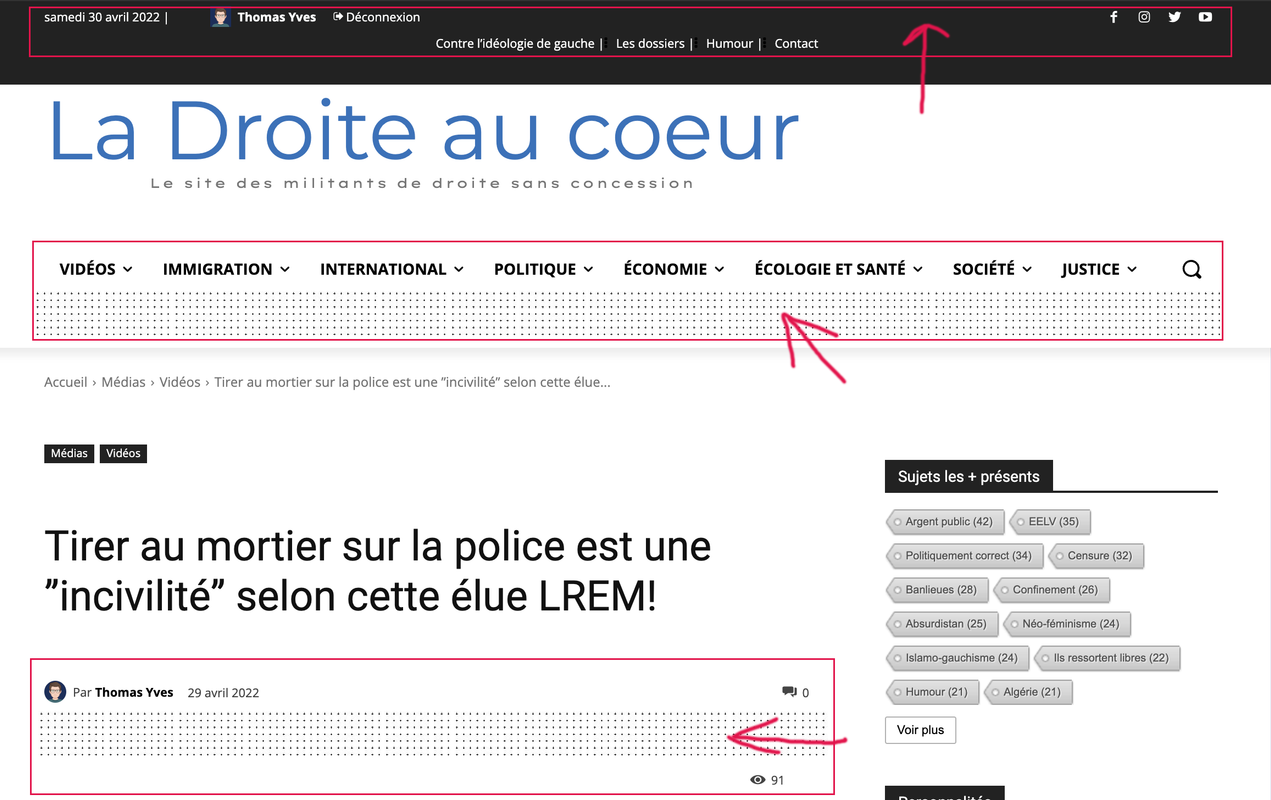
JeanbatmanHi, I did an update and remarked that the Author date, comments number and views used to be inlined, now the view counter skips a line on both my desktop and mobile version. Several inline problem I spotted on this pic.
 benjaone1
 How about with HTML or in some other way get the images on the mobilemenu?
 hellodaviddavis
 I applied my adsense code to the global ads code panel in the theme settings and built the ads on my desktop. However, they will only show on mobile and tablet devices. Also, when I download the AMP plug ins it completely corrupts the page, meaning i cant use this plug in with your theme 🙁
Bettina Hello!
There is an element called ” Mobile menu “. Just add it and select a menu which was already built in the Dashboard -> Appearance -> Menus.
Regarding to the screenshot 2, you can add a “list menu” element.
And you can use it as above(Just add it and select a menu which was already built in the Dashboard -> Appearance -> Menus.)
Thank you!
 Revive the Netherlands
 Hey,
I am using this code on the mobile theme:
video {
width: 100% ;
height: auto;
}
Because otherwise some video’s don’t fit the screen
Bettina Hello!
There is an element called ” Mobile menu “. Just add it and select a menu which was already built in the Dashboard -> Appearance -> Menus.
Other 2 possibilities:
1. Use Modals: https://forum.tagdiv.com/modal-popup/
2. Page mega menu: https://forum.tagdiv.com/page-menu/
Thank you!
Calin Hi,
“A manually specified redirect_uri used with Login on the web must exactly match one of the URIs listed here. This list is also used by the JavaScript SDK for in-app browsers that suppress popups” should be like this -> https://YOUR_AUTH0_DOMAIN/login/callback -> https://www.knowband.com/blog/mobile-app/create-facebook-app-for-facebook-login-authentication/
Here are some more details about this -> https://developers.facebook.com/docs/facebook-login/security/#strict_mode
Thank you!
Bettina Hello!
There are some settings only in the theme panel. Here you can remove/set a picture for mobile menu background: https://www.screencast.com/t/x3Xrln2b88x
And the background color here: https://www.screencast.com/t/PbU3hQpDqHh
In this modal you can not add any element. You should choose the menu from the tagdiv Composer.
A workaround there could be to use a modal popup: https://forum.tagdiv.com/modal-popup/
Thank you!
 suaraumkm
Hi, How i can create menu like this, with icon etc…
when access on mobile ?
https://imgur.com/a/gNKBWWC
https://imgur.com/a/xnoR97Q (number 1 & 2)
hellodaviddavisRevive the Netherlands On this page the facebook video height is not corrext.
If I use this css code.
iframe[src*=”facebook.com”] {
height: 800px!important;
}
There comes alot of width space below the facebook video on this page with an image: https://www.revive.nl/mattheus-van-der-steen-spreekt-zegen-uit-over-koningin-maxima-in-maastricht/
I think the problem is the iframe inherited the style from the image on mobile.
 nbauorg
Hi, I use a mobile menu template. But I fail to customize it. Although I selected the right menu in the composer it does not show. Also the search modal does not look very useful. What can I do?
Calin Yes, but at least you can test to see if using only the amp is that section displayed (when you are using the mobile theme plugin, this is using a different template for the mobile version).
Bettina Hello!
Check this guide: https://tagdiv.com/newspaper-10-3-7-update-brings-customizable-and-fast-mobile-pages/
Make sure you do not have the Mobile Theme plugin installed and active.
Thank you!
 ialv
ialv Perhaps I have not explained myself well.
I want a part of the menu (three lines) to appear as an extension of the menu.
It would be something like this: https://demo.tagdiv.com/newspaper_nft_pro/
Here, when you click ALL in the menu, you get more options and views of the menu itself.
And that in the mobile version it can also be displayed (or the whole menu can be displayed).
How can I do something like this?
Translated with http://www.DeepL.com/Translator (free version)
 Atithya
 If I am using basic AMP without your Tag div mobile theme, then I will only get default AMP layout.



