
- NewsmagUsing other ads
- NewsmagSidebar ads
- NewsmagImport / Export theme settings
- NewsmagRequirements for Newsmag
- NewsmagNewsmag documentation
- NewsmagHow to update the theme
- NewsmagBlock settings tutorial
- NewsmagIntroduction
- NewsmagPage Menu
- NewsmagMega menu
- NewsmagLogo & Favicon
- NewsmagFooter templates
- NewsmagTheme thumbs
- NewsmagBackground introduction
- NewsmagVideo playlist
 Vlad S
 Hello !
That is a suggestion from gtmetrix and google to use the perfect sizes but that will affect your website in other ways. Because using another thumb for mobile will create additional images on your website which will lead to more space occupied on your server.
Most of the results from gtmetrix and google page speed are suggestions. You can add another size for your thumbs in wordpress here:
Go to your WordPress dashboard.
Navigate to the Settings > Media tab.
Look for the Image sizes > Thumbnail size section.
Change the default width and height of your thumbnails in pixels.
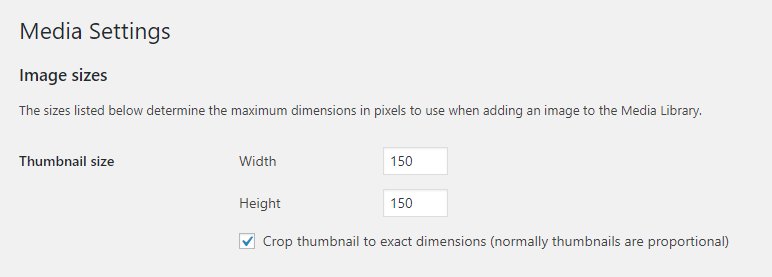
Thank you !
 info@eskuare.com
 Ok,
Another thing…
Why google ads amp works on desktop iphone version but not in real iphone????
Also we have too pages on the footer but when we click on it nothing appers on the page….
Thanks
 ccanjang
Hello,
Thank you for your good theme and services.
I want that featured image don’t be displayed on post pages.
Already I turned off the options SHOW FEATURED IMAGE and FEATURED IMAGE PLACEHOLDER.
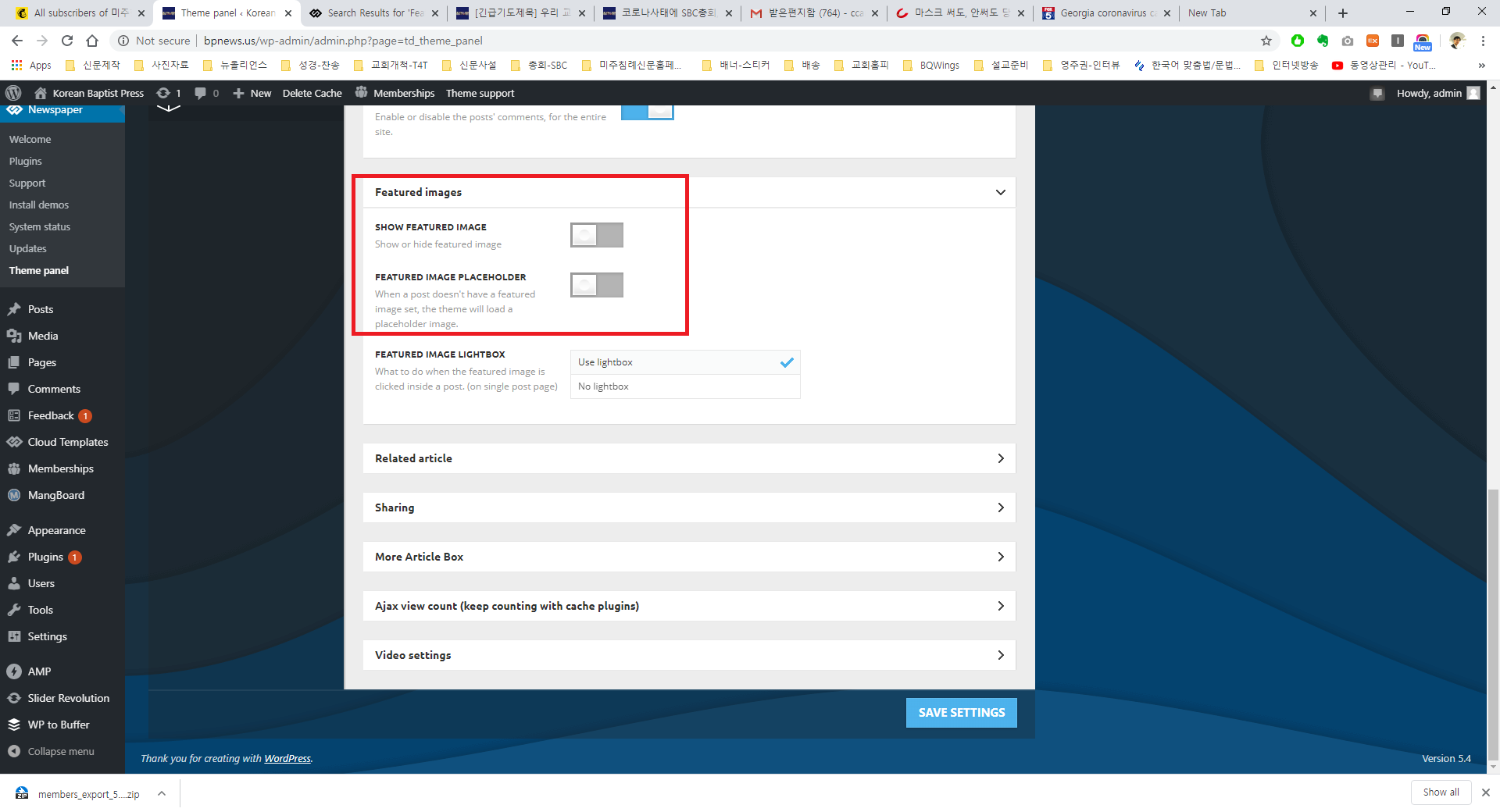
However still I see the featured image even I have tried other laptop(because I worried cache problem).
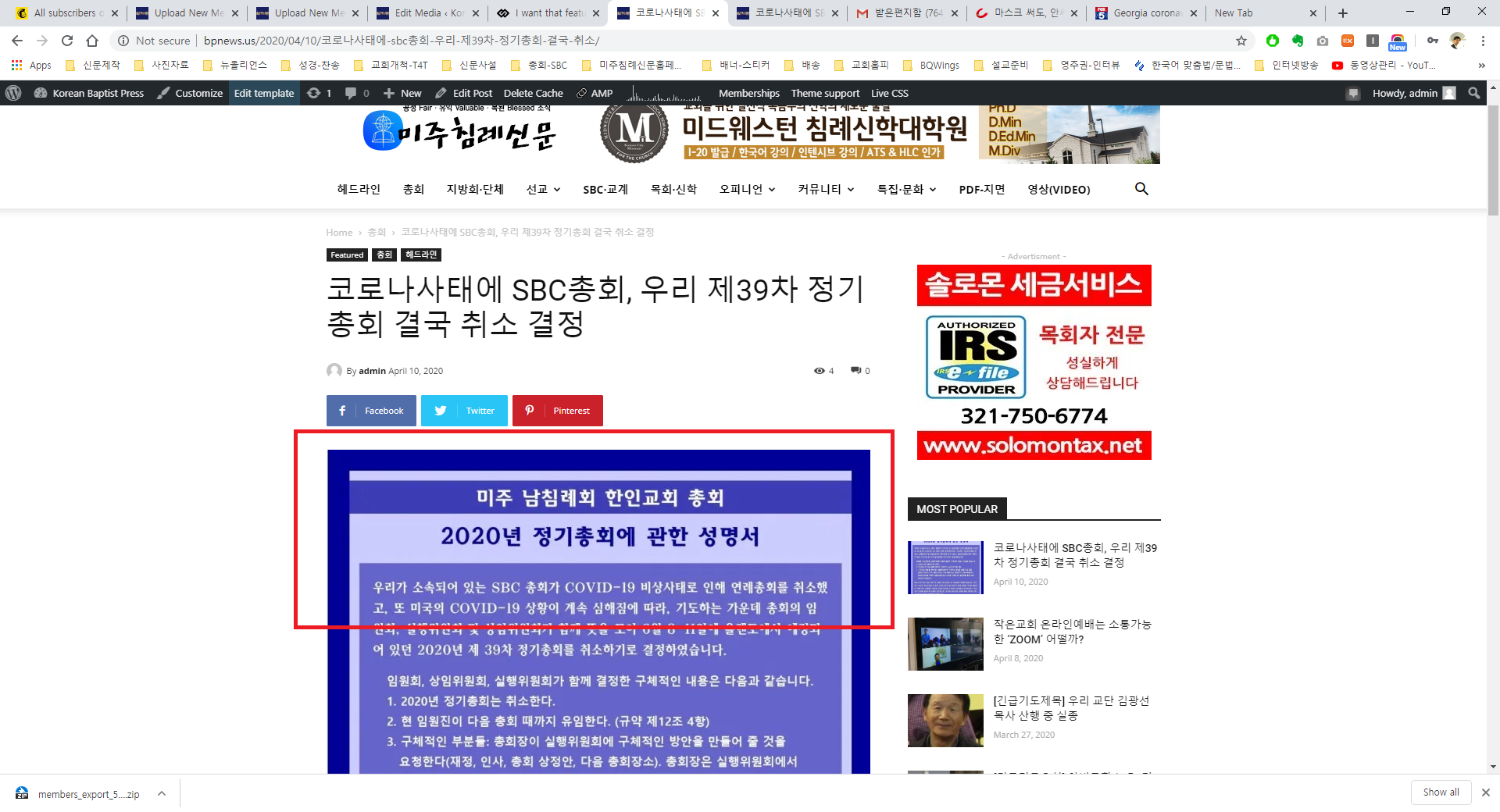
But I don’t see on mobile device.

I don’t know what is problem.
I will wait your reply.
Thanks
 elvisfrog
It might be a silly question but couldn’t find the answer.
First, when I import and use a Template page does it hurt to rename it? Meaning SEO or Theme Settings? Just want something other than “author temp 7”.
Second, and this might not be the place to get the answer, for those template pages I have Yoast and I can add SEO to the template, but does that hurt or help to index? I know you can enable search the pages through Yoast, but is that good or bad, if you load the blank page it just loads the default text so is there a way to load a different page? For example, I use a template for the author so if someone for whatever reason typed that direct link, it shows blank template, could it instead show page listing authors? I imagine I could do it with some clever PHP perhaps a better way exists or really no point?
I love this theme so much, really great. I want to learn as much to best utilize all its features and functions.
Thank you for your time.
Joseph
 dimitrisv
 Hi Vlad,
I did everything you suggested, just left the 6 plugins from TagDiv. No caching is present. Tried with even another browser I had never used to see the page and the issue remains.
Actually I am unable to find the redirect/refresh instruction in the main header cloud template that loads the modal.
 swolly
Hi,
is it possible to add many others “custom ads spot” in theme panel using with some hooks?
Ty
 BuddhaNET777
The desktop theme and mobile theme for https://buddhanet.world are great and exactly how I want them.. please look at the mobile theme on your phone so you can see what I mean by it being different.
when resizing the browser window on desktop instead of showing the mobile header or even the proper desktop header as when in large window it shows another form of the black pro header which appears to be defaulted.
how do I fix this 
 Gluten_Free_Adventures
Dear All,
I am facing a problem with the images on my posts. Let me explain it by giving an example:
EXAMPLE 1:
When I search through Google “Restaurantes sin gluten en Plovdiv” it is driving my visitor to an image gallery of all images without displaying the written content:
– https://www.glutenfreeadventures.net/restaurantes-sin-gluten-en-plovdiv-2/restaurantes-sin-gluten-en-plovdiv-2/
I expect Google to take my visitors to the entry with combined text and content:
– https://www.glutenfreeadventures.net/restaurantes-sin-gluten-en-plovdiv-2/
The entry has the name “restaurantes sin gluten en plovdiv (2)” and when I create this new entry, wordpress automatically generates the url: http://www.glutenfreeadventures.net/restaurantes-sin-gluten-en-plovdiv-2
The name of the main image (imagen destacada) in the post in this case is the same “Restaurantes sin gluten en Plovdiv (2)”. Also for the Alt title.
EXAMPLE 2:
In this case, I type in “Restaurantes sin gluten en Sofia” and Google provides the url of another image gallery of the entry but not displaying the written content:
– https://www.glutenfreeadventures.net/en/gluten-free-restaurants-in-sofia-1/terraza-restaurante-sin-gluten-soul-kitchen-sofia-bulgaria-2/
Again a slider of
In both cases, the given url does not belong to the image.
URL of the image library in the first example: https://www.glutenfreeadventures.net/wp-content/uploads/2020/03/restaurantes-sin-gluten-en-plovdiv-2.jpg
URL of the image library in the second example: https://www.glutenfreeadventures.net/wp-content/uploads/2020/03/terraza-restaurante-sin-gluten-soul-kitchen-sofia-bulgaria.jpg
Do you know why this is happening?
Is there any specific configuration in the Theme Panel to avoid the creation of these urls and image galleries without the text?
Please, could you tell me how can I solve this issue?
Thank you in advance for your support
 wf84
wf84 Hmm, i checked on another computer and yes the menu loads and fast in Edge. I don’t know why but it seems resolved.. 🙂 bye
 Calin
Calin Hi,
You can remove the comment count from the blocks using this option from theme panel -> https://i.imgur.com/F5Q1tDg.png also in order to remove it from posts you can use these settings for standard templates -> https://i.imgur.com/iRudzRZ.png if you are using a PRO Demo or just a single post template from tagDiv Cloud Library for posts, then you need to edit it with tagDiv Composer and use the right click on the elements you want to remove. -> https://i.imgur.com/tEctz6F.png -> https://i.imgur.com/eZNPb6Q.png using other ads.
Thank you!
 SiemenG
Hi,
Every time i go to another page on my website the header loads again and it is a lot higher for a few seconds.
Website: http://www.blauwzwartfans.be
Print screen of what happens: https://ibb.co/tDJwdyX
Thanks for helping
 trishnikov
Hello, it used to be fine, but now the plugin loads very much CNC, without it the site flies. What could it be, otherwise the site works terribly. Could you take a look?
Without plugin – https://i.ibb.co/PcCxYS7/image.jpg
With plugin (200-300 CPU) – https://i.ibb.co/jhD4rtf/image.jpg
 Axtudo
My ad code isn’t working on (Video pop-up ad) https://prnt.sc/ruhso1 use the plug-in (Advanced Ads Pro) note: In the other blocks it’s perfect
 pinnaclecompass
 Hello,
We have the same issue. Out database is huge, so we cannot use the live search anymore, as this overloads our server too often.
The instructions above appear for one page.
How do we remove live search for the whole site, both on mobile and desktop?
(Even if we have to edit code after each theme update, we have to do it because of the DB size.)
(We have over 80,000 posts. We do have a massive dedicated server, and it still struggles with searches. Or, if you have other suggestions, like a way to implement Google API search into the theme, let us know.)
Thank you.
-
This reply was modified 6 years by
pinnaclecompass.
 MBB12
MBB12 Hi there,
I have the same problem with the “save” button: it loads in a loop without end.
At the moment I cannot use the composer at all. I followed all requirements, but still no change. No other plugins are installed.
Please help
Thank you
 matthewbath
Hi!
I wonder if you can help with a possible solution for our publication Wise Living Magazine?
I’m trying to create a colour change state on mouseover when the cursor hovers over a Block Header 8 title.
I can get all other elements to change colour on hover (such as article title) using a FLexblock. I can also add a URL link to the Block Header 8 title, but it would be great for navigation if the header title (such as ‘Your Garden’ on the linked-to image example) change colour on mouseover.
An image showing what I’m trying to do is:

Is this possible?
Many thanks – and hope you like the website!
Matt
 adrien77
Hi,
sorry for my english
i’m put some script some ads but it’s don’t live
i’m do it for header ads it’s ok but when i’m do it for sidebar ad and another i have nothing live but it’s a same script i’m put in theme panel for the ads, you can see here on the index and one the article :
Index :
https://manageo-manageofr.pf8.wpserveur.net/
thanks for your help
Adrien
Calin Hi,
1. Yes, the share is not in the content, this is set with an untested plugin that do not recognize the theme settings, but there are also other errors -> https://i.imgur.com/c4yzRDU.png the images are not loaded, these are encoded in base64.
To align the share buttons you can use a css like this one -> https://i.imgur.com/OF4nphU.png
.page .sd-sharing-enabled {

  width: 1064px;

  margin: auto;

}
The code need to be set in theme panel> custom code> custom css.
2. These ads are set in Appearance > Widgets in sidebars, you need to look for ad box element -> https://i.imgur.com/dSaq9j0.png -> https://forum.tagdiv.com/custom-ad-spots/ also on homepage these can be set with tagDiv Composer edit the page like this -> https://i.imgur.com/ToxdGUw.jpg and use the right click on the element you want to remove -> https://i.imgur.com/M5hVeIo.jpg
3. This is an individual setting on post -> https://i.imgur.com/78EgZh4.png you can use it when you want to have a different style on some posts, if you want to have the same post style you need to use this option -> https://i.imgur.com/HYjSks9.png on posts and in theme panel you can set the global post style -> https://i.imgur.com/bgFMa2S.png
4. We can check the issue only if you can send us an email at contact@tagdiv.com and provide admin login, as well as cPanel. We will take a look. Include a link to this topic in the email.
5. That is the latest articles section, this one comes from the page template, you have set the Page Builder + Latest Articles + Pagination. You can edit it from inside the page(backend) -> https://i.imgur.com/QncbNRm.png
7. The share options are set in theme panel -> https://i.imgur.com/FsBfI7v.png -> https://forum.tagdiv.com/design-post-pages-using-default-templates/
Hope this will help you!
Thank you!
Calin Hi,
There is another way to do it, you can set the the code in theme panel in a custom ad -> https://i.imgur.com/429zJaT.png after that you can use an ad box and set the custom ad from theme panel -> https://i.imgur.com/1xeFUqT.png also make sure that your ads are working and the shortcode is good.
Let me know the results!
Thank you!
Calin Hi,
Yes, using our theme you can use banners, absence and other ads, please check our documentation for this -> https://i.imgur.com/bcrjOXN.png -> https://forum.tagdiv.com/ads-adsense-overview/ also you can check our video tutorial -> https://www.youtube.com/watch?v=biTpVVlr8j8 -> https://www.youtube.com/user/tagdiv
Monetize your website with the new Ad Box Element -> https://tagdiv.com/ad-box-newspaper-theme/
Thank you!
 amassio
 Vlad, my problem in not on related post but the single post page when scroll to the end loads another post. I don’t want this behavior.
Vlad S Hello !
You can remove it but I don’t see how the sidebar will affect your adsense. No other users reported an issue with it.
Thank you !
Calin Hi Ivancho,
What I mean is that if you want to use a banner/image only for a specific viewport, or for all, why not, you can use one of these codes from our documentation -> https://forum.tagdiv.com/using-other-ads-non-adsense-ads/
Hope this will help you!
Thank you!
 Jose
JoseHello,
I have two pages set up the same, they both use tagdiv’s mobile theme.
When the content of the article is finished, the related articles appear. Then, the content of the sidebar appears.
On the second page, at the end of the article’s content, the related advertising appears (adsense), but then, there is nothing of the sidebar’s content.
The only difference is that in the first page I have the related content activated, and in the second page it is not activated (because I use ads).
Is it possible that this is the reason why the content of the sidebar is shown in one page and not in the other?

 Adaras
 Hi,
It’s because it’s two different disclaimer views – one is fixed (for sponsored partnerships) which follows the visitor when they scroll down, and the other is just a one-line banner used when I tell the visitors that ad links are used in the article.
The problem is that BOTH these disclaimers disappear completely when the infinite article loads. As you can see the code is gone.
Is there otherwise another way to input these codes in the cloud template for posts?
<?php adb_manual_output_static_content(); ?>
<?php adb_manual_output_fixed_content(); ?>
-
This reply was modified 6 years by
Adaras.



