
- NewspaperWP Rocket and Newspaper Theme: Optimization Guide
- TutorialsDefault Block Settings Guide
- TutorialsOffset Feature
 Anamaria
 Hello,
Yes, you can use another template for posts from that category.
If you want the same style of your categories/posts, then you can duplicate a template/layout for every category/post to have a different template, make the specific changes and assign it to that category/post.
Check this topic: https://forum.tagdiv.com/topic/different-logo-in-categorypage/ ; Here
is explained step by step how you can duplicate a template.
Thank you!
 Amie
Amie Hello Bettina!
Thank you as always!
This phenomenon (cannot add saved elements) occurs on all template pages,
and Global Colors on my page look like this below:

The color is set by a code, but would you happen to know where the problem is..?
Thank you for your help again!
Amie
 VeriArtem
 Hello
Regarding a screenshot from reference post https://www.screencast.com/t/wekHmc7kJ8J I installed before updating theme however https://imgur.com/4G74M7F options are only for post not for static pages. I created page 404 and a page visitors to log in for posting and now I need template.
Console Error
JQMIGRATE: Migrate is installed, version 3.3.2
js_files_for_wp_admin.min.js?ver=e815948e5c9ec5801de67b92a1d5a59fxx:42 Array(6)
js_files_for_wp_admin.min.js?ver=e815948e5c9ec5801de67b92a1d5a59fxx:42 Object
js_files_wp_admin.min.js?ver=87b3292f51aec51c00e6ce7db9b73ed1:5 API ERROR td-cloud-library/td_cloud_proxy Error – check for php warnings: Object timeout timeout
DevTools failed to load source map: Could not load content for chrome-extension://eakacpaijcpapndcfffdgphdiccmpknp/scripts/content_page.map: System error: net::ERR_BLOCKED_BY_CLIENT
Pre-designed Templates – tagDiv Cloud Library
Invalid reply from server endpoint.
Regards
Alex
 Anamaria
 Hello,
No, you can design each page as you want.
Also, you can disable the header and footer for a page or a template from Manager(Website Manager) -> Header/Footer -> https://i.imgur.com/2pQrAJl.jpg
Thank you!
 fiatmedia
This is a re-post of an issue I have reported which is being dealt with very poorly by support. I’d like someone else to look at this problem and treat it as if it’s a problem YOU are having (it would be fixed in a day if it was a problem YOU were having). I am losing time and money because of this problem, and I could be losing a client because of it. Here is the original message below, and the original exchange is https://forum.tagdiv.com/topic/some-objectsitems-not-loading/ Thanks
ORIGINAL MESSAGE
I’m including all of these issues at once because I have a feeling they are all related, and maybe seeing them all together will give you some clues as to what’s going on.
1. When I pull in a contact form from the cloud library, from any theme, only the shortcode displays. No form shows up, and the short code is not parsed when viewing the page live either; I only see the short code.
2. With some modules I can’t change the background image in the template. When I try to, the image doesn’t change. In other modules I AM able to change the background image. One module that consistently never let me replace the image is the fancy text and picture module. It has a game console as the default image. I’m never able to replace it. And when image replacement DOES work on some module, the image placement doesn’t work the normal way; I have to do a workaround (see next point)
3. I can’t add an image the normal way, in any module, because when I choose an image and click “insert into post” nothing happens. I have to instead copy the URL of the image in my library, paste it within the “Add by URL” field, and only then will the image load.
4. Something that consistently fails, apart from contact forms, is that I can’t load the “Hero” image module. When I drag it into the page I just get a status wheel spinning and spinning and nothing happens.
I’m running the latest wordpress build. Everything looks good in the theme panels status menu. I have read the themes minimum technical requirements and everything looks good there too. All the required plugins are installed and ONLY the required plugins are installed. I don’t have any other page building/editing plugins installed. So I can’t see any obvious reason for why the theme is so buggy and temperamental. It renders the theme practically unusable
Thanks for your help
 tsc_site
 Won`t this change the template for all other pages? Even footer and header? I want to delete footer and header only for this particular page.
thank you
VeriArtem Hello Bettina
After click on Cloud or Load template I get ” Invalid reply from server endpoint.”
On https://cloud.tagdiv.com/#/load/Pages I could not figure out what should I download if access from my admin area will working. (I know that I cannot use staff from https://cloud.tagdiv.com/#/load/Pages)
Regards
Alex
 kubick
 As I wrote. It does not appear in the “cloud template” home page or any other page.
There is clearly something wrong.
 Bettina
 Hello!
If you use a cloud template for your homepage, then it should appear there: https://prnt.sc/fWy6y6_BL59l
Thank you!
Bettina Hello Alex!
No. The elements can even be added to the homepage. Please note that you need a cloud template for that.
Thank you!
 WordDom
 So i use single template 12 and if i have alt attribute now, there is another problem with pagespeed because of aria :
Les attributs [aria-*] ne correspondent pas à leurs rôles
Chaque role ARIA est rattaché à un sous-ensemble spécifique d’attributs aria-*. S’ils ne sont pas correctement associés, les attributs aria-* ne seront pas valides.
Please see : https://dequeuniversity.com/rules/axe/4.4/aria-allowed-attr?utm_source=lighthouse&utm_medium=lr
-
This reply was modified 3 years by
WordDom.
Bettina Hello Carlos!
You can have a faster website with any version how I said above.
There are a lot of factors which can make your site slow. Make sure you use only some templates and fewer functionalities and options.
Some factors which you need to take into account are:
External factors: server speed, if you are using CDN or not, the external resources loaded by your website like ads, fonts, tracking scripts like Facebook Pixel, Google Analytics, Twitter analytics, Hotjar and so on.
Internal factors: the number of elements on the page, image size, image formats, if you are using mobile optimized layouts, console errors, if you are using the Standard Pack plugin or not, if you are using the PRO demo or a standard one.
Unfortunately, no. Because the Mobile theme plugin overwrites the cloud templates.
Thank you!
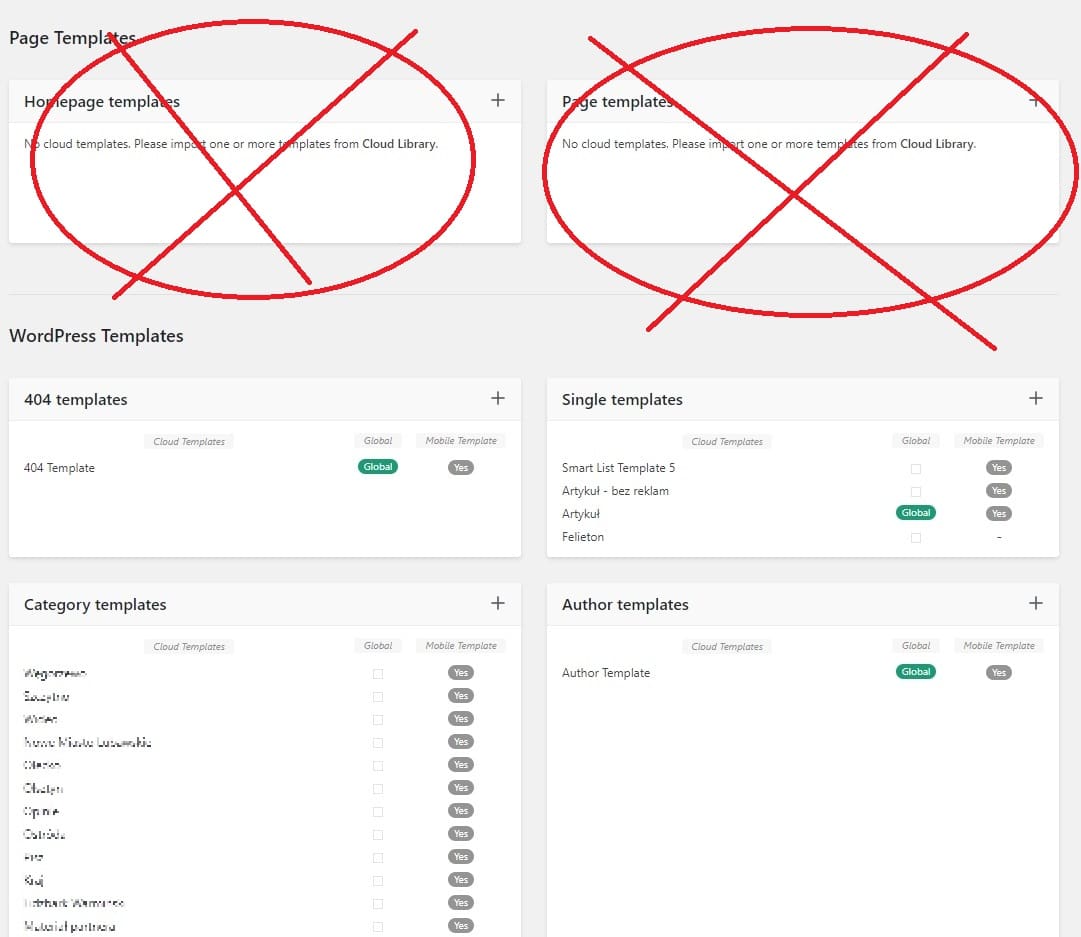
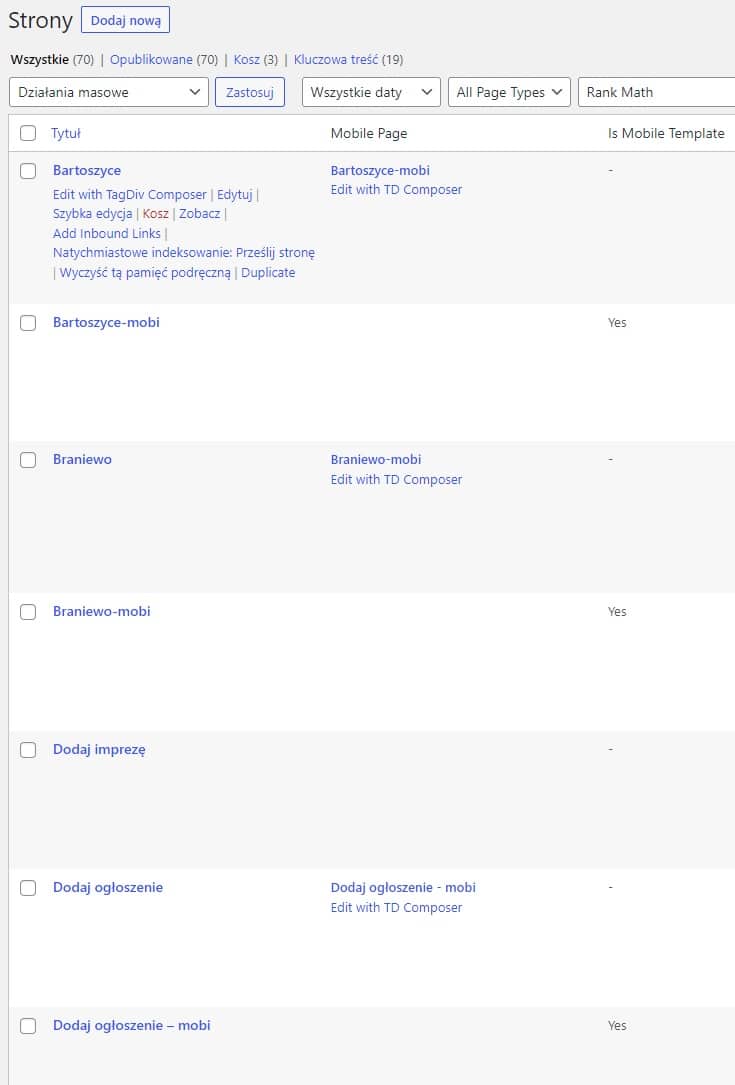
kubickI have over 70 pages on my website. Each of them has its own layout and mobile version.
None of them show up in “Cloud templates”. Same home page. It is not visible in “Cloud templates” or in the admin bar.
I use 30 categories on the site. Each of them has its own layout.
Categories, however, show up in “Cloud templates” and in the admin bar on the front end of the page.
Shouldn’t pages be visible in “Cloud templates”?
Anamaria Hello,
As I said, there is an issue with the settings for the page template.
Thank you!
Anamaria Hello,
Please edit the tag templates with tagdiv Composer, select the page title an delete the additional text https://i.imgur.com/TiDuVmg.png
Thank you!
 dentisti.al
 Im not getting anywhere here. Is it possible to have a look at the setup your self as it is not working. I set it to mobile + amp or mobile and home page just shows no content. I set it to just AMP and the home page works but no other links show content.
This tutorialhttps://www.youtube.com/watch?v=SpGkOnJeNZY&ab_channel=tagDiv also i dont seem to figure out where this option to create mobile template is. Nothing in my admin bar
 Calin
Calin Hi,
1. I just test the single post template 12 and is ok https://i.imgur.com/Ihq7tuy.pngjust make sure that your image has an alt text (you can set it on media).
2. This can be done using the tabbed element – https://forum.tagdiv.com/use-tabbed-content-shortcode/ in this way you can set 2 tabes and in one set page, both pages will have the same flex block but this will be in one page set to be filtered after related articles and in the other one from the same author.
3. Normally, the ads on a single post template should count only the paragraphs, but it can also get other elements. Now if you have a structure for your posts, then you can change the number of paragraphs, also you can set 3 inline ads – https://forum.tagdiv.com/article-ads/
Thank you!
 karlostipo
 Hi Bettina,
Thank you very much for your answer. Now I am clearer on how it works.
But I have one last question please. For speed and optimization you advise to use the Mobile theme right?, so if I use Mobile theme for Mobile + AMP (which is advisable right?), it is no longer necessary for me to create the Mobile specific pages for the Cloud Templates and for the WordPress pages right? And I suppose that by removing all these mobile pages the website will be lighter and faster right?
Thank you very much in advance!. Best regards,
Carlos
Anamaria Hello,
I just checked, and now the website is displayed correctly-> https://i.imgur.com/d74zOUB.png
The mobile theme comes with its own templates for page, post, category, etc so your current templates from the desktop theme will get converted to the mobile theme layout, the page content is made without builders in mobile editor => https://www.screencast.com/t/xbgZG8kH also, the options that are provided to edit the mobile theme version are limited (this keeps the things simple)).Also, please check this topic where I explained each mobile version -> https://forum.tagdiv.com/topic/mobile-version-not-working-properly-2/ and choose what mobile version you want.
Thank you!
Anamaria Hello,
Please use the cloud template, i.e., the Single Post template; you can after customize it as you want the template and add the reviews
-> https://forum.tagdiv.com/user-reviews/
-> https://forum.tagdiv.com/custom-post-type-support/
Please check this guide to set up a Single Pist Template https://forum.tagdiv.com/design-post-pages-using-cloud-library-templates/ -> https://forum.tagdiv.com/single-post-shortcodes/
2. Please check the layout for a row; you can set the width for each column. Please check those articles about the flexibility of rows and inner rows
-> https://tagdiv.com/flexibility-rows-columns-newspaper-theme/
-> https://tagdiv.com/how-to-add-delete-and-duplicate-row-newspaper-theme/
I added this proposal.
Thank you!
Anamaria Hello,
You can use a different header for posts; please check this topic https://forum.tagdiv.com/topic/different-logo-in-categorypage/. The steps are the same for each template.
If you want the same style of your categories/posts, you can duplicate a template/layout for every category/post to have a different template, make the specific changes and assign it to that category/post.
Thank you!
Anamaria Hello,
Please note that we don’t recommend you use WP Bakery anymore since there can be conflicts between TagDiv Composer and WP Bakery; also WP Bakery can’t edit the tagDiv Composer templates. You can use the cloud library and directly import a homepage template if you want: https://forum.tagdiv.com/homepage-how-to-build-and-set-it/
All the Cloud library templates are fully editable using tagDiv Composer.
Also, on our channel https://www.youtube.com/channel/UCOT1RiNysIPCTPSnVZskwtQ, you can find more videos that can help you and documentation https://forum.tagdiv.com/newspaper-theme-documentation/, and you can ask us here on the forum if you have any questions.
Thank you!
Anamaria Hello,
Please note that we don’t recommend you use WP Bakery anymore since there can be conflicts between TagDiv Composer and WP Bakery; also WP Bakery can’t edit the tagDiv Composer templates. You can use the cloud library and directly import a homepage template if you want: https://forum.tagdiv.com/homepage-how-to-build-and-set-it/
All the Cloud library templates are fully editable using tagDiv Composer.
Also, on our channel https://www.youtube.com/channel/UCOT1RiNysIPCTPSnVZskwtQ, you can find more videos that can help you and documentation https://forum.tagdiv.com/newspaper-theme-documentation/, and you can ask us here on the forum if you have any questions.
Thank you!
Anamaria Hello,
Yes, we recommend to use cloud/PRO templates in order to have the possibility to edit them with the TagDiv Composer which contains a lot of functions and features, please check our tutorial here: https://forum.tagdiv.com/tagdiv-composer-tutorial/
More documentation about the cloud templates is here:
– https://forum.tagdiv.com/cloud-library-templates/
– https://forum.tagdiv.com/design-post-pages-using-cloud-library-templates/
– https://forum.tagdiv.com/cloud-library-category-templates/
For mobile version our theme you can choose from 3 mobile versions
-> mobile responsive => https://www.screencast.com/t/oJ2ShOp47
-> mobile theme plugin => https://forum.tagdiv.com/the-mobile-theme/
-> mobile page => https://tagdiv.com/newspaper-10-3-7-update-brings-customizable-and-fast-mobile-pages/
If you created the mobile pages with tagDiv Composer, then when you install the Mobile Theme plugin, your pages will be overwritten by the plugin (the mobile theme comes with its templates for page, post, category, etc so your current templates from the desktop theme will get converted to the mobile theme layout, the page content is made without builders in mobile editor => https://www.screencast.com/t/xbgZG8kH also, the options that are provided to edit the mobile theme version are limited (this keeps the things simple)).
This is a video about Responsive Newspaper Theme, AMP & Mobile Theme, Mobile Pages & Templates -> https://www.youtube.com/watch?v=SpGkOnJeNZY
So, the mobile responsive is what you see then that you select the viewport on phone => https://www.screencast.com/t/matV17hH, so some settings may apply for each viewport(where is the border blue), and others are not(where the border is black).
The mobile page has the mobile templates from Cloud Library => https://www.screencast.com/t/YCcZ8rL8
Mobile responsive version of the theme and the mobile page editor can be edit with tagDiv Composer, the mobile theme plugin not.
For example, you can have the mobile theme plugin activate and use the mobile page/mobile responsive version for the homepage/pages, but for the categories pages/404 page you can’t use the mobile page/mobile responsive version if you have the mobile theme plugin activate.
So, if you want to design the pages with tagDiv Composer, you can use the mobile page or mobile responsive version.
Thank you!
Anamaria Hello,
Please let me know what mobile version you want to use, mobile responsive, mobile theme, or mobile page.
The mobile theme comes with its own templates for page, post, category, etc so your current templates from the desktop theme will get converted to the mobile theme layout, the page content is made without builders in mobile editor => https://www.screencast.com/t/xbgZG8kH also, the options that are provided to edit the mobile theme version are limited (this keeps the things simple)).Also, please check this topic where I explained each mobile version -> https://forum.tagdiv.com/topic/mobile-version-not-working-properly-2/ and choose what mobile version you want.
Also, please provide some screenshots or a video.
Thank you!



