- NewsmagPage templates
- NewsmagCategory templates
- NewsmagFooter templates
- NewsmagDefault post templates
- NewsmagPost templates
- NewsmagHomepage – How to build and set it
- NewsmagtagDiv Composer Tutorial
- NewsmagCustom Post Type Support
- NewsmagNewsmag documentation
- NewsmagHow to use the Visual Composer plugin
- NewsmagHeader styles
- NewsmagSmart sidebar
- NewsmagCategory grid styles
- NewsmagCategory top post styles
- NewsmagHow category settings work
- NewsmagFeatured images
 lonnie
wp_booster error on events calendar’s event category page, how to solve? thank you
td_module: td_module_15($post): $post is not WP_Post
/home1/public_html//wp-content/plugins/td-composer/legacy/common/wp_booster/td_module.php
Array
(
[0] => Array
(
[file] => /home1/ctmakhor/public_html/3fan/wp-content/plugins/td-composer/legacy/common/wp_booster/td_module.php
[line] => 37
[function] => error
[class] => td_util
[type] => ::
[args] => Array
(
[0] => /home1/ctmakhor/public_html/3fan/wp-content/plugins/td-composer/legacy/common/wp_booster/td_module.php
[1] => td_module: td_module_15($post): $post is not WP_Post
)
)
[1] => Array
(
[file] => /home1/ctmakhor/public_html/3fan/wp-content/plugins/td-composer/legacy/common/wp_booster/td_module_single_base.php
[line] => 16
[function] => __construct
[class] => td_module
[object] => td_module_15 Object
(
[td_post_theme_settings] =>
[is_single] =>
[post] =>
[title_attribute] =>
[title] =>
[href] =>
[module_atts:td_module:private] => Array
(
)
[td_review:protected] =>
[is_review:protected] =>
[post_thumb_id:protected] =>
)
[type] => ->
[args] => Array
(
[0] => stdClass Object
(
[ID] => 0
[post_status] => publish
[post_author] => 0
[post_parent] => 0
[post_type] => page
[post_date] => 2022-08-22 00:00:00
[post_date_gmt] => 2022-08-22 00:00:00
[post_modified] => 2022-08-22 00:00:00
[post_modified_gmt] => 2022-08-22 00:00:00
[post_content] =>
[post_title] =>
[post_excerpt] =>
[post_content_filtered] =>
[post_mime_type] =>
[post_password] =>
[post_name] =>
[guid] =>
[menu_order] => 0
[pinged] =>
[to_ping] =>
[ping_status] =>
[comment_status] => closed
[comment_count] => 0
)
)
)
[2] => Array
(
[file] => /home1/ctmakhor/public_html/3fan/wp-content/plugins/td-standard-pack/Newspaper/includes/modules/td_module_15.php
[line] => 12
[function] => __construct
[class] => td_module_single_base
[object] => td_module_15 Object
(
[td_post_theme_settings] =>
[is_single] =>
[post] =>
[title_attribute] =>
[title] =>
[href] =>
[module_atts:td_module:private] => Array
(
)
[td_review:protected] =>
[is_review:protected] =>
[post_thumb_id:protected] =>
)
[type] => ->
[args] => Array
(
[0] => stdClass Object
(
[ID] => 0
[post_status] => publish
[post_author] => 0
[post_parent] => 0
[post_type] => page
[post_date] => 2022-08-22 00:00:00
[post_date_gmt] => 2022-08-22 00:00:00
[post_modified] => 2022-08-22 00:00:00
[post_modified_gmt] => 2022-08-22 00:00:00
[post_content] =>
[post_title] =>
[post_excerpt] =>
[post_content_filtered] =>
[post_mime_type] =>
[post_password] =>
[post_name] =>
[guid] =>
[menu_order] => 0
[pinged] =>
[to_ping] =>
[ping_status] =>
[comment_status] => closed
[comment_count] => 0
)
[1] => Array
(
)
)
)
[3] => Array
(
[file] => /home1/ctmakhor/public_html/3fan/wp-content/plugins/td-standard-pack/Newspaper/loop.php
[line] => 34
[function] => __construct
[class] => td_module_15
[object] => td_module_15 Object
(
[td_post_theme_settings] =>
[is_single] =>
[post] =>
[title_attribute] =>
[title] =>
[href] =>
[module_atts:td_module:private] => Array
(
)
[td_review:protected] =>
[is_review:protected] =>
[post_thumb_id:protected] =>
)
[type] => ->
[args] => Array
(
[0] => stdClass Object
(
[ID] => 0
[post_status] => publish
[post_author] => 0
[post_parent] => 0
[post_type] => page
[post_date] => 2022-08-22 00:00:00
[post_date_gmt] => 2022-08-22 00:00:00
[post_modified] => 2022-08-22 00:00:00
[post_modified_gmt] => 2022-08-22 00:00:00
[post_content] =>
[post_title] =>
[post_excerpt] =>
[post_content_filtered] =>
[post_mime_type] =>
[post_password] =>
[post_name] =>
[guid] =>
[menu_order] => 0
[pinged] =>
[to_ping] =>
[ping_status] =>
[comment_status] => closed
[comment_count] => 0
)
)
)
[4] => Array
(
[file] => /home1/ctmakhor/public_html/3fan/wp-content/plugins/td-composer/legacy/Newspaper/index.php
[line] => 45
[args] => Array
(
[0] => /home1/ctmakhor/public_html/3fan/wp-content/plugins/td-standard-pack/Newspaper/loop.php
)
[function] => require_once
)
[5] => Array
(
[file] => /home1/ctmakhor/public_html/3fan/wp-includes/template-loader.php
[line] => 106
[args] => Array
(
[0] => /home1/ctmakhor/public_html/3fan/wp-content/plugins/td-composer/legacy/Newspaper/index.php
)
[function] => include
)
[6] => Array
(
[file] => /home1/ctmakhor/public_html/3fan/wp-blog-header.php
[line] => 19
[args] => Array
(
[0] => /home1/ctmakhor/public_html/3fan/wp-includes/template-loader.php
)
[function] => require_once
)
)
 cpaez1234
I’m already super pissed off right now because I have tried to solve the problem myself, I have tried to look it up on YouTube, I have tried to access any plugin that might help, and i’m at the point where I have to ask on this moronic forum which is such old technology and probably will take months to answer my question that Tagdiv should answer easily on their How To pages. HOW do enable the stupid Mega Menu??? I don’t have the option on my menu pages and everywhere that i’ve looked on YouTube and even TagDiv’s pages on how to set it up, its enabled. For me it’s not. I’m using the Newspaper theme and its pissing me off to no end. HOW DO I ENABLE IT?! It’s already set up on the initial header template, but not on the menu creation page.
 shafiqgujjar
Hi support, this is my site coknews.com
Whenever i try to edit page with tagdiv composer. I am not able to edit it. I get error “The webpage at https://coknews.com/wp-admin/post.php?post_id=426&td_action=tdc&tdbTemplateType=page might be temporarily down or it may have moved permanently to a new web address.”
 nagappaagencies
I observed a strange behavior that my home page displaying all posts in the home page, whereas the home page should display only the homepage cloud template that I’ve set up. Please help!
https://nagshub.com
 Clecio
I set the logo to the top of the Header Menu, however, when resizing the page, a logo from the template is being displayed.
I’ve looked in several locations in the control panel, and I haven’t found anything related and configurable.
Would you know where this configuration would be ?
 Calin
Calin Hi focuspiedra,
To add the “trending now” element to a page or a cloud template you need to use the tagDiv Composer to edit that page/cloud template -> https://i.imgur.com/URQ8Rgg.png then click on add -> https://prnt.sc/-jdKs1SwWgiZ and search for the element you want, after that drag and drop the element where you want to set it -> https://i.imgur.com/biRL1rm.jpg
I hope this will help you!
shafiqgujjarHi,
Please help me i want to edit my homepage setting but “Edit with tagdiv composer” is not working.
My website URL is https://coknews.com/
After click on “Edit with tagdiv composer” its showing this error https://coknews.com/wp-admin/post.php?post_id=426&td_action=tdc&tdbTemplateType=page&prev_url=%2F%2Fcoknews.com%2F
Please help me so i can stay with your theme.
Calin Hi Gen Fujiwara,
Indeed, the theme provide by default the responsive version. Also it provides the mobile theme plugin that has a pre-made template that can not be edited, but it can do the mobile version faster then the responsive version.
Now, the mobile page templates, those are cloud templates made for mobile version, in this way you can have a different content/layout on mobile and you can edit it after your needs with the tagDiv Composer.
So our theme has in the end 3 possibilities for the mobile version:
1. Responsive version, this is by default when you install the theme and you do not use mobile page or mobile theme plugin.
2. Mobile page/template this allows you to create with tagDiv Composer and cloud a different layout and set different elements for mobile and iPad/tablet and it will overwrite the responsive version.
3. Mobile theme plugin, this is a light theme version for mobile that will overwrite the mobile page and responsive version if enabled.
So when you have a mobile page/template this will be used instead of a responsive version, but if you also have the mobile theme enabled, this one will override both of them.
How to combine them? Yes, this can be possible, for example the mobile page/template will apply only on that page or cloud template that is assigned. But what to do if you want to use a mobile theme plugin too? If you use mobile theme, in Gutenberg editor it is an option to disable the mobile theme in current post/page, if you use the option, then it will be use the mobile page/template (if is assigned) or the responsive version.
So in your case you can disable the mobile theme on the homepage -> https://i.imgur.com/NX57q4t.png or if you do not want it at all, disable the plugin or use it only for amp -> https://i.imgur.com/Grlz5Ee.png.
Here is also a video that explains all those -> https://www.youtube.com/watch?v=SpGkOnJeNZY
Hope this will help you!
 Anamaria
 Hello,
1. Please make sure you have the Cloud Library activated and after importing a Single Post Template -> https://www.youtube.com/watch?v=I1R3j1QYod0
You need to use the smart list from tagDiv Composer, inside Single Post Content ->
https://i.imgur.com/dbipPWQ.png according to the documentation https://forum.tagdiv.com/smart-lists/
Also, you don’t need to use the classic editor, you can use the Gutenberg editor, which is the default editor for WordPress and select/add the element classic https://i.imgur.com/9sWuCtW.png to add the smart list.
Also, please make sure you have the same heading, in the post editor and in the smart list element, please check this video -> https://www.screencast.com/t/BuFFxQKgj
2. The header is a page made with tagDiv composer, and that page is set in the modal popup element -> https://forum.tagdiv.com/modal-popup/
Thank you!
Calin Hi,
The Newspaper theme allows you to include flex blocks inside your post content using a single post template.
Simply click on the single post content element and click on the Ads tab. Here, you are able to add the code for the flex block to be displayed inside the post content. An example code to add flex block with a random post can be get from here -> https://pastebin.com/trhbST2j -> https://imgur.com/swFF2As
Example : Flex block with a random post. The sample code added in the field for the article inline ad 1 -> https://imgur.com/809lHPB
To make your own inline blocks, create a new page and set the flex block that you want to use, after you edit it just copy the shortcode for the flex block from the page and set it like in above example -> https://imgur.com/sVBHL49
The code is the one set between the “vc_column” and “/vc_column” shortcodes
-> https://imgur.com/ah9QUig
I hope this will help you!
 Mudassir Moin
 Hello,
I turned off the mobile theme plugin and made a custom theme for mobile from the template options beside tagdiv composer for the homepage. However, as soon as I did that my mobile homepage and desktop homepage were identical. However, my layout and design for post pages for mobile devices broke down. The images don’t even appear.
For example:
Desktop design for post: https://snipboard.io/XkOHKq.jpg
Mobile design for post:
https://snipboard.io/kmTFIN.jpg
https://snipboard.io/tQVzc9.jpg
https://snipboard.io/WH2l6y.jpg
https://snipboard.io/Lblpsk.jpg
How it looks on tagdiv composer for mobile: https://snipboard.io/iZnWyY.jpg
Link: https://wirefray.com/kaiju-no-8-anime-announced/
So what is the solution? I am getting tired now. The same problem over and over again. I don’t mean to ask this many questions but why do these problems keep happening with the Newspaper theme…
Calin Hi,
The cloud button will be display only on elements that can use cloud templates, like, posts, categories, authors … but not on pages. For pages you need to edit theme first with tagDiv Composer and after that select the cloud -> https://i.imgur.com/Kr6B5lK.png -> https://prnt.sc/_98dsBDoSmJI
I hope this will help you!
Anamaria Hello,
You have the mobile theme plugin activated, the mobile theme comes with its own templates for page, post, category, etc so your current templates from the desktop theme will get converted to the mobile theme layout, the page content is made without builders in mobile editor => https://www.screencast.com/t/xbgZG8kH also, the options that are provided to edit the mobile theme version are limited (this keeps the things simple)).
Better deactivate the plugin and see the results
Also, if you create a mobile page, please make sure you assign it like this https://www.screencast.com/t/lektAhyjd
This is a video about Responsive Newspaper Theme, AMP & Mobile Theme, Mobile Pages & Templates -> https://www.youtube.com/watch?v=SpGkOnJeNZY
Thank you!
 TradersQue
Using the template ads are great, but what if google auto ads turned off seems to not take away a large banner ad taking up your webpage. The ad is full width and clutters up the page, how do we remove this banner ad, https://tradersque.com/
Calin Hi,
The gallery module will work on desktop, responsive version and on mobile page template, but not on mobile theme. So, if you are using the mobile theme plugin the gallery modal will not apply.
Thank you!
Calin Hi smartoptions,
“On one of our shop pages https://smartoptions.io/shop/universal-crypto-signals/, we offer 6 items of our partner but they a not shown next or undernet each other because of the explanation of the services. Does the theme offer a solution for this because I can’t find it?”
If this is a shop page, then you should be able to use tagDiv Composer to display on a woo block the products you want.
For the part with the mobile ranks, you can try to use the mobile page template ?(this can be used on pages and cloud templates) -> https://tagdiv.com/newspaper-10-3-7-update-brings-customizable-and-fast-mobile-pages/
I hope this will help!
 poldino
 This is pressable.com’s answer. I use this template with these plugins for 14 different client pages and 4 different servers. they all use php 8.1 and I have had no problems
————————————————————————————–
I found that the following plugins are causing the issue:
td-composer
td-standard-pack
Error logs shows:
PHP Fatal error: Uncaught TypeError: Unsupported operand types: string / float in /srv/htdocs/wp-content/plugins/td-composer/legacy/Newspaper/includes/shortcodes/td_flex_block_1.php:439
Mudassir Moin Hello,
1. I have done everything mentioned above, however, I am still seeing no improvement on my mobile theme. I created a custom mobile template and it looks fine when I’m editing it with the Tagdiv Composer. However, after I save it and load the website from my phone nothing changes.
https://snipboard.io/qi9KTd.jpg
I deleted my previous cache plugin and used WP Super Cache with the settings you suggested. I also reconfigured my Cloudflare with the preferences shown in the article you provided me with, however, it is still not fixed. How do I fix this?
2. The desktop theme seems to load fine on my laptops. Please tell me how to give a cover image to my latest articles that appear on my homepage.
https://snipboard.io/jmphN4.jpg
Regards.
Anamaria Hello,
You can duplicate the header template and assign it to the page and set the menu -> https://i.imgur.com/ZQlWeP9.png -> https://forum.tagdiv.com/topic/different-logo-in-categorypage/
Thank you!
Calin Hi Tiit, this situation appears because the tagDiv Composer can be used to create pages and cloud templates, but for posts only to create templates, templates that will apply on all posts or individual posts.
So the tagDiv Composer should be used only to edit the layout of the post, not to create a posts.
Also, the single post content need to be set only once in the cloud template and this will display all the content. If you want to set the content on columns, then you need to to it using the WordPress editor https://www.youtube.com/watch?v=RpZLwy_YLoE
I hope this will help you!
Anamaria Hello,
You have cloud templates, so you need to customize with tagDiv Composer, please check these guides -> https://forum.tagdiv.com/header-manager/ https://www.youtube.com/watch?v=HXQQygkCCJo
Our theme is a frontend theme for most of the elements and changes, you’ll need to use the tagDiv Composer to edit the pages and templates for posts/categories, etc => https://i.imgur.com/I3OUYxr.jpg -> https://i.imgur.com/mMrEufY.jpg from the frontend, no in the code -> https://www.screencast.com/t/LDdokrHPl
Also, on our channel https://www.youtube.com/channel/UCOT1RiNysIPCTPSnVZskwtQ, you can find more videos that can help you and documentation https://forum.tagdiv.com/newspaper-theme-documentation/ and you can ask us here on the forum if you have any questions
The options from the Theme Panel are for the standard template.
Thank you!
Anamaria Hello,
If you have the “more from author” and “Related Articles” in a tab like this -> https://i.imgur.com/ZuIs8Y1.png then you are using standard -> https://forum.tagdiv.com/design-post-pages-using-default-templates/ therefore in theme is only one option that disables both options -> https://i.imgur.com/M8bUmQu.png if you want to keep those templates the only way to remove the “more from author” tab is to use a custom CSS like this one:
.single .td-related-right{ display: none; }
Set the code in Theme Panel ->Custom code -> Custom CSS
Hope this helps you!
Thank you!
Anamaria Hello,
Seems you have the Mobile theme plugin activate, when you install and activate the Mobile Theme plugin, your pages will be overwritten by the plugin (the mobile theme comes with its own templates for page, post, category, etc so your current templates from the desktop theme will get converted to the mobile theme layout, the page content is made without builders in mobile editor => https://www.screencast.com/t/xbgZG8kH also, the options that are provided to edit the mobile theme version are limited (this keeps the things simple)).
Better deactivate the plugin and see the results
Also, if you create a mobile page, please make sure you assign it like this https://www.screencast.com/t/lektAhyjd
This is a video about Responsive Newspaper Theme, AMP & Mobile Theme, Mobile Pages & Templates -> https://www.youtube.com/watch?v=SpGkOnJeNZY
Thank you!
 bstaff
Hi there, I am getting a Lost Connection to the database for my website that I believe is responsible for my website going down intermittently for up to 10 to 20 minutes per instance.
I am running Newspaper 11.5.1 on WP version 6.0 and the error is appearing in my error log in my main root level.
Here is the error:
09-Aug-2022 06:40:16 UTC] WordPress database error Lost connection to MySQL server during query for query SELECT post_modified_gmt FROM wp_posts WHERE post_status = ‘publish’ AND post_type IN (‘post’, ‘page’, ‘attachment’, ‘tdb_templates’, ‘snp_popups’, ‘snp_ab’, ‘snp_mail_log’) ORDER BY post_modified_gmt DESC LIMIT 1 made by require(‘wp-blog-header.php’), wp, WP->main, WP->send_headers, get_lastpostmodified, _get_last_post_time
The error reoccurs multiple times and eventually stops and the website goes back online.
If you could provide any insight on this error it would be most appreciated.
Cheers
Brent
 thedonatshop
 I have added yet another. The results are still sample posts.
https://i.gyazo.com/9f5f1ab7b22e40fc22de03263ff1cab0.png
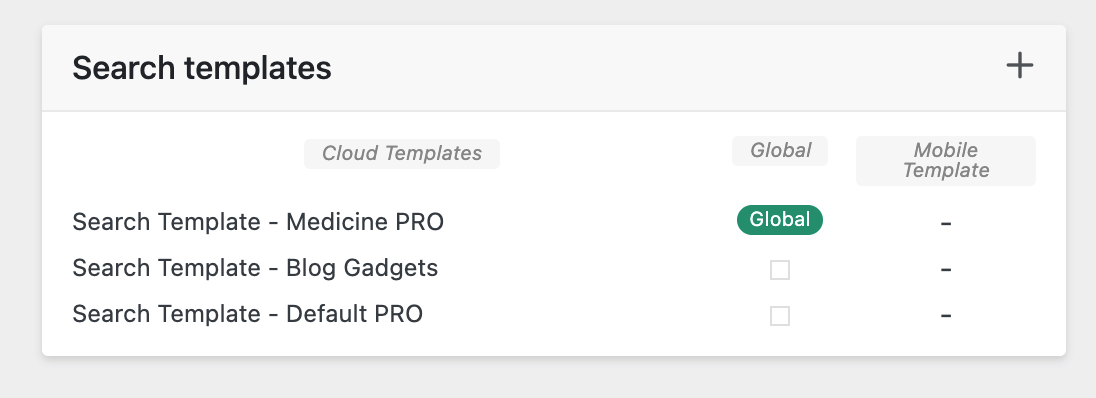
when I click “view” directly from the search template it brings me to the medicine pro search page. it shows with “sample posts”
but then when I do a search on that page it reloads to the “blog gadgets” search template again. but maybe it’s cached. I don’t know.