
- NewspaperDesign your Post Pages using the Cloud Library Templates
- NewspaperDesign your post pages using the Default Templates
- NewsmagPage templates
- NewspaperPage templates
- NewspaperCreate a form contact page
- NewspaperCloud Library Templates
- NewspaperCloud Library – Category Templates
- NewsmagCategory templates
- NewsmagFooter templates
- NewsmagDefault post templates
- NewsmagPost templates
- NewsmagHomepage – How to build and set it
- NewspaperHomepage – How to build and set it
- NewspaperPost templates
- NewspaperDefault post templates
- NewspaperCategory templates
- NewspaperPost template ads
- Apitd_api_single_template::update_key
- Apitd_api_single_template::update
- Apitd_api_single_template::add
 neakriti
Hi,
I would like to change an existing template to fit my custom needs. Is it possible to change/edit any parts of a template? Even the logos are not taken from the TD panel, but instead use the default template’s logos, and I have to change them at each page.
So how can I customize an existing downloaded cloud template?
Thanks
 Vlad S
 Hello !
The slide element which comes from tagDiv Composer it looks like this and it only pulls posts and it works like a block but it offers you a slide effect: https://www.screencast.com/t/LrFJAPusQh This is an element from tagDiv Composer, You will have to open tagdiv composer on your homepage or on your templates and add it.
The other solution would be to use Revolution Slider. Unfortunately we have not tested any more plugins in this matter, you can however test and see other plugins that fit your taste and work with the theme.
I hope this was more helpful !
Thank you !
 hewmedia
When creating my website, I used the default Cloud Templates to customize my pages, such as article layouts, author pages, etc. Now, when I go to Cloud Templates, they have all disappeared. I did not delete them and the other people who have access to them have also not deleted them. My website still works as it used to, but if I wanted to update a page, I cannot do that without having to build a whole new template. Any suggestions on recovering these?
 anonovochines
Hello.
Is it possible to use a translated version of a Cloud Template for the Header for example?
I have created a template on cloud template to be used as header for all pages, and I also created its translated version in another language, however I can’t set a Cloud Template to be used as header in the translated language. And when I edit the translated version of the Header Cloud Template it also edits the original one.
Is there any way to solve this?
 ingriddurupt
Hi,
I imported a template.
I don’t see the bocks but only code :
[vc_row full_width="stretch_row_content_no_space td-stretch-content"][vc_column][td_block_big_grid_fl_3 td_grid_style=”td-grid-style-4″ tdc_css=””][/vc_column][/vc_row][vc_row][vc_column width="2/3"][td_block_18 custom_title=”SANTE” category_id=”17″ sort=”random_posts” limit=”” ajax_pagination=”next_prev”][/vc_column][vc_column width="1/3"][td_block_social_counter facebook="Bienvivrelamenopause " instagram="Bienvivrelamenopause " tdc_css=""][vc_column_text]
If I cick on convert to block I still get code text :
[vc_row][vc_column width="2/3"][td_block_18 custom_title=”SANTE” category_id=”17″ sort=”random_posts” limit=”” ajax_pagination=”next_prev”][/vc_column][vc_column width="1/3"][td_block_social_counter facebook="Bienvivrelamenopause " instagram="Bienvivrelamenopause " tdc_css=""][vc_column_text]
<div align=”center”>
[/vc_column_text][/vc_column][/vc_row]

 Anamaria
 Hi,
I think you had a mobile page template assigned on single post template for the mobile version, and this was deleted from cloud templates but was still assigned to the single post template.
To fix this you need to create a new mobile page template the set it on the no templates. => https://www.screencast.com/t/qeMBSUw7c
This is a topic with similar problem => https://forum.tagdiv.com/topic/mobile-template-loads-on-desktop/
Thank you!
 Bettina
 Hello!
If you created the mobile pages with TagDiv Composer, then when you install Mobile Theme plugin, your pages will be overwritten by the plugin.
The Mobile Theme is a performance optimized theme included in the Newspaper main theme and it loads only for mobile devices. It comes with it’s own templates for page, post, category, etc so your current templates from the desktop theme will get converted to the mobile theme layout. For more details, please take a look here: https://forum.tagdiv.com/the-mobile-theme/
Better deactivate the plugin and see the results.
If you don’t use Mobile theme, then you can create a header/footer for the mobile page, or convert the header/footer from desktop like this: https://www.screencast.com/t/dDe4WoCd ; then after convert you can modify them with TagDiv Composer.
Hope that helps you!
Thank you!
 Calin
Calin Hi Kiko0132, usually when those “text titles” are in pages, you can use tagDiv Composer, edit the page click on the title and change it https://i.imgur.com/S8FSrLY.png also the text from templates can be translated from Theme panel > Translation -> https://i.imgur.com/pFrQy3k.png
Hope this will help you!
Bettina Hello!
If you use a cloud/PRO template for your page, then please edit that page with TagDiv Composer plugin and check in the settings of element if there is set up the font correctly.
If this problem persist, please provide me more information about your issue and also a screenshot to understand better where this issue appears and help you efficiently.
Thank you!
Bettina Hello!
I checked your website and it seems you have a default template and also you inserted the element in the header.
If you want to change the post content also with TagDiv Composer, then you need to create/import a cloud template.
So, the “Page title” element it is working on a post only with cloud/PRO posts template.
Thank you!
Anamaria Hello,
For increase speed, you can use the mobile theme plugin. you’ll gain a better speed then responsive version of the theme, but in order to achieve that speed you’ll need to create a new content for pages because in the most of cases those were made with builders or shortcodes ( tagDiv Composer, WPBakery ) and you need to use only the mobile editor ( you need to set the content for pages in the mobile editor and this content will be display on the mobile theme, also the mobile theme will not display any sidebar)
-> https://i.imgur.com/9d0UWLT.png
When you install Mobile Theme plugin, your pages on mobile will be overwritten by the plugin.
The Mobile Theme is a performance optimized theme included in the Newspaper main theme and it loads only for mobile devices. It comes with its own templates for page, post, category, etc so your current templates from the desktop theme will get converted to the mobile theme layout.
Also, we have the option mobile page -> https://tagdiv.com/newspaper-10-3-7-update-brings-customizable-and-fast-mobile-pages/ this option is to can create mobile pages using tagDiv Composer, also now this option is availed to create cloud templates for the mobile theme too, to can set the layout you want to a mobile website.
Hope this helps you!
Thank you!
 headline
The Newspaper theme you guys have built is excellent in so many ways. But one real shortcoming is the difficulty in making custom page types. For example, with the current proliferation of fake news, most news aggregators, (Facebook included), expect news orgs to have at least 10 additional pages that cover ethics, ownerships, masthead, public policy, corrections, etc.
But Newspaper theme in its current state, provides no template for creating custom page types. So I have to create a cloud template, write the info into a column text box, optimize by screen size, copy the entire code to a new page, then copy the column text into the mobile editor and optimize everything for AMP. None of this can be done in Gutenberg and just saved as a custom page type.
With the critical nature of these additional pages in today’s media ecosystem, future newspaper updates should include a “policies” custom and page type/taxonomy.
 jonathanboulton
Hello everyone,
I’ve ran into an issue when trying to load a template via the tagdiv composer. my aim is to import a contact page into the contact section of my website, but whichever template I use, I receive the error “one of the images failed to upload” and then it doesn’t continue loading anything else so I have to leave the page.
 lioron23
Hi team, where can I edit the default theme author archive php template? not looking to use cloud template for this, would like to be able to fully customize this page. Thanks!
Bettina Hello!
A solution for this could be to create a new single post cloud template, edit it with TagDiv Composer to remove the single featured image element and then you assign this single post cloud template which you just created into whatever article you need. You can assign it by edit a post normally(without TagDiv Composer) and you will find a section at the bottom of the page.
Hope that helps you!
Thank you!
Vlad S Hello !
1. Thumbs on category must be inserted manually. There is no automatic option at the moment.
2. Category layouts and post layouts attached to different categories can be set from here: https://www.screencast.com/t/hyu2Rn3t0tu2 ; https://forum.tagdiv.com/cloud-library-category-templates/ ; https://forum.tagdiv.com/design-post-pages-using-cloud-library-templates/
3. Unfortunately this option is not possible at the moment. Thumbs are created from the Featured image.
I hope this was helpful !
Thank you !
 thcp2020
 Thanks again Bettina,
You are a saviour!
Please see below what the template looks like and how the category pages turn out.
https://paste.pics/1d1ef90478f012cf5c94e67ce5fd5aae
https://paste.pics/74166d006689684c7f1f35fed8a48c85
If you could help with this issue we will be very grateful!
All the best
thcp2020
Bettina Hello @Roularta!
If you have a cloud/PRO template, then you can edit the post page with TagDiv Composer, click on text and you will have these settings in the element like this: https://www.screencast.com/t/r4pj0fKqzJ
So you can add your ad code there and set up the Par(Paragraph).
Let me know about your results!
Thank you!
 PKP01
PKP01Hi,
Within category template breadcrumbs I have site homepage and category title. Since category title is anyway the biggest text right below breadcrumbs this is creating awkward layout and not very nice from SEO perspective. How to remove category name from category breadcrumb?
Example: https://bajki-zasypianki.pl/wiersze-dla-dzieci/
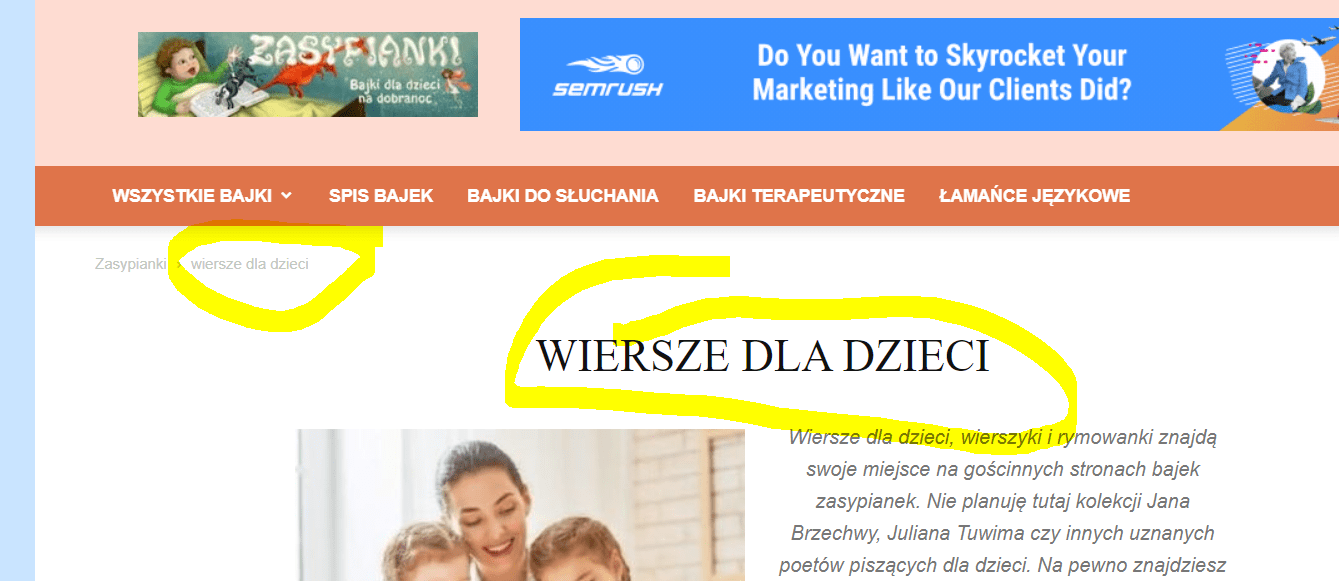
Thanks for help!
Pawel
 imkimc
 Hi Vlad,
Yes, I know where that settings is and it is off.
So my question remains, why is the modal code showing up on all of our pages?
see here: https://www.rvtravel.com
We are not using one of the new Pro demos yet, using the Pro demo requires a complete re-build of our site which takes a lot of time and effort. So we are still using the older default template for our site. We are working on getting rid of the Standard Pack plugin but all of our pages have not been updated yet so we have some more work to do on that front.
Thanks,
Kim
 Toni S.
Hi, I couldn’t get the coronavirus medicine pro -template working.
I get when I try to use divTag composer: “Errors at columns elements: 3(models) : 4(dom). The model does not match the content Current state has involved an issue.”
I tried everything as told in https://forum.tagdiv.com/tagdiv-composer-not-working/
The error exists right from the start before I’ve done anything besides installing the theme, sample content and plugins that should be compatible.
Only the front page allows me to adjust things. Is there a fix for this?
Calin Hi,
I think that you are using the mobile theme plugin, you’ll gain a better speed then responsive version of theme, but in order to achieve that speed you’ll need to create a new content for pages because in the most of cases those were made with builders or shortcodes ( tagDiv Composer, WPBakery ) and you need to use only the mobile editor ( you need to set the content for pages in mobile editor and this content will be display on mobile theme, also the mobile theme will not display any sidebar)
-> https://i.imgur.com/9d0UWLT.png
Also you can show the responsive version on mobile theme (to get the same layout as on desktop on mobile) -> https://i.imgur.com/m0bVB5T.png you can check more details about mobile theme in our documentation -> https://tagdiv.com/mobile-theme-get-mobile-ready-with-newsmag-theme/ or if you want to have the responsive version only, you can use the amp option from mobile theme -> https://i.imgur.com/oofST3D.png (to use the mobile theme template on amp) or you can disable the plugin.
These options are like this:
Mobile -> the mobile theme will apply only on mobile version.
Mobile + amp -> it will apply on both and it will have the same layout.
Amp -> the mobile theme plugin layout will be use only for amp version.
Hope this will help you!
Thank you!
thcp2020 Hello Bettina!
This has fixed my issue thank you!
Are there ways of making dropdown lists that aren’t the category siblings but from a menu?
I also have another issue with a category template. Category Template 8 with the background photo in the title doesn’t seen to respond on the category pages that use this template. The title, category sibling and category description are not covered by the background photo so the whole page looks wrong.
All the best
Vlad S Hello !
Unfortunately a template for a page to be saved is not an option but what you can do is:
You will have to do the following:
Create 1 page and duplicate it.
Edit the template as you can see here:https://www.screencast.com/t/vpXRzB7FYMyV
Copy all the shortcodes from the template: https://www.screencast.com/t/ye2iAqcLVdf
Open a post template like on your new host: https://www.screencast.com/t/sXhnGhmYxJ
Select all the content from here and remove: https://www.screencast.com/t/0cgtSqguH And now paste over the shortcodes you have copied from the old template.
Simply save the template and enjoy !
I hope this was helpful !
Thank you !
 alohawithlove
Hello, I’ve been using Mintyside template and there is a brown arrow at the bottom right that sends the user back to the top of the page. Recently, a grey box also appeared that does the same thing, how do I get rid of it?
Also, can I change the color of this button?
My URL is alohawithlove.com.
Thanks



