
- NewspaperDesign your Post Pages using the Cloud Library Templates
- NewspaperDesign your post pages using the Default Templates
- NewsmagPage templates
- NewspaperPage templates
- NewspaperCreate a form contact page
- NewspaperCloud Library Templates
- NewspaperCloud Library – Category Templates
- NewsmagCategory templates
- NewsmagFooter templates
- NewsmagDefault post templates
- NewsmagPost templates
- NewsmagHomepage – How to build and set it
- NewspaperHomepage – How to build and set it
- NewspaperPost templates
- NewspaperDefault post templates
- NewspaperCategory templates
- NewspaperPost template ads
- Apitd_api_single_template::update_key
- Apitd_api_single_template::update
- Apitd_api_single_template::add
 GregH
GregH OK, but HOW do I change the image size for the single-post template? I tried setting image size (my images are sized before upload), and the size is ignored and the theme blows up the image – and I cannot find any CSS to change that. The images as I stated are way to big and significantly affect page load speed.
-
This reply was modified 6 years by
GregH.
 shogunteam
I would like to set my start page as Search Template 29 – Influencer. Is it possible? If yes, how?
Thank you in advance!
Best regards
Adam
 Calin
Calin Hi nitesh9291, if you are using a pro demo, then you can edit it using tagDiv Composer and edit the pages and cloud template.
Also pleas provide some more details about the problem, some screenshots and what demo you are using.
Thank you!
Calin Hi angelahou,
If you search in cloud template for landing you find these 3 results https://imgur.com/GGGH0u3 also there are more element, but these are not set with the name landing or landing page, also if you have a vision for how it should look this landing page, you can use tagdiv Composer -> https://i.imgur.com/vt8wDqB.png to build it.
I think that you want to be something like these homepages -> https://demo.tagdiv.com/newspaper_nature/ -> https://demo.tagdiv.com/newspaper_dentist/
Thank you!
Calin Hi,
1. There is no need to make other pages, all you need to do is to create a category and assign to this category posts.
All categories are using templates. You can use standard templates -> https://forum.tagdiv.com/default-category-settings/ or cloud templates -> https://tagdiv.com/what-is-the-cloud-library/ (cloud templates can be edited with tagDiv Composer)-> https://i.imgur.com/vxN8vG1.png -> https://i.imgur.com/XBAi1be.jpg -> https://i.imgur.com/JvUnlLV.jpg
a) yes, on homepage you can display the articles from all categories.
b) yes, the category page will display only the articles that has assigned that category or are part from a subcategory from main category.
c) the featured category is just a filter that can be use to filter and order the articles, but if you are using standard templates and assign to one post this category, it will be hide(you can do this for any category using a custom css), you can check more in our guide from here -> https://forum.tagdiv.com/featured-posts-2/
d) yes, an article can be part from as many categories you want, there is no limit or restriction.
2. If you are using cloud templates, please try like this -> https://i.imgur.com/XRj95Ae.jpg check if the logo is not set in a small column or inner column from row or inner row -> https://i.imgur.com/JBuAaxN.png in my can I have two option, to change to another layout or change the width in css tab -> https://i.imgur.com/lBVEdr9.jpg after that just change the logo with from here -> https://i.imgur.com/gq3GmWH.jpg or -> https://i.imgur.com/Vf4i9yG.jpg
3. Unfortunately on standard footer template you can not add a link on the About us title, you can add html link only inside the box for that section -> https://i.imgur.com/j4r9Ko8.png ->https://i.imgur.com/xPtwrMa.png or you can use a footer template and and set a custom html in title text area -> https://i.imgur.com/qGz6I7v.png
4. That is big grid full 4 and is made to look like that with a custom css -> https://i.imgur.com/f8lQNIW.jpg but if you installed this demo, then your posts should be already display in this grid on homepage.
5. That is the mega menu with sub-categories, you can create one using our guide from here -> https://forum.tagdiv.com/mega-menu/
6. As long as these block do not have set a filer per category, will be auto populate, but if you want, you can edit the elements that you do not like or you want to display other type of category or sort -> https://forum.tagdiv.com/block-settings-guide/
Hope this will help you!
Thank you!
 Vlad S
 Hello !
We are sorry for the delay !
You’ll need to use the mobile theme with amp plugin, in this way you’ll have the mobile template on amp does not matter on the option you choose ( only amp or amp + mobile them ) ->http://prntscr.com/opwh8s
This should make your homepage ready for AMP.
Let us know the result.
Thank you!
Calin Hi,
When a header is set in theme panel as global -> https://i.imgur.com/xX2tdIm.png it will be set on entire website, but if you edit a page or cloud template you can assign an individual header that can overwrite the global for that page/template -> https://i.imgur.com/8MDbsmH.png
Please check if you do not have set an individual template on these pages with a different header.
Thank you!
Calin Hi pkvolattu, this is because the gadgets pro is using an overlay header and all the pages, post should have first set an image and over it will be set the header menu.
Another solution is to change the header menu or change it from overlay using tagDiv Composer -> https://i.imgur.com/QAXbOyT.png and set the header template 62 -> https://i.imgur.com/LOtVjms.png.
Thank you!
 pedrogm91
CONSOLE CHROME
Uncaught Error: Syntax error, unrecognized expression: undefined<div class=”tdc-sidebar-separator tdc-sidebar-text-separator”><span>Row</span></div><div class=”tdc-sidebar-element tdc-row-temp” data-shortcode-name=”vc_row” data-template-content=”W3ZjX3JvdyB0ZGNfY3NzPSJleUpoYkd3aU9uc2liV0Z5WjJsdUxYSnBaMmgwSWpvaU1DSXNJbTFoY21kcGJpMXNaV1owSWpvaU1DSXNJbUp2Y21SbGNpMXlhV2RvZEMxM2FXUjBhQ0k2SWpBaUxDSmliM0prWlhJdGJHVm1kQzEzYVdSMGFDSTZJakFpTENKd1lXUmthVzVuTFhSdmNDSTZJalF3Y0hnaUxDSndZV1JrYVc1bkxYSnBaMmgwSWpvaU1DSXNJbkJoWkdScGJtY3RZbTkwZEc5dElqb2lOREJ3ZUNJc0luQmhaR1JwYm1jdGJHVm1kQ0k2SWpBaUxDSjNhV1IwYUNJNklqRXdNQ1VpTENKaVlXTnJaM0p2ZFc1a0xXTnZiRzl5SWpvaUkyWXpaak5tTXlJc0ltSmhZMnRuY205MWJtUXRjRzl6YVhScGIyNGlPaUpqWlc1MFpYSWdZMlZ1ZEdWeUlpd2laR2x6Y0d4aGVTSTZJaUo5TENKd2FHOXVaU0k2ZXlKaVlXTnJaM0p2ZFc1a0xYQnZjMmwwYVc5dUlqb2lZMlZ1ZEdWeUlHTmxiblJsY2lJc0ltUnBjM0JzWVhraU9pSWlmU3dpY0dodmJtVmZiV0Y0WDNkcFpIUm9Jam8zTmpjc0luQnZjblJ5WVdsMElqcDdJbTFoY21kcGJpMXlhV2RvZENJNklqQWlMQ0p0WVhKbmFXNHRiR1ZtZENJNklqQWlMQ0ppYjNKa1pYSXRjbWxuYUhRdGQybGtkR2dpT2lJd0lpd2lZbTl5WkdWeUxXeGxablF0ZDJsa2RHZ2lPaUl3SWl3aWNHRmtaR2x1WnkxeWFXZG9kQ0k2SWpBaUxDSndZV1JrYVc1bkxXeGxablFpT2lJd0lpd2laR2x6Y0d4aGVTSTZJaUo5TENKd2IzSjBjbUZwZEY5dFlYaGZkMmxrZEdnaU9qRXdNVGdzSW5CdmNuUnlZV2wwWDIxcGJsOTNhV1IwYUNJNk56WTRmUT09IiBmdWxsX3dpZHRoPSJzdHJldGNoX3JvdyJdW3ZjX2NvbHVtbiB3aWR0aD0iMS8xIiB0ZGNfY3NzPSJleUpoYkd3aU9uc2laR2x6Y0d4aGVTSTZJaUo5ZlE9PSJdW3ZjX3Jvd19pbm5lciB0ZGNfY3NzPSJleUpoYkd3aU9uc2ljR0ZrWkdsdVp5MTBiM0FpT2lJME1DSXNJbkJoWkdScGJtY3RZbTkwZEc5dElqb2lOREFpTENKaVlXTnJaM0p2ZFc1a0xXbHRZV2RsSWpvaWRYSnNLRndpYUhSMGNEb3ZMMjV2ZEdsamFXRnpMbWRwWVc1amFHbHVibWxqYVM1amIyMHZkM0F0WTI5dWRHVnVkQzkxY0d4dllXUnpMekl3TWpBdk1EVXZZbUZ1Ym1WeUxYQnlaVzFwZFcwdWFuQm5YQ0lwSWl3aVpHbHpjR3hoZVNJNklpSjlmUT09Il1bdmNfY29sdW1uX2lubmVyIHdpZHRoPSIxLzIiXVt0ZG1fYmxvY2tfaW5saW5lX3RleHQgZGVzY3JpcHRpb249IlFVTkRSVk5QSlRJd1ZFOVVRVXc9IiBjb250ZW50X2FsaWduX2hvcml6b250YWw9ImNvbnRlbnQtaG9yaXotY2VudGVyIiBkZXNjcmlwdGlvbl9jb2xvcj0iI2ZmZmZmZiIgbGlua3NfY29sb3I9IiNmZmZmZmYiIGxpbmtzX2NvbG9yX2g9IiNmZmZmZmYiIGZfZGVzY3JfZm9udF9zaXplPSIyNCIgZl9kZXNjcl9mb250X2xpbmVfaGVpZ2h0PSIxLjIiIGZfZGVzY3JfZm9udF93ZWlnaHQ9IjUwMCIgZl9kZXNjcl9mb250X2ZhbWlseT0iNDM4Il1bdGRtX2Jsb2NrX2lubGluZV90ZXh0IGRlc2NyaXB0aW9uPSJSR1Z6WTNWaWNtVWxNakJ1ZFdWemRISnZKVEl3SlRCQlkyOXVkR1Z1YVdSdkpUSXdVSEpsYldsMWJRPT0iIGZfZGVzY3JfZm9udF9zaXplPSI0OCIgZl9kZXNjcl9mb250X2ZhbWlseT0iNTIyIiBkZXNjcmlwdGlvbl9jb2xvcj0iI2ZmZmZmZiIgZl9kZXNjcl9mb250X2xpbmVfaGVpZ2h0PSIxIiBmX2Rlc2NyX2ZvbnRfd2VpZ2h0PSI0MDAiIHRkY19jc3M9ImV5SmhiR3dpT25zaWNHRmtaR2x1WnkxMGIzQWlPaUl4TUhCNElpd2ljR0ZrWkdsdVp5MXlhV2RvZENJNklqRXdjSGdpTENKd1lXUmthVzVuTFdKdmRIUnZiU0k2SWpFd2NIZ2lMQ0p3WVdSa2FXNW5MV3hsWm5RaU9pSXhNSEI0SWl3aVpHbHpjR3hoZVNJNklpSjlmUT09IiBjb250ZW50X2FsaWduX2hvcml6b250YWw9ImNvbnRlbnQtaG9yaXotY2VudGVyIl1bdGRtX2Jsb2NrX2J1dHRvbiBidXR0b25fdGV4dD0iVkVSIEFIT1JBIiBidXR0b25fc2l6ZT0idGRtLWJ0bi1tZCIgYnV0dG9uX2Rpc3BsYXk9IiIgYnV0dG9uX3VybD0iL3RpZW5kYSIgY29udGVudF9hbGlnbl9ob3Jpem9udGFsPSJjb250ZW50LWhvcml6LWNlbnRlciJdWy92Y19jb2x1bW5faW5uZXJdW3ZjX2NvbHVtbl9pbm5lciB3aWR0aD0iMS8yIl1bL3ZjX2NvbHVtbl9pbm5lcl1bL3ZjX3Jvd19pbm5lcl1bL3ZjX2NvbHVtbl1bL3ZjX3Jvd10=” ><div class=”tdc-element-ico tdc-ico-template”></div><div class=”tdc-element-id”>Banner – template</div><div class=”tdc-element-delete” data-type=”vc_row” data-name=”Banner”></div></div><div class=”tdc-sidebar-separator tdc-sidebar-text-separator”><span>Posts Loop</span></div><div class=”tdc-sidebar-element tdc-element” data-shortcode-name=”tdb_loop” data-start-values=”W3sibW9kdWxlc19vbl9yb3ciOiIiLCJpbWFnZV9mbG9hdGVkIjoiZmxvYXRfbGVmdCIsImltYWdlX2hlaWdodCI6ImV5SmhiR3dpT2lJM01DSXNJbkJvYjI1bElqb2lNVEV3SW4wPSIsImltYWdlX3dpZHRoIjoiZXlKaGJHd2lPaUkxTUNJc0luQm9iMjVsSWpvaU16SWlmUT09IiwibWV0YV9wYWRkaW5nIjoiZXlKaGJHd2lPaUl4Tm5CNElpd2ljR2h2Ym1VaU9pSXhObkI0SWl3aWNHOXlkSEpoYVhRaU9pSXhObkI0SW4wPSIsInNob3dfY29tIjoibm9uZSIsInNob3dfZGF0ZSI6IiIsInNob3dfYXV0aG9yIjoibm9uZSIsIm1vZHVsZXNfY2F0ZWdvcnkiOiJpbWFnZSIsIm1vZHVsZXNfY2F0ZWdvcnlfbWFyZ2luIjoiZXlKaGJHd2lPaUl3SURBZ01IQjRJaXdpY0dodmJtVWlPaUl3SURBZ01UQndlQ0o5IiwiZl90aXRsZV9mb250X3NpemUiOiJleUpoYkd3aU9pSXpNQ0lzSW5Cb2IyNWxJam9pTWpBaUxDSndiM0owY21GcGRDSTZJakkwSW4wPSIsImZfdGl0bGVfZm9udF9saW5lX2hlaWdodCI6IjEuMjYiLCJmX3RpdGxlX2ZvbnRfZmFtaWx5IjoiMzc0IiwiZl90aXRsZV9mb250X3dlaWdodCI6IjcwMCIsImZfZXhfZm9udF9zaXplIjoiZXlKaGJHd2lPaUl4TmlJc0luQnZjblJ5WVdsMElqb2lNVFFpZlE9PSIsImZfZXhfZm9udF9saW5lX2hlaWdodCI6IjEuNiIsImV4X3R4dCI6IiM1MjUyNTIiLCJmX2NhdF9mb250X2ZhbWlseSI6IjQzOCIsImZfY2F0X2ZvbnRfd2VpZ2h0IjoiNzAwIiwiZl9jYXRfZm9udF9zaXplIjoiZXlKaGJHd2lPaUl4TWlJc0luQm9iMjVsSWpvaU9TSjkiLCJtb2R1bGVzX2NhdGVnb3J5X3BhZGRpbmciOiJleUpoYkd3aU9pSTFjSGdnTm5CNElEUndlQ0lzSW5Cb2IyNWxJam9pTkhCNElEWndlQ0o5IiwiZl9idG5fZm9udF9zaXplIjoiZXlKaGJHd2lPaUl4TmlJc0luQnZjblJ5WVdsMElqb2lNVE1pZlE9PSIsImZfYnRuX2ZvbnRfbGluZV9oZWlnaHQiOiIxIiwiZl9idG5fZm9udF9mYW1pbHkiOiI0MzgiLCJidG5fcGFkZGluZyI6ImV5SmhiR3dpT2lJeE1YQjRJREUxY0hnZ01UQndlQ0lzSW5CdmNuUnlZV2wwSWpvaU1UQndlQ0F4TlhCNEluMD0iLCJ0aXRsZV90eHRfaG92ZXIiOiIjZTc1NTI0IiwiYnRuX2JnIjoiI2U3NTUyNCIsImNhdF9iZ19ob3ZlciI6IiNlNzU1MjQiLCJtYzFfZWwiOiI1MCIsImFsbF9tb2R1bGVzX3NwYWNlIjoiZXlKaGJHd2lPaUkxTUNJc0luQm9iMjVsSWpvaU16UWlMQ0p3YjNKMGNtRnBkQ0k2SWpReUluMD0iLCJhamF4X3BhZ2luYXRpb24iOiJudW1iZXJlZCIsImJ0bl9tYXJnaW4iOiIyMXB4IDAgMCIsInNob3dfYnRuIjoiZXlKd2FHOXVaU0k2SW01dmJtVWlmUT09Iiwic2hvd19leGNlcnB0IjoiZXlKd2FHOXVaU0k2SW01dmJtVWlmUT09IiwibW9kdWxlc19kaXZpZGVyIjoiIiwibW9kdWxlc19kaXZpZGVyX2NvbG9yIjoiI2YyZjJmMiIsImFydF90aXRsZSI6ImV5SndiM0owY21GcGRDSTZJakFpZlE9PSIsInBhZ19hX2JnIjoiI2U3NTUyNCIsInBhZ19hX2JvcmRlciI6IiNlNzU1MjQiLCJvZmZzZXQiOiIzIiwiZl9leF9mb250X2ZhbWlseSI6IjQzOCIsImZfYnRuX2ZvbnRfd2VpZ2h0IjoiNzAwIiwibWV0YV9pbmZvX2hvcml6IjoiY29udGVudC1ob3Jpei1jZW50ZXIiLCJtZXRhX2luZm9fYWxpZ24iOiJjZW50ZXIiLCJ0ZGNfY3NzIjoiZXlKaGJHd2lPbnNpWkdsemNHeGhlU0k2SWlKOWZRPT0iLCJtX3BhZGRpbmciOiIwcHggMHB4IDBweCAwcHgiLCJibG9ja190ZW1wbGF0ZV9pZCI6IiIsInNoYWRvd19zaGFkb3dfY29sb3IiOiJyZ2JhKDEyLDAsMCwwLjE0KSIsInNoYWRvd19zaGFkb3dfc2l6ZSI6IjUiLCJzaGFkb3dfc2hhZG93X29mZnNldF9ob3Jpem9udGFsIjoiMiIsInNoYWRvd19zaGFkb3dfb2Zmc2V0X3ZlcnRpY2FsIjoiMiIsInNoYWRvd19zaGFkb3dfc3ByZWFkIjoiMiJ9XQ==” ><div class=”tdc-element-ico tdc-ico-template”></div><div class=”tdc-element-id”>banner post – template</div><div class=”tdc-element-delete” data-type=”tdb_loop” data-name=”banner post”></div></div>
at Function.ea.error (jquery.js?ver=1.12.4-wp:2)
at ea.tokenize (jquery.js?ver=1.12.4-wp:2)
at ea.select (jquery.js?ver=1.12.4-wp:2)
at Function.ea [as find] (jquery.js?ver=1.12.4-wp:2)
at n.fn.init.find (jquery.js?ver=1.12.4-wp:2)
at new n.fn.init (jquery.js?ver=1.12.4-wp:2)
at n (jquery.js?ver=1.12.4-wp:2)
at Object.updateSavedShortcodes (js_files_for_wrapper.min.js?ver=1a221c8450bc290d78da968c50c142a1:619)
at Object.init (js_files_for_wrapper.min.js?ver=1a221c8450bc290d78da968c50c142a1:586)
at js_files_for_wrapper.min.js?ver=1a221c8450bc290d78da968c50c142a1:632
js_files_vue_modals.min.js?ver=a336a33b491e4d82f056f6bf77847b68:205 You are running Vue in development mode.
Make sure to turn on production mode when deploying for production.
See more tips at https://vuejs.org/guide/deployment.html
post-edit-1480.js:1 Uncaught TypeError: Cannot read property ‘value’ of null
at Function.get (post-edit-1480.js:1)
at t.loadFacebookPreviewData (post-edit-1480.js:1)
at Object.loadFacebookPreviewData (data.min.js?ver=75f90354ddff4acd5b0b4026454037ca:2)
at HTMLDocument.<anonymous> (post-edit-1480.js:1)
post-edit-1480.js:1 Uncaught TypeError: Cannot read property ‘value’ of null
at Function.get (post-edit-1480.js:1)
at t.loadTwitterPreviewData (post-edit-1480.js:1)
at Object.loadTwitterPreviewData (data.min.js?ver=75f90354ddff4acd5b0b4026454037ca:2)
at HTMLDocument.<anonymous> (post-edit-1480.js:1)
js_files_vue_modals.min.js?ver=a336a33b491e4d82f056f6bf77847b68:205 Download the Vue Devtools extension for a better development experience:
https://github.com/vuejs/vue-devtools
js_files_vue_modals.min.js?ver=a336a33b491e4d82f056f6bf77847b68:205 You are running Vue in development mode.
Make sure to turn on production mode when deploying for production.
See more tips at https://vuejs.org/guide/deployment.html
?td_action=tdc_edit&post_id=2&tdbTemplateType=page:4917 GET https://hotsweethome.live/wp-content/uploads/2020/04/logo.png net::ERR_CERT_DATE_INVALID
js_files_for_wp_admin.min.js?ver=1a221c8450bc290d78da968c50c142a1:27 (6) [i, i, i, i, i, i]
js_files_for_wrapper.min.js?ver=1a221c8450bc290d78da968c50c142a1:44 Uncaught TypeError: Cannot read property ‘$tdcAction’ of undefined
at Object.saveHistory (js_files_for_wrapper.min.js?ver=1a221c8450bc290d78da968c50c142a1:44)
at js_files_for_wrapper.min.js?ver=1a221c8450bc290d78da968c50c142a1:30
saveHistory @ js_files_for_wrapper.min.js?ver=1a221c8450bc290d78da968c50c142a1:44
(anonymous) @ js_files_for_wrapper.min.js?ver=1a221c8450bc290d78da968c50c142a1:30
setTimeout (async)
takeSnapshot @ js_files_for_wrapper.min.js?ver=1a221c8450bc290d78da968c50c142a1:30
init @ js_files_for_wrapper.min.js?ver=1a221c8450bc290d78da968c50c142a1:21
init @ js_files_for_wrapper.min.js?ver=1a221c8450bc290d78da968c50c142a1:236
loadIframe @ js_files_for_wrapper.min.js?ver=1a221c8450bc290d78da968c50c142a1:382
dispatch @ jquery.js?ver=1.12.4-wp:3
r.handle @ jquery.js?ver=1.12.4-wp:3
js_files_for_wrapper.min.js?ver=1a221c8450bc290d78da968c50c142a1:606 {$currentZone: undefined, $currentRow: undefined, $currentColumn: undefined, $currentInnerRow: undefined, $currentInnerColumn: undefined, …}
19js_files_for_wrapper.min.js?ver=1a221c8450bc290d78da968c50c142a1:383 Uncaught TypeError: Cannot read property ‘hide’ of undefined
at HTMLDocument.<anonymous> (js_files_for_wrapper.min.js?ver=1a221c8450bc290d78da968c50c142a1:383)
at HTMLDocument.dispatch (jquery.js?ver=1.12.4-wp:3)
at HTMLDocument.r.handle (jquery.js?ver=1.12.4-wp:3)
 KD
KDHello! I’m using the Search and Filter Pro plugin and am trying to have the search results from the plugin display using the template I’ve set for the sitewide search results [a Cloud Template]. I tried adding the tdb_view_search.php to the child theme and then setting that as the results page in the plugin but it broke the site. I also tried using the archive.php page just to see what would happen and that also broke the site. So far the only thing that doesn’t break the site is the default search.php but that isn’t the layout my client would like to use. Can you please give me some guidance on how I might add the custom theme to the Child theme to achieve the results layout that the clients wants [basically Module 16]? Thank you for your help!
 pradipbhattarai
I have created a custom title for pages. When I place this title at the top of pages, even the single post template replicates it. What may be the reason behind it?
Calin Hi tangusta,
Depends on the demo you are using, the ads can be set in theme panel or it can be set with tagdiv Composer in ad box or single post template on post content -> https://i.imgur.com/VJESMRU.png -> https://i.imgur.com/akMRjTD.jpg -> https://i.imgur.com/aR0a94T.jpg
If there is still a problem, please provide me a link where I can inspect the situation.
Hope this will help you!
Calin Hi,
Please edit this cloud template with tagDiv Composer and remove the offset from the post loop -> https://i.imgur.com/B2YYpwY.png -> https://i.imgur.com/kMWaDV1.jpg -> https://i.imgur.com/oeJkZ55.jpg
Let me know the results!
Thank you!
Calin Hi citizenmilton, this is not what we mean, the thing is that if you are edition a demo, when you’ll uninstall it or change all the content that was add by that demo will be removed, therefore if you edit the category that was from demo or a post/page, this will be lost.
The demo content is just to have an idea for how it will look, also you can choose to use the demo with content or only the demo settings/layout -> https://forum.tagdiv.com/installing-demos/
Also you can choose to import the cloud templates from tagdiv Cloud Library -> https://i.imgur.com/OwYG2I9.png but you can edit them without any problems.
Hope this will help you!
Calin Hi,
1. The links/posts that are display at the end of articles can be edited using tagDiv Composer -> https://i.imgur.com/VWPm3LW.png -> https://i.imgur.com/llfT4UZ.png also you can replace this block with a flex block and filter it -> https://i.imgur.com/9Lwvwgl.png
2. Using tagDiv Composer there is no element to add the comment section on pages, this can be done only using the option from theme panel that is a general option for all pages. Also on homepage there is no option using our theme to set the comment section under each box/article, it can display only the number of comments.
3. First you need to set some reviews to your posts/articles using our guide -> https://forum.tagdiv.com/reviews-2/after that you need to edit the single post template from tagDiv Cloud Library with tagDiv Composer -> https://i.imgur.com/YoP015M.png and add the review elements -> https://i.imgur.com/FDcMddl.png
4. What you can do is to use tagdiv Composer and you can flip the row using the order option -> https://i.imgur.com/NGaV2Dj.png or better you can do this per columns -> https://i.imgur.com/9RaZMAX.png
Hope this will help you!
 Sal+Pimienta
 Dear Vlad,
I would like to follow up on my ticket regarding the advertisements not appearing on the mobile version. This has now been checked on multiple phones, in multiple countries and different platforms (both android and iOS).
Please note, my purchased plan includes 6 month support. It has been almost a full week with this issue persisting, without a clear answer to my issue. Furthermore, it has been 4 days since your last answer.
I expect an answer within the next 24 hours and a solution regarding AMP ads which are still not appearing on mobile phones and the homepage not having a compatible AMP template.
Kind regards
 SMK
SMKHello
I’ve made my website by adjusting Magazine PRO demo to my needs. I’m using global category template for category pages. Post are displayed in “Block 11” and I can’t find an option to change color of text. In tagdiv Composer there are options: General, Filter, Style, Css, but none of them provide an option to change any color in this block. How can I do that?
Calin Hi,
This is because you are using the mobile theme plugin, you’ll gain a better speed then responsive version of theme, but in order to achieve that speed you’ll need to create a new content for pages because in the most of cases those were made with builders or shortcodes ( tagDiv Composer, WPBakery ) and you need to use only the mobile editor ( you need to set the content for pages in mobile editor and this content will be display on mobile theme, also the mobile theme will not display any sidebar)
-> https://i.imgur.com/9d0UWLT.png
Also you can show the responsive version on mobile theme (to get the same layout as on desktop on mobile) -> https://i.imgur.com/m0bVB5T.png you can check more details about mobile theme in our documentation -> https://forum.tagdiv.com/the-mobile-theme/ or if you want to have the responsive version only, you can use the amp option from mobile theme -> https://i.imgur.com/oofST3D.png (to use the mobile theme template on amp) or you can disable the plugin.
Thank you!
Calin Hi,
If you are using a cloud header you can make the menu sticky from website manager -> https://i.imgur.com/Wxw7fVm.jpg if you are using a standard header style, use the settings from theme panel -> https://i.imgur.com/Kes35H4.png
For ads, as long you use the responsive version, the settings made with tagDiv Composer will work -> https://i.imgur.com/uhF328t.png also on this https://prnt.sc/u3hx8byou have set the ad only on mobile menu that is different form the rest of theme, therefore there is no need to extra html tags.
As for amp that is because you try to enable it on cloud template, this will be enable on post, pages and other settings that you can check here -> https://i.imgur.com/h55QHdp.png (but for the moment the cloud templates can not be use as amp, for the moment is use the mobile theme for amp).
Is look that you set an inline css in your code -> https://i.imgur.com/5BtoKb4.png if you remove that padding-left: 40px!important; the banner will be display like this -> https://i.imgur.com/ZDGrwdr.png
Thank you!
Calin Hi,
All the PRO demos are built using tagDiv Composer and also the cloud library templates; in order to change the background color / image you will have to edit all the ROWS as you can see here: -> https://i.imgur.com/VZ1rAOj.png -> https://i.imgur.com/5ZATBhT.png
Hope this will help you!
Thank you !
Calin Hi fleur,
You need to assign the cloud template to a page or in theme panel -> https://i.imgur.com/w7ORV29.png after that the menu will be display normal (when you edit the cloud template the space for content is not allocate -> https://i.imgur.com/qs6JaKY.png) -> https://i.imgur.com/qs6JaKY.png -> https://i.imgur.com/ZIlRN7M.png let me know if after the header is assigned the sub-menu is or not displaying entirely.
Let me know if this is helping you!
Thank you!
 drh10
drh10 Hi Calin
The problem is that I have a custom title area – so it doesn’t look very good when I select the page template (pagebuilder + page title).
Please see my link: https://justforcats.co.uk/test-food-review/
As you can see, the breadcrumbs from the page builder element is in the right position, but doesn’t show the parent page.
However, the parent pages does show in the breadcrumbs in the title area – but this is not what I would like as I have used a page title element to show page title (to make it look better).
Is there a way to make the parent page show in the breadcrumbs element in the page builder?
Thanks
Vlad S Hello !
In order to adjust page width you have to select every row of your page using the tagDiv Composer and then set the stretch mode you want like here : https://www.screencast.com/t/BkWwdHh6
In order to make the post page full width you will have to add a single post template and then edit it. Check more about how to have single post template here: https://tagdiv.com/customize-articles-with-single-post-templates/ And for the header you can do it here: https://www.screencast.com/t/xf56tQN0.
These are the ways you can increase your page width from theme options. Anything above this will require custom code.
Thank you !
 RGLAS
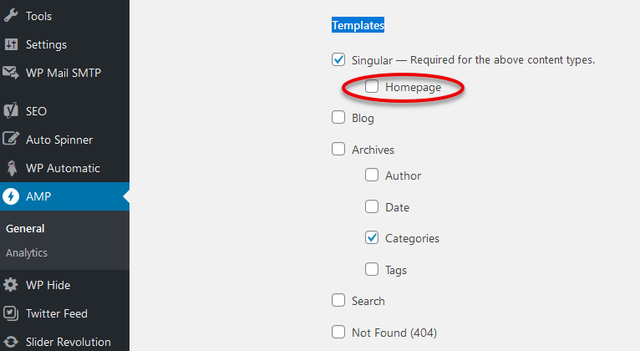
RGLAS Hello, I can’t change the earlier message, but I think I found the problem.
I had to search in the AMP settings
I’ve had to unchecked Templates at Homepage
-
This reply was modified 6 years by
RGLAS.
 thahorse
Hi Team,
1) The background image loads only as long as I am logged in to WordPress; as soon as I log out (or load the page on another browser, the div class “backstretch” is not loaded, and the background image does not load.
What gives?
2) Screenshots and html below:
Screenshot:
https://ibb.co/GtxrG7y
3) HTML from when logged in (background image loads):
<body class=”home page-template-default page page-id-105 logged-in admin-bar td-standard-pack tdm-menu-active-style3 global-block-template-10 td-black tdb-template td-animation-stack-type1 td-boxed-layout customize-support td-js-loaded” itemscope=”itemscope” itemtype=”https://schema.org/WebPage”>
<div class=”backstretch”> </div>
4) HTML from when NOT logged in (the background image does not load, backstretch missing):
<body class=”home page-template-default page page-id-105 td-standard-pack tdm-menu-active-style3 global-block-template-10 td-black tdb-template td-animation-stack-type1 td-boxed-layout td-js-loaded” itemscope=”itemscope” itemtype=”https://schema.org/WebPage”>
<div class=”td-scroll-up”>
5) How can I fix this?
Thanks for your help!



