
- NewspaperDesign your Post Pages using the Cloud Library Templates
- NewspaperDesign your post pages using the Default Templates
- NewsmagPage templates
- NewspaperPage templates
- NewspaperCreate a form contact page
- NewspaperCloud Library Templates
- NewspaperCloud Library – Category Templates
- NewsmagCategory templates
- NewsmagFooter templates
- NewsmagDefault post templates
- NewsmagPost templates
- NewsmagHomepage – How to build and set it
- NewspaperHomepage – How to build and set it
- NewspaperPost templates
- NewspaperDefault post templates
- NewspaperCategory templates
- NewspaperPost template ads
- Apitd_api_single_template::update_key
- Apitd_api_single_template::update
- Apitd_api_single_template::add
 Anamaria
 Hello,
Please check the tab style and clear the color for SVG https://i.imgur.com/xrKbHCf.png
Using our theme, you can choose from 3 mobile versions
-> mobile responsive => https://www.screencast.com/t/oJ2ShOp47
-> mobile theme plugin => https://forum.tagdiv.com/the-mobile-theme/
-> mobile page => https://tagdiv.com/newspaper-10-3-7-update-brings-customizable-and-fast-mobile-pages/ The option that you need to use.
Suppose you created the mobile pages with tagDiv Composer. In that case, when you install the Mobile Theme plugin, your pages will be overwritten by the plugin (the mobile theme comes with its templates for page, post, category, etc, so your current templates from the desktop theme will get converted to the mobile theme layout, the page content is made without builders in mobile editor => https://www.screencast.com/t/xbgZG8kH also, the options that are provided to edit the mobile theme version are limited (this keeps the things simple)).
This is a video about Responsive Newspaper Theme, AMP & Mobile Theme, Mobile Pages & Templates -> https://www.youtube.com/watch?v=SpGkOnJeNZY.
So, the mobile responsive is what you see when that you select the viewport on phone => https://www.screencast.com/t/matV17hH, so some settings may apply for each viewport(where is the border blue), and others are not(where the border is black).
The mobile page has the mobile templates from Cloud Library => https://www.screencast.com/t/YCcZ8rL8
The Mobile responsive version of the theme and the mobile page editor can be edit with tagDiv Composer, the mobile theme plugin cannot.
For example, you can have the mobile theme plugin activated and use the mobile page/mobile responsive version for the homepage/pages, but for the categories pages/404 page, you can’t use the mobile page/mobile responsive version if you have the mobile theme plugin activated.
So, if you want to design the pages with tagDiv Composer, you can use the mobile page or mobile responsive version.
Thank you!
Anamaria Hello Claudiu,
1.3 The pro is added using this custom code CSS -> https://i.imgur.com/YBfqUU3.jpeg. You can delete the code CSS.
1.3.1 CSS is used for the logo, menu, and news ticker flex blocks -> https://i.imgur.com/shKyAKR.jpeg, so it is recommended that you check if this is no longer used before deleting it.
3. The theme colors are used for standard templates. For example, the colors for search, mobile menu, and back to top are still used. So, you can create your global colors in manage and use them on all templates.
4. The empty rows are not displayed in the front end; they are only displayed when you edit the page with tagdiv Composer. So, I don’t understand what you mean by ” How do I know the order and the number of columns and elements inside a row?” Can you please provide screenshots and more details?
7. The icons are added with HTML and CSS, so I recommend using that guide to add icons to the menu because they are easy to add.
/////////////////
1. Yes, the theme has the option for undo-redo, but it is disabled. Please open a page in tagDiv Composer, then click on Manager and then on settings -> https://i.imgur.com/KuvxEl6.png. Enable the option and should display the arrows for undo and redo ->
https://i.imgur.com/nxnyvw1.png Check this guide https://forum.tagdiv.com/tagdiv-composer-website-manager/
2. Yes, there is an option for hover color; please check the tab style https://i.imgur.com/sno3ST3.jpeg
3. These are not recommendations specific to any theme but rather general guidelines applicable to all websites, regardless of the theme used.
General Image Size Recommendations for Mobile:
For mobile display, image sizes are adjusted to ensure both performance and quality:
-
Featured Image: 600 x 400 pixels (or up to 720 x 480 pixels for high-resolution screens).
Thumbnail: 150 x 150 pixels (used for list or grid views).
Post Images: 600 – 800 pixels wide (suitable for both mobile and tablet displays).
General Image Size Recommendations for Desktop:
For desktop displays, larger image resolutions are typically used:
-
Featured Image: 1200 x 800 pixels.
Thumbnail: 300 x 300 pixels.
Post Images: 1200 – 1600 pixels wide (depending on the layout and design).
4. Please remove the align settings that you made and set this on the row https://i.imgur.com/mMokZ65.png
5. You can use the SCF plugin to create a custom field, and after, you can set the text and show it on the category template using the custom field element -> https://i.imgur.com/9bfKMKw.png -> https://i.imgur.com/1IoLb8T.png -> https://i.imgur.com/qE4g6oW.jpeg
For each category on the flex block, there is a special filter for the current category, which dynamically displays the posts from that category within each category -> https://forum.tagdiv.com/flex-block-settings-guide/
The Posts Loop automatically filters the posts depending on the cloud template you set (for example, on the category page, there will be posted posts from that category) https://forum.tagdiv.com/posts-loop/
5.1 Please check this topic https://forum.tagdiv.com/topic/how-to-add-different-sidebare-for-different-posts-with-the-same-category/
5.2 You can assign an individual header on the page like this: go to the manager and set the header template that you want -> https://i.imgur.com/whZRjpm.jpeg not global, then only this header will be on that page—the same steps for the footer.
Have a great weekend!
 Claudiu
 Hi,
Thank you for your answers and your time.
1. I see.
1.2 Ok, got it.
1.3 See attachement. I could delete ‘living’ & ‘magazine’ which were text, but pro its still there. Image – Show, Text – Hide, Icon – Hide (so it’s not an icon). Also for mobile if it’s different.
1.3.1 What is that CSS code (under logo) box for? Can I delete it or will affect something?
2. Ok.
3. Got it with Global colors for tagdiv. But what about theme settings colors? For entire website, no matter page, category, post, sidebar, header, footer. Do I have such a setting that works and it’s recomended?
4. How I know the order and the number of columns and elements inside a row? I don’t want unuseful extra boxes. Is there a list or another way to take a look at them without hover each pixel?
5. Ok.
6. Ty, I did it.
7. You didn’t answer my actual questions about menu’s icons which look like tagdiv code vs Font Awesome. I found these icons for example for mobile menu burger, but there is no use case for them in main menu like you actually did it in demos?
Hands-on again, I will give it some extra time. So here are some extra specific questions:
1. Is there an option while editing with tagdiv to Undo the last action(s), like Ctrl+Z or a button somewhere?
2. Where do I edit hover color for links in menu? It’s a theme setting or a tagdiv editing setting?
3. What’s the recommended size for mobile for each of demos? Where can I check it for desktop / mobile? Like you used to have in theme settings 272×90 and so on.
4.1 See attachement. I can’t handle to align them like logo to the left and menu and search to the right. I tried even to align all to the left, but doesn’t work with these settings. Row + Column + Elements SS:
https://ibb.co/D74gYq8
https://ibb.co/vh24tbB
https://ibb.co/DRNbNBB
5. How do I know if i’m editing a single category or a template for all categories? My scenario: I want to create categories with more text. I found the category description element, but I need more and I have only one description field / element.
The final result should be:
– category description
– grid flex
– other category description (I guess I don’t have 2nd description with tagdiv) / personalized rows for each category (even if it’s manually for each of them)
5.1 Personalized ‘sidebar’ for each of the categories it’s possible? Like different filters for each of them.
5.2 Regarding global / per page edit. How do I know if I’m applying header changes for entire website, or just for ‘this’ page.
Thank you too!
 gmodonesi
 Hello, thank you for the answer.
Actually my question was to find out if the counter is incremented only when an article is actually opened (“sinlge post template”) or also when the preview of the article (image and title only) appears on the homepage or in some side bar for example.
Thanks
-
This reply was modified 1 year by
gmodonesi.
 osamahalari
 I tried it in new page,still its giving same Invalid response from server endpoint.It loads everywhere else just not the page templates.
It loads headers,footers,tags,archive,404,category,author etc without issue.The only problem is when i want to load cloud library in page section.
I also increased the memory limit to 256 and for once i even changed it to 512M but still the same invalid response for page.
Please tell me why is this happening?And how to fix this.
 Bettina
 Hello!
I’ve activated the Standard Pack plugin because you use default templates.
We recommend using cloud/PRO templates to have the possibility to edit them with the TagDiv Composer, which contains a lot of functions and features; please check our tutorial here: https://forum.tagdiv.com/tagdiv-composer-tutorial/
More documentation about the cloud templates is here:
– https://forum.tagdiv.com/cloud-library-templates/
– https://forum.tagdiv.com/design-post-pages-using-cloud-library-templates/
– https://forum.tagdiv.com/cloud-library-category-templates/
Thank you!
Anamaria Hello,
Have you tried to import the category cloud template-> https://forum.tagdiv.com/cloud-library-category-templates/? If yes, and this is not imported, then please check the console -> click the Network tab, select the error, and select Preview -> https://i.imgur.com/iiBOHwP.png and you will see the error.
For each category, on the flex block there is a special filter for the current category, which dynamically displays the posts from that category within each category -> https://forum.tagdiv.com/flex-block-settings-guide/
The Posts Loop automatically filters the posts depending on the cloud template you set (for example, on the category page, there will be posted posts from that category) https://forum.tagdiv.com/posts-loop/
Did you edit with tagdiv Composer, and the changes that you made are not saving?
Thank you!
 secondcup
Goal: To create or duplicate a Recipes category page similar to https://edmontonnews.today/category/lifestyle/recipes/ with a grid layout displaying specific post snippets.
Actions Taken:
Created a New Category: Added a new category page with the name intended for the layout.
Loaded Template: In TagDiv Composer, attempted to load a pre-designed template for the new category page.
Theme Panel Navigation: Went to the Theme Panel as instructed, but no changes reflected after trying to load the template.
Added Grid Block to Page: Manually inserted a grid block into the page, which populated with post snippets as intended. However, no option was available to edit or filter the grid content to display only specific posts or adjust layout details.
Current Outcome:
The grid loaded on the page displays posts automatically but lacks editable settings within TagDiv Composer, preventing further customization or filtering.
Additional steps in Theme Panel or Cloud Templates do not produce the intended layout adjustments.
Unresolved Issues:
Lack of editable options for filtering or modifying content in the grid block.
Loaded templates and Theme Panel settings do not apply or reflect the desired changes on the category page.
this is the page i am trying to edit https://dispensarynearme.news/news/category/lifestyle/cannabis-lifestyle/
Anamaria Hello,
You can try to create a new page and try to import the template from frontend -> https://i.imgur.com/EE1ZCI3.jpeg
Also, please check the error log.
Thank you!
Anamaria Hello,
Please check the block with “No posts” and delete it the offset number; leave it empty with no space or value: https://app.screencast.com/Gh9jDf6t0XtLS
For each tag, on the flex block there is a special filter for the current tag, which dynamically displays the posts from that tag within each tag https://i.imgur.com/twZS0DH.png
The Posts Loop automatically filters the posts depending on the cloud template you set (for example, on the tag page, there will be posted posts from that tag) https://forum.tagdiv.com/posts-loop/
Thank you!
osamahalariHi everyone,
I’m using the TagDiv Newspaper theme on my WordPress site and I’m running into an issue when trying to load prebuilt templates from the Cloud Library.
Specifically, I’m trying to import a contact page template from the Cloud Library, but whenever I go to the TagDiv Composer and click on “Cloud Library” or “Load Template,” I get an “invalid response from server endpoint” error. This only happens when I try to load a Page template. Header, footer, search, and category templates load without any problem.
Website link is https://phonerad.com
Here’s what I’ve tried so far:
• Accessing the Cloud Library through the TagDiv demo site – which works perfectly and loads all templates, including page templates, without issues.
• Checking if there might be any server settings or caching conflicts that could interfere, but I haven’t found anything obvious.
Questions:
1. Has anyone encountered this issue with page templates in the TagDiv Cloud Library before?
2. Is there an alternative way to import page templates directly to my site, perhaps from outside the WordPress environment, since they load fine on the demo site?
 Hamet
HametHello, please I would like to know if I can customize my template with Elementor or add Elementor elements like tabs and I want to know how to put animation on images via your page builder.
 Luigi23
Hi
I have some problem with your template:
1- I created Cloud templates > Homepage templates.
I then created the Mobile version of home page, but I can’t see it active.
2- I created Cloud templates > Header templates. I made all the changes for devices. But I don’t see this Header on mobile.
https://imgur.com/undefined
could you kindly help me?
thank you very much
kind regards
Anamaria Hello Claudiu,
1. We introduced cloud templates because they help you create your desired design. In the cloud template library, you’ll find the 15 standard header templates and other templates -> https://cloud.tagdiv.com/#/load/Headers -> https://i.imgur.com/y1MSS8j.png. Regarding the logo, there are several options—you can set a text logo, an image logo, or an SVG logo. There are also options to hide the logo image or text logo, and you’ll find all options here -> https://i.imgur.com/gFRtk7c.png. Additionally, after setting the logo, you can adjust the sizes for each viewport, including tablet and phone -> https://i.imgur.com/ZJssWZl.png.
1.2 That option is displayed and works for the logo image in cloud templates; however, it’s not recommended. It was kept because you can also set the favicon here, and modifications would have been necessary to keep the favicon and remove the logo.
1.3 I think it’s not displaying because it’s not set to show the logo image -> https://i.imgur.com/xViW280.png.
1.4 Please provide more details about what you mean by a modal header.
2. The Elementor plugin works with standard templates, not cloud templates. It’s added there just like bbPress and other plugins.
2.1 I recommend creating your pages with tagDiv Composer. Here’s a tutorial on designing from scratch -> https://www.youtube.com/watch?v=SoGQ0d5kIBg
2.2 Yes, you can create cloud templates for posts, categories, and so on. You can create your own modules and use them in templates and pages -> https://forum.tagdiv.com/modules-builder-newspaper-theme/ -> https://forum.tagdiv.com/flex-block-builder-flex-loop-builder/ -> https://forum.tagdiv.com/how-use-tagdiv-cloud-library-templates/
3. First, create global colors in the manager https://forum.tagdiv.com/tagdiv-composer-website-manager/, and then select them according to where you want them applied https://i.imgur.com/x66vvKZ.png. If you want a different color instead of the one already selected, you only need to go to the manager to change it, and it will apply to all elements where it’s been used https://i.imgur.com/Mlg3Zac.png
4. You’ll find them in tagDiv Composer; here’s documentation on rows and their flexibility -> https://tagdiv.com/flexibility-rows-columns-newspaper-theme/
-> https://tagdiv.com/how-to-add-delete-and-duplicate-row-newspaper-theme/
-> https://tagdiv.com/right-click-menu-tagdiv-composer/
5. It depends—you may not need to create a footer from scratch; you can just import one and set your logo and menu depending on your needs https://forum.tagdiv.com/footer-templates/
6. You need to edit the single post template with tagDiv Composer. Select the title, and here you’ll have all the font, color, and other styling functionalities -> https://i.imgur.com/4KXVNqb.jpeg. -> https://forum.tagdiv.com/design-post-pages-using-cloud-library-templates/ -> https://forum.tagdiv.com/single-post-shortcodes/
7. You can add an icon element from font awesome plugin – https://forum.tagdiv.com/how-to-add-icons-in-menu/
Also, please check our documentation here: https://forum.tagdiv.com/category/newspaper-8-documentation/, and you can ask us anytime you have questions.
Thank you!
Bettina Hello!
They are different, but you can create the author box from many shortcodes, such as the author image, name, and description, in the author template. Also, there are two different author box shortcodes: https://app.screencast.com/NZZuwlLDlGGwD
Only the extended shortcodes can be used on other pages.
Each shortcode has an option called “Extra class.” You can write a class, such as “modify_class,” and write some CSS code using this class, such as “.modify_class.”
Thank you!
Anamaria Hello,
Please check the block with “No posts” and delete it the offset number; leave it empty with no space or value: https://app.screencast.com/Gh9jDf6t0XtLS
For each category, on the flex block there is a special filter for the current category, which dynamically displays the posts from that category within each category.
The Posts Loop automatically filters the posts depending on the cloud template you set (for example, on the category page, there will be posted posts from that category) https://forum.tagdiv.com/posts-loop/
Thank you!
 xelibris
Environment
Theme: Newspaper 12.6.8
Template: Category Template – Week PRO
Site URL: https://sideration.net
Issue Description
Some category pages are not displaying their associated posts without any apparent reason. For example:
The “Société” category has 2 published posts

When clicking “See” to view the category page, no posts are displayed
The category URL is correct
New posts assigned to this category don’t appear either
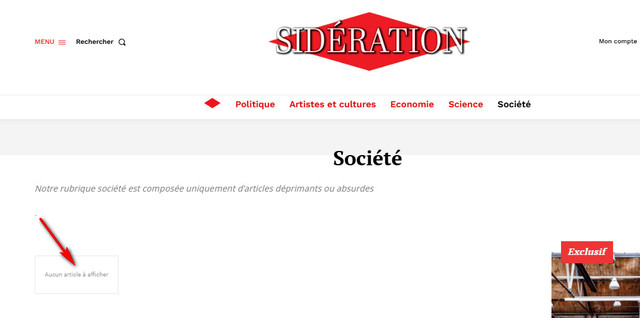
Troubleshooting Steps Taken
Verified the category URL is correct
Tried creating new posts and assigning them to the category
Cleared cache
Verified posts are properly published and categorized
Expected Behavior
Category page should display all posts assigned to that category
Actual Behavior
Category page appears empty, showing no posts
Question
Could you please help me identify why these posts are not appearing on their category page and how to resolve this issue?
Additional information or logs can be provided if needed.
Thank you for your assistance.
 iitob
iitobOur site: https://shorturl.at/Fz3P6
Using Newspaper theme with tagdiv Cloud Library and tagdiv Composer enabled. We have customized the design of the site’s homepage, single post, pages, category, footer, header etc using cloud templates.
When we make these changes, they look great and can be seen by logged in users. However, non-logged in users cannot see the changes to the site.
We are using Cloudflare and Jetpack with our site. Manually purged the cache many times, tested on multiple devices, nothing seems to help. This is an ongoing issue that has been happening for weeks.
Please help – willing to pay for a quick resolution!
 fm360
fm360 Not exactly
For example, a row that has multiple blocks, images… and that row appears on multiple pages. If i edit something in that template, it will update on all the pages that are loading the template.
Anamaria Hello,
You can create a cloud template for posts, categories and so on.
You can use a single post template and set it Global https://forum.tagdiv.com/design-post-pages-using-default-templates/
You can assign a Single Post Template for each category, in Theme Panel -> Categories -> https://i.imgur.com/gggYHLj.pngand you can design the template as you want for each Single Post Template from those categories or from frontend for each post -> https://i.imgur.com/7bhfa3S.png
Thank you!
 peyanski
 Thank you for the answer. Then we have to ask can we have multiple cloud templates active and visible at site at same time for pages and for posts? As example we want to have different cloud template to be active for video posts and for articles with text and other type at same time to be active for audio posts. Is this possible? And same regarding the pages?
-
This reply was modified 1 year by
peyanski.
 Bart Leonard
I have been trying to customise my website using PC Forge Pro and I can’t see the templates in the cloud library. How do I access them?
My aim is to make individual products on the woo product archive page to display using modules similar to those used in the PC Forge Completed Builds page..
Anamaria Hello,
You can edit the cloud templates with tagdiv Composer, it is not indicated to edit the theme files.
You can find more templates here https://cloud.tagdiv.com/#/load/Single, or you can create your own templates with tagdiv Composer https://forum.tagdiv.com/how-use-tagdiv-cloud-library-templates/
More documentation about the cloud templates is here:
– https://forum.tagdiv.com/cloud-library-templates/
– https://forum.tagdiv.com/design-post-pages-using-cloud-library-templates/
– https://forum.tagdiv.com/cloud-library-category-templates/
Thank you!
Anamaria Hi,
Please tell me where it only appears on one page or the entire site. Did you add any code or elements from another plugin?
Please follow the steps from this topic https://forum.tagdiv.com/topic/error-at-zones-6models-1dom-the-model-does-not-match-the-content-currene/ if you have a child theme; please use the main theme.
You can try to revert an old revision on a page/template -> https://www.wpbeginner.com/beginners-guide/complete-guide-to-wordpress-post-revisions/
Thank you!
 rainteq
Hello,
I want to ask how to make the submenu visible. It is based don Header Template Default Pro.
TagDiv Composer Header:
TagDiv Composer Main Page:
Live View:
I tried to play with Z-Index, but it seems the submenu is just hidden behind page content.



