
- NewspaperWP Rocket and Newspaper Theme: Optimization Guide
- TutorialsDefault Block Settings Guide
- TutorialsOffset Feature
 Calin
Calin Hi,
If you are using multipurpose or templates from cloud, those need to be load at the beginning of website, if you force them to load at the bottom is possible to get some errors.
You can try with other plugins if you want.
-> https://developers.google.com/speed/pagespeed/insights/?hl=ro&url=https%3A%2F%2Fatolyekariyer.com%2F&tab=desktop
Thank you for your understanding.
 Simion C.
 Hi,
The content width can be increased everywhere where the tagDiv composer can be used. That presumes pages, post templates, category templates, author templates etc by using the cloud library plugin
– https://forum.tagdiv.com/tagdiv-cloud-library-plugin/
This is possible using the row stretch settings
– https://www.screencast.com/t/7tjfmTYcE79L
You can experiment with the cloud templates here, preview and even edit them
– https://affiliate.tagdiv.com/#/load/All
There are templates for posts, categories etc, there are page and homepage designs, sections, blocks and many others.
Let us know if you have more questions.
Thanks
 3ftDeep
 Thanks. I can see an option for infinite loading + load more pagination from Loop Settings?
My template is set to ‘pagebuilder + latest articles + pagination’ with M6. The loop settings only have filters for the categories.
I just need 9 posts on the homepage then infinite scroll on page 2 rather than another grid of 9 and 83 more pages.
Thanks in advance
Thanks
 tecnicowebna
Good morning, last night I updated your template to version 9.2.1 and this morning I am on the main page this situation does not load the thumbnails.
Why ?
 Catalin
 Hi,
You should use the infinite loading + load more pagination from Loop Settings. Check the page templates from here -> https://forum.tagdiv.com/page-templates-2/ Loop settings.
Thanks.
Calin Hi @WebMasterhi,
What I mean is that on your example that page of category in order to have a line of category posts, one of ads, you can get a category Template from tagDiv Cloud Library
https://forum.tagdiv.com/tagdiv-cloud-library-plugin/
You can edit the category template with TD Composer
https://www.screencast.com/t/dGXQN21Ww4Qx
https://www.screencast.com/t/QebUiMHvKdb
Hope this will help you better.
Thanks.
3ftDeepHello
Below the main content of my homepage is a ‘latest article’ section that is part of the template.
I have it set to show 9 posts with the rest paginated (page 2, 3, 4 etc)
I really need to retain only 9 posts on my homepage but wonder if it’s possible to have page 2 show infinite posts?
Currently I have 82 pages all showing 9 posts, which is a lot and isn’t ideal.
Thanks in advance.
 Bridgwater
I’m seeing the following errors showing up on the bottom of the page on http://www.bridgwater.co
wp_booster error:
td_api_base::mark_used_on_page : a component with the ID: tdm_sub_footer_template_1 is not set.
/home/bridgwaterco/public_html/wp-content/themes/Newspaper/includes/wp_booster/td_api.php
Display backtrace
wp_booster error:
td_api_base::get_key : a component with the ID: tdm_sub_footer_template_1 Key: file is not set.
/home/bridgwaterco/public_html/wp-content/themes/Newspaper/includes/wp_booster/td_api.php
Display backtrace
wp_booster error:
The path of the template id: tdm_sub_footer_template_1 not found.
/home/bridgwaterco/public_html/wp-content/themes/Newspaper/includes/wp_booster/td_api.php
Display backtrace
 snygo
snygoHello,
Today we updated the update, then updated the TD Composer. Now my homepage looks funny, it will only display code. Below is this message:
wp_booster error:
Internal error: The system tried to use an att that does not exist! class_name: td_res_context Att name: “shadow_offset_horizontal” as “shadow_offset_horizontal”
/var/www/vhosts/web1.server.domain.com/httpdocs/klonen/wp-content/themes/Newspaper/includes/wp_booster/td_css_res_compiler.php
I get this message in composer:
Error at rows: 12 (models): 1 (dom). The model does not match the content
All plugins have been updated. The template re-recorded again. A cache is not running.
This code appears on the homepage:
array (172) {[“modules_on_row”] => string (3) “50%” [“modules_category”] => string (5) “image” [“show_excerpt”] => string (4) “none” [” show_btn “] => string (4)” none “[” ajax_pagination “] => string (8)” numbered “[” separator “] => string (0)” “[” custom_title “] => string (0) “” [“custom_url”] => string (0) “” [“block_template_id”] => string (0) “” [“mc1_tl”] => string (0) “” [“mc1_el”] => string (” 0) “” [“limit”] => string (0) “” [“offset”] => string (0) “” [“ajax_pagination_infinite_stop”] => string (0) “” [“container_width”] => string (0) “” [“m_padding”] => string (0) “” [“m_radius”] => string (0) “” [“all_modules_space”] => string (0) “” [“modules_divider”] => string (0) “” [“modules_divider_color”] => string (7) “#eaeaea” [“image_size”] => string (0) “” [“image_height”] => string (0) “” [ “image_width”] => string (0) “” [“image_floated”] => string (8) “no_float” [“image_radius”] => string (0) “” [“hide_image”] => string (0) “” [“meta_info_align”] => string (0) “” [“meta_info_horiz”] => string (18) “content-horiz-left” [“meta_width”] => stri ng (0) “” [“meta_margin”] => string (0) “” [“meta_padding”] => string (0) “” [“art_title”] => string (0) “” [“art_excerpt”] => string (0) “” [“art_btn”] => string (0) “” [“meta_info_border_size”] => string (0) “” [“meta_info_border_style”] => string (0) “” [“meta_info_border_color “] => string (7)” #eaeaea “[” modules_category_margin “] => string (0)” “[” modules_category_padding “] => string (0)” “[” show_cat “] => string (12)” inline-block “[” show_author “] => string (12)” inline-block “[” author_photo “] => string (0)” “[” author_photo_size “] => string (0)” “[” author_photo_space ” ] => string (0) “” [“author_photo_radius”] => string (0) “” [“show_date”] => string (12) “inline-block” [“show_com”] => string (5) ” block “[” excerpt_middle “] => string (0)” “[” btn_title “] => string (0)” “[” btn_margin “] => string (0)” “[” btn_padding “] => string ( 0) “” [“f_header_font_header”] => string (0) “” [“f_header_font_title”] => string (12) “Block header” [“f_header_font_settings”] => string (0) “” [“f_header_font_family”] => string (0) “” [“f_header_font_si ze “] => string (0)” “[” f_header_font_line_height “] => string (0)” “[” f_header_font_style “] => string (0)” “[” f_header_font_weight “] => string (0)” ” [“f_header_font_transform”] => string (0) “” [“f_header_font_spacing”] => string (0) “” [“f_header_”] => string (0) “” [“f_pag_font_title”] => string (15) “Pagination text” [“f_pag_font_settings”] => string (0) “” [“f_pag_font_family”] => string (0) “” [“f_pag_font_size”] => string (0) “” [“f_pag_font_line_height”] => string (0) “” [“f_pag_font_style”] => string (0) “” [“f_pag_font_weight”] => string (0) “” [“f_pag_font_transform”] => string (0) “” [“f_pag_font_spacing”] => string (0) “” [“f_pag_”] => string (0) “” [“f_title_font_header”] => string (0) “” [“f_title_font_title”] => string (13) “Article title” [ “f_title_font_settings”] => string (0) “” [“f_title_font_family”] => string (0) “” [“f_title_font_size”] => string (0) “” [“f_title_font_line_height”] => string (0) ” “[” f_title_font_style “] => string (0)” “[” f_title_font_weight “] => string (0)” “[” f_title_font_transform “] => str ing (0) “” [“f_title_font_spacing”] => string (0) “” [“f_title_”] => string (0) “” [“f_cat_font_title”] => string (20) “Article category tag” [” f_cat_font_settings “] => string (0)” “[” f_cat_font_family “] => string (0)” “[” f_cat_font_size “] => string (0)” “[” f_cat_font_line_height “] => string (0)” ” [“f_cat_font_style”] => string (0) “” [“f_cat_font_weight”] => string (0) “” [“f_cat_font_transform”] => string (0) “” [“f_cat_font_spacing”] => string (0) “” [“f_cat _”] => string (0) “” [“f_meta_font_title”] => string (17) “Article meta info” [“f_meta_font_settings”] => string (0) “” [“f_meta_font_family”] = > string (0) “” [“f_meta_font_size”] => string (0) “” [“f_meta_font_line_height”] => string (0) “” [“f_meta_font_style”] => string (0) “” [“f_meta_font_weight” ] => string (0) “” [“f_meta_font_transform”] => string (0) “” [“f_meta_font_spacing”] => string (0) “” [“f_meta _”] => string (0) “” [” f_ex_font_title “] => string (15)” article excerpt “[” f_ex_font_settings “] => string (0)” “[” f_ex_font_family “] => string (0)” “[” f_ex_font_size “] => string (0)” “[” f_ex_font_line_height “] => string (0)” “[” f_ex_font_style “] => string (0)” “[” f_ex_font_weight “] => string (0)” “[ “f_ex_font_transform”] => string (0) “” [“f_ex_font_spacing”] => stri
Simion C. Hi,
Such plugins will not work, this will require modifications in the theme files. It also depends on where you want to display the time ago, in modules or in the post page.
In the post page it is possible with cloud post templates. The date can be displayed in a time ago format (for a 7 day period)
You can test this by previewing then editing a cloud post template here
– https://affiliate.tagdiv.com/#/load/Single
– https://www.screencast.com/t/5jK9ApgeYCN
In modules it could only be done with some modifications
– https://forum.tagdiv.com/topic/the-time-ago-in-block-3-is-correct-but-another-block-is-wrong-time/
Thanks
 mightypixel
When I try to load the Cloud Templates > All Templates page, it often returns 500 errors.
I have created 4 working templates, and when the page actually loads, rest of the features and functions of the theme work without any problems.
“PHP Fatal error: Allowed memory size of 536870912 bytes exhausted (tried to allocate 90112 bytes) in /www/mope_295/public/wp-includes/functions.php on line 3751” while reading response header from upstream, request: “GET /wp-admin/edit.php?post_type=tdb_templates HTTP/1.0”, upstream: “fastcgi://unix:/var/run/php7.2”
 blukid
After the last update (9.2) my site has been down and/or loading extremely slowly (2 minutes per page). The database is showing constant theme related errors now (see below). The site is using minimal server resources and had been working well/fast for the past several months. No server changes have been made. Any assistance would be appreciated.
The site uses WPML but I have just tested with only a minimal set of plugins and it still runs extremely slowly.
Active Plugins
– Calendarize it! for WordPress
– Really Simple SSL
– tagDiv Composer
[11-Dec-2018 18:11:39 UTC] WordPress database error Lost connection to MySQL server during query for query SELECT post_id FROM wo_postmeta WHERE meta_key = ‘_wp_attached_file’ AND meta_value = ‘2018/03/can_logo_orig_400x148_reg.png’ made by require(‘wp-blog-header.php’), require_once(‘wp-includes/template-loader.php’), include(‘/themes/Newspaper/404.php’), get_header, locate_template, load_template, require_once(‘/themes/Newspaper/header.php’), td_api_header_style::_helper_show_header, load_template, require_once(‘/themes/Newspaper/parts/header/header-style-9.php’), locate_template, load_template, require_once(‘/themes/Newspaper/parts/header/logo-text.php’), attachment_url_to_postid
 n1ck
n1ckHello,
How to create a category page like these:
https://demo.tagdiv.com/newsmag/category/template-style-6/
https://demo.tagdiv.com/newsmag/category/template-style-5/
Please give me the code I have to use.
Thanks!
Catalin Hello,
1)Send us an email at contact@tagdiv.com with your log-in information (wp-admin) so we can further investigate it closer your setup page.
2)Sorry, but please notice that the only way, in this case, is to use the cloud templates, create a category template, an example, and apply it for all of your categories.
3)I do not know how you have edited the category.php file and how you have added the Ads into your category page. Use the Cloud Template and create your category template for your desired category customize it with Ad Spots.
Thanks for the message!
Simion C. So there are problems with the lazyload despite clearing all caches including browser cache? I see it is disabled at the moment on your website.
Does the issue with the composer happen only for the homepage? What if you try it on a new page?
If you create or import a cloud post template it should appear in the general post template as well as in the single post edit screen
– https://www.screencast.com/t/JwpYwbia
– https://www.screencast.com/t/c8VaatOks
We could take a look if you can provide admin login at contact@tagdiv.com as well as cPanel or FTP if possible. Mention in the email how we can recreate the problems exactly.
Calin Hi,
I think that you transform a template to a page ( you made a static template not dynamical ).
Please follow carefully the guide for
tagDiv Cloud Library plugin -> https://forum.tagdiv.com/tagdiv-cloud-library-plugin/
Thank you for your understanding.
 mystafet
 Thanks for the reply Catalin, so that means that the Cloud Templates do not have an option to import a page? I would need to fully modify an existing template?
The only reason I’m considering using the Cloud Template is I want to be able to add the Multi-Purpose Widget for Counter Box to the top of a specific Blog Post, and the Cloud Templates are the only way that I am able to use the TD Composer on a blog layout, correct?
 ben.hinc
 Hello Catalin,
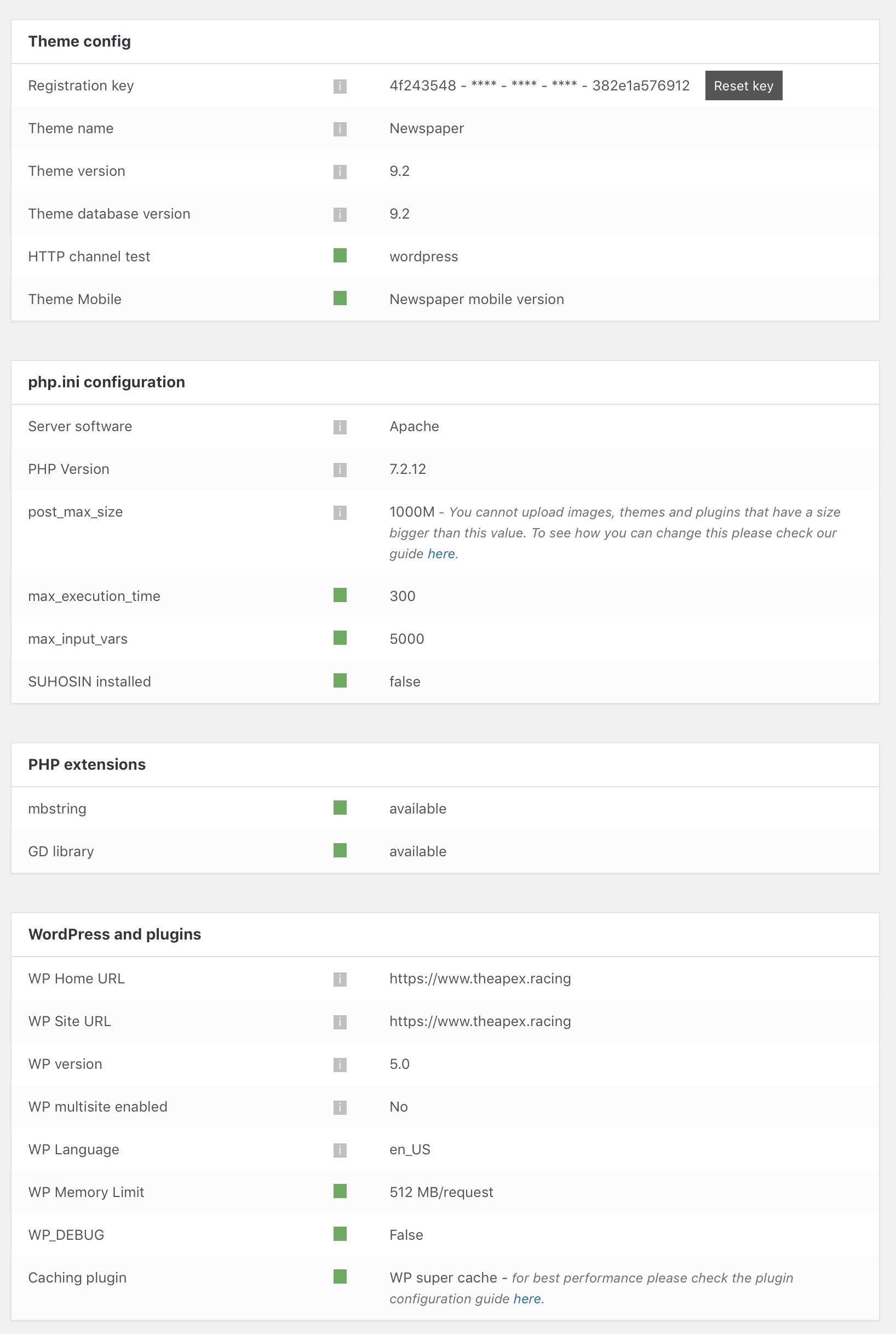
I have modified the memory limit and I’m still unable to save pages. The progress spinner just spins and the page is never saved. As I said previously, cloud templates save without any problem.
I have verified that everything in the theme status panel is green, which should mean that my site is meeeting all of the requirements as outlined in the link you provided above.
Calin Hi,
This footer is made custom, if you want you can make a footer page with tagDiv Composer and set it in footer.
-> https://forum.tagdiv.com/footer-templates/
Or import one from tagDiv Cloud Library
https://www.screencast.com/t/wDspcWGq5n8
https://www.screencast.com/t/aNhIMWq8Oztq
Thank you.
-
This reply was modified 7 years by
 Calin.
Catalin Hello,
1)Try to press the CTRL+SHIFT+R and the option will be available. It’s a caching problem.
2)You should use the Cloud Template Library to customize your category and tag pages because using this plugin you can add the Ad Box everywhere you want on the page.
3)You should use the theme core files and change the position of your ads. If you are not aware of the steps which are needed to take, in this case, please consider hiring a freelancer/developer to help you because we cannot provide custom work at the moment, sorry!
4)After more further deeper investigations, it seems that problem regarding displaying of images happen due to memory caches. First of all, please remove all of the untested plugins and then, clear all of the caches (browser cache, hosting/server cache, purge CDN files if you are using something like this) and then, check the results.
5)Clear all the caches, purge CDN files and check the results. If the problem is still there, please provide your website URL so I will be able to provide a more accurate response.
Thanks.
Simion C. Sorry for the delay, we try to reply in all topics as soon as possible, within the allocated support hours.
Also as a note, please try not to reply in your own topic multiple times, this will only delay the response from us. So for example this topic would have been among the first in priority without that last reply.
1. The cloud smart list templates display only the smart list itself, the post content element is or should not be present in the template
– https://www.screencast.com/t/PtSK5cwMYM
If you edit a smart list post template you can see that the post content is missing, only the smart list element is there.
So if the post contains other content besides the smart list, it will not be displayed. if that is the case, it would be better to use default post templates.
But that means that in order to display a block in the post page, after the content, you would have to maybe edit the post template files and enter it there, or in the content directly
– https://forum.tagdiv.com/topic/how-to-ad-block-under-the-post/
2. With no AMP and mobile theme plugin, the same smart list template from desktop will be displayed at all times and for all devices.
3. A code like this will do that – https://www.screencast.com/t/9qSmvpF4w
.td-smart-list-pagination .td-icon-right,

.td-smart-list-pagination .td-icon-left {

display: none;

}
4. Maybe like this, with CSS is easiest – https://www.screencast.com/t/6JPPg5La
.td-smart-list-pagination .td-smart-back {

display: none;

}
Thanks
Simion C. Hi,
There is no need to edit that text, once you apply the template to an author it will display the respective authors name instead
– https://www.screencast.com/t/5cqKloaWgn4
– https://www.screencast.com/t/t3D5XAjjr
– https://www.screencast.com/t/stZ13nhWH
There will be placeholder text in the cloud templates, but it will change and display the necessary information once applied to the post pages, author pages etc.
If I misunderstand please correct me.
Thanks
Calin Hi,
If I understand correctly you have some problems with the layout for the post template 3 and 4.
Please read our documentation for Featured image or video -> https://forum.tagdiv.com/featured-image-or-video/
You can get 404 page Template from tagDiv Cloud Library
https://www.screencast.com/t/XS4zNeIdK25
And set it as 404 template
https://www.screencast.com/t/AcXUmXxA
Please provide a link to your website were I can inspect the problem.
Thank you.
Simion C. Because the element displays a post loop – https://codex.wordpress.org/The_Loop
– https://www.wpbeginner.com/glossary/loop/
Loops have no filtering options, they can be placed in pages, cloud category templates, cloud tag templates etc.
For example while creating a category template, place a loop element in it. The template can be applied to multiple categories, the loop will be filtered automatically to display posts only from the respective category.
This is useful to have, blocks for example will always display the same posts regardless of where they are places, according to the filtering you set, but the loop will display posts according to where it s placed.
 Seba086
Hi, I’m having an issue with the template. Somedays my client calls me because the website is down (blank page). When I enter to the admin panel, my Newspaper’s menu disappeared and only returns after reinstalling it…
I’ve no clue on what’s going on but this is really annoying..
Can you help me please? Thank you.
