
- NewspaperDesign your Post Pages using the Cloud Library Templates
- NewspaperDesign your post pages using the Default Templates
- NewsmagPage templates
- NewspaperPage templates
- NewspaperCreate a form contact page
- NewspaperCloud Library Templates
- NewspaperCloud Library – Category Templates
- NewsmagCategory templates
- NewsmagFooter templates
- NewsmagDefault post templates
- NewsmagPost templates
- NewsmagHomepage – How to build and set it
- NewspaperHomepage – How to build and set it
- NewspaperPost templates
- NewspaperDefault post templates
- NewspaperCategory templates
- NewspaperPost template ads
- Apitd_api_single_template::update_key
- Apitd_api_single_template::update
- Apitd_api_single_template::add
 Outdoorinfo
Hi,
Recently i have update to version 9. Somehow the post setting tab is now missing on the post page.
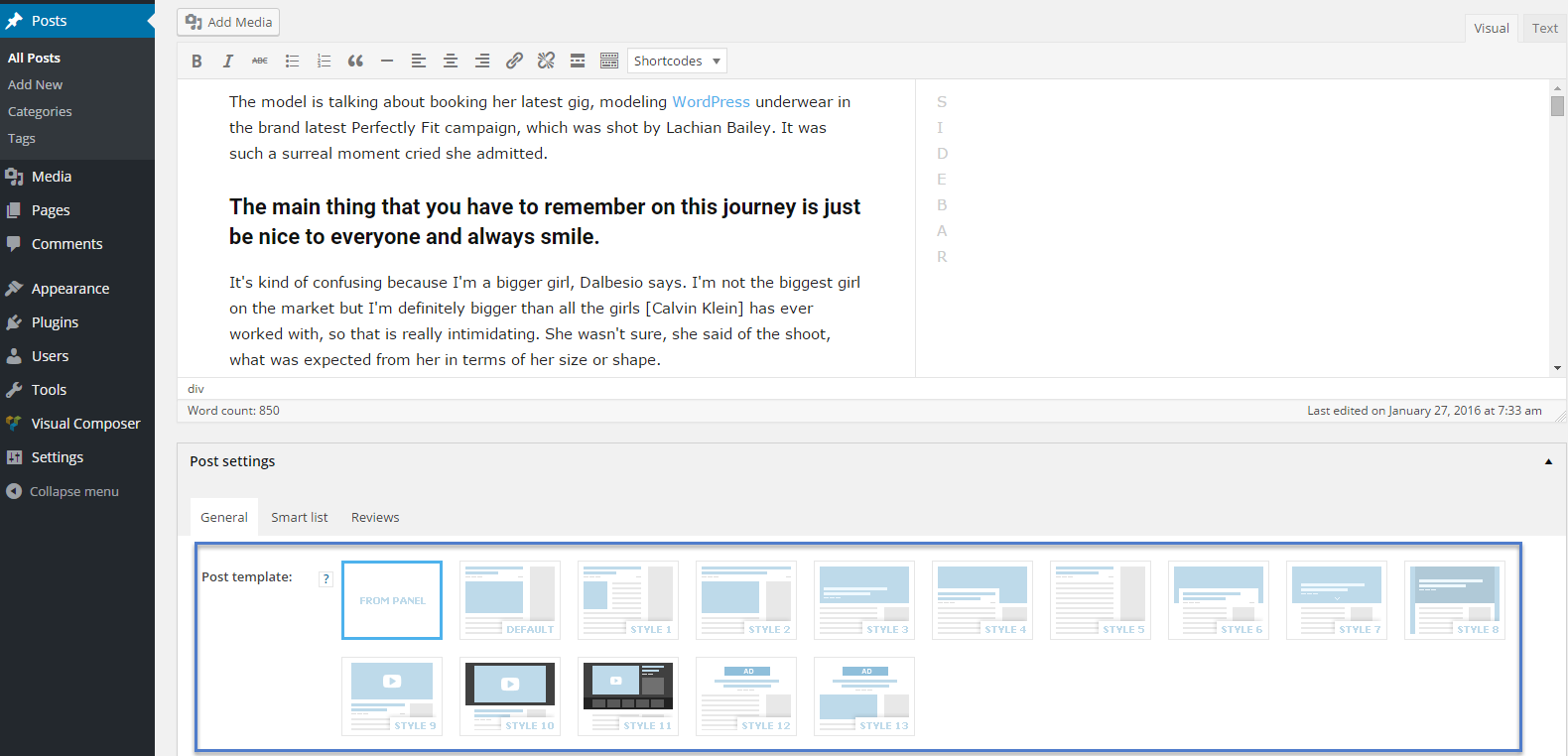
How can i make it visible again?
 Catalin
 Hello wildbunnys,
Unfortunately, the theme does not have any such an option for this, sorry! You should try using the Cloud Template Library and create such a custom Category template which can be customized by yourself and as you wish. Using this functionality, please keep in mind that you can create your own custom category template using the TD Composer which allows you to add more elements and functionalities at your page. Please check here -> https://forum.tagdiv.com/tagdiv-cloud-library-plugin/ to read more details for that plugin.
Thanks for your understanding!
 Simion C.
 Hi,
Only the category tags will appear in the module, these aren’t supposed to display other tags. That is the case for all the block modules not just for the flex.
The single post tags element will show all the tags the post has been assigned, just like it is using the predefined post templates. You select which tags you want for a post when editing it, then these tags will appear in the post page.
Currently there are no setting to choose from all the post tags, which ones will be displayed. Sorry for any inconvenience.
Thanks
 ctoweett
 I reported a similar issue here https://forum.tagdiv.com/topic/templates-resetting/. Just checked and my 404 page has also reset. Tag template, search template and date template have also reset. Tagdiv team needs to check up on this issue.
 fgmotta
I’m trying a problem with the 404 error page. I’ve created a template from the template. I make change in thema’s settings. It changes, works for some time, but every time it starts to change and refresh the theme it disables.
 Ken0929
Hi, I have a few questions.
How can I show a tag(not a category tag) on flex block 1?
And regarding cloud templates(Single Post Templates),
How can I show just a specific tag, not all tags, using element(Single Post Tags)?
Or is there other ways to show a specific tag?
For example, like this page? https://forum.tagdiv.com/custom-post-type-support/
Sorry for my bad explanation, but what I want to do is to use “tag” like a “category tag”.
Thank you.
 Calin
Calin Hi,
Yes this is possible, for full width, you need to go in Newspaper > Theme panel > Template settings > Force full width, there you need to select Stretch container and content ( https://www.screencast.com/t/nGavZs2NA ) you can select only the container you desire to stretch.
The layout for the homage you can choose it from Cloud Template ( only if you like one of them), or you can create your own page (for cloud Select Cloud Templates > Add New then select Homepages, choose a page if you like it https://www.screencast.com/t/AOSKhVZO ) or create a new page and edit it with tagDiv Composer.
Then go in Settings > Reading select a static page and set the homepage ( https://www.screencast.com/t/4wzjRZvnNg2 )
Thank you.
 wildbunnys
 Hi,
1) Thank you, it solves my problem
2) I was talking about the tag page that is displayed when I click on a tag. I don’t like the title “Tag: XYZ” and also the tag description is visible (i would like to hide it). Is there a way to modify the template or to inherit the template from the category global settings?
Thank you
 k2point0
 Hello,
I am trying to install City News without Demo on YogeshKhetani.com blog. I applied that. Still not working. As described in the tutorial and videos, it’s not just Click and Install the demos.
I also checked Settings > WP Reading option, this shows up:
What do I need to select?
This tutorial isn’t helpful either: https://forum.tagdiv.com/installing-demos/
I need a solution on why Demos aren’t working! I just want the homepage of any Demos.
Is there something which I need to do in the Template Settings under Theme Panel?
 wildbunnys
Hi,
Im using Newspaper 9 and I have some questions according to tag template and category template
1)Under Theme panel -> Categories -> Category global settings : Category Template, the info box(?) says that “Some of the headers also show the category description” but it seems that all headers are showing the category description. Is there a way to hide the category description for category pages?
2) I use tag to regroup articles from different categories (that’s the purpose of tags right?) and the template of the tag page is not really beautiful with the title “Tag: XYZ” and also the tag description is visible. Is there a way to modify the template or to inherit the template from the category global settings?
Thank you!
 chaddng
 Hi, Sorry for the slow response – so many other things to do!
So when it worked for you in a cloud template, which part of the adsense code did you use. It’s not working with it all entered – seems to be this bit that is the problem [enable_page_level_ads: true] but you obviously can’t just remove and setting it to ‘false’ doesn’t help…
<script async src=”//pagead2.googlesyndication.com/pagead/js/adsbygoogle.js”></script>
<script>
(adsbygoogle = window.adsbygoogle || []).push({
google_ad_client: “ca-pub-3503819165109177”,
enable_page_level_ads: true
});
</script>
Calin Hi,
If you like it, all you need to do is to go in cloud templates search for it ( https://www.screencast.com/t/lEaQazKYb7Dd ) click on it, then click on Create Template… after you get it you pages.
Or if you desire to create a new page similar you can use TD Composer, I will give you an example: Create a new page and publish it, after that click on tagdiv composer https://www.screencast.com/t/ZrchgGdN will open in front td composer, hover empty column and click on the row, on left side you’ll see Row > General, select the Layout you like ( in this case 1/2 +1/2 ), after that select the empty column from the left click on the row and drag tow inner row in it, hover the second inner row and click on inner row and split it in tow https://www.screencast.com/t/clEmDeMbkguF then drag your content .
See results: https://www.screencast.com/t/rRNxEvLkirU
Thank you.
Simion C. Hi,
1. Through the Cloud library you can import page templates, modify them if needed and save them. They can be reused when needed
– https://forum.tagdiv.com/tagdiv-cloud-library-plugin/
There are homepage templates, page templates and sections (blocks of content)
– http://prntscr.com/kvogz4
2. There aren’t many animation capabilities for the composer elements at the moment. Might be available in the future for specific or dedicated elements, can’t say exactly what will happen. Sorry for the inconvenience.
Thanks
Calin Hi,
To do that go back in WP Dashboard select Page open the “About Page Header Hero – Spa Heaven” page then from the right on Page Attributes > Template click on drop down list and chose “PageBuilder + Empty page” https://www.screencast.com/t/nWplPv95eegx after that update/publish the page, go on you web site page and refresh it.
Thank you.
 Scott
ScottI would like use the Heaven Spa About Page cloud template as template for a page on my site: https://cloud.tagdiv.com/about-page-header-hero-spa-heaven/. However when I do this, my normal page header appears: https://www.awesomescreenshot.com/image/3615695/b494352d5802d6b7d073c372e77ee3e9
How do I move the full width row (the hero header ) to the top of the page and turnoff or hide off the regular page header similar to the Heaven Spa About page?
 remarkablex
Hello
I have 2 questions.
1. I’ve designed a page in tagDiv editor and I want to use this page design multiple times in different cases. But there is no option for saving this page design as a template like Visual Composer. How can we duplicate pages or save WHOLE PAGE as a template?
2. Is there any animation option in tagDiv editor, like Visual Composer has?
wildbunnysHi,
1) The articles listed under Author, Search, Tags, Archives, Category templates are all considered as duplicate content for search engines?
2) If on a same page I have the same article at two different places (e.g. once in the side bar and once in the footer), is this also considered as duplicate content?
Thank you for your help
Simion C. Hi,
The comments section will always be displayed at the bottom of the post page. That is how it is defined in the code.
Using predefined post template this could only be done by making modification in the post template files. Some similar topics here
– https://forum.tagdiv.com/topic/post-comments-directly-under-post/
However using cloud post templates it is a matter of drag and drop while editing a post template
– https://www.screencast.com/t/Mtfs3iiv
The comments can be positioned differently in the post template by this method. You can find out more about the cloud library plugin here
– https://forum.tagdiv.com/tagdiv-cloud-library-plugin/
Thanks
Calin Hi,
After you get the templet you need to go in wordpress dashboard then click on Newspaper > Theme panel > Footer >Footer settings and in section footer page select from dropdown the template you desire ( https://www.screencast.com/t/iKrh3Xo2iw ) .
Thank you.
ScottI imported the Church footer from the cloud library because I wanted to use it as a footer. It is imported as a page instead. How do I use this as a footer template?
chaddng Thanks for taking time to look into this. I’ve had a look at all your links and yes that is the issue. however, before I open up a forum topic perhaps it’s worth asking this:
This post, for example, is using one of your default templates and is working fine. https://wmw-dev.co.uk/police-seize-uninsured-scrambler-from-young-person/
What adsense code is that default template adding into the page content that I’m doing differently? I was just copying and pasting the full adsense code block which is obviously wrong. It’s being done correctly in your default template. I can’t see what I should be posting instead?
Thanks,
Naomi
Calin Hi,
1. The excerpt is quite bet tricky, you’ll need to be very careful in which module you make changes and in which module you’ll aspect to appear changes ( if you will change in module 1, just in that module will appear the changes ), also please read this topic https://forum.tagdiv.com/topic/chinese-excerpts-do-not-work/ .
2. If I understand correctly, you want to make some change in footer section… if you don’t want to use a demo or a template from cloud template, you can make a page ( create a new page, and build it how you desired ), after that in Newspaper> Theme panel > Footer > Footer Settings you will find footer page, from there you can set the page you just created; please read this documentation for footer template https://forum.tagdiv.com/footer-templates/ .
Thank you.
 Bogdan B.
 Hello,
In order to show a custom post type in the standard category taxonomy you will need to create a custom category page template using the cloud library plugin and create content block that can show other post types besides the standard ‘post’.
Please read this guide to learn how a block can show other post types: https://forum.tagdiv.com/block-settings-guide/
Thank you!
 zambrastaff
Hey, i hope this is just me been too stupid to see the obvious, but im trying to install demo content but i cant. When i click on install with demo content, there nos yes or no option. i just get this notice:
INSTALL THE FULL DEMO
Close
Are you sure you want to install the full demo? This will import homepages, sample content with images, backgrounds, template layouts, fonts, colors.
Notice: The demo can be fully uninstalled and the system will attempt to rollback to your previous state. Any content, menus and attachment created by the demo are removable via the uninstall button.
Please backup your settings to be sure that you don’t lose them by accident.
 TinhMarketingOnline
Hello.
Have a good day.
I’m installing the Newspaper interface, and having some problems can not be found, please help me.
1. The article link contains some strange characters in the latter.
For example: drbaohiem.com/bai-viet-moi => drbaohiem.com/bai-viet-moi/#.W56JQs4zaM8
Photos: 
2. There are a lot of ads hidden inside the article, the page, when clicking on any link on the website, these hidden links appear advertising, although I do not have these ads, I did Many ways to overcome but still not possible. Please help me. Thanks very much.
