
- TutorialsFrom WPBakery to tagDiv Composer
 Bogdan B.
 Hello,
We are sorry you feel this way about our theme and about the support. Please understand that the plugin is compatible with our theme but compatibility does not mean it will become part of the theme and part of the theme structure or elements. Compatibility simply means it will work with our theme but it does not mean we have created special code for the plugin to be implemented seamlessly into the theme. The 2 options you requested support for were the avatars not being in sync and the admin panel for the buddypress needs to be moved from it’s current implementation into the theme top bar.
Both of these are not related to the theme support because one is a plugin setting: https://www.screencast.com/t/4bTh3GRww and the other represents customization where you want to change the default implementation of the plugin and move it from the wp admin bar to the theme top bar. This is not covered by any setting nor covered by the theme support. We understand you need this option but it’s not up to the theme or the theme support. It is an implementation you require that is not provided in the theme and we never advertised it to be so. Custom work is not part of the theme support. That is why we suggested hiring a freelancer.
If for any reason you find that the theme is not up to your expectation or the theme support is not what you were looking for we will be able to provide with a refund so you can choose another theme for your project. You can request a refund here in case you need it: https://themeforest.net/refund_requests/new
Thank you for your understanding!
Bogdan B
 herondino
Hi,
how could I reduce padding values in sidebar?
Please, taka a look at http://vaniobossle.com/
I would like reduce space between “Centro da Visão” and “Coris Medicina Avançada” banners. So between posts that are showing below this banners (e.g., between “COMISSÃO QUER ENCERRAR HOJE A DISCUSSÃO DA REFORMA DA PREVIDÊNCIA” and “Prefeitura e Capitania dos Portos fiscalizam transporte marítimo em Florianópolis” posts).
Thanks!
 EU-uutiset
Hi,
I’ve been trying to figure this one out for quite some time. By changing the theme colours in “theme panel” i should be able to change the default background AND font colours. For some strange reason that doesn’t work for the “Related articles” box in posts: http://eu-uutiset.fi/wp-content/uploads/2017/05/theme-colors.jpg
Is there anywhere else that font colour can be changed (that I might have accidentally set), should it be white, or might there be a misconfiguration in the theme? I’ve searched through all of the colour settings in my theme panel, but haven’t come up with any results. I use no external or added css that should interfere with the header font colours.
The font colour works flawlessly everywhere else than in the “Related articles” header.
 r_koek
 If it’s to hard, then use the free WordPress plugin: Really Simple SSL.
it solves all your problems mentioned.
I do not work here as well… Just helping!
 greggorilagan
 Hey Simion. I tried. It keeps catching this meta: <meta property=”og:image” content=”https://i0.wp.com/smartomarketing.com/wp-content/uploads/2017/04/free-stock-photos.jpg?fit=1200%2C996&ssl=1″ /><meta name=”author” content=”Greggor Ilagan”>
Rather than: <meta property=”fb:app_id” content=”765322123646289″ />
<meta property=”og:image” content=”https://smartomarketing.com/wp-content/uploads/2017/04/free-stock-photos-fb.jpg” />
Everything is set up correctly. I don’t know how to solve it. Please help.
 NewBuddy
Hi,Tagdiv team!
First,i very like this theme,but I’m facing some problem.
I installed instant article for wp plugin.
All chinese characters showing “??????????????????Newline”! And no image or any media.
https://drive.google.com/open?id=0B5Fx4F93CeRHaFlSSlg4Und6cW8
Please give me a solution!
Thanks!
 jornalcidade
Hi,
I am activating SSL on the site.
I realize that in some places on the site, by default, links and scripts are queued or shown with http.
The Visual Composer module shows all posts through HTTP .
Is there some kind of easy change that can do it?
 Magistar
 I have the exact same issue. Just updated from 7.4 to 7.8.1 and unfortunately this did not resolve the issue. The thumbs on the video’s are loaded from http://img.youtube instead of https://img.youtube thereby breaking my SSL security.
http://img.youtube.com/vi/pmPoaM8PqxU/default.jpg’. This content should also be served over HTTPS.
How did you guys resolve this?
-
This reply was modified 9 years by
Magistar.
Bogdan B. If you update to the latest version you will no longer have issues with this if you do not activate the login. If the login is active, then you will have to move to ssl as google requires it. Please make sure you have the latest version of the theme and the login is disabled in the theme panel https://www.screencast.com/t/pM8PNoB1WvC
Thank you!
 dahlnewpage
Hello! The SSL certificate is currently active with my hosting company on my website. But the hosting company said that I need to use a plugin called: https://wordpress.org/plugins/wp-force-ssl/ to force the encryption.
Does this Newspaper theme have anything similar (or other plugin to recommend) or do I need to use this plugin to force the SSL encryption?
I actually only need the encryption on one page where I will have a product for sale.
Thanks!
 slider1990
 Hi,
hehe no i mean not this excactliy. I mean the site self. I will use a SSL certificate from lets encrypt. When i open the site now, i have not the green lock in the browser. I dont have it, because one img is still loading from an old URL which is not “https”. And this img is a img from this class.
If you look in the site code, press strg+f and search for “http://”, the first result show the link. And this link is the problem. I dont know where i can change this link or rebuild it or what ever. 🙂
Thx
Bogdan B. Yes indeed the theme was already adjusted for this but you still need to move to ssl if you require a login on your site. Please update your theme to the latest version using this guide: https://forum.tagdiv.com/how-to-update-the-theme-2/
Thank you!
 joeydekoning
I’m trying to install the NewsPaper theme on a test server. The test server is on a self-signed SSL certificate. When I install Visual Composer through the NewsPaper plug-in panel, I get an error:
Download failed. cURL error 60: SSL certificate problem: self signed certificate
How can I install this required plug-in with a self-signed certificate?
Thanks!
 Bladl
BladlHi,
All files are cleanly integrated via https only the following Google font from the theme is stubborn only via http in the source code
‘http://fonts.googleapis.com/css?family=Lato’. This request has been blocked; the content must be served over HTTPS.
How can I change this to https, because all other content functions problem-free over https.
greeting
Ingo
 ekraja
Hello Sir,
If I am checking view source of any post or page or homepage of my website. It shows user ID and password/login detail.
But if I see website it shows nothing.
I want to remove it from all posts and pages. Because it is giving me error in webmaster tool that required ssL certificate..
So please tell how it will be removed??
Thanks
 Nano
NanoWhile conversating here – https://forum.tagdiv.com/topic/how-to-get-next-page-design-like-this/#post-167908 , amit noticed that the mentioned link is broken. On further checking,
I noticed that not just that page but many other such pages are broken due to mixed content ( loading over insecure elements) issues in the bulk. This issue appears on few pages but not all posts of my website.
Please check the screenshot to see the broken page on the left and mixed content error on the right side. -https://s17.postimg.org/truo9cttb/broken_page_and_mixed_content.jpg
Here are few such pages with errors:
https://tomatoheart.com/webjockey/facts-about-bb-ki-vines-bhuvan-bam/
https://tomatoheart.com/shubham/kenny-sebastian-things-to-know/
https://tomatoheart.com/amardeep-singh/roadies-fame-raghu-and-rajiv-startup-show/
while other pages like:
https://tomatoheart.com/amardeep-singh/arunabh-kumar-tvf-founder-facts/
https://tomatoheart.com/niti-jha/michelle-obama-natural-hair-style/
doesn’t have any such issues. The homepage is also working well.
The issue rises only for normal users, not the logged in admins. I am using SSL for almost a year. Most of the mixed content errors are loading insecure theme files. I have recently updated the theme and since then I have noticed this issue. I have already sent login credentials to you for one another thread.
Please look into this issue.
Thank you
 alexandreminem
 Hi there! thanks for your reply.
So here is the checklist you gave me :
Requirements for Newspaper : got all, CHECK
System status parameters : checked, and everything was set
Install theme via FTP : actually I installed a fresh updated theme before i wrote.
Deactivated all plugins : CHECK
And these errors were still here.
As for the SSL transition : the console errors says that an ad is not working properly and the others are about the fonts that can’t be loaded in https, thanks to this theme settings.
Guys i’m stuck here, do you have any other clue about what causes these 2 errors?
Thanks
 Simion C.
 Hi,
The theme has these requirements – https://forum.tagdiv.com/requirements-for-newspaper/ and modifications to be made according to this guide if it is necessary – https://forum.tagdiv.com/system-status-parameters-guide/
You can try to reinstall the theme using this method – https://forum.tagdiv.com/install-via-ftp/ and use only the plugins provided with the theme package, clear any caching installed and try again.
I see that you have many errors and warnings present on your website
– https://www.screencast.com/t/vRGaXW5G4cLn
This indicates that the transition to https was not done properly, please check these few leads that have proved to be useful to other users in this situation
– http://www.wpbeginner.com/wp-tutorials/how-to-add-ssl-and-https-in-wordpress/
– https://css-tricks.com/moving-to-https-on-wordpress/
– https://yoast.com/dev-blog/move-website-https-ssl/
You can also check our forum for some insight on this matter
– https://forum.tagdiv.com/topic/moving-to-ssl/
Thanks
 Divemasterza
 Thanks for the above info 🙂
We have move quite a lot of websites to https in the last couple of months.
line 10948 (latest build) of tagdiv_theme.js
var weather = 'http://api.openweathermap.org/data/2.5/weather?lat=' + tdWeather._currentLatitude + '&lon=' + tdWeather._currentLongitude + '&units=metric&lang=' + tdWeather._currentItem.api_language + '&appid=' + tdWeather._currentItem.api_key;
this is where I think the issue lies. Openweathermap API does not use SSL. (And I don’t think they intent to unless you pay $180/m)
-
This reply was modified 9 years by
Divemasterza.
Simion C. Hi,
I have tested the weather widget function, but everything is working properly. Please try as a test to disable all your plugins except the ones provided with the theme, remove the weather widget from your page and clear any caching installed. Then add the widget again and check to see if it is working properly. Please let us know how it goes.
If the problem is still there, maybe you have not made the necessary modifications when moving to https
You could check these few resources for more information
– http://www.wpbeginner.com/wp-tutorials/how-to-add-ssl-and-https-in-wordpress/
– https://css-tricks.com/moving-to-https-on-wordpress/
– https://yoast.com/dev-blog/move-website-https-ssl/
You can also check our forum for some insight on ssl:
– https://forum.tagdiv.com/topic/moving-to-ssl/
Thanks
 anoopcnair
I have been working with Godaddy hosting (the linux virtual server provider) because of the issues of very slow loading time of the site.
I tested the loading time with different tools but it’s seems loading time is very high. Rather in the flow I could see that it’s wait for 5S/7s before loading the website. This is really slow
(see the attached pic 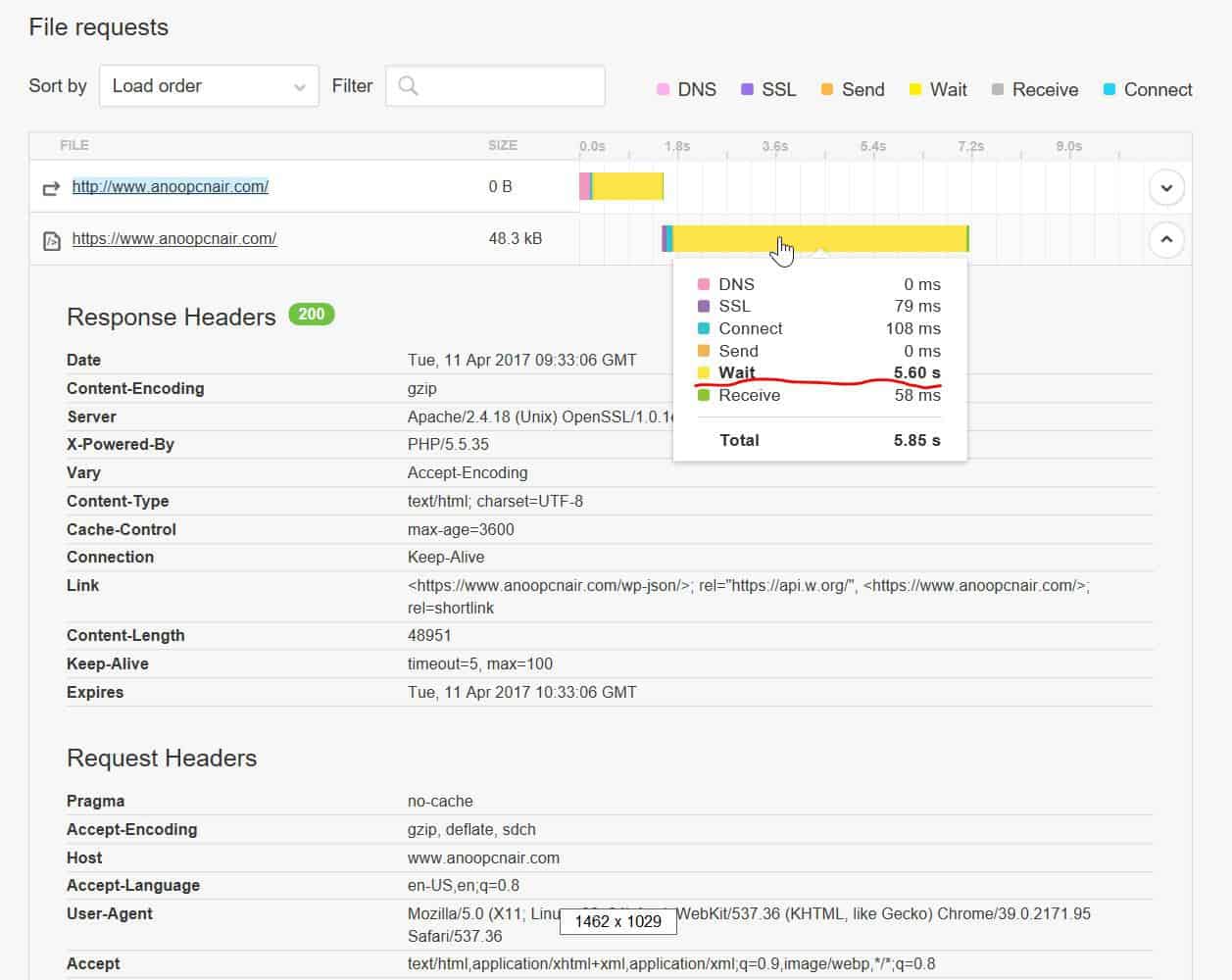 )
)
https://gtmetrix.com/reports/www.anoopcnair.com/3pyMLT7K (result is copied below)
https://tools.pingdom.com/#!/dtR5oa/www.anoopcnair.com
Godaddy says this is coding issue and the web developer says this is server issue but I’m stuck now . Any pointers would be really helpful !!
200 OK
anoopcnair.com
47.8 KB
7.52s
HeadersResponse
Response Headers
Date
Tue, 11 Apr 2017 09:34:23 GMT
Server
Apache/2.4.18 (Unix) OpenSSL/1.0.1e-fips mod_bwlimited/1.4
X-Powered-By
PHP/5.5.35
Link
<https://www.anoopcnair.com/wp-json/>; rel=”https://api.w.org/”, <https://www.anoopcnair.com/>; rel=
shortlink
Vary
Accept-Encoding
Content-Encoding
gzip
Cache-Control
max-age=3600
Expires
Tue, 11 Apr 2017 10:34:23 GMT
Content-Length
48957
Keep-Alive
timeout=5, max=100
Connection
Keep-Alive
Content-Type
text/html; charset=UTF-8
Request Headers
Host
http://www.anoopcnair.com
User-Agent
Mozilla/5.0 (X11; Linux x86_64; rv:49.0) Gecko/20100101 Firefox/49.0
Accept
text/html,application/xhtml+xml,application/xml;q=0.9,*/*;q=0.8
Accept-Language
en-US,en;q=0.5
Accept-Encoding
gzip, deflate, br
Connection
keep-alive
Upgrade-Insecure-Requests
Simion C. Hi,
Please check the settings in the Visual composer plugin
– https://www.screencast.com/t/YZ9cbH8Y – https://www.screencast.com/t/k0RJjssLuvY5
maybe this is an access issue if no block settings are available. If everything is in order and reinstalling the plugin does not fix this, please send us an email at contact@tagdiv.com so we can take a look. Also paste a link to this topic so we can identify you.
Thanks
 andrealabt
 Hi Simion,
the website is yourwellnesslibrary.com.
thanks for your help.
 srikanthBogdan B.
 Hello,
It seems the move to https was not done correctly. Please use these few guides to help:
http://www.wpbeginner.com/wp-tutorials/how-to-add-ssl-and-https-in-wordpress/
https://css-tricks.com/moving-to-https-on-wordpress/
https://yoast.com/dev-blog/move-website-https-ssl/
You can also check our forum for some insight on ssl:
https://forum.tagdiv.com/topic/moving-to-ssl/
Thank you!



