
- NewsmagtagDiv Composer Tutorial
- NewsmagHow to use the Visual Composer plugin
- NewsmagHow to update a plugin
- NewsmagRequirements for Newsmag
- NewsmagInstall via WordPress
- NewsmagInstall via FTP
- NewsmagBlock settings tutorial
- NewsmagPage Menu
- NewsmagCustom ad spots
- NewsmagSmart sidebar
- NewsmagVideo playlist
- NewsmagPage templates
 krenarthaci
the plugin of newspaper theme, called td-composer is slowing down my website. is creating more than 300 queries, 15 of them are slow queries, and hight pcu usage
 RAJENDRA2022
time_ago_txt_pos – Is not mapped in the shortcode that uses this module ( tdb_module_related)
/var/www/wp-content/plugins/td-composer/legacy/common/wp_booster/td_module.php
 Calin
Calin Hi,
I believe that you are referring to this element -> https://i.imgur.com/1Z4KA0V.jpg if is so, then you can displayed those extra elements only by editing the code for the element -> wp-content/plugins/td-composer/legacy/Newspaper/includes/shortcodes/td_block_authors.php
For Author template, you can use a cloud template from the tagDiv Cloud Library, those can be edited using tagDiv Composer and you can make it as you want. Also if you want you can create an individual author template per each author.
Thank you!
Calin Hi,
This can be done only if the code from the theme is changed. Because this is removing the frontend editor from the plugin.
The code is still on the wp-content/plugins/td-composer/legacy/common/wp_booster/td_wp_booster_functions.php you need to comment the lines 1777 -1779 -> https://i.imgur.com/Px0N2pl.png
I hope this will help you!
Calin Hi,
The homepage from the Newsmag voice can be edited using the tagDiv Composer -> https://forum.tagdiv.com/tagdiv-composer-tutorial-2/ -> https://i.imgur.com/Tr3f6Ed.jpg
The underline from the homepage is set with a custom css from the demo files -> https://prnt.sc/TMc7fh9DPJuS to change it you need to set another custom css for the code -> https://i.imgur.com/1FvjUdi.jpg
.td-newsmag-voice .td-pb-span4 .td_block_template_1 .block-title span:after {

    background-color: red;

}
This code need to be set in the theme panel > custom code > custom css.
I hope this will help you!
Thank you!
 Alex
Alex Enter the control panel and follow this path: wp-content / plugins / td-composer / legacy / common / wp_booster / td_page_views.php. Edit td_page_view.php and double flag as in this screen https://ibb.co/vVSjhtP
You will have to repeat these steps every time you update the theme.

 declandunn
I’m not able to use WP Editor in TagDiv Composer, for Column Content, getting a 403 error even though it’s been working for a while.
/wp-content/plugins/td-composer/includes/wpeditor.php
I checked Newspaper’s sections on 403 errors like this, and all my settings are good, file permissions are good, .htaccess is good. Nothing’s really changed, and not sure how to undo this. Am following up with my host, though all their settings are good and it has been working for a long time, no plugins added.
Know these kinds of problems are tricky to figure out, wondering if there’s any other suggestions?
Thanks!
 sigurantanationala
Hi sir,
The theme use the shortcode [td_block_authors] for the block authors. I want to customize it and I don’t know where is this template.
What I want to customize is as follows.
– I want to display the role/roles of a user
– I would like each author in the list to come up with their last posted article.
– how to integrate a custom widget or if a custom template can be created and used with this builder (tagDiv composer). This Author Blocks Template I would like to make it custom to look exactly like the picture.
Related to the other template (Author Template)
– how can I change the way the authors are displayed? I mean to make it on a grid of 2 columns for example.
– On the author page (where his posts appear) how can I add the role?
I would like you to help me with these questions because it is a very important project to be completed.
 johnnielightning
Required plug ins cause Newspaper site to crash. Cannot load Newspaper td composer to Ionos.com host without Critical Error. Help
johnnielightningtd composer plug in causes critical error message
 mattemkadia
Hi Guys, I use custom shortcodes to render conditional elements in tagDiv Composer such as category-specific web banners. These custom shortcodes are placed inside the text column shortcode as recommended by you in an earlier support ticket.
The shortcodes I’ve registered fetch a template part, inside which is a conditional statement to check the current category which then displays the relevant web banner shortcode. So my shortcode is a conditional loop file which checks the cat and returns an ad space using do_shortcode(‘[show_ad_space_1]’);
My shortcodes work fine when placed anywhere inside the main body container in tagDiv Composer but when trying to add them to the header template they don’t seem to render, and no ads are shown.
Is there anything which would stop them from working inside the header of the website?
Thanks
Matt
 ExtraSportz
I have created a news page for all the posts. I want to edit this page with tagDiv. But it says that TD composer is disabled on the posts page. What to do? I can make changes to other pages. But I have to customize this page.
I am attaching an image for your reference.
Please let me know what is the solution to it.
Whenever I try to edit it with tagdvi, it shows me this error:
https://imgur.com/5DvawV7
 tenacemente
Salve, sto riscontrando questo problema sulla pagina Iscriviti https://tenacemente.com/iscriviti/
Cosa significa la scritta: “Warning: Undefined array key “widget_id” in /home/customer/www/tenacemente.com/public_html/wp-content/plugins/td-composer/legacy/common/wp_booster/td_wp_booster_functions.php on line 2946″
Cosa devo fare? Grazie
 Autotrader – Cox Automotive
When we tried to copy the content and paste it into an empty column, it just show an loading icon forever.
We investigated and saw that it because the POST request to “/wp-json/td-composer/do_job?tmp_jobId=1…” was returned with 403 error.
We attached the link to the video then you can easier to understand the error.
Reproduce video: https://coxautoinc-my.sharepoint.com/:v:/p/long_nguyen/Ec0DGqq2DCpOu3qhcUBrXW4Ba1x11D03z0q6uSL682EBvA?e=8SKGsS
403 error: https://coxautoinc-my.sharepoint.com/:i:/p/long_nguyen/EQBlw6aUU9VEnsXF2rMFzbIBaeAOtDeVNfd1WPf41pFIlQ?e=DB1hSf
Note: password to access the link: Passw0rd@123
Thanks
 Eighthats
Calin HI,
Indeed for the mobile theme you need to do those changes in the mobile files, those are on this path -> wp-content/plugins/td-composer/mobile there you can edit the single.php file for the mobile page, unfortunately those changes need to be done after each theme update.
Thank you!
 Bettina
 Hello!
Make sure you deactivated the non-tested plugins with the theme before installing the td composer. It could be from a plugin conflict or settings: https://forum.tagdiv.com/general-options-may-interfere-newspaper-theme/
Check the requirements here: https://forum.tagdiv.com/requirements-for-newspaper/
Thank you!
Eighthats I am also seeing
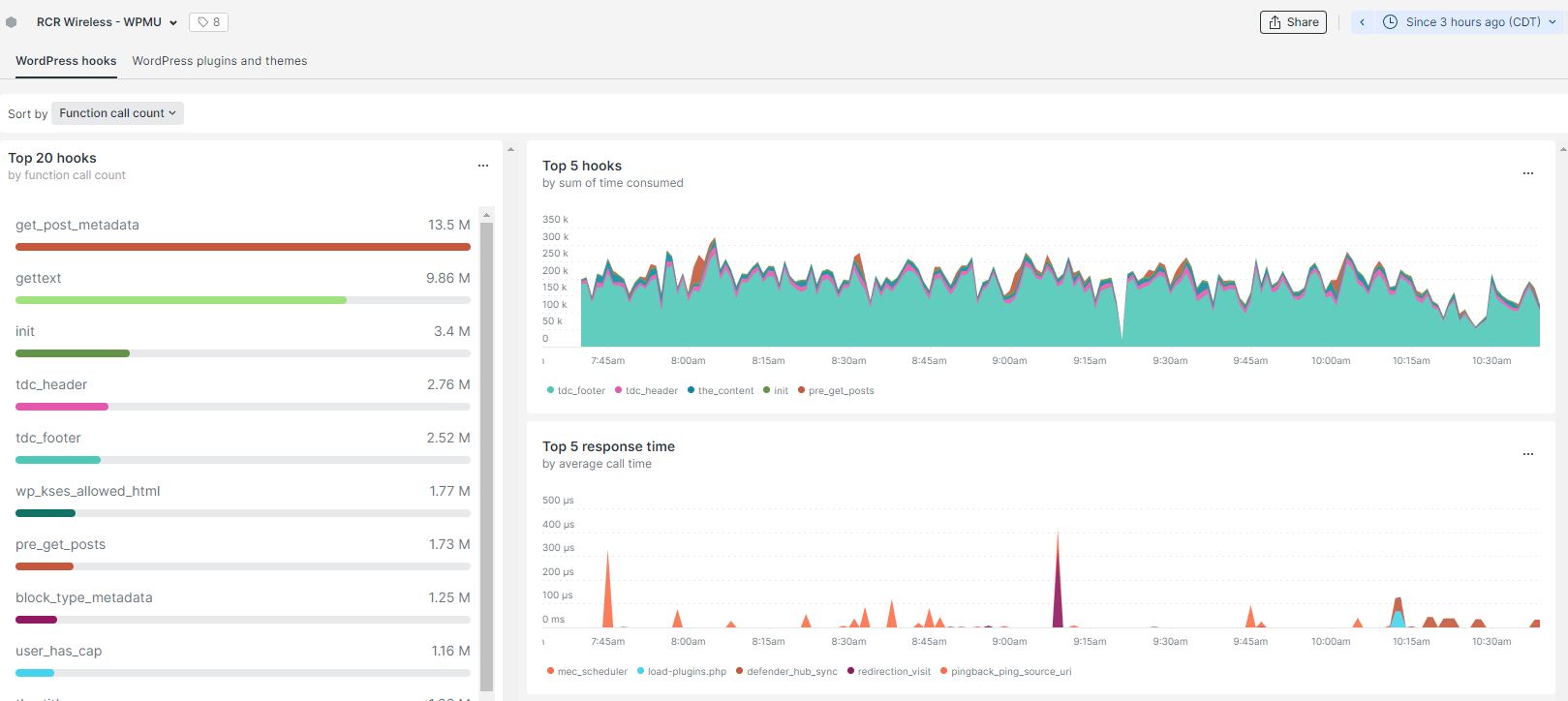
3 day count for function calls:
get_post_metadata – 147m
td-composer 200m
-
This reply was modified 4 years by
Eighthats.
Eighthatshttp://www.rcrwireless.com
The site is is going down due to 524 errors every 5 hours or so.
New relic is reporting that tdc_footer is causing the longest loading issues.
Theme name Newspaper
Theme version 11.5.1
Theme database version 11.5.1
Server software nginx/1.20.1
PHP Version 7.4.30
post_max_size 128M
max_execution_time 300
max_input_vars 3000
SUHOSIN installed false
WP Home URL https://www.rcrwireless.com
WP Site URL https://www.rcrwireless.com
WP version 6.0.1
WP multisite enabled No
WP Language en_US
WP Memory Limit 756 MB/request
WP_DEBUG False
Caching plugin No caching plugin detected
I will be emailing support with a login for the site, as well as some screen shots.
Server is hosted with WPMUdev
64GB memory
16 vCPU
640GB storage
30TB bandwidth
1M /month estimated visits
 faka
fakaHello, good day!
I have a problem with TD Composer. When I want to edit a text field, so change the content via the Edit Content button, the WP Editor starts to load (see image) and does not stop. So I can’t adjust the content anymore.
Updates are all up to date.
What can I do?
 ilmetu
Hi there,
three weeks ago i bought newsmag theme, i setup everything and i’m ready to publish the website.
BUT …
i saw some bug and i would like to test the Newspaper version, so i bought it also… because it seems more developed and more people use it.
UNFORTUNATELY …
i install it normally, but when i activate the theme a really bad bad error comes up and the website is not reachable anymore…
Warning: require_once(legacy/Newspaper/functions.php): failed to open stream: No such file or directory in /home/customer/www/elettronauti.it/public_html/wp-content/plugins/td-composer/td-composer.php on line 189
Fatal error: require_once(): Failed opening required ‘legacy/Newspaper/functions.php’ (include_path=’.:/usr/local/php74/pear’) in /home/customer/www/elettronauti.it/public_html/wp-content/plugins/td-composer/td-composer.php on line 189
can you help me please?
 Anamaria
 Hello,
Please check this article https://webhostinghero.org/how-to-exclude-categories-from-search-in-wordpress/ -> wp-content/plugins/td-composer/legacy/Newspaper/functions.php
You can build a child theme and implement this, so it won’t get overwritten by the updates.
Thank you for understanding!
Anamaria Hello,
You can translate it in the theme files wp-content/plugins/td-composer/legacy/common/wp_booster/td_social_sharing.php -> https://i.imgur.com/A6mIVVB.png
Thank you!
 globalsouthvoice
  didtav
 the error notification when I tried to edit the homepage with Td Composer:
Error at zones: 6(models) : 5(dom). The model does not match the content Current state has involved an issue. You could try an UNDO operation (CTRL+Z / CTRL+SHIFT+Z)
the homepage was automatically generated by prebuilt website, I didn’t change anything



