youthost
Specific from the beginning that is not a problem of server/cache or plugin conflict, the same problems are present on your demos shop for example https://demo.tagdiv.com/newspaper_shop_audio/
When the quantity of the product is changed in the cart and then pressed the “Update Cart” button, or when a product is deleted from the cart by pressing the X, the ‘Woo Menu Cart’ does not update, this is important and could confuse customers.
This also happens when there is a product in the cart and press on the product (product detail / product page), sometimes resulting in the Woo Menu cart ’empty or differently updated, this also is important and could confuse customers.
I believe that everything derives from the failure to update something at the time of the actions: “Update Cart” Button, Delete Cart Item, etc.
This thing I think everyone is interested.
Here they talk about something similar that could help you in the solution:
https://github.com/woocommerce/woocommerce/issues/11064
Here also some IMG from your demo site
https://drive.google.com/file/d/1rzSssUVU_Bwrl9FOo-5OPYLIuaweVrtq/view?usp=sharing
The cart reports items even if empty, even if you update the page.
https://drive.google.com/file/d/10UMsBmTIQuIAHAsZI4vXROgr2r1ml0qx/view?usp=sharing
The cart reports the previous quantity even if the ‘Update Chart’ button has pressed, even if you update the page.
https://drive.google.com/file/d/1HQtBeLFAHD5wccaPR5rOfJi4lHmBENap/view?usp=sharing
https://drive.google.com/file/d/1IwxFgly8VOZAIXUqw8rSiCUvmzJjR0MR/view?usp=sharing
Going in detail of the product the Woo Menu chart displays the data of the previous product, even if you update the page.
NOTE: People cannot encounter these problems in the purchase of products on any operational site.
 Bettina
 Hello!
Update WordPress, PHP, the theme, and plugins to the latest version.
Check all these requirements for the theme: https://forum.tagdiv.com/requirements-for-newspaper/
Thank you!
Bettina Hello!
Update WordPress, PHP, the theme, and plugins to the latest version.
Check all these requirements for the theme: https://forum.tagdiv.com/requirements-for-newspaper/
Thank you!
 BatmanUnleashed
hi,
basically i am trying to design my posts page and its being a bit of a nightmare.
i need my posts to include a title, a picture, some descriptive text, and a button, so i designed a nice template using tagdiv and set it as a global template for posts.
the issue i found then is that all my posts are identical and if i change one bit on any of them, using tagdiv (eg replace the text with relevant text), it updates all posts using that template to be identical.
so i tried just designing the sidebars using tagdiv, and then tried using a different page builder for the content of the post as i thought this then wouldnt be global, and only the sidebars would be global.
unfortunately i have tried using divi builder by elegant themes, and even though it says it’s active on a particular post, it doesnt seem to work and the visual page builder doesnt show up when editing.
so then i tried elementor, and this is giving an error of:
“sorry the content area was not found in your page. you must call ‘the_content’ function in the current template, in order for elementor to work on this page’
it’s really frustrating because the theme is generally very good but it feels like there are some really difficult things about it.
surely it cannot be so difficult to use a page builder on a posts page? what i want is very simple and yet i just cannot figure out the issue. each of my posts should follow the same layout, however replace the images to relevant images, replace the links to the relevant links, and replace the texts to relevant text… for each individual post.
i’ve followed instructions in the guide, i know how to use tagdiv, and yet nothing works. tagdiv only seems appropriate for creating site-wide functions, or pages rather than posts.
 Trent Ernst
Hey:
This one’s a bit out of my league.
Basically, when I try and enter my location into the weather widget, it pops up with the name of a hole-in-the-wall town 150 km away.
This is really irksome, and it’s not just OWM. Google had the same bad data until I complained to them.
However, OWM has changed how they’re doing things, so when I asked them if they could fix it at their end, they sent me this note.
1) Our data is based not only on weather stations; our data is a whole chain, and the basis is based on our model, so in your case, it’s not just a weather station that stands in Groundbirch.
2) This moment will be more complicated, and this is geocoding. In our products, for example, in current weather or, on our website, or in hourly forecast, there is a database with all cities – embedded geocoding. Previously, it was supported, supplemented and updated. However, for more than a year, we have completely removed the support and production of embedded geocoding, and because of this, new locations or the repair of old ones are not supported. Of course, in general, the performance still remains for users, but we do not recommend and do not guarantee quality when using.
As an alternative to the old embedded geocoding, we have introduced our new separate Geocoding API product; this product dynamically updates a database filled with recent locations and supported. And, of course, in our geocoding, your location is there, and this is a separate city; examples will be shown below.
Documentation – https://openweathermap.org/api/geocoding-api#description
Requests syntaxes – https://api.openweathermap.org/geo/1.0/direct?q=Tumbler Ridge&limit=5&appid=yourapikey
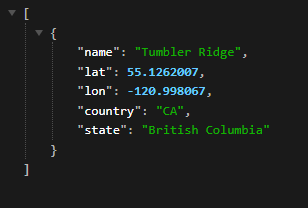
Requests syntaxes – https://api.openweathermap.org/geo/1.0/reverse?lat=55.1262007&lon=-120.998067&limit=5&appid=yourapikey
Screenshot or response – https://i.gyazo.com/3db694f93e406ff4069dba4440c68ef7.png
3) The main point you will have to pass to the technical team is that they will need to use another plugin or write a separate script. In this script, the main point is that you will need to use the coordinates for the request you will receive from the Geocoding API, after which you will substitute the exact coordinates in the Gecodoing API, which will return the correct location.
I, of course, understand this only enough to know that it’s over my head. Is this something that is currently able to be done with the weather widget? I’ve tried, but it doesn’t seem to work, but it could just be operator error, and I might have tried to fix it one too many times and introduced an error. Or it could be at their end, because as of right now, I’m not able to get any data to load, even if I type in London, which is where they are HQed out of. Are you able to see weather data for where you are?
 NAGARAJBV5
 Actually This Error Coming After Updated the Theme for Latest Version
-
This reply was modified 2 years by
NAGARAJBV5.
Bettina Hello @rockerosnet!
If you use a cloud template that can be modified with the TagDiv Composer, then you can hide the widget sidebar element on the mobile viewport: https://app.screencast.com/J1WHpnwEiWXe8 -> https://app.screencast.com/l7gEvJiOFpYWz
We have 3 options for mobile versions that you can use:
1. Responsive version: A responsive version of your website looks similar to the desktop version. TagDiv Composer is used to edit the page.Click on the mobile viewport: https://www.screencast.com/t/XDQJedlggSB. There, you can see your mobile version and edit or adjust the elements to look better.
2. Mobile pages: https://tagdiv.com/newspaper-10-3-7-update-brings-customizable-and-fast-mobile-pages
3. Mobile theme plugin: The Mobile Theme is a performance-optimized theme included in the main Newspaper theme that only loads on mobile devices. It comes with its own templates and designs for pages, posts, categories, etc., so your current templates from the desktop theme will get converted to the mobile theme layout. Please see https://forum.tagdiv.com/the-mobile-theme/ and https://forum.tagdiv.com/mobile-theme-introduction/ for more information.
A full explanation is here: https://www.youtube.com/watch?v=SpGkOnJeNZY
If you need to use mobile version 1 or 2, then you need to uninstall the Mobile Theme plugin and AMP.
Thank you!
 miltonrodas
site url: Golfgame.io
——————————-
Hi, according to your template, the main page being utilized for the homepage of my website is a page named ‘News’, which is also linked to in the top main menu.
The issue I need help with is that the Site Identity information I have added for the site is not reflecting when people visit my website on desktop or mobile, and it only shows “News – Golf Game” as the name of the website when they arrive at the site.
Please, how can I update the title of the Page named ‘News’, to show the site name and slogan, so it looks like this on the browser bar:
Golf Game | To Grow The Golf Game Community!
Bettina Hello!
Yes. Please deactivate all the non-tested plugins with our theme before updating.
Update WordPress, PHP, the theme, and plugins to the latest version.
Check all these requirements for the theme: https://forum.tagdiv.com/requirements-for-newspaper/
Let me know the results!
Thank you!
 l3negociosonline
Hello,
I have tried several time Activate the Theme original of Newspaper, but it does not work, still and loading forever, dont reply to any messages. Im need help.
Its original theme with the same domain, im just update the server.
Best Regards.
 SportsNewsIRLAND
i am getting the following error with td-cloud-library[12-Dec-2023 18:47:18 UTC] PHP Deprecated: preg_match(): Passing null to parameter #2 ($subject) of type string is deprecated in /bitnami/wordpress/wp-content/plugins/td-cloud-library/includes/Mobile_Detect.php on line 1257
i am also getting errors wihe AMP and mobile plugins since PHP version: 8.1.14
how do i fix or will these errors be fixed in updates
 tizian-ffm
Hello,
when the tagdiv Cloud Library plugin is activated, I only see the images in the WordPress media library that I have uploaded under my user name, when the plugin is deactivated, I see all images in the media library – which should be the default. Why is the plugin accessing the media library and restricting its use? In my opinion, this makes no sense and prevents editors from sharing images. Please check and fix it urgently in the next update.
 pratul11
 Hi
The Homepage also not showing me latest posts. Why?
Strange thing is the pages (homepage & Shop) are loading correct from your end (even without tagdiv cloud shop template) but not in my end!! And is installing cloud template for shop mandatory? What I do for homepage?
And earlier…like couple of weeks back, everything was fine and loading everything updated…even without your cloud templates!
It doesn’t make any sense! Can you also check again from your end if latest pages are loading without problems?
And what should I do?
 FDS
FDS good news, with today’s update of the Ezoic plugin (2.9.4), the theme is working properly again
FDS with today’s update of the Ezoic plugin (2.9.4), the theme is working properly again
 robink
 Hello Anamaria,
You did not read my message until the end…
I HAVE sent you these links to DEBUG CACHE POST on linkedin…
and you’re advising me to go the Linkedin Debug page…!?!
So please take in consideration my demand
I know it looked like cache, so Linkedin post debug is the first thing I tried, but no matter what, it doesn’t grab the featured image.
Unless I switch the same article to the DEFAULT POST TEMPLATE, then I go to linked in and try to post again, andf the image is correctly Grabbed.
If I switch back again to custom post, then the bug happens again…
So…?
Look, it’s 5 years I’m running 2 websites under NEWSPAPER for the Same company, and BOTHE SITES are presenting the same BUG since last update (prior 12.5.2)…
I tried to Update to the last version, 12.6.x but BUG IS STILL HERE.
Please believe me, warn your Dev team to double check this Post image Module un your Builder.
Many thanks
FDS hello… I have the same issue..
message from ezoic about tagdiv : Sorry – were they able to provide any sort of troubleshooting as to why the new Ezoic update would have caused an issue?
Okay – I’m not sure we’re really going to be able to troubleshoot this further from our end. It might simply be that the theme itself isn’t compatible.
Do you happen to have the actual theme name / URL where we can review their documentation for the theme?
Do you know if they’re using any sort of caching involved with the theme that’s built in?
Bettina Hello @abhinavkhare!
You shouldn’t update that plugin. https://forum.tagdiv.com/import-revolution-sliders-on-demos-prebuilt-websites/ -> https://forum.tagdiv.com/how-to-install-revolution-slider-v5/
Thank you!
 whichcamefirst
 Hello,
Same issue, the logs are flooded by lines like this:
PHP Warning: Undefined array key "widget_id" in /public_html/wp-content/plugins/td-composer/legacy/common/wp_booster/td_wp_booster_functions.php on line 3123
WordPress, theme and plugins are all up to date.
The issue can be fixed editing plugin code (as @bananaj specified) but it’s not really a fix, on next update the problem will be back.
Can you fix this in the next version?
Thanks.
 info@simonebarbone.net
 Hi, did you receive my email? Please could you update me as it is a critical issue on homepage to solve on live website.
Thank you.
Bettina Hello Adam!
I’ve checked as well and the files should be there in the package.
You shouldn’t create a child theme. We recommend using cloud/PRO templates in order to have the possibility to edit them with the TagDiv Composer, which contains a lot of functions and features. Please check out our tutorial here: https://forum.tagdiv.com/tagdiv-composer-tutorial/
More documentation about the cloud templates is here:
– https://forum.tagdiv.com/cloud-library-templates/
– https://forum.tagdiv.com/design-post-pages-using-cloud-library-templates/
– https://forum.tagdiv.com/cloud-library-category-templates/
The child theme is not overwritten by the update. An issue for that could be the compatibility of your child theme with the new version of our theme.
Thank you!
 abhinavkhare
How to update rv slider and other slider please assist me
 Cuddlepill
I was on a very old version of Newspaper (10. something) and recently updated to the latest version which resulted in a site crash. Not sure what happened/how I can fix. I’ve updated all of the required plugins and am running on the latest version of WordPress. Any resources to help me out of this mess would be greatly appreciated!
 _Adam_
 Hi !
Indeed.
I moved the newspaper-child folder into the theme.
After copying the child theme folder, I cannot find the child theme to activate in Appearance > Themes.
The question I ask myself. Do I need to create a child theme?
Will the changes I currently make to the main theme be deleted during updates?
robinkHello Support,
I’ve noticed and found the issue, when using a custom post template, and sharing the article in Linkedin (fb and twitter are ok), th featured image is not found…
But when I Switch back to Default newspaper post template, then the image is correctly fetched and showing when publishing on Likedin…
I guess there is an issue with recent updates, because the sharing was working fine until Theme update to 12.5.1 and new update 12.6.2 isn’t resolving the issue either.
So my guess is, there must be an issue with the Featured Image Module, when creating a custom template…
Please advice,
Many thanks & kind regards.
You can try this post on Linkedin post debug : https://monaco-hebdo.com/actualites/international/monaco-a-nairobi-pour-la-6eme-assemblee-des-nations-unies-pour-lenvironnement/
Direct link to Linkedin debug :