Rafael
 Hi,
I was emailed once and asked a few questions yesterday. Since my response yesterday, it’s now been another day without an update. Can someone kindly let me know what’s going on please?
 carlodap
 Hi Bettina, thanks for your prompt reply. I followed your instructions without fixing the issue. Then I decided to downgrade the Newspaper plugin to the previous version and afterward reinstall the last update and I sorted it out. Hope this may help other people that might have encountered the same glitch. Regards
 greenbooks
Hi
I have WordPress 5.9.1
Notification on the Panel that new version NEWSPAPER – VERSION: 11.4.2 is available
When click to update, WordPress Update page shows – Theme is current.
Whatam I doing wrong?
Thank you
 Balint
 I’ve seen that the new update for the theme arrived in that day.
But can you help me with the CSS? I use the Single Post Template 2 for my articles page. What CSS code should is post to the Custom CSS to add space (20px) between the text element and the add.
I use all the ad places from the single post theme.
Thanks.
 Eighthats
Currently, when using the tagdiv editor, changes made to the mobile menu, such as selecting which menu it should use,
do not save when the page is updated.
The mobile menu always pulls up the menu from the main header, even if the menu itself is set to a different menu.
This page is using a different overall header:
https://www.rcrwireless.com/qualcomm-analyst-day-2022
The mobile menu will not retain the settings so we’ve had to leave the horizontal menu layout in place.
I have also been unable to change the CSS on the page. Any changes made are erased when the page is updated.
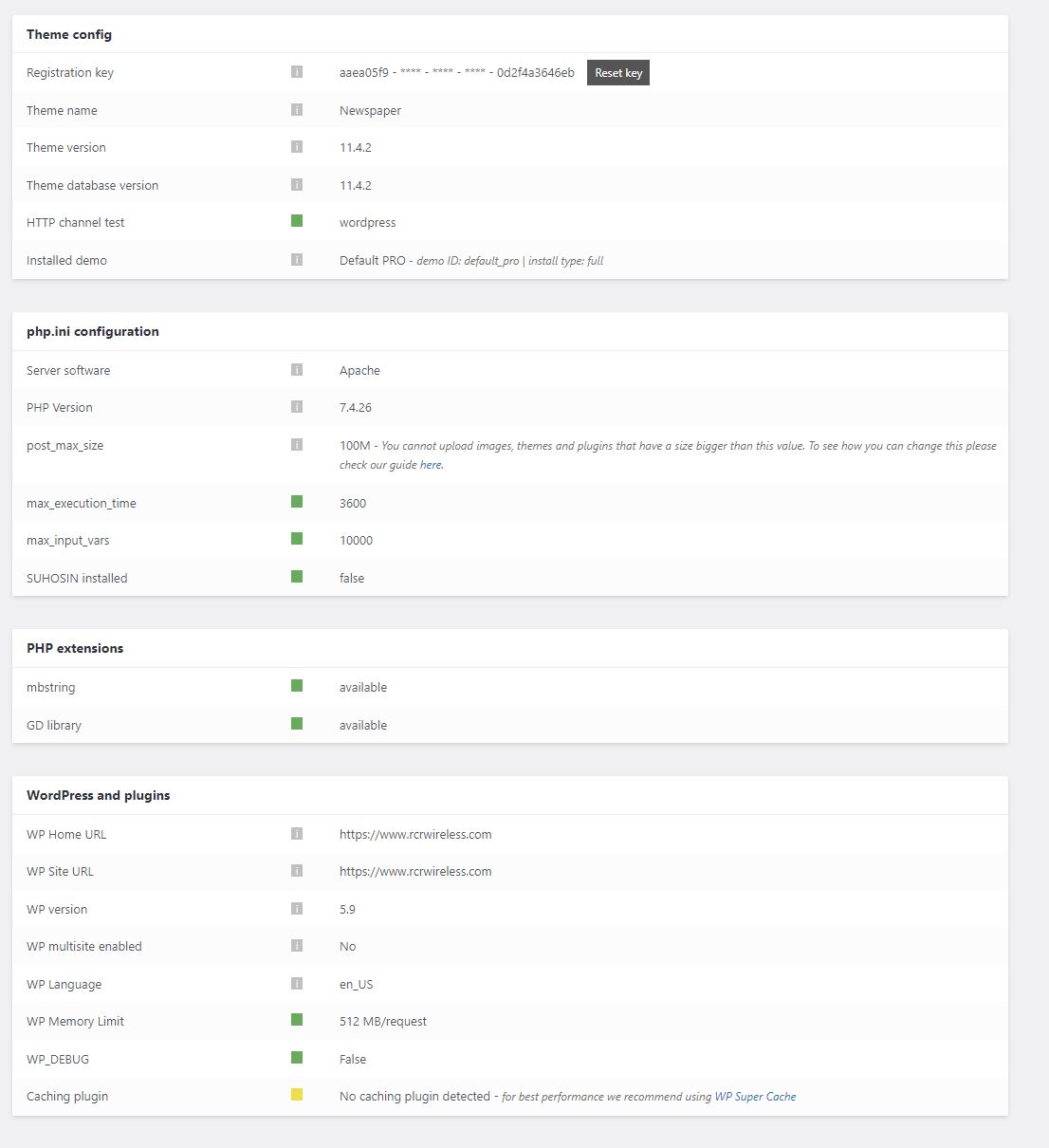
Theme status page:
 larryb19
https://dev.grocerybusiness.ca/
Main menu was working perfectly. I was editing a published article. I clicked “update” and now main menu is broken/blank on home screen until I scroll and then all the navigation options appear.
 Bruno Riggs
Hi,
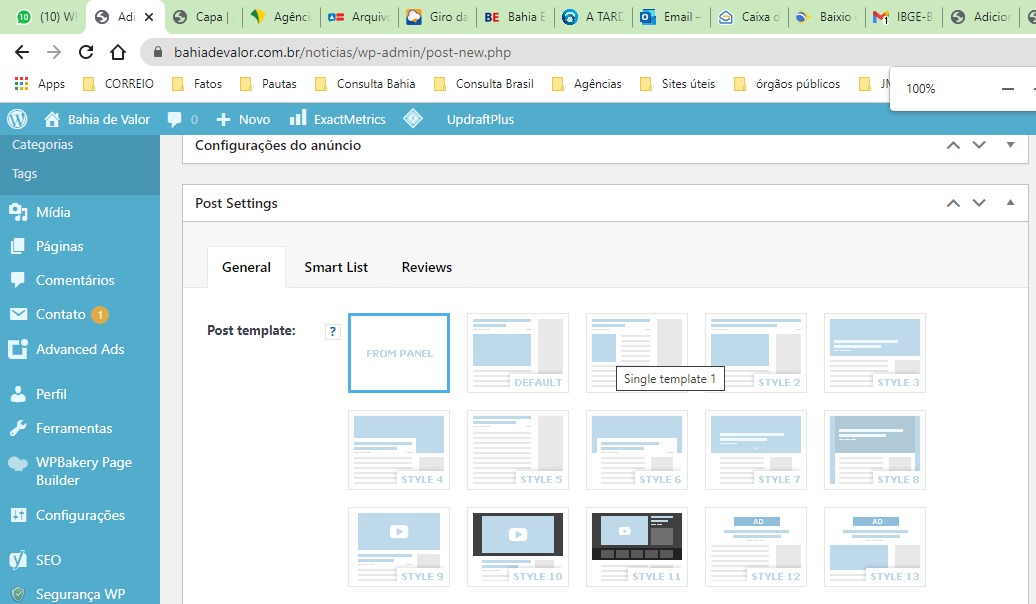
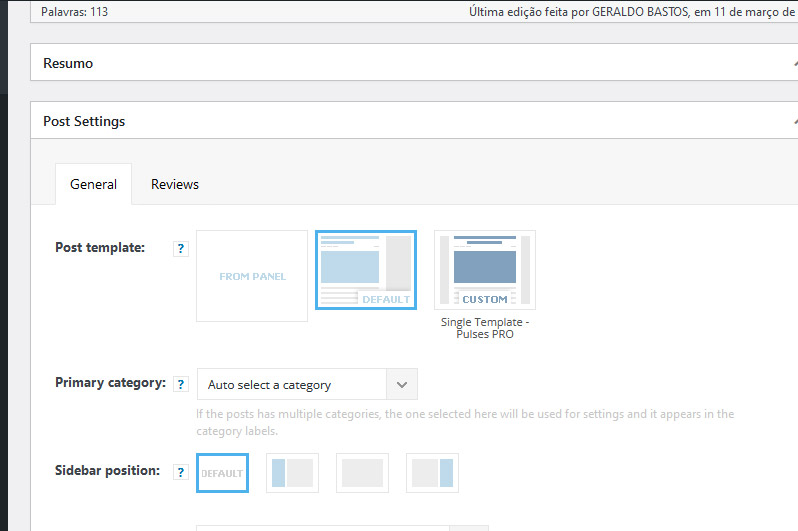
Note, on our old website, which uses its theme in an older version, several layout options appear.
In our new project, with its more current theme, fewer options appear. Did you take it out over in new updates? Are these options available today?
Old Website with old Newspaper: https://badevalor.com.br/errors/tela-post-templates.jpeg
New Website with new Newapaper: https://badevalor.com.br/errors/tela-post-templates2.jpg
Thanks.
 Calin
Calin Hi PatWire,
Can you make a staging or subdomain where to check this problem?
Also, the problem persist if you are using only the theme plugins? (it is possible after the theme update to be a plugin conflict).
Thank you!
 PatWire
The mobile menu fails in 11.4.2 – rolled back to 11.4.1 and it works again
There was also a WordPress update today to 5.9
Mobile theme plugin not activated because I don’t use the mobile theme plugin
Thanks
 Wyohost
Hi,
I’ve purchased the Newspaper theme and when running it through an HTML validator there are 167 errors and 26 warnings.
https://validator.nu/?doc=https%3A%2F%2Fwyonews.wyowp.com%2F
I would never expect a theme of this caliber to be error free, but 193 errors or warnings is too many.
I just updated it and those are the results from the most recent update today.
 RGLAS
RGLASI have a problem with my mobile layout.
Everything works except my home page, scrips don’t work and top logo is not what it should be.
 Bettina
 Hello @carlodap !
Make sure you have all the tagdiv plugins installed, active and updated.
Check if you have also the Standard Pack plugin. Check some other possible factors which can interfere there: https://forum.tagdiv.com/general-options-may-interfere-newspaper-theme/
Please re-install the Cloud Library plugin!
Let me know the results!
Thank you!
carlodapHi there, after the last update to the 11.4.2 Newspaper theme, in the preview of the related article at the bottom of the posting page a wp_booster error comes up . When I try to use the TAG-Div composer an error of disabled plugins is shown but all the needed plugins are active. The published posts, at the moment, are not affected presumably because published before the update. Here the link to the screenshots of the issue https://imgur.com/a/kygQyeV and the URL of my blog https://www.empillsblog.com/
Hope you may help. Thanks in advance
 bizlize
 not made any changes to code, but updated to wordpress new version
 danna
danna Hello!
Is this fixed with the new update?
All the best,
Daniel
Calin Hi,
Our theme can use 3 options for mobile version:
1 – the responsive version
2 – the mobile page template (can be used on pages and cloud templates -> https://prnt.sc/XVq4TcxR0lwJ)
3 – the mobile theme plugin
To have the same layout, then you need to avoid the mobile theme plugin. Use the responsive version or the mobile page template (if you want to edit the mobile version to have a different look or content).
Also, here is a video tutorial that maybe can help you!
Thank you!
Bettina Hello @pratiek!
It could be a plugin conflict there or something that can interfere in our theme: https://forum.tagdiv.com/general-options-may-interfere-newspaper-theme/, so please make a test and deactivate ALL plugins except tagDiv ones, also deactivate the cache plugin that you use, and try again.
Enable the sharing feature on mobile theme + AMP from Theme panel -> Mobile
Theme -> Post Settings -> Sharing.
Yes, you’re right they do not appear on AMP. I’ll address this issue to our developers.
Yes, we implemented it in the new update.
Thank you!
 aeiko
aeikoEvery time i make an update in the theme channel, even to change the logo or take out an ad etc, you click save and the square loader keeps spinning it never actually saves and the site does not update. Any ideas?
 MDNM2017
On the left side of the word press dashboard- we only see the words Cloud Templates Before – the downloaded templates were available to easily edit under the Cloud Template line. Now the fonts are so small to click to edit. What happened?
Also when editing our templates, if we make a mistake we used to clock on the undo button at the bottom of the panel left side. Now it’s missing. Where is it? https://infomeddnews.com
Thank you.
 Venkat896
Home Page seeing error values.
Text like shows this
Warning: A non-numeric value encountered in /home3/atomict3/public_html/telugunewsxpress/wp-content/plugins/td-composer/legacy/Newspaper/includes/shortcodes/td_flex_block_4.php on line 471
Warning: A non-numeric value encountered in /home3/atomict3/public_html/telugunewsxpress/wp-content/plugins/td-composer/legacy/Newspaper/includes/shortcodes/td_flex_block_4.php on line 498
Warning: A non-numeric value encountered in /home3/atomict3/public_html/telugunewsxpress/wp-content/plugins/td-composer/legacy/Newspaper/includes/shortcodes/td_flex_block_4.php on line 471
Warning: A non-numeric value encountered in /home3/atomict3/public_html/telugunewsxpress/wp-content/plugins/td-composer/legacy/Newspaper/includes/shortcodes/td_flex_block_4.php on line 498
Warning: A non-numeric value encountered in /home3/atomict3/public_html/telugunewsxpress/wp-content/plugins/td-composer/legacy/Newspaper/includes/shortcodes/td_flex_block_4.php on line 471
Warning: A non-numeric value encountered in /home3/atomict3/public_html/telugunewsxpress/wp-content/plugins/td-composer/legacy/Newspaper/includes/shortcodes/td_flex_block_4.php on line 498
Warning: A non-numeric value encountered in /home3/atomict3/public_html/telugunewsxpress/wp-content/plugins/td-composer/legacy/Newspaper/includes/shortcodes/td_flex_block_4.php on line 471
Warning: A non-numeric value encountered in /home3/atomict3/public_html/telugunewsxpress/wp-content/plugins/td-composer/legacy/Newspaper/includes/shortcodes/td_flex_block_4.php on line 498
And SECOND Problerm
Wordpress site memory increased in the host. But Theme not showing update.
Please fix both problem.
 DenverLifeMagazine
I have two websites on Newspaper theme that I was doing a footer update on. One site saved just fine, the other site’s TagDiv composer is only saving the header area and will not save changes in other sections.
Tried editing the footer in the Home page TagDiv Composer and the Cloud Templates Footer TagDiv Composer. Both times, you only get the confirmation box saying that the header was successfully saved and no confirmation for the footer. Then going on the front end you can see that the footer changes are not saved. I tried clearing the site cache and updating the newspaper theme to 11.4.2, neither of which helped.
Has anyone run across this issue and know how to fix it?
 finrising
 We can not update plugin and theme. But ealier we had not problem with this plugin. It`s true that plugin are deactivated.
But I see.
finrising We cant update plugin and theme. But ealier we hadnt problem with this plugin. It`s true that plugin are deactivated.
But I see.
 Prateek
Hello, team tagDiv.
The copy url button in share section isn’t working for me while logged into my admin dashboard. A button is showing but without the link icon and when I click on it, it just reloads the same page.
As soon as I logout, the icon shows up and it starts working. But there are a few issues—
1.) When logged out, on clicking, the link is indeed copied but the tick mark’s color is white which is almost invisible if the button background color is light.
2.) On amp pages, the button does not show anything. Just empty space. When clicked, same problem, it reloads the page.
3.) Apart from copy url button, the Flipboard share button also doesn’t show anything on amp pages.
Lastly, I just noticed that the WhatsApp and Telegram buttons, unlike before, are showing up on desktop as well. Is this part of the update?
 LPH
LPH Hi Anamaria,
I didn’t send an email. Instead, the site was reverted back to 11.4.1.
I’ll look at your suggestion and see what happens. As always, thank you!
Update: I get it. Yes. I can replace that area with the block you suggested as long as I change it to 5 posts, 5 in a row.