
- NewsmagHow to update a plugin
- NewspaperHow to update a plugin
- NewsmagHow to update the theme
- NewsmagHow to update the WPBakery plugin
- NewspaperHow to update the WPBakery Page Builder plugin
- NewspaperHow to Update the Newspaper Theme
- Apitd_api_top_bar_template::update_key
- Apitd_api_top_bar_template::update
- Apitd_api_single_template::update_key
- Apitd_api_single_template::update
- Apitd_api_footer_template::update_key
- Apitd_api_footer_template::update
- Apitd_api_smart_list::update_key
- Apitd_api_smart_list::update
- Apitd_api_thumb::update_key
- Apitd_api_thumb::update
- Apitd_api_category_top_posts_style::update_key
- Apitd_api_category_top_posts_style::update
- Apitd_api_category_template::update_key
- Apitd_api_category_template::update
 Anamaria
 Hello,
Please make sure you have the tagDiv Standard Pack plugin activated, also clear your cache, from the last update, this plugin is no longer required because the new demos are using cloud templates.
You can use a header template from Cloud Library, and you can customize it with tagDiv Composer => https://www.youtube.com/watch?v=HXQQygkCCJo
Let me know the results!
Thank you!
 Jose
JoseHello team,
Since the last theme update, this does not work. I have tried to install the photos again, but nothing, it doesn’t work either.
You can see it here: https://cutt.ly/UmyW15T

How can I solve it?
Thank you.
 AInews2
 Thanks for the update, glad I’m not the only one 🙂 Please let me know when the issue is resolved as our site goes live in a few days.
 Bettina
 Hello!
The Woocommerce is a tested plugin with our theme, so you shouldn’t lose anything. Of course, I recommend you to make a full backup before any changes.
Please check what’s new in the last update by accessing those links:
– https://tagdiv.com/newspaper-theme-11-woocommerce-tagdiv-shop-plugin/
– https://tagdiv.com/whats-new-newspaper-11-theme-update/
Thank you!
 sunil5823
 thanks for the response I updated the version of the theme that’s worked for me…how can I change in the index.php as I am changing in index.php but there is not making any change so could you please let me know how to change in index.php?
 jcustudentassocation
Hi,
Logging in this morning my website had automatically deactivated my plugins – I got this sorted but now there is an issue with my header being cut off and squashed – extending to the full page. Has there been an update that has messed with my layout or a plugin that has been deactivated that I’ve forgotten about?
 simonxyz
 I was able to fix my problem… all I had to do was: update my plugins.
simonxyz I update to the latest Newspaper version. Now my header and footer section does not display properly, I get code instead. In the header section I get this:
[tdb_header_logo image=”” image_retina=”” align_vert=”content-vert-center” align_horiz=”content-horiz-center” image_width=”eyJwb3J0cmFpdCI6IjIyMCJ9″]
dyrectory.com business directory
[tdb_header_menu main_sub_tdicon=”td-icon-down” sub_tdicon=”td-icon-right-arrow” mm_align_horiz=”content-horiz-center” modules_on_row_regular=”20%” modules_on_row_cats=”25%” image_size=”td_324x400″ modules_category=”image” show_excerpt=”none” show_com=”none” show_date=”” show_author=”none” mm_sub_align_horiz=”content-horiz-right” mm_elem_align_horiz=”content-horiz-right” inline=”yes” menu_id=”28″ mm_align_screen=”yes” f_elem_font_family=”” f_elem_font_size=”eyJwb3J0cmFpdCI6IjExIn0=” mm_width=”1300″ mm_subcats_bg=”#ffffff” mm_elem_border_a=”0 1px 0 0″ mm_elem_padd=”eyJhbGwiOiIycHggMjJweCIsInBvcnRyYWl0IjoiMCAxNHB4In0=” mm_sub_padd=”eyJhbGwiOiIxNnB4IDAiLCJwb3J0cmFpdCI6IjE0cHggMCJ9″ f_title_font_size=”eyJhbGwiOiIxNSIsImxhbmRzY2FwZSI6IjE0IiwicG9ydHJhaXQiOiIxMyJ9″ f_title_font_line_height=”1.2″ art_title=”3px 0″ f_mm_sub_font_size=”eyJhbGwiOiIxMyIsInBvcnRyYWl0IjoiMTEifQ==” mm_child_cats=”10″ mm_elem_border=”0 1px 0 0″ mm_height=”eyJhbGwiOiIzNDUiLCJsYW5kc2NhcGUiOiIzMDAiLCJwb3J0cmFpdCI6IjI0MCJ9″ mm_sub_width=”eyJsYW5kc2NhcGUiOiIxNjAiLCJwb3J0cmFpdCI6IjE0MCJ9″ mm_padd=”eyJwb3J0cmFpdCI6IjE0In0=” modules_gap=”eyJwb3J0cmFpdCI6IjE0In0=” elem_padd=”eyJwb3J0cmFpdCI6IjAgMTJweCJ9″ f_elem_font_line_height=”eyJwb3J0cmFpdCI6IjQ4cHgifQ==” video_icon=”eyJwb3J0cmFpdCI6IjI0In0=” all_modules_space=”26″ tds_menu_sub_active=”tds_menu_sub_active1″ tds_menu_sub_active2-line_color=”” tds_menu_active=”tds_menu_active1″][tdb_header_search inline=”yes” toggle_txt_pos=”after” form_align=”content-horiz-right” results_msg_align=”content-horiz-center” image_floated=”float_left” image_width=”30″ image_size=”td_324x400″ show_cat=”none” show_btn=”none” show_date=”” show_review=”” show_com=”none” show_excerpt=”none” show_author=”none” art_title=”0 0 2px 0″ all_modules_space=”20″ tdicon=”td-icon-magnifier-big-rounded” icon_size=”eyJhbGwiOiIyMCIsInBvcnRyYWl0IjoiMTgifQ==” tdc_css=”eyJhbGwiOnsiZGlzcGxheSI6IiJ9LCJwb3J0cmFpdCI6eyJtYXJnaW4tdG9wIjoiMSIsImRpc3BsYXkiOiIifSwicG9ydHJhaXRfbWF4X3dpZHRoIjoxMDE4LCJwb3J0cmFpdF9taW5fd2lkdGgiOjc2OH0=” modules_on_row=”eyJhbGwiOiI1MCUiLCJwb3J0cmFpdCI6IjUwJSIsImxhbmRzY2FwZSI6IjUwJSJ9″ meta_info_horiz=”content-horiz-left” form_width=”600″ input_border=”0 0 1px 0″ modules_divider=”” form_padding=”eyJwb3J0cmFpdCI6IjIwcHggMjBweCAyMHB4IiwiYWxsIjoiMzBweCJ9″ arrow_color=”#ffffff” btn_bg_h=”rgba(0,0,0,0)” btn_tdicon=”td-icon-menu-right” btn_icon_pos=”after” btn_icon_size=”7″ btn_icon_space=”8″ f_title_font_family=”” f_cat_font_family=”” f_cat_font_transform=”uppercase” f_title_font_weight=”” f_title_font_transform=”” f_title_font_size=”13″ title_txt_hover=”#4db2ec” results_limit=”6″ float_block=”yes” icon_color=”#000000″ results_border=”0 0 1px 0″ f_title_font_line_height=”1.4″ btn_color=”#000000″ btn_color_h=”#4db2ec” all_underline_color=”” results_msg_color_h=”#4db2ec” image_height=”100″ meta_padding=”3px 0 0 16px” modules_gap=”20″ mc1_tl=”12″ show_form=”yes” f_meta_font_weight=”” h_effect=”” results_msg_padding=”10px 0″ f_results_msg_font_style=”normal” video_icon=”24″ modules_divider_color=”” modules_border_color=”” btn_padding=”0″ form_border=”0″ form_shadow_shadow_offset_vertical=”3″ results_padding=”0 30px 30px” btn_bg=”rgba(0,0,0,0)” icon_padding=”eyJhbGwiOjIuNCwicG9ydHJhaXQiOiIyLjYifQ==”]
 Studio Silver
Hello, how are you?
We have version 11 installed and we are facing some unusual difficulties
with the theme on the website: https://www.jmais.com.br
Print: https://drive.google.com/file/d/1D0rUznJG1G8uUDZUjSeLO5e5ikiZXBiV/view?usp=sharing
Our 100% dedicated server is for jmais.com.br
300GB SSD
12 GB RAM
6 NUCLEOS CPU
+ PROTECTION AND CACHE CLOUD FLARE
After installing the theme, we observed a large increase in server resource consumption, even with the number of accesses considered simultaneous than 100 visitors online. A sudden surge in CPU and PROCESSES happens out of nowhere even with a constant number of hits.
We have experience with our server and it is capable of handling more than 1500 visitors online, and reaching 200 is already crashing.
Can you guide me in what might be happening?
Here are the errors that we identified, we do not know if it is related to this slowness.
1) Error that is reporting in the error log is:
[27-Jun-2021 18:45:51 UTC] WordPress database error Commands out of sync; you can’t run this command now for the SHOW FULL COLUMNS FROM wp_options query done by shutdown_action_hook, do_action(‘shutdown’), WP_Hook->do_action, WP_Hook->apply_filters, td_options::on_shutdown_save_options, update_option
2) Error, from http follows the print: https://drive.google.com/file/d/11KtmEo_Oa7ZirlizDEkk0zu7BPNrknd3/view?usp=sharing
As for the plugins, we are only using Adrotate and your originals.
We await a solution.
Sincerely, Rudmar from Brazil
 Ramletb
I’ve read the other suggestions to deactivate Composer, uninstall, clear cache, reinstall, activate, clear cache and our mobile images are still not loading. Please advise for americanfaith.com. I’ve also tried reverting back to 10.4 and still no luck.
 TobiasForster
Hi,
i am within my installation of Newspaper 11 on http://www.bblprofis.de – If i post a new article the article page is fine and everything is like i want it to be. But if i check the website there is just an update in the latest articles on top of the blog.
Article https://www.bblprofis.de/index.php/2021/06/27/geruecht-fc-bayern-basketball-nimmt-ex-berliner-landry-nnoko-ins-visier/ should be also shown in section “Basketball Gerüchte” as the articles got the right category for this. But there is no update to this section. I already cleared caching for website and for browser but no better result.
How can i adjust this? I thought with every change on the website there should be an update even with caching.
Thank you for your help
bye
Toby
TobiasForsterHi,
i just installed Newspaper 11 and i got some issues regarding the views counter which is included in the article posts (see attached). If i check those numbers with the Jetpack stats they are different. What or in which way Newspaper 11 theme counts with this? Are this the users that read the article? Are there any rules behind? And are the stats up to date or just updated from time to time?
Thank you
bye
Toby
 hoechong
Hi, I have tried clearing my caches and ensure the facebook ID is correct and to no avail, the counter still doesn’t get updated.
Counter reads 39.
https://yamchatime.com/
My actual facebook already has 63 likes.
https://www.facebook.com/yamchatime
Please help. Thank you
 Testventure
 Update: I also deleted WP Super Cache to double check. But even without any Caching Plugin this issue remains.
 leejaehak
Just like the theme has a translation feature, I would like the social media buttons to have a translation option as well.
I hope it will be reflected in the next update.
Thank you.
 Leofitz
Hello, I’m using the Newspaper theme with ‘Magazine’ layout. My site is updated to v.11.
Could you help me stabilize the display of my site’s background image the reloading of page layouts?
I’ve tried unsuccessfully to resolve an ongoing issue with the distracting reloading of my site background image, and page layouts as one toggles through the top menu navigation. On the loading of a new site page page there is sometimes a flashing blank white screen that’s then replaced with the page content, or, a flashing re-sizing of the page. On page loading the background image may also briefly disappear, showing the green default background.
Can you suggest a solution for this? I would like the background image to be ‘nailed’ in place through all page navigation, and the frame of the page to be set in size and location. As one navigates between pages only the interior images and text content change without layout shifting or resizing. These problems are seen when clicking the following page links; Home logo, Home, About, Resources, Contact.
My A2hosting account does have Litespeed server support.
The site is https://marketwisetrader.com
I can send you username/password by email if needed.
I appreciate your assistance.
Lon K
 nhowarth
 Hi Bettina, The problem is apparent on https://tagdiv-com.cdn.ampproject.org/c/s/tagdiv.com/whats-new-in-the-newspaper-theme-10-4-update/?amp as well as my website.
Please see screenshot at https://i.imgur.com/nUChDHz.jpg
I used the TOR browser to take the first shot. As you will see the text of the like button has been translated into French as “J’aime”
I used the Firefox browser to take the second shot. As you will see the text of the like button has been translated into Greek (as I reported earlier) as ”Μου αρέσει!”
Perhaps you can investigate this as the problem is clearly not with me.
Thank you
AInews2 Just to add some extra information, here is what I see on my page:
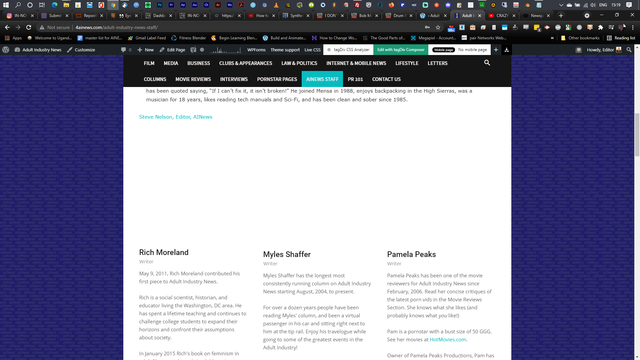
I have tried disabling all plugins, doesn’t seem to be a plugin conflict….could be the theme update, not sure how long the page hasn’t worked.
I have tried just copying a part of the code and placing it on another test page, to see if the images display again, but they still show as blank.
Here is what the source code says when inspecting it
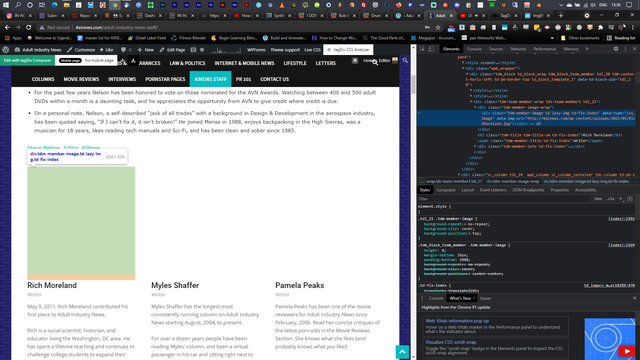
Hope that helps
 aceable
Hello,
I updated to Newspaper 11 and TagDiv no longer has Subscription box shortcodes. They do not offer them as available elements nor do they recognize the subscriptions boxes I already had on my page
 haizattabdul
Hi i just updated newspaper theme 11 but the my website got a missing/broken menu and search button in homepage.
URL: https://www.yoy.my/
Photos: 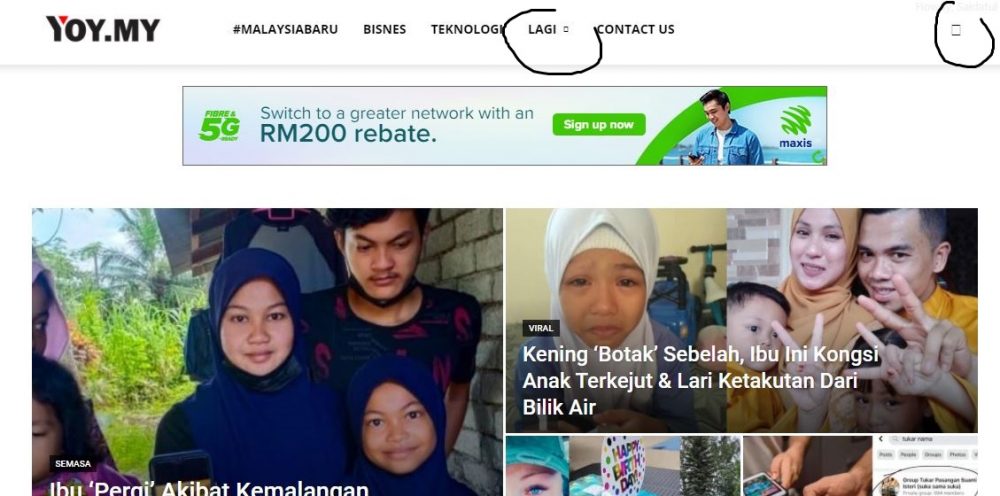
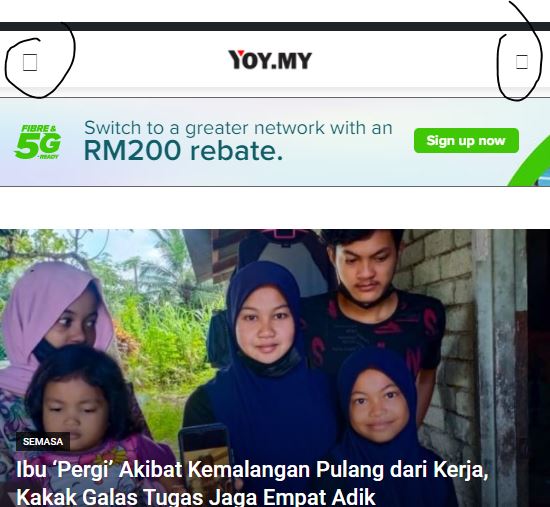
Please help.
 pdpa
pdpa update after insert .htaccess
use Edge : wp editor load loop. (i think cache)
use firefox & Chrome : ready!
OK!!! Thank you
-
This reply was modified 5 years by
pdpa.
Bettina Hello!
No, it won’t update automatically because they are independent from each other. So, if you will change the desktop page, then you should go to your mobile page and change it there too.
If you will choose to use a responsive version, then you won’t have this problem.
A responsive version of your website is looking similar like on desktop, edit the page with TagDiv Composer, click on the mobile viewport: https://www.screencast.com/t/XDQJedlggSB ; there you can see your mobile version and you can edit the elements there.
Thank you!
Bettina Hello!
That’s strange because some of our clients were so thankful with the latest update because for them the page speed was increase.
Our developers are working a lot to improve the page speed in every update and also to add more settings and more possibilities to change the design or the structure of the websites based on the client’s requirements.
Let me know the results after update!
I recommend you to make a full backup and update plugins and the theme via file transfer, so that you don’t face any error: https://forum.tagdiv.com/how-to-update-the-theme-2/
Thank you!
 tsharma
Hello,
I am using Newspaper11 and I am not able to change especially the colors for any widget using TDComposer.
When I choose colors in TDComposer, the newly selected color does not get updated either in the Color picker or the target widget etc.
However if I make change to any ‘Text’ based options like padding, margin, excerpt length, or any such field in TDComposer which is text based then TDComposer works fine but color picker related functionality is not working at all.
Here is link to my site – https://demo.testoxide.com/
 Breinblik
 Hey Bettina,
I wasn’t talking about a specific page. What i ment was in general. Every time a change is made to a page the mobile page needs to be changed to right? It won’t update automatically? Is there a more clever way to do this without having to change both the normal page and the mobile page?

