
- Apitd_api_top_bar_template::update_key
- Apitd_api_top_bar_template::update
- Apitd_api_single_template::update_key
- Apitd_api_single_template::update
- Apitd_api_footer_template::update_key
- Apitd_api_footer_template::update
- Apitd_api_smart_list::update_key
- Apitd_api_smart_list::update
- Apitd_api_thumb::update_key
- Apitd_api_thumb::update
- Apitd_api_category_top_posts_style::update_key
- Apitd_api_category_top_posts_style::update
- Apitd_api_category_template::update_key
- Apitd_api_category_template::update
- Apitd_api_module::update_key
- Apitd_api_module::update
- Apitd_api_block::update_key
- Apitd_api_block::update
- Apitd_api_header_style::update_key
- Apitd_api_header_style::update
 Vlad S
 Hello !
Please make sure that your update has been done according to our procedure as you can see here: https://forum.tagdiv.com/how-to-update-the-theme-2/ Also please take a look for a possible plugin conflict, please deactivate ALL plugins except tagDiv ones, also if you are using child theme or cache plugin, deactivate them, clear all cache and try again.
Let us know the result !
Thank you !
 theoctant
 Hello,
I’ve installed and configured it according to the link. I still find that changes to the front end are not being updated immediately!
Thanks!
Vlad S Hello !
You can keep the staging active and the live one too. You can use the key for 1 staging and 1 live website. This is recommended by us because it is easier for users to test and update the theme on development modes.
Thank you !
Vlad S Hello !
New layouts and demos will be available only starting from version 11. This update will not include any new demo layouts.
Thank you !
 Razvan
Hello, I recently updated on 8th of march the to the new wordpress 5.7, and I found out that on desktop new articles don’t show up, even though they are published. When I switch to mobile, everything is fine, and when I log into my account the posts show up as usual. My site: http://www.tenews.ro
 Anamaria
 Hi,
We hope that the update will be soon in less than two months.
Thank you for your understanding!
 sirms
sirms Hi again, i need somebody from the theme-develop team to fix this problem for me. I added my own MU-Plugin, and with a code for the post published and for the post update, the date text for “post update” is showing in english.
I have tried to added the code in the function.php without any luck.
The theme is overwriting for some reason, if i cloud have someone the team to help me with a code that will fix this will be much appreciated.
LINK: https://www.screencast.com/t/swyLU24s57X
Best regards,
MS
 fabiossantos
Hi I need help to update version 10.3.9.1 to the current version
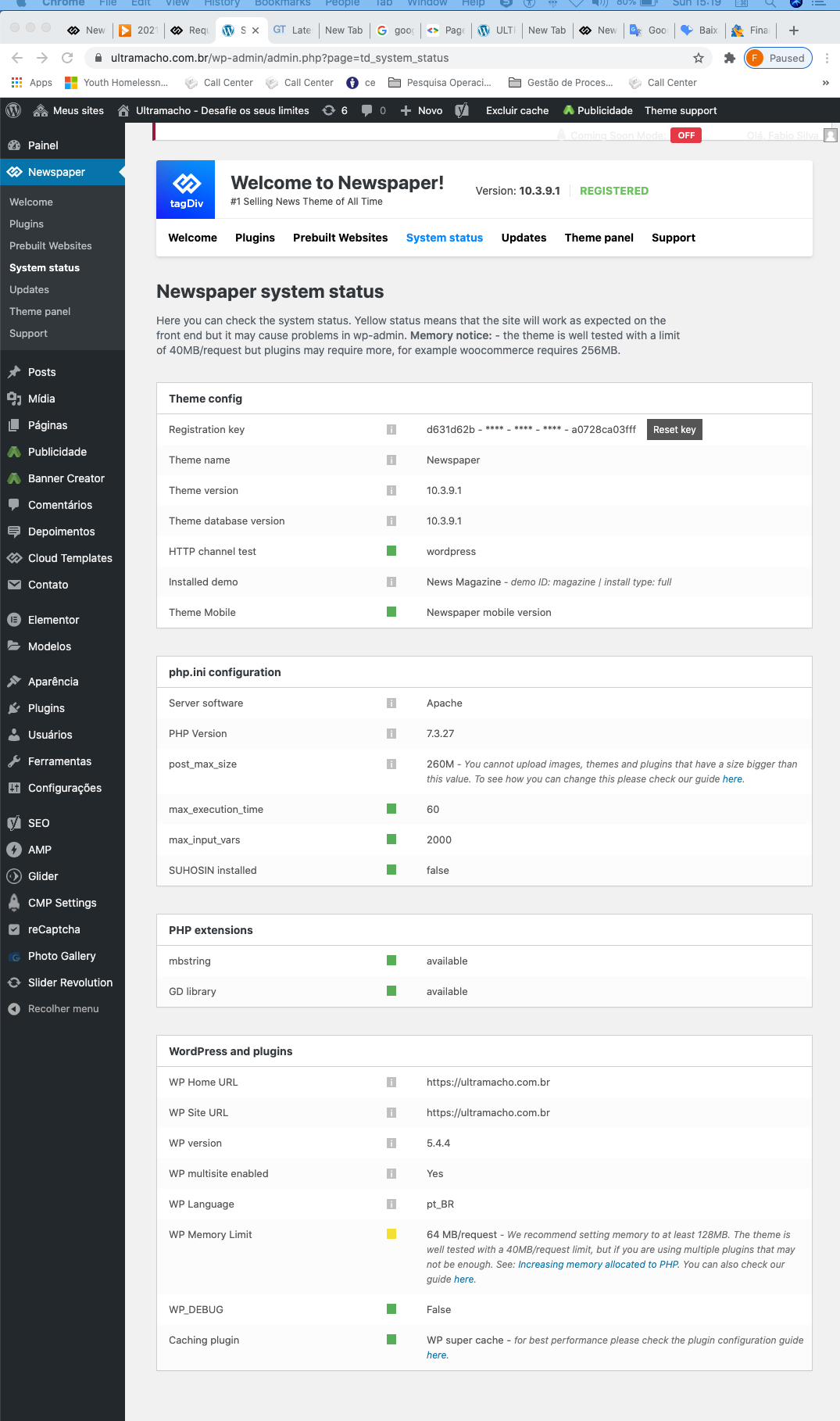
 matsati
Hello,
I am having trouble with getting the correct values for the PHP Execution Time and PHP Max Input Vars for Newspaper theme. I am currently on PHP 7.4 installed and am running Newspaper Version: 10.3.9.1. I followed the system setup guide (https://forum.tagdiv.com/system-status-parameters-guide/) I restarted the php and load pages on the website, but nothing I do seems to get these settings to change (ie. PHP Execution Time 30 and PHP Max Input Vars 1000). Any suggestions on why this is happening?
I also noticed after this new theme update, basically bricked my cron scheduler. Nothing is running. I get this error:
“cURL error 28: Connection timed out after 3001 milliseconds”
Cant seem to figure out how to fix this either, any comments and suggestions would be greatly appreciated! 🙂
—
Duane
 bysystem
Post editor and media files not visible after new update
RazvanHello, I updated to a new version on 8th march, and I saw that new articles don’t show up on desktop when logged out. I tried to refresh but nothing.
here is my site: http://www.tenews.ro
theoctantMy site theoctant.org is having issues with updating the content on the page. Certain post pages, for example – https://theoctant.org/edition/issue/features/cake-romance-and-the-ace-of-hearts-a-conversation-with-the-asexual-community-in-yale-nus/ – are currently displaying a mobile template page (on a desktop browser, no less) that I have tried to discard, even when I have changed it back to “No mobile theme”. The strange thing is that after I log into my WordPress account and make the changes, everything shows up perfectly when I am using the same browser from which I changed it (even when logged out). However the moment I use a different browser, the whole page is different.
To make this clear, this is what I see when accessing outside the original browser page:
http://prnt.sc/10keucm
This is what I want it to look like, having edited it as such using the composer:
http://prnt.sc/10kevk3
On mobile, this is happening as well.
http://prnt.sc/10kewvd
Yet on certain pages, this is completely not an issue. It seems to be completely random, which pages are ok and which are not.
http://prnt.sc/10kf0bs
This is really frustrating me. Aside from this specific issue, many times, it seems like changes take a significant amount of time to be reflected on the page (more than a day) after being changed in composer. If this is consistently going to be the case, I am deeply disappointed with the amount of money I have spent on TagDiv. I have already disabled all other plugins and updated to the latest version of Tagdiv. What is the problem here?
 mikadim
 Hi,
I think of that solution Anamaria but in the next update, the code will be erased. Is there another solution? Maybe a mobile hook so i can put the code in the child theme?
Thanks, Katerina
 asiandrama
Ever since the latest WordPress update, my embeded WordPress posts no longer show an image just a link to the post. The link at the bottom of this page is an embeded posts and should show the post image. The images shows when editing the post, but not on the live website. I do not have lazyload turned on in your Newspaper theme. What else would cause this?
Please advise.
 Bettina
 Hello!
5. If you have a responsive version, then you can edit the post with TagDiv Composer, click on mobile viewport: https://www.screencast.com/t/XDQJedlggSB ; click on the element and delete the form.
6. 7. You can delete those elements how I explained already above at point 5.
8. In our theme we have a setting when you edit the post template with TagDiv Composer. You need to disable that setting like this: https://www.screencast.com/t/JaSHpq10Y
9. You should be able to delete with TagDiv Composer like in point 5, click on the element and you can simply drag & drop the element at the bottom of the page or just press the button delete when the element is selected.
For example – https://wordpress.org/support/topic/the-link-you-followed-has-expired/
In that case the max upload size was limited, increasing it solved the problem. Usually this is the main cause.
Check this guide carefully and make modifications if needed to have set the requirements as in our guide: https://forum.tagdiv.com/requirements-for-newspaper/
If everything is set properly there should be no problem. Contact your hosting provider if needed and ask them to make changes as the guide suggests.
You can also install the theme by FTP, that is not difficult to do and it’s very useful to know how to use FTP. If our guide is not detailed enough check some more online:
– https://dappercodes.com/installing-wordpress-theme-via-ftp/
– https://docs.presscustomizr.com/article/141-how-to-manually-install-or-update-a-wordpress-theme
– https://www.shoutmeloud.com/install-wordpress-theme.html
If you want, you can send us an email at contact@tagdiv.com and provide admin login, as well as cPanel or FTP if possible. We will take a look. Include a link to this topic in the email.
Thank you!
 chvojkapavel@gmail.com
 Hello Bettina,
thanks, the thumbnails have been solved.
Regarding 5. – is it possible to delete the comments only under each article? Or is there a common setting – this is only visible on a mobile phone: https://www.manzelskyslub.sk/manzelstvo-ako-sa-vyvarovat-apokalypse-vo-vztahu-s-tvojim-manzelom/
6.7.8 I was writing about the mobile version (desktop works well), please see e.g.:https://www.manzelskyslub.sk/manzelstvo-ako-sa-vyvarovat-apokalypse-vo-vztahu-s-tvojim-manzelom/
9. Very below on a mobile version there is word ABOUT US (under the articles) and please, could you let me know where I can delete it? e.g.:https://www.manzelskyslub.sk/manzelstvo-ako-sa-vyvarovat-apokalypse-vo-vztahu-s-tvojim-manzelom/
And one other thing if I want to create a new page there is an error code:
“The Link You Followed Has Expired”. This happens only if I want to create a new page. If I want update a page this will let me do it. Also I can create and update articles. The only issue are creating new pages. My PhP is 7.4 Apache 2.4, my execution time is 600, memory limit 512 MB, upload max filesize 256 MB, post max size 256 MB. I already tried to follow the steps written on the page: https://www.wpbeginner.com/wp-tutorials/how-to-fix-the-link-you-followed-has-expired-error-in-wordpress/ and this didn’t help. Please, do you have any idea what can be the issue? This happens only after installing this News x Paper Theme.
Thanks!
-
This reply was modified 5 years by
chvojkapavel@gmail.com.
 jcdestro20
 Same problem after the updates, wordpress and AMP…. Somethime my newsletter theme section, the plates vanish with this message. Error: The response is not a valid JSON response. 🙁
 margot
(Spanish) Hola, acabo de instalar NewsMag en mi WordPress. El site (tietarteve.com) funciona en el computer pero no funciona bien en el móvil.
No se puede acceder a muchas de las páginas, no se actualizan los cambios en las páginas, los menus funcionan mal y no llevan a las páginas. Un desatre.
Están instalados los plugins tagDiv Composer, tagDiv Mubile Theme, tagDiv Newslwtter, tagDiv Social Counter y AMP
El wordpress es el 5.6.2 con PHP 7.3.27 en alojamiento Siteground y funcionaba todo bien con otro tema.
Esto es un grave problema para mi, mis clientes usan mucho mi site con el movil.
Necesito ayuda urgente
(Eng) Hi, I just installed NewsMag on my WordPress. The site (tietarteve.com) works on the computer but it does not work fine on the mobile.
Many of the pages cannot be accessed, changes to pages are not updated, menus work poorly and do not lead to pages. A disaster.
The tagDiv Composer, tagDiv Mubile Theme, tagDiv Newslwtter, tagDiv Social Counter and AMP plugins are installed
The wordpress is 5.6.2 with PHP 7.3.27 on Siteground hosting and it worked all fine with another theme.
This is a serious problem for me, my clients use my site a lot with their mobile.
I need help, urgently
Thanks in advanced
 dragonwolf
 Hi Calin!
Fortunately, CLS is still not a major issue for Speed and SEO score but Google is planning to give more focus to that. So right now, I do not want to do changes, it not worth that recently.
But I would be happy to have a new update that fix these major problems. If it will be within 1-2 months, I would wait for that. If not, then yes, I should change it.
Thank you,
Dezső
 Calin
Calin Hi bzeegers,
The options from theme panel are not apply on all elements. For example if you are using cloud templates, those can be edited only with tagDiv Composer individual per template.
Also there are blocks that has individual settings, those will apply over the settings from theme panel (blocks and grids) also the flex blocks and flex grids are also special blocks.
Also if you set in theme panel a font on H2 H3 this do not mean that it will apply on all H4 from a page, that option is usually for content set with the editor.
So like Anamaria said, the theme panel settings are more for tagDiv Standard pack elements/templates.
Thank you!
Calin Hi,
Yes, there are some problems with CLS, to have better results, what you can do for the moment is to remove the mega menu, for logo use a cloud header where you can set for logo images or text that have width and height. Also removing the sticky header and sidebar should provide some improvements.
We are testing now a new theme update that we hope it will fix those major problems.
Thank you!
Bettina Hello!
I checked your website and it is loading pretty fast on my side.
If you follow the steps which are presented in this tutorial here: https://tagdiv.com/how-to-increase-page-loading-speed/ you’ll be able to increase the speed of your website.
Also, to increase the page speed you can check these similar topics for more solutions:
– https://forum.tagdiv.com/topic/optimize-script-to-improve-site-speed/
– https://forum.tagdiv.com/topic/a-few-tips-for-newspaper-x-speed-high-cpu-usage-issues/
– https://tagdiv.com/how-to-increase-page-loading-speed/
Please note that page speed is not covered by the support team: https://forum.tagdiv.com/newspaper-theme-support/
Please give it a try and follow the steps which I presented above about page speed.
Also, check our guide from here: https://forum.tagdiv.com/how-to-make-the-site-faster/
Our developers are working to improve the page speed, so we hope in short time we will deliver the improvement in the future updates.
Thank you for your understanding!
 qzconsulting
 Hi,
Yes, I have the latest of everything. I have narrowed this down the compatibility with AMP plugin on WP.
Pressing save changes throws the error even though if i reload the page, the changes are applied. SAme goes for post updates or anywhere AMP is being loaded.
Just for the sake of discussion, which version of AMP plugin has your theme been tested on? Your last mobile theme plugin update according to my plugin panel is Version 1.4 | built on 11.12.2020 7:40
Let me know which version of AMP yours is tested on so i can try that version. Also, can i try your theme with AMPforWP plugin? Are the settings different or something else?
Quratulain
Anamaria Hello,
Seems you have installed the Mobile theme plugin. If you created the mobile pages with tagDiv Composer, then when you install the Mobile Theme plugin, your pages will be overwritten by the plugin.
Better deactivate the plugin and see the results.
Also, if you create a mobile page, please check if is set correctly => https://tagdiv.com/newspaper-10-3-7-update-brings-customizable-and-fast-mobile-pages/
Hope this helps you!
Thank you!
Calin Hi michaelaulia,
I also have an install where I updated the WordPress to 5.7 and until now everything is working correctly on Newsmag theme, indeed I have few plugins and elements on that but everything seems to be fine.
Thank you!
