
 Orzech
Hello,
I have a problem with my site. When i want go to page i have a this info.
wp_booster error:
td_api_base::mark_used_on_page : a component with the ID: single_template_1 is not set.
/wp-gm/wp-content/plugins/td-composer/legacy/common/wp_booster/td_api.php
Display backtrace
wp_booster error:
td_api_base::get_key : a component with the ID: single_template_1 Key: file is not set.
/wp-gm/wp-content/plugins/td-composer/legacy/common/wp_booster/td_api.php
Display backtrace
wp_booster error:
The path of the single_template_1 template not found. Did you disable a tagDiv plugin?
/wp-gm/wp-content/plugins/td-composer/legacy/common/wp_booster/td_api.php
Display backtrace
wp_booster error:
td_api_base::get_key : a component with the ID: single_template_1 Key: bg_use_featured_image_as_background is not set.
/wp-gm/wp-content/plugins/td-composer/legacy/common/wp_booster/td_api.php
Display backtrace
wp_booster error:
td_api_base::get_key : a component with the ID: single_template_1 Key: bg_disable_background is not set.
/wp-gm/wp-content/plugins/td-composer/legacy/common/wp_booster/td_api.php
Display backtrace
wp_booster error:
td_api_base::get_key : a component with the ID: single_template_1 Key: bg_box_layout_config is not set.
/wp-gm/wp-content/plugins/td-composer/legacy/common/wp_booster/td_api.php
Display backtraceCan You help me?
Maciej
 russl
russlHi, single posts share does not appear in Mozilla when viewing a share on FB.
Can you add it to the update so I don’t have to edit it manually every time?
GOSSIP PRO
“wp-content / plugins / td-cloud-library / shortcodes / single / tdb_single_post_share.php”
edit the character on line “154” to a position around 340 characters, where 105px -> 115px is entered instead
 Calin
Calin Hi,
Please note that the theme updates were from v9.x to v10.x, this is the same theme and the version before v10 was v9.8.
The site don’t need to be migrate, all you need to do is to update the theme -> https://tagdiv.com/update-newspaper-theme/
Please make sure that all the settings are like in our requirements, please follow the guide carefully
– https://forum.tagdiv.com/requirements-for-newspaper/
and please increase all requirements that are lower, and follow all steps.
Make sure that you do not have a plugin conflict, please deactivate ALL plugins except tagDiv plugins, also if you are using child theme, cache plugin or CDN, deactivate them, clear all cache and try again.
Let me know the results!
Thank you!
 ludyma
 Thanks, I already fixed it, that’s why you see it well, the problem was that it was updated from v5 to V6 and I don’t respect the bullets.
 andreamarta
Hello,
I installed the AAWP plugin for Amazon Affiliation on my website http://www.multimetrodigitale.it, but AAWP doesn’t work with the AMP plugin.
It used to work before with TagDiv AMP but now, after the theme update and the release of the new AMP plugin, AAWP it’s not working anymore.
I contacted the AAWP customer service and they told me that “our plugin does not support the ‘Transitional’ mode in the AMP plugin”.
Is there anything I can do? How can I switch from “Transitional mode” to any other mode?
Thanks in advance for your help,
Andrea
 eivind1984
 Thank you! I’ve updated the theme and connected to instagram, but the same error still persists: Broken image urls, and error message “URL signature expired” when I try to open one of the images in a separate tab.
We have no caching plugins enabled, so I assume there is no need to wait for anything after connection to instagram?
How do we troubleshoot and fix this?
Thank you.
Calin Hi,
Unfortunately there is no field to translate that word, I think that you can translate it only from files, but also these changes will be lost when you’ll make an update.
Thank you for your understanding!
Calin Hi,
Please make sure that you are using the last version of Newspaper theme, v10.3.3 -> https://tagdiv.com/update-newspaper-theme/
If you are using the social counter of Instagram, make sure that you set in theme panel the api key -> https://forum.tagdiv.com/instagram-widget/ also for YouTube you need to use an api key too -> https://forum.tagdiv.com/youtube-api-key/ after that the social counter should work -> https://forum.tagdiv.com/tagdiv-social-counter-tutorial-2/
Also if you are using cache plugin, you need to clear all cache.
Please make sure that all the settings are like in our requirements, please follow the guide carefully
– https://forum.tagdiv.com/requirements-for-newspaper/
and please increase all requirements that are lower, and follow all steps.
Let me know the results!
Thank you!
 daveslc
I’m using 10.2 and want to update to 10.3.3.
When I update, will various things be maintained?
a. Settings be maintained? Or do I need to upload them again?
b. I’m using the Default PRO demo. Will all design customizations to the homepage be maintained?
c. I’m using a couple of the cloud templates. Will those be maintained?
 Diana
DianaHi, guys:
I am running a few sites on Newspaper 9 and I see that you have come up some time ago with v.10.
I didn’t see any specific instructions on migration from 9 to 10 and I was reluctant to do it, due to the fact that if I install another theme, the previous content gets wiped (BTW, why didn’t you release it as an update to 9?). Also, please let me know if you have a version higher than v.9.7.2
Yet, I am running now into some problems, such as misalignment of objects in the page (in the composer I place them in a certain location in the tagDiv composer and they show up somewhere else on the live page), as well as page changes failing to save (I only get the message that the header changes have been saved, not the page content changes).
What do you suggest?
Please let me know as soon as possible.
Many thanks,
Diana
ludyma Hi Clarin, I already solved the Slider thing, it was a failure to update from v5 to V6, I had to do it from scratch all hehe.
 FietsersbondHZ
 Ok, the new category layout eventually updated on my desktop but now I get to see the old layout on my tablet and mobile phone…Also my tablet and mobile phone is still showing the old header image while on the desktop I get to see the new one.
Loading more articles in the category works fine on the desktop but no new articles are loaded on tablet and phone, the loading icon just keeps spinning and nothing happens.
-
This reply was modified 6 years by
FietsersbondHZ.
 peterninchich1
I updated my site to Version 10.3.3 and am now unable to edit one of my posts. I am using a large amount of Visualizer (plugin) charts in one of my blog posts and never had issues editing the post. Yesterday, I tried editing my post and the page would not load. I received the error “There has been a critical error on your website. Please check your site admin email inbox for instructions.” The post still appears on my live website (https://501pm-news.com/newspaper-headline-analysis/). However, I am no longer able to edit the post. I tried debugging the issue by deactivating this plugin and it looks like I am able to edit the post (if I disable this plugin). Where the charts previously were, I now see “Your site doesn’t include support for the “visualizer/chart” block. You can leave this block intact or remove it entirely.”
When I reactive the plugin, I am no longer able to edit the post. At first I thought it may be a compatibility issue between my theme and Visualizer. To test this, I added a single Visualizer chart to a different one of my blog posts. I was able to edit the blog post and the Visualizer chart appeared. Now I’m not sure why I am unable to edit the post.
 Nagarig
 As per those answers, can we edit theme names, etc from Cpanel files? There will be no problems or in updates?
 japjeet1
 Actually I am trying the same, click on the text, isn’t making any change in the window, Secondly, there isn’t any save button. I think earlier when I used to try, once I type / paste text in this window, it would update itself automatically.
But now that isn’t happening either.
Calin Hi,
There were some changes for the Instagram therefore in Newspaper V10.3 was added the Instagram key -> https://forum.tagdiv.com/instagram-widget/
To fix the problem, you’ll need to update the theme -> How to Update the Newspaper Theme for WordPress -> https://tagdiv.com/update-newspaper-theme/
Let me know the results!
Thank you!
Calin Hi,
Please do not replay multiple times in topic, will only delay the time until you get the answer, we answer in topics from oldest to newest.
@fatih-2 you can use tagDiv Composer and the Big Grid Flex elements or slide element or the revolution Slider.
How to install Revolution Slider v5 -> https://forum.tagdiv.com/how-to-install-revolution-slider-v5/
Import Revolution Sliders on demos -> https://forum.tagdiv.com/import-revolution-sliders-on-demos/
@soham24 please try to install/update the plugins one by one from here -> https://i.imgur.com/s7BJQEF.png
Please make sure that all the settings are like in our requirements, please follow the guide carefully
– https://forum.tagdiv.com/requirements-for-newspaper/
and please increase all requirements that are lower, and follow all steps.
Thank you!
Calin Hi,
According to our guide for this update, these are the steps that need to be made when you update the theme -> https://tagdiv.com/update-newspaper-theme/ we’ll for the coming updates to make it better.
Please make sure that you made the settings for the Instagram as in our documentation from here -> https://forum.tagdiv.com/instagram-widget/ also you can make a test and try with another id like cocacola or envato to see if for these ids are displaying some images or not.
If there is still a problem, you can send us an email at contact@tagdiv.com and provide admin login. We will take a look. Include a link to this topic in the email.
Let me know the results!
Thank you!
Calin Hi,
Please make sure that you made the update according to our documentation: How to Update the Newspaper Theme for WordPress
Please make sure that you Update and activate the required plugins too -> https://i.imgur.com/UC66Qdo.png
If there is still a problem, let us know!
Thank you!
 Vlad S
 Hello !
Please follow our documentation regarding Theme installation https://forum.tagdiv.com/install-via-wordpress/ and plugins installation: https://forum.tagdiv.com/newspaper-how-to-update-a-plugin/
Please make sure that you have accomplished all the system requirements as in our documentation here: https://forum.tagdiv.com/requirements-for-newspaper/
Please make sure that you do not have a plugin conflict, please deactivate ALL plugins except tagDiv ones, also if you are using child theme or cache plugin, deactivate them, clear all cache and try again.
Thank you !
 sloope
 Update Nr 2: My boyfriend has Newspaper aswell and he has the same problem – he can’t edit the footer (from the cloud library) because the Tag Div Composer doesn’t work.
When we’re at the overview site of the cloud templates, and hover over a footer – there is no “edit template”, while we can see it at other cloud templates.
I deactivated ALL other plugins, then activated them one at a time and the problem with the Warning doesn’t appear anymore…
-
This reply was modified 6 years by
sloope.
 marclaude
Dear TagDiv Team,
I have just updated the Newspaper Theme from 9.7 to the latest 10.3.3 version, the update worked fine, thank you.
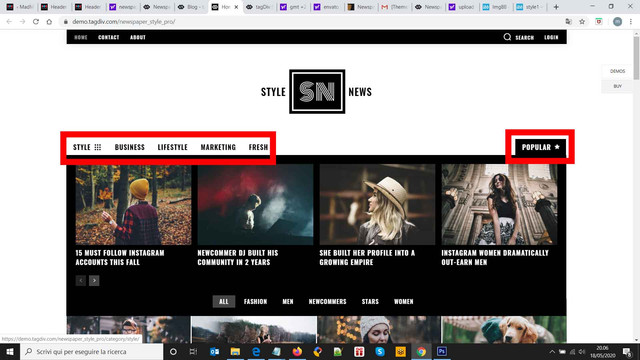
I want to make a new header, I wonder if you can explain me how the Style Demo Template Header works, because it seems like that they are two Header Menus with Mega Menu on the same header menu position.
I really cannot understand how the POPULAR item works.
I imported the Header 63 – Style Demo Template Header, but it allows me to edit on the same position only one header main menu, but on Style Demo Template Header it seems that there are two menus on the same row, or at least the POPULAR item is separated and aligned on the right, with its own Mega Menu.
Style Demo Template Header
Import
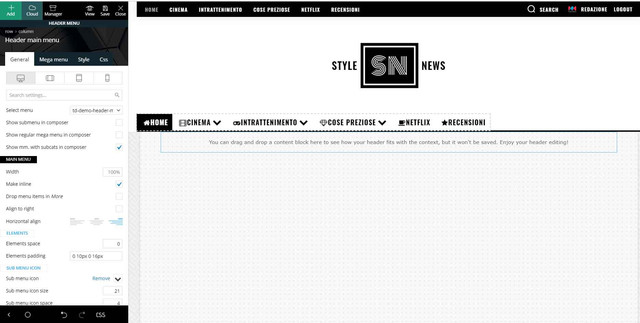
The final result is really nice, but I really cannot understand how to set a header main menu on the left and then add another item with its mega menu on the right on the same row / available position.
I hope I was able to explain you my need.
I really I hope you can help me – I have renewed the support for this – because I think that with 10.3.3 version I can further improve the style of my magazine.
Waiting your courteous reply,
Best Regards,
Marco
sloope Update: When I deactivate Yoast, at least the zodiac footer is imported… Anyways, I can’t save it most of the time and I can’t edit inside Tag Div Composer at the old footers…
Also I found out, whenever I am able to save it… and I watch the preview, the footer is imported two times and there is this message:
Warning: getimagesize(https://www.annaobermeier.at/wp-content/uploads/2020/04/logo-1.jpg): failed to open stream: HTTP request failed! HTTP/1.1 403 Forbidden in /www/htdocs/w014a910/lovely-photos.at/wp-content/plugins/td-cloud-library/shortcodes/header/tdb_header_logo.php on line 792
-
This reply was modified 6 years by
 paypt
payptHi,
I am getting “Error establishing a database connection” after changing y theme to Newspaper X.
The requirements for Newspaper theme is updated correctly.
For example, the memory limit, var, and all other requirements in that requirement page is all changed.
Server hosted is on Dedicated server with sufficient space, ram and everything as only 1 site hosted.
Kindly suggest solution as the hosting provider responded to contact the developer as they do not have any issue with their server. It is the theme which is causing this problem.
While checking with the issue, found that there are hundreds of similar issues posted by others too. Means your theme has some problem which needs to be fixed, otherwise how so many people getting so many errors.
It is neither opening to write a new post window not opening the edit post window.
 gpm79
gpm79 They are the same plugins that I had installed before the update when everything worked.



