- NewsmagHow to update a plugin
- NewspaperHow to update a plugin
- NewsmagHow to update the theme
- NewsmagHow to update the WPBakery plugin
- NewspaperHow to update the WPBakery Page Builder plugin
- NewspaperHow to Update the Newspaper Theme
- Apitd_api_top_bar_template::update_key
- Apitd_api_top_bar_template::update
- Apitd_api_single_template::update_key
- Apitd_api_single_template::update
- Apitd_api_footer_template::update_key
- Apitd_api_footer_template::update
- Apitd_api_smart_list::update_key
- Apitd_api_smart_list::update
- Apitd_api_thumb::update_key
- Apitd_api_thumb::update
- Apitd_api_category_top_posts_style::update_key
- Apitd_api_category_top_posts_style::update
- Apitd_api_category_template::update_key
- Apitd_api_category_template::update
 IFP News
 Hello @Calin
Thanks for your support. Actually we have not added any new plugins and just we have updated the Theme and changing our servers about 20 days ago.
This issue happens suddenly and by deactivating some plugins we can not find it. The next case may happen 3 days later…
Do you need any access to check inside?
Regards
 dhwitwer
I recently updated my site to Newspaper 9 theme. but Magic Member plugin is not working with the new theme. Please suggest
 docktera
Hi,
When we edit a page – which was successfully build with TD Composer – to update for example “Yoast SEO” settings and update the page using the blue WordPress button “Update”; then after opening TD Composer again, all content line breaks / new lines are removed from “Column text elements” when opening the text element with the “Edit Content” button.
How can we prevent this behavior?
Thank you!
 360velo
 Looks like this Newspaper: td_panel_core.php (includes/wp_booster/wp-admin/panel/panel_core/td_panel_core.php)
References 1.jpg. And it should be 1.png.
The CSS here :\includes\wp_booster\wp-admin\css\wp-admin.css:
Reference 1.png.
Please confirm that I should update includes/wp_booster/wp-admin/panel/panel_core/td_panel_core.php to reference 1.png
 Simion C.
 To make an ad appear at the very top above the top bar would require that the ad code is inserted in the header template directly – http://prntscr.com/mgu7al
After the coming update it will be possible to re-arrange the header elements by using cloud header templates, so placing the header ad at the top is a drag and drop process
– http://prntscr.com/mgu7yw
Regarding the background ad, some users have created a background image taking into account the width of the theme
– https://forum.tagdiv.com/topic/big-grid-slide-problem/
Or maybe there are ad inserting plugins that have options to place ads left and right of the body.
 Calin
Calin Hi,
Yes that errors are from <amp-auto-ads> , please make sure that you make the configuration as in the amp-auto-ads documentation-> https://www.ampproject.org/docs/reference/components/amp-auto-ads
Regarding the AMP issues, seems the auto ads code has been entered in the header ad spot
– http://prntscr.com/mf5orn
That would be wrong, that code can only be entered like this at the moment
– https://forum.tagdiv.com/topic/info-adv-amp/
I believe an option will be added in a coming update for the AMP plugin, so that the code can be entered in the theme panel instead of the plugin files. But for the moment that is the only way.
Thank you!
 Catalin
 Hi,
If you will use such a demo with a demo content imported and then if you will edit the dummy content with your changes after you will change the demo, all of your edited posts will be lost. You should not edit, you need to create because then, all of these will be updated into your database and you will never lose anything.
Thanks.
Simion C. Hi,
So you are removing the featured image from the page or post edit screen, then update it, and it is still displayed there? That would be unusual, when the respective post or page is updated the settings you make should remain.
What if you change something else about the post or page, does that save?
Does it happen if you switch to a default theme as a quick test? Or if you deactivate all non-theme plugins and remove it then?
Thanks
Catalin Hi,
Ensure that you have followed all of the steps from here -> https://forum.tagdiv.com/newsmag-how-to-update-the-theme/ If the problem is still there, please send us an email at contact@tagdiv.com with your log-in information (wp-admin) so we can further investigate it closer your setup page. Provide there your Item Purchase Code so we can try to activate your theme.
Thanks for your understanding!
Simion C. You could use default grids, these use thumbnails exactly cut for the respective modules
– https://demo.tagdiv.com/newspaper/big-grid-1/
Adding more sizes to the flex grids and blocks is present on our to do list. You could add more in the td_config file as you say but the changes will be lost after an update.Better to use the api plugin provided here
– https://forum.tagdiv.com/practical-example-how-to-add-a-new-block-and-module/
Add he api:update there, for example – http://prntscr.com/mgsgru
Then regenerate the thumbnails (I use the force regenerate plugin) and the grid will use the size you set – http://prntscr.com/mgsh89
Could be other ways of doing it maybe.
Calin Hi,
This would be more easy to only use custom css because if you make those changes in theme panel after update you’ll lose theme, but the code in custom code will remain, also very sun will be some theme updates that comes with a lots of improves.
If you need help with custom css please let me know!
Thank you for your understanding!
 ktchicago
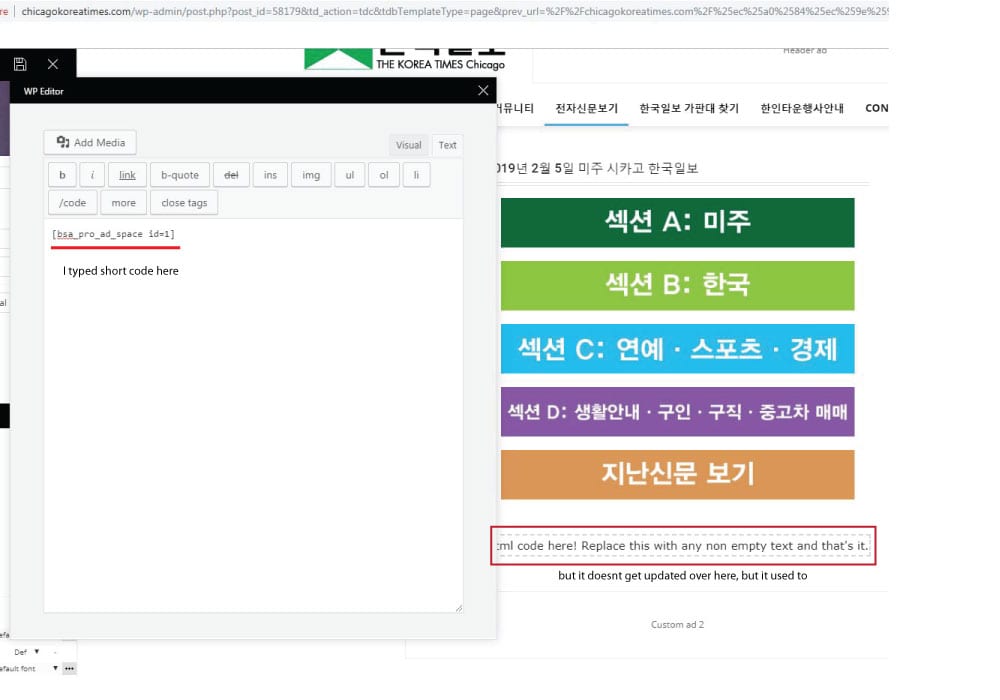
 the short code worked when I edit the page with WP bakery, but the error message appears when I tried to edit the page with TD composer after editing page with wp bakery.
It used to work fine, but the contents I wrote on column text box doesnt get updated as I write on it. I tried it again after disabling all plugins I installed recently, but it still was same :/
http://chicagokoreatimes.com/wp-content/uploads/2019/02/columntext1.jpg
Calin Hi,
If I understand correctly you want to make a theme update, if is so please make first a full backup to your website and database.
Here is our documentation for how to update the theme -> https://forum.tagdiv.com/how-to-update-the-theme-2/
Thank you!
Catalin Hi,
Please notice that in the latest theme update, we have update the Visual Composer which come bundled with the theme’s packet as you can see here -> https://www.screencast.com/t/SHn7Og8u7c
Thanks.
Catalin Hi,
First of all, you need to update the Newsmag theme and then, update the plugin with the version which comes bundled with the theme core files.
Thanks for the message!
 melodia2
 I don’t want to update these but add new as well.
Most grids on flex need an image around 300, others 400px wide (no height limits)
Loading an 696px image wide brings a lot of unused bandwidth and slows down page.
So can you guide me on how to add more image sizes on image_size param?
 guischarf
 Hi.
I can see we are in 5.4.7 and 5.6 is already out. However, I don’t find the way to upgrade. Se downloaded again the theme, but it seems to have that 5.4.7 version:
“Hay una nueva versión de WPBakery Page Builder disponible. Ver detalles de la versión 5.6. La actualización automática no está disponible para este plugin. To receive automatic updates license activation is required. Please visit settings to activate your WPBakery Page Builder. Got WPBakery Page Builder in theme?”
Translation: “There is a new version of WPBakery Page Builder available. You can see 5.6 details. Automatic update is not available for this plugin. To receive automatic updates license activation is required. Please visit settings to activate your WPBakery Page Builder. Got WPBakery Page Builder in theme?”
It takes me to this link https://kb.wpbakery.com/docs/faq/can-i-update-wpbakery-page-builder-if-i-have-purchased-it-in-a-theme/ which basically says that the theme developer will provide the new, updated version.
Are you providing it? How can I get it?
Thanks.
Calin Hi,
Please check our documentation for How to update Visual Composer plugin -> https://forum.tagdiv.com/how-to-update-visual-composer-plugin/
Yes there is a problem, the new WordPress version is now base on Gutenberg and the latest arterioles can be edit only using the Gutenberg editor, but after you make the settings for it you can change back to classic editor.
Thank you for your understanding!
 Odufroehliche
 Hi Catalin,
thanks for your feedback. I’ve downloaded the whole packet already. As soon WordPress 5.03 is installed – what part of the theme-packet should be updated first to avoid problems? Newsmag-theme? Or visual composer first? Or doesn’t matter?
And what about Revolution Slider? Is it necessary at all for correct functioning of the theme or can I delete/ignore it?
Best
Petra
Calin Hi,
So you want to upload a pdf file, in order to do that you need to go in one post and add media -> https://www.screencast.com/t/g4SlcLE9pn select the pdf file, and set the link to media file -> https://www.screencast.com/t/9EXVraase update the post and check the results -> https://www.screencast.com/t/uuDNwe7jKY
Hope this will help you!
Thanks.
 Jair Prandi
Hello!
When I did the last update of the Newspaper theme I had a problem.
After almost 30 days, I realized that the ad Ads Article Inline ad was not showing up. When I realized, I came back with an older version Newpaper 9.1 and the ad reappeared.
With this I had an average loss of USD 220.00 because the ads did not appear.
Yesterday I tried to update again, but the ads did not appear and I had to keep the old version 9.1
O site é https://www.viagensecaminhos.com
Simion C. Hi,
For the best results each header style has a recommended logo size which should be used
– https://forum.tagdiv.com/logo-favicon/
As a side note there will be a header builder introduced in the coming theme update, this will add a great deal of flexibility to the header section.
Thanks
Simion C. Hi,
The header has an ad spot, it will appear differently depending on header style used
– https://forum.tagdiv.com/header-styles/
– https://forum.tagdiv.com/header-ads-adsense/
With the new header builder that will be introduced in the coming theme update, it may be possible to change the ad position in the header.
But for the moment if you want to chnage it or add elements in the header it will require modifications to the header template you are using – http://prntscr.com/mgepcy
A background ad consisting of a background image and link can be set in the theme panel
– https://forum.tagdiv.com/background-ads/
This would not be how you wanted however.
Thanks
Simion C. Hi,
Maybe you are using an older theme version, compatibility with WordPress 5 and Gutenberg was added in theme update 9.2, a changelog can be seen at the bottom of this page
– https://themeforest.net/item/newspaper/5489609
If you use an older version than 9.2 there may be problems.
Thanks
Calin Hi,
Our team developers are working to make the theme more faster, and I think that in coming updates this will be implemented.
Thank you for your understanding!