
- NewspaperUsing the Theme Translations with WPML
- NewspaperHow to Install Newspaper via FTP
- NewspaperHow to Install Newspaper via WordPress
 Mybody
Hello TagDiv Support Team,
I’m using the Newspaper theme with tagDiv Composer on my WordPress website MyBody.it.
I changed the WordPress language to Italian, but many parts of the theme/interface are still not translated. From what I can see, there are more than 500 strings/phrases that would need to be translated manually.
Before proceeding manually, I would like to understand if there is a faster and official way to translate all these theme strings into Italian.
Could you please let me know:
Is there an automatic or recommended method to translate all Newspaper/tagDiv strings into Italian?
Is there an Italian language file available for the theme?
Can this be handled through the theme panel, Loco Translate, WPML, TranslatePress, or another recommended plugin?
Is there a way to import a ready-made Italian translation file instead of translating every single string manually?
Are tagDiv Composer blocks and theme elements supposed to translate automatically when WordPress is set to Italian?
At the moment, translating more than 500 strings manually would be extremely time-consuming and not really acceptable for a premium theme. If there is no faster solution, this would be quite disappointing from a usability point of view.
If needed, we can provide temporary WordPress admin access so you can check the issue directly.
Thank you in advance for your help.
Best regards,
Sara
 Simion C.
 From what I see you have no menus in that language. Menus can be translated or created for each language. I suggest checking this guide -> https://wpml.org/documentation/getting-started-guide/translating-menus/
Thank you!
 lupoluka85
 Thanks for the fix. I will try it and let you know. Can you please also help me with the following issue?
I am using wpml with Newspaper theme and my menu becomes invisible for some languages. https://prnt.sc/pQIQBVp8UYHJ how can I fix it?
 Calin
Calin Hi,
I see that it is possible that additional plugins installed on the site are consuming more resources than you currently have allocated.
What you can do is run a test using only the theme plugins to see if the problem still persists. If everything works correctly, then enable the other plugins one by one and test after each activation.
There are plugins like WPML, Revolution Slider, and others that require quite a lot of memory. In some cases, 512 MB of memory is not enough and may need to be doubled.
Thank you!
Calin Hi,
I see, in this situation, it just needs to translate the current content into another language, then Gtranslate will be a good solution. If you need to separate the content, then if WPML is not an option, the only option remaining, I believe, is Polylang or another similar plugin that has a free version.
 opinandosinanestesia
 The problem I see is that for a website with content like ours, using WPML is going to cost a fortune, and I can’t afford such exorbitant amounts. Thanks!
Calin Hi,
If you want to translate the website and have the same content, then you can use GTranslate, for different content and layout for each language, you can use WPML https://forum.tagdiv.com/using-theme-translations-together-wpml/
opinandosinanestesia Thank you very much.
I completely understand what you’re saying. In fact, as you can see in another ticket, we’re going to study the case with the Polylkang support team and a cloned website to see how to resolve the problem.
I can’t use the WPML plugin because my website has nearly 5,000 posts, and I have to use the premium version, which is prohibitively expensive for a website of this size.
Calin Hi,
Unfortunately, the Polylang plugin hasn’t been officially tested with our theme, so we don’t know all the exact settings or how it behaves. That said, we have seen several users try it.
It’s possible that after installing and activating the plugin, you’ll need to reassign the cloud templates for each language manually. Usually, multilingual plugins try to set the templates from the default language automatically, but this isn’t always guaranteed. You’ll want to check that your articles, categories, menus, and templates are correctly assigned for your default language.
For the other languages, you’ll likely need to translate or duplicate pages and cloud templates, then edit them individually for each language.
If you want the most seamless multilingual experience with Newspaper, the recommended plugin is WPML: https://forum.tagdiv.com/using-theme-translations-together-wpml/
Calin Hi,
Unfortunately, the theme hasn’t been tested with the Polylang plugin, so our knowledge of how it should be set up and function together is quite limited.
For multilingual setups, our theme has been tested with WPML. With this plugin, the correct approach is to create a separate page for each language. On each page, you can configure individual settings to display content related to the selected category. One important aspect is ensuring that you have categories created for all languages and that they are properly assigned.
We also recommend reviewing the Polylang documentation, as it provides useful guidance on how to achieve this setup:(https://polylang.pro/documentation/support/guides/)
Thank you.
Calin Hi,
When WPML is used with our theme https://forum.tagdiv.com/using-theme-translations-together-wpml/ the cloud template will be displayed for the language that has been imported, to display it for other languages, you need to duplicate it for that language and after that, edit the text in that language with tagDiv Composer https://i.imgur.com/fd9AonW.png https://i.imgur.com/DPOXyzs.png https://i.imgur.com/SM7h0xa.png
https://forum.tagdiv.com/using-theme-translations-together-wpml/
 MarcusMi
Hello Support,
I am contacting you because I am running into what looks like a compatibility or translation-handling issue between WPML and the Newspaper theme by tagDiv.
My setup is:
-
WordPress
Newspaper theme (Today News PRO demo/import)
tagDiv Composer / Cloud Library
WPML
Secondary language: German (/de)
Default language: English
What I am trying to achieve is straightforward:
I want to have an English footer on the English site and a German footer on the German site. The footer content was created with the tagDiv Composer as a footer template / Cloud Template.
The issue is that I cannot create or manage the translation workflow for these Cloud Templates correctly, and as a result the German footer keeps showing English text for posts.
Here is what I observed:
In WPML → Settings → Post Types Translation, I set the Cloud Template post type to:
“Translatable – use translation if available or fallback to default language”
However, in the Cloud Templates area in the WordPress backend, I do not see the WPML translation controls I would expect, such as the language columns or the “+” translation icon for German.
Because of that, I cannot create a proper German translation of the footer template through WPML.
I also checked WPML String Translation and Translation Dashboard / Other texts (Strings), but the footer text does not appear there.
The footer text is not coming from a normal theme option or a menu string. It is content inside a tagDiv footer block created in the tagDiv Composer.
I tried creating a copied/duplicated footer and also a copied single post template as a workaround, but that led to additional problems:
-
changes in the copied version affected the English version as well, or vice versa
at some points, post formatting broke for both languages
I had to manually restore several pages/templates in tagDiv Composer
some templates disappeared or behaved inconsistently in the backend, even though the frontend still partially worked
Another related symptom:
In English posts, I can select the template “Single Template – Today News PRO”.
In German posts, I only see “Default”, not the same Single Template option.
This makes me think WPML may not be recognizing or linking the tagDiv Cloud Templates correctly for the secondary language.
At one point, setting Cloud Templates to a stricter translation mode caused header/footer/template behavior to break more severely, so I reverted to the fallback setting above.
At the moment, the frontend is mostly restored, but one core problem remains:
the German version — all posts — of the site still displays the English footer text, and I have no reliable WPML-based way to translate the footer Cloud Template.
From my perspective, the main issue is:
WPML seems not to expose the translation UI for tagDiv Cloud Templates in this setup, and the footer content is also not available through String Translation.
Could you please help me with the following:
-
Is this a known compatibility issue with Newspaper/tagDiv Cloud Templates?
Should WPML show translation icons / language columns for these Cloud Templates in the backend?
Is there a recommended WPML workflow for translating tagDiv footer templates created with tagDiv Composer?
Why would the English Single Template be selectable in English posts, but only “Default” appear in German posts?
Is there any additional configuration, compatibility plugin, or troubleshooting step required so WPML recognizes these Cloud Templates properly?
I can provide screenshots of:
WPML Post Type Translation settings, the Cloud Templates backend screen where no translation icons appear and
the footer output on the German frontend
See here:
https://ibb.co/M5p25kGH
https://ibb.co/s9MCdJFY
https://ibb.co/tTF1dXHN
https://ibb.co/dJsgKd69
https://ibb.co/hxGqZZk0
Thank you in advance for your help.
Best regards,
Marcus
PS here’s the response by WPML support:
Hello there,
Thank you for contacting WPML support. I’d be happy to assist you on this issue.
According to the documentation here: https://forum.tagdiv.com/using-theme-translations-together-wpml/, the templates should display “+” signs. However, it appears that the plugin layout has changed.
Could you please reach out to their support team to check if there’s a way to view the template list as shown in the documentation?
We can also review this from our side and report it to our compatibility team, but contacting them directly would likely be the fastest solution for you.
Regarding the templates, lets translate the templates first and check it further.
Let me know there feedback on it.
Thanks
Calin Hi,
This can be done by using the WPML shortcode with tagDiv Composer in the cloud header, add the shortcode element where you want to display the language switcher and set the shortcode in it.
– https://wpml.org/documentation/getting-started-guide/language-setup/language-switcher-options/adding-language-switchers-using-php-and-shortcodes/
 MzMaffei
We are using Newspaper 12.7.5 with td-cloud-library 3.9.4 and WPML. We need a native language switcher element in the header Cloud Template builder, but tdb_header_language does not exist in our shortcodes/header/ directory and does not appear in the editor element list.
Available header shortcodes in our installation: tdb_header_categories, tdb_header_date, tdb_header_logo, tdb_header_mega_menu, tdb_header_menu, tdb_header_menu_favorites, tdb_header_search, tdb_header_user, tdb_header_weather.
Questions:
Is tdb_header_language available in a newer version of Newspaper or td-cloud-library?
Is there a dedicated WPML + tagDiv integration plugin that adds this element?
Is there an official recommended approach to integrate WPML language switcher natively in the header Cloud Template builder?
Calin Hi,
Please change the user and password, and no longer share them on the forum, only in private.
1. This depending o the translation method/plugin you are using. We tested teh theme with the WPML plugin and this can be set as mentioned in our guide https://forum.tagdiv.com/using-theme-translations-together-wpml/. Using a different plugin it should bee need to check the plugin documentation:
https://polylang.pro/documentation/support/getting-started/setup-wizard/ https://polylang.pro/documentation/support/getting-started/create-menus/
2. The option of Infinite Loading for Single Posts can be enabled/disabled by using tagDiv Composer on the post template, edit it and select the right icon as mentioned in this guide https://forum.tagdiv.com/infinite-loading-single-posts/
Thank you!
 wesicily
 Good morning,
as you can see from the screenshots I attached, even after following exactly the procedure described in your guide and in the forum thread, the Cloud Templates with WPML are still not working correctly.
I have been trying to solve this issue for several days now without success, and I am honestly struggling to make it work.
I have:
– duplicated the Cloud Templates for the other languages
– tried assigning them correctly
– followed your documentation step by step
– checked both WPML and theme settings
Despite this, the templates are not being properly linked to the correct language, or duplicated items are created but remain in the original language.
At this point, I strongly suspect there may be a bug in the theme or a real compatibility issue with WPML in my installation.
I kindly ask you to help me identify the exact cause of this problem, because right now I do not know how to proceed further.
I look forward to your technical feedback.
Thank you for your support.
Best regards


Calin Hi,
When WPML is used with our theme https://forum.tagdiv.com/using-theme-translations-together-wpml/ the cloud template will be displayed for the language that has been imported, to display it for other languages, you need to duplicate it for that language and after that, edit the text in that language https://i.imgur.com/fd9AonW.png https://i.imgur.com/DPOXyzs.png https://i.imgur.com/SM7h0xa.png
https://forum.tagdiv.com/using-theme-translations-together-wpml/
wesicilyHello,
with WPML active on Newspaper I’m unable to properly translate Cloud Templates, in particular:
• Single Post Templates
• Author Templates
When I click the “+” icon to add a new language:
a new duplicated template is created
it is not assigned to the selected language
the “Used on” field is not preserved
the new template is not linked to the original one
WPML opens the standard WordPress editor instead of the WPML translation editor
I also followed your official guide:
https://tagdiv.com/wpml-newspaper-theme-compatibility/
However:
the UI/visual layout is different from what is shown in the guide
the described workflow does not work in my case
Setup:
Newspaper theme (latest version)
Cloud Templates enabled
WPML with Advanced Translation Editor
Languages: Italian / English
I would like to ask:
Is there an official and supported workflow to translate Single Post and Author Templates with WPML?
Is this a known bug or limitation?
Do Cloud Templates require any special configuration in WPML (post type tdb_templates)?
Thank you for your support.
Best regards,
Valerio Platania
WeSicily.it
Calin Hi,
I understand what you want to achieve. Unfortunately, we haven’t tested the Polylang plugin with our theme, so we cannot provide a solution or guarantee compatibility for it.
Our theme is normally tested with WPML, which allows you to create different Cloud Templates for each language (check if the Polylang plugin provides this option). For example:
When you select Arabic, you can use and edit a template in RTL.
When you select French, it can be a completely different template.
For more details on how to use WPML with our theme and set up templates for multiple languages, please check this guide: https://forum.tagdiv.com/using-theme-translations-together-wpml/
Calin Hi,
This is because you need to translate/duplicate the template per language.
Also, make sure that the WPML is set as in our guide – https://forum.tagdiv.com/using-theme-translations-together-wpml/ https://i.imgur.com/sNh9mfx.png – https://i.imgur.com/zOy0539.png
Thank you!
 kappe79
Hi,
I’m using Newspaper theme with WPML multilanguage plugin.
I defined 8 single templates with tagdiv Cloud Template and use two languages managed with WPML. If I work with original language I haven’t any problems, but if select my secondary language there is something wrong in the Theme Category Setting.
For the first category, my Post Cloud Library Template list is empty, so I can’t associate my template to the category:
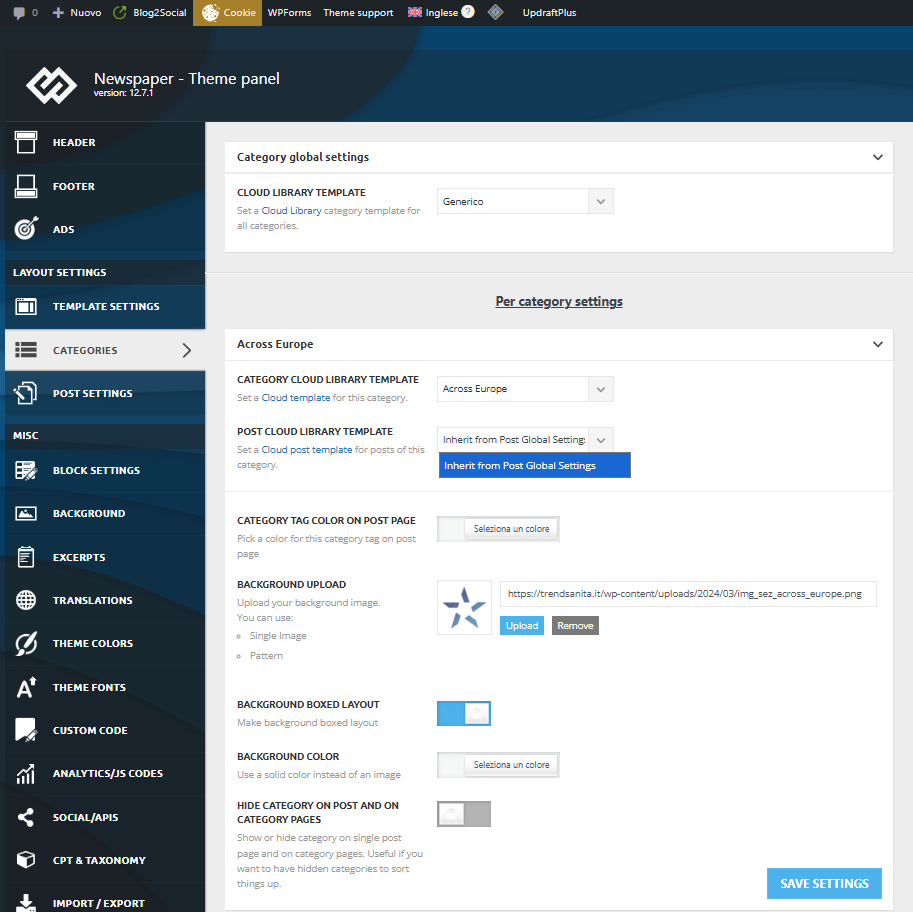
For the next category instead the list is right and complete:
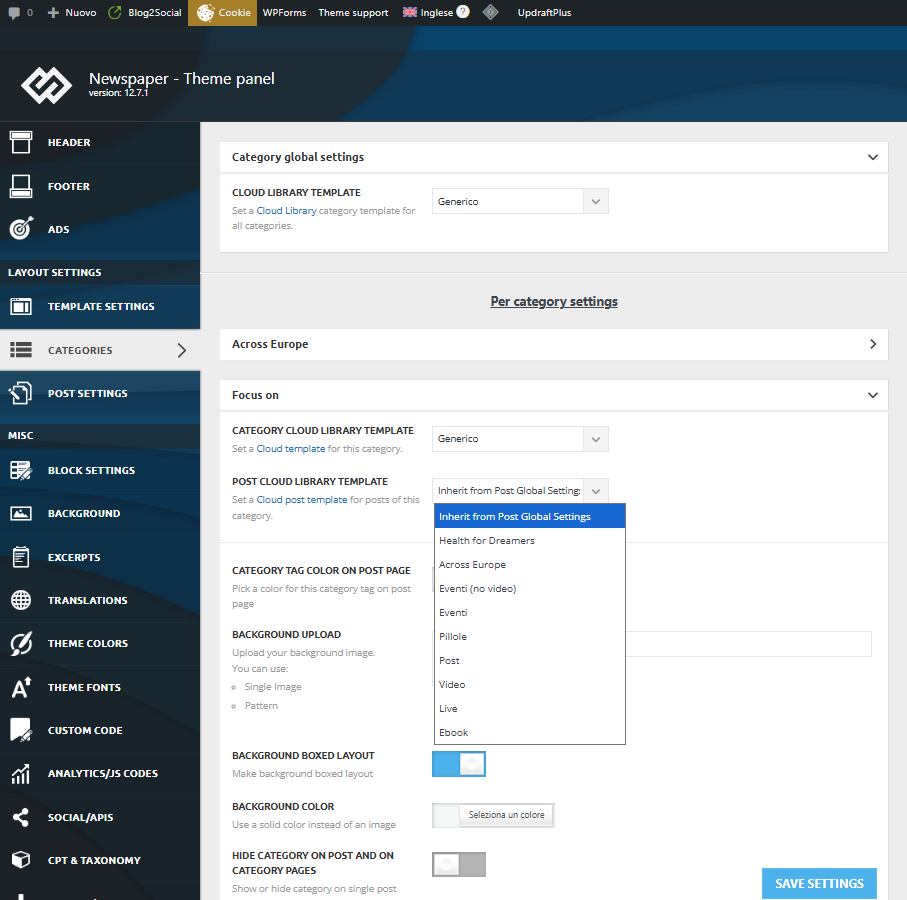
Why?
Thank you.
Enzo
Calin Hi,
When WPML is used with our theme https://forum.tagdiv.com/using-theme-translations-together-wpml/ the cloud template will be displayed for the language that has been imported, to display it for other languages, you need to duplicate it for that language and after that, edit the text in that language https://i.imgur.com/fd9AonW.png https://i.imgur.com/DPOXyzs.png https://i.imgur.com/SM7h0xa.png
 babak.s.z
 FBM
FBMHi there,
we came across this issue:
Installing wpml:
– in the template overview as written in your tutorial it works fine BUT
– the cloud template overview does not load correctly with the languages
– the cloud templates wont load correctly in theme panel when you try to give the translated categories the correct translated cloud template.
We made a fix and now it works.
If you guys are interested write an e-mail and I’ll share the code (not sure if you want code in the forum).
Maybe you can then look for a lasting solution.
Here a summary what it does:
Summary: What the Plugin Does
Problem it solves:
When you switch languages in WPML, tagDiv’s Cloud Templates Library and Theme Panel don’t update – they keep showing templates from the wrong language because they use their own cached language setting.
How it fixes it:
1. Client-Side (JavaScript):
Intercepts all HTTP requests (AJAX, Fetch API, XMLHttpRequest) made by tagDiv
Automatically adds the current WPML language parameter (lang=en or lang=de) to every request
Sets language cookies that tagDiv reads (wpml_lang, _icl_current_language)
This ensures tagDiv’s JavaScript always requests templates in the correct language
2. Server-Side (PHP):
Forces WPML to use the language from the URL parameter (?lang=en)
Switches WPML context during AJAX requests so WordPress queries return content in the right language
Filters template metadata to ensure the correct translated templates are loaded
In simple terms:
The plugin acts as a “translator” between WPML and tagDiv, making sure they both agree on which language is currently active. It catches every request tagDiv makes and stamps it with the correct language code before it reaches the server.
Result:
✅ Cloud Templates Library shows correct language templates
✅ Theme Panel dropdowns show correct language templates
✅ Language switching works immediately without page refresh issues
Cheers.
babak.s.z 


